Only 13% of enterprises have enterprise-grade internal threat detection, while 29% can’t spot ransomware lurking on their network
In QNAP’s “Global Enterprise Cyber Resilience Survey 2026”, 1,838 organizations across 93 countries assessed their own cyber resilience. One question asked: if ransomware were already hiding on your network, moving laterally over SMB file shares and preparing to encrypt files, could your organization detect and stop it on its own? Only 13% have deployed network detection and response (NDR) at the network layer that can automatically detect and isolate the source of infection. At the other end, 29% admit they have no proactive detection at all, and typically realize they’ve been breached only when file extensions change or antivirus raises an alert.
The remaining 58% have endpoint detection and response (EDR) or firewalls in place, yet still can’t monitor every device on the internal network. That leaves blind spots where attackers can move laterally without IT ever seeing them.
Ransomware starts moving laterally within 29 minutes on average, yet intrusions take a median of 11 days to detect
Attacker speed (minutes): The CrowdStrike 2026 Global Threat Report found that eCrime groups need an average of just 29 minutes to move from initial access to lateral movement. That is 65% faster than in 2024, and the fastest case took only 27 seconds.
Defender speed (days): Google Mandiant’s M-Trends 2025 reports a median of 11 days from intrusion to detection, stretching to 26 days when an outside party is the one to raise the alarm.
Attackers work in minutes; organizations respond in days. In that gap, any isolation step that depends on someone reading logs and pulling a network cable by hand may come too late. If internal detection can’t act and block on its own, by the time IT notices, ransomware may already have reached core databases, file servers and backup systems, causing serious damage to the business.
Why isn’t EDR enough? How EDR and NDR divide internal network defense
Many organizations assume that EDR on every computer plus a firewall adds up to a secure internal network. But the firewall only watches traffic in and out of the network, and antivirus or EDR only watches individual devices. Between them lies a large blind spot: lateral movement inside the network.
-
The limits of EDR: EDR needs an agent installed on each endpoint and server to monitor behavior. It works well on devices that can run that software, but printers, IP cameras, OT controllers on the production line and third-party NAS can’t run an EDR agent. EDR also observes behavior inside a single device, and seen from any one host, lateral movement often looks like an ordinary connection. Once attackers gain administrator rights, they can simply disable the agent.
-
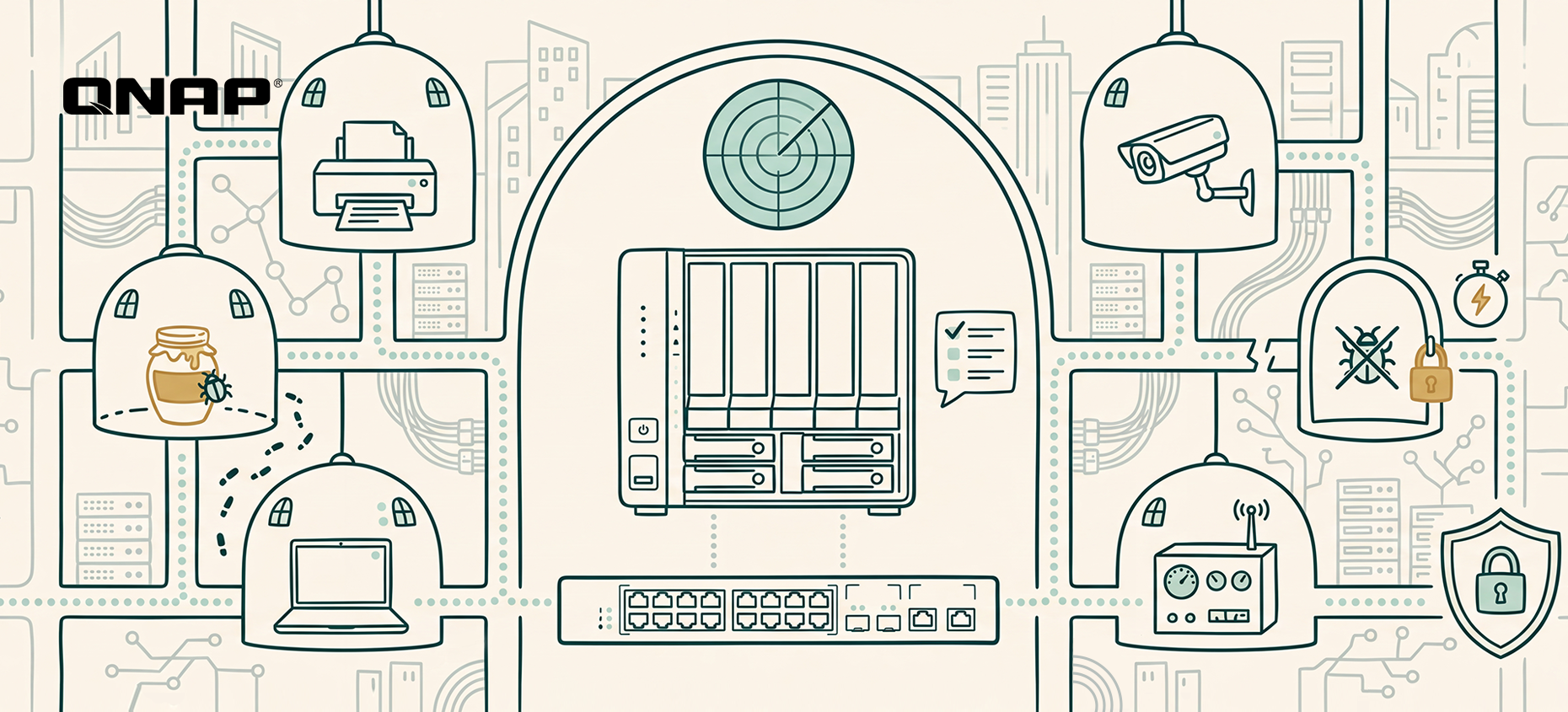
Why NDR (network detection and response) offers broader, proactive defense: NDR works at the network layer, analyzing traffic between devices at the switch. With nothing to install device by device, every device connected to the network falls within its view, and it focuses on abnormal connections from one device to another.
EDR protects the endpoints themselves; NDR protects the paths between them. The two work hand in hand.
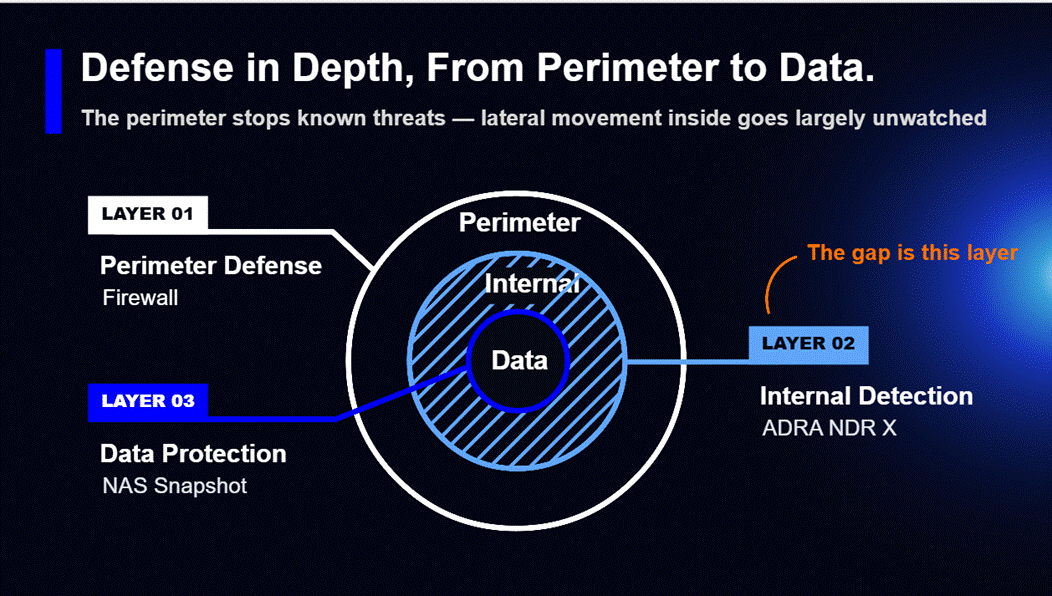
QNAP ADRA NDR X: turn your NAS into the brain of internal network defense that automatically detects, traps and isolates lateral threats
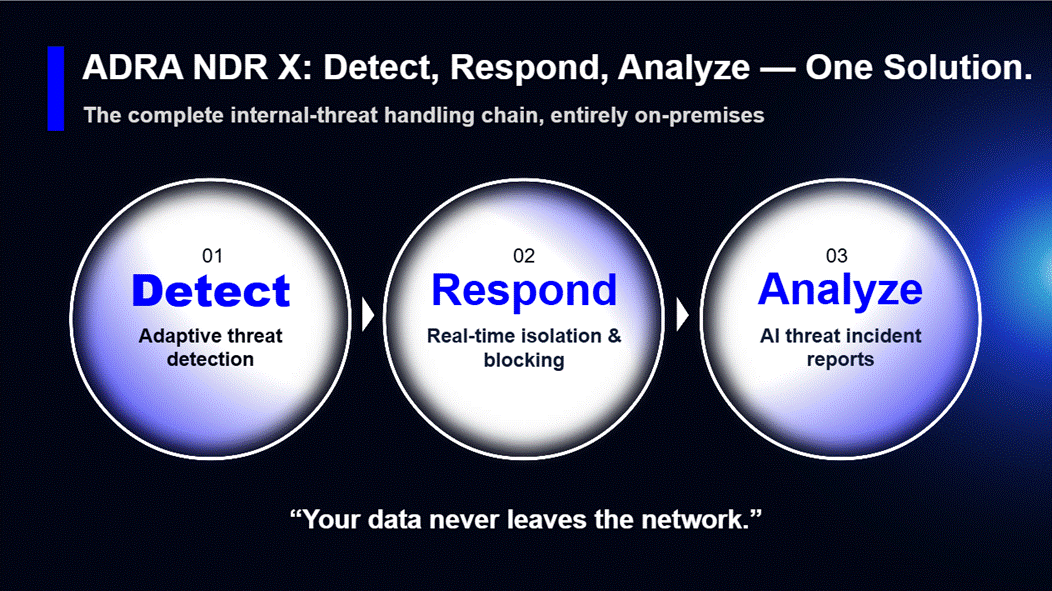
To lower the budget and skills barriers that small and mid-sized businesses face, QNAP offers ADRA NDR X, a dedicated network detection and response solution. It’s a free download from App Center with no per-device license fees. Once installed, your QNAP NAS becomes the NDR analysis hub for your internal network. Pair it with a compatible switch to get started, with no changes to your existing network architecture. Key capabilities include:
-
Catches new attacks, too: On top of more than 43,000 attack signatures, ADRA NDR X uses machine learning to learn each device’s normal activity and flags behavior that deviates from it.
-
Spots attackers before they move: ADRA NDR X sets decoys (honeypots) across the internal network to lure hidden malware into the open, so you can defend proactively instead of waiting for an alert.
-
Keeps the damage contained: Based on your policies, it automatically cuts off an infected device’s network connection while every other device keeps running, and NAS snapshots preserve a recoverable version of your files.
-
Clear answers without a security expert: Built-in AI instantly summarizes each threat and recommends a response, so IT knows what to do next and the business has an overall risk report to review and act on.
*Note: Higher-end NAS models are recommended for AI features.
Internal network health check: three questions that reveal your detection gaps
IT and security leaders can start by checking three things:
-
Visibility into blind spots: Are printers, IP cameras, IoT and other devices that can’t run antivirus being monitored today? Would you know if one of them were infected?
-
Automated blocking: If a computer on your network suddenly starts mass-accessing SMB shared folders, will the system alert on it and block it automatically, or is no automated process in place yet?
-
Response time: How long does it currently take your organization to go from spotting an anomaly to isolating the infected device?
Assess your organization’s security maturity now! See QNAP’s “Global Enterprise Cyber Resilience Survey 2026”: [Download the full report]
The report scores 1,838 organizations’ self-assessments across eleven controls spanning four stages: data protection and backup, identity and access control, threat monitoring and active defense, and business continuity and recovery. Results are cross-analyzed by region, industry and company size, so you can benchmark directly against peers. The report also sets out priority improvements for each maturity tier as a starting point for planning your next step.
Frequently asked questions (FAQ)
-
Is QNAP ADRA NDR X really free? Will we pay more in license fees as we add devices?
The ADRA NDR X software is completely free, with no per-device license fees at all. Most security vendors charge annual NDR fees based on the number of monitored IPs or traffic volume, so the more devices you have, the more you pay. QNAP makes it a free install straight from the QTS / QuTS hero App Center. As long as you have a supported QNAP NAS and a compatible switch, you won’t pay license fees whether your network has 50 devices or 500.
-
We already have a firewall and antivirus. Why do we still need NDR inside the network?
Because the firewall only watches traffic entering and leaving the network, and antivirus or EDR only watches individual devices. Between them lies a large blind spot: lateral movement inside the network. Attackers rarely break through firewalls head-on these days; they usually slip in through phishing emails or an employee’s laptop. Once inside, they hop between printers, NAS and colleagues’ computers over SMB file shares, and the firewall sees none of it. Only NDR, which monitors device traffic at the switch layer, can catch this kind of spread.
-
Our network printers and IP cameras can’t run antivirus. What if attackers use them as a stepping stone?
That is exactly why you need NDR: it’s agentless, so nothing has to be installed on the device. Printers, cameras, production machines and contractors’ laptops may not be able to run EDR, but any device that connects to the network has to go through the switch. NDR (such as QNAP’s NDR solution) monitors connection traffic directly at the switch, so if a printer suddenly starts making abnormal connections to other computers or scanning the network, it can be knocked offline at the network layer.
-
Will copying switch traffic to the NAS for security analysis slow down our network?
No. It won’t slow anything down or affect existing network traffic. ADRA NDR X works through port mirroring: the switch simply sends a copy of the packets to the NAS for inspection, rather than placing the NAS on the main data path. Even if the NAS reboots or runs at full load, office network traffic carries on as normal. The switch only cuts off an infected computer’s port when ransomware is detected.
-
We only have part-time IT and no dedicated security team. Will we understand NDR’s complex alerts?
Yes. The biggest headache with traditional security tools is the thousands of log entries they generate every day that nobody has time to read. ADRA NDR X’s built-in AI analysis translates complex attack data into plain-language threat summaries and recommended next steps. Even more important, its automatic isolation blocks the connection the moment ransomware is detected, with no need to wait for IT to read logs and pull cables by hand.
Nur 13 % der Unternehmen verfügen über unternehmensgerechte interne Bedrohungserkennung, während 29 % Ransomware im eigenen Netzwerk nicht erkennen können
In QNAPs „Global Enterprise Cyber Resilience Survey 2026“ bewerteten 1.838 Organisationen aus 93 Ländern ihre eigene Cyber-Resilienz. Eine Frage lautete: Wenn Ransomware bereits im Netzwerk versteckt ist, sich über SMB-Freigaben lateral bewegt und sich darauf vorbereitet, Dateien zu verschlüsseln – könnte Ihre Organisation sie selbstständig erkennen und stoppen? Nur 13 % haben Network Detection and Response (NDR) auf Netzwerkebene implementiert, das automatisch die Infektionsquelle erkennt und isoliert. Am anderen Ende geben 29 % zu, dass sie keinerlei proaktive Erkennung haben und meist erst merken, dass sie kompromittiert wurden, wenn sich Dateiendungen ändern oder das Antivirus einen Alarm auslöst.
Die übrigen 58 % verfügen über Endpoint Detection and Response (EDR) oder Firewalls, können aber dennoch nicht jedes Gerät im internen Netzwerk überwachen. Das hinterlässt blinde Flecken, in denen Angreifer sich lateral bewegen können, ohne dass die IT sie bemerkt.
Ransomware beginnt im Durchschnitt nach 29 Minuten mit der lateralen Bewegung, während Intrusionen im Median erst nach 11 Tagen erkannt werden
Angreifer-Geschwindigkeit (Minuten): Der CrowdStrike 2026 Global Threat Report fand heraus, dass eCrime-Gruppen im Durchschnitt nur 29 Minuten benötigen, um vom ersten Zugriff zur lateralen Bewegung überzugehen. Das ist 65 % schneller als 2024, und der schnellste Fall dauerte nur 27 Sekunden.
Verteidiger-Geschwindigkeit (Tage): Google Mandiants M-Trends 2025 berichten von einem Median von 11 Tagen vom Eindringen bis zur Erkennung, der sich auf 26 Tage verlängert, wenn eine externe Partei den Alarm auslöst.
Angreifer arbeiten in Minuten; Organisationen reagieren in Tagen. In dieser Lücke kann jeder Isolationsschritt, der davon abhängt, dass jemand Protokolle liest und ein Netzwerkkabel von Hand zieht, zu spät kommen. Wenn die interne Erkennung nicht selbstständig handeln und blockieren kann, hat die Ransomware möglicherweise bereits Kern-Datenbanken, Dateiserver und Backup-Systeme erreicht, bevor die IT es bemerkt – mit schwerwiegenden Folgen für das Unternehmen.
Warum reicht EDR nicht aus? Wie EDR und NDR die interne Netzwerkverteidigung aufteilen
Viele Organisationen gehen davon aus, dass EDR auf jedem Computer plus eine Firewall ein sicheres internes Netzwerk ergibt. Doch die Firewall überwacht nur den ein- und ausgehenden Datenverkehr, und Antivirus oder EDR überwachen nur einzelne Geräte. Dazwischen liegt ein großer blinder Fleck: die laterale Bewegung im Netzwerk.
-
Die Grenzen von EDR: EDR benötigt einen Agenten auf jedem Endpunkt und Server, um das Verhalten zu überwachen. Das funktioniert gut auf Geräten, die diese Software ausführen können, aber Drucker, IP-Kameras, OT-Controller in der Produktion und NAS von Drittanbietern können keinen EDR-Agenten ausführen. EDR beobachtet zudem nur das Verhalten innerhalb eines einzelnen Geräts, und von einem Host aus betrachtet sieht laterale Bewegung oft wie eine normale Verbindung aus. Sobald Angreifer Administratorrechte erlangen, können sie den Agenten einfach deaktivieren.
-
Warum NDR (Network Detection and Response) eine breitere, proaktive Verteidigung bietet: NDR arbeitet auf Netzwerkebene und analysiert den Datenverkehr zwischen Geräten am Switch. Da nichts geräteweise installiert werden muss, fallen alle mit dem Netzwerk verbundenen Geräte in seinen Blick, und es konzentriert sich auf ungewöhnliche Verbindungen von einem Gerät zum anderen.
EDR schützt die Endpunkte selbst; NDR schützt die Wege zwischen ihnen. Beide arbeiten Hand in Hand.
QNAP ADRA NDR X: Machen Sie Ihr NAS zum Gehirn der internen Netzwerkverteidigung, das lateral Bedrohungen automatisch erkennt, fängt und isoliert
Um die Budget- und Kompetenzbarrieren für kleine und mittlere Unternehmen zu senken, bietet QNAP ADRA NDR X an, eine dedizierte Network Detection and Response-Lösung. Sie ist kostenlos im App Center erhältlich, ohne Lizenzgebühren pro Gerät. Nach der Installation wird Ihr QNAP NAS zum NDR-Analysezentrum für Ihr internes Netzwerk. Kombinieren Sie es mit einem kompatiblen Switch, um loszulegen – ohne Änderungen an Ihrer bestehenden Netzwerkarchitektur. Zu den wichtigsten Funktionen gehören:
-
Erkennt auch neue Angriffe: Neben mehr als 43.000 Angriffssignaturen nutzt ADRA NDR X maschinelles Lernen, um das normale Verhalten jedes Geräts zu erlernen und abweichendes Verhalten zu melden.
-
Entdeckt Angreifer, bevor sie sich bewegen: ADRA NDR X setzt Köder (Honeypots) im internen Netzwerk, um versteckte Malware ins Offene zu locken, sodass Sie proaktiv verteidigen können, statt auf einen Alarm zu warten.
-
Hält den Schaden begrenzt: Basierend auf Ihren Richtlinien trennt es automatisch die Netzwerkverbindung eines infizierten Geräts, während alle anderen Geräte weiterlaufen, und NAS-Snapshots bewahren eine wiederherstellbare Version Ihrer Dateien.
-
Klare Antworten ohne Sicherheitsexperten: Die integrierte KI fasst jede Bedrohung sofort zusammen und empfiehlt eine Reaktion, sodass die IT weiß, was zu tun ist, und das Unternehmen einen umfassenden Risikobericht zur Überprüfung und zum Handeln erhält.
*Hinweis: Für KI-Funktionen werden höherwertige NAS-Modelle empfohlen.
Interner Netzwerk-Gesundheitscheck: Drei Fragen, die Ihre Erkennungslücken aufdecken
IT- und Sicherheitsverantwortliche können mit drei Prüfungen beginnen:
-
Sichtbarkeit von blinden Flecken: Werden Drucker, IP-Kameras, IoT und andere Geräte, die kein Antivirus ausführen können, heute überwacht? Würden Sie merken, wenn eines davon infiziert wäre?
-
Automatische Blockierung: Wenn ein Computer im Netzwerk plötzlich massenhaft auf SMB-Freigaben zugreift, wird das System darauf aufmerksam und blockiert es automatisch, oder gibt es noch keinen automatisierten Prozess?
-
Reaktionszeit: Wie lange dauert es derzeit, bis Ihre Organisation von der Erkennung einer Anomalie zur Isolierung des infizierten Geräts gelangt?
Bewerten Sie jetzt die Sicherheitsreife Ihrer Organisation! Sehen Sie QNAPs „Global Enterprise Cyber Resilience Survey 2026“: [Vollständigen Bericht herunterladen]
Der Bericht bewertet die Selbsteinschätzungen von 1.838 Organisationen anhand von elf Kontrollen in vier Phasen: Datenschutz und Backup, Identitäts- und Zugriffskontrolle, Bedrohungsüberwachung und aktive Verteidigung sowie Geschäftskontinuität und Wiederherstellung. Die Ergebnisse werden nach Region, Branche und Unternehmensgröße analysiert, sodass Sie sich direkt mit Ihren Mitbewerbern vergleichen können. Der Bericht legt außerdem Prioritäten für Verbesserungen in jeder Reifestufe fest – als Ausgangspunkt für die Planung Ihres nächsten Schritts.
Häufig gestellte Fragen (FAQ)
-
Ist QNAP ADRA NDR X wirklich kostenlos? Müssen wir mehr Lizenzgebühren zahlen, wenn wir Geräte hinzufügen?
Die ADRA NDR X Software ist komplett kostenlos, ohne jegliche Lizenzgebühren pro Gerät. Die meisten Sicherheitsanbieter verlangen jährliche NDR-Gebühren basierend auf der Anzahl überwachter IPs oder dem Datenvolumen – je mehr Geräte, desto mehr Kosten. QNAP macht die Installation direkt aus dem QTS / QuTS hero App Center kostenlos. Solange Sie ein unterstütztes QNAP NAS und einen kompatiblen Switch haben, zahlen Sie keine Lizenzgebühren – egal ob Ihr Netzwerk 50 oder 500 Geräte hat.
-
Wir haben bereits eine Firewall und Antivirus. Warum brauchen wir trotzdem NDR im Netzwerk?
Weil die Firewall nur den ein- und ausgehenden Datenverkehr überwacht und Antivirus oder EDR nur einzelne Geräte. Dazwischen liegt ein großer blinder Fleck: die laterale Bewegung im Netzwerk. Angreifer brechen heutzutage selten frontal durch Firewalls; sie gelangen meist über Phishing-E-Mails oder den Laptop eines Mitarbeiters ins Netzwerk. Einmal drin, springen sie über SMB-Freigaben zwischen Druckern, NAS und den Computern der Kollegen – und die Firewall sieht davon nichts. Nur NDR, das den Datenverkehr der Geräte auf Switch-Ebene überwacht, kann diese Art der Ausbreitung erkennen.
-
Unsere Netzwerkdrucker und IP-Kameras können kein Antivirus ausführen. Was, wenn Angreifer sie als Sprungbrett nutzen?
Genau deshalb brauchen Sie NDR: Es ist agentenlos, sodass nichts auf dem Gerät installiert werden muss. Drucker, Kameras, Produktionsmaschinen und Laptops von Dienstleistern können möglicherweise kein EDR ausführen, aber jedes Gerät, das sich mit dem Netzwerk verbindet, muss durch den Switch gehen. NDR (wie QNAPs NDR-Lösung) überwacht den Verbindungsverkehr direkt am Switch. Wenn ein Drucker plötzlich ungewöhnliche Verbindungen zu anderen Computern herstellt oder das Netzwerk scannt, kann er auf Netzwerkebene offline genommen werden.
-
Verlangsamt das Kopieren des Switch-Verkehrs zum NAS für die Sicherheitsanalyse unser Netzwerk?
Nein. Es verlangsamt nichts und beeinflusst den bestehenden Netzwerkverkehr nicht. ADRA NDR X arbeitet mit Port Mirroring: Der Switch sendet einfach eine Kopie der Pakete zur Inspektion an das NAS, statt das NAS auf den Hauptdatenpfad zu setzen. Selbst wenn das NAS neu startet oder unter Volllast läuft, läuft der Netzwerkverkehr im Büro normal weiter. Der Switch trennt nur den Port eines infizierten Computers, wenn Ransomware erkannt wird.
-
Wir haben nur Teilzeit-IT und kein dediziertes Sicherheitsteam. Werden wir die komplexen NDR-Alerts verstehen?
Ja. Das größte Problem bei traditionellen Sicherheitstools sind die tausenden Logeinträge, die täglich erzeugt werden und niemand liest. Die integrierte KI-Analyse von ADRA NDR X übersetzt komplexe Angriffsdaten in verständliche Bedrohungszusammenfassungen und empfohlene nächste Schritte. Noch wichtiger: Die automatische Isolation blockiert die Verbindung sofort, wenn Ransomware erkannt wird – ohne dass die IT erst Protokolle lesen und Kabel von Hand ziehen muss.


 8 Min. Lesezeit