Only 13% of enterprises have enterprise-grade internal threat detection, while 29% can’t spot ransomware lurking on their network
In QNAP’s “Global Enterprise Cyber Resilience Survey 2026”, 1,838 organizations across 93 countries assessed their own cyber resilience. One question asked: if ransomware were already hiding on your network, moving laterally over SMB file shares and preparing to encrypt files, could your organization detect and stop it on its own? Only 13% have deployed network detection and response (NDR) at the network layer that can automatically detect and isolate the source of infection. At the other end, 29% admit they have no proactive detection at all, and typically realize they’ve been breached only when file extensions change or antivirus raises an alert.
The remaining 58% have endpoint detection and response (EDR) or firewalls in place, yet still can’t monitor every device on the internal network. That leaves blind spots where attackers can move laterally without IT ever seeing them.
Ransomware starts moving laterally within 29 minutes on average, yet intrusions take a median of 11 days to detect
Attacker speed (minutes): The CrowdStrike 2026 Global Threat Report found that eCrime groups need an average of just 29 minutes to move from initial access to lateral movement. That is 65% faster than in 2024, and the fastest case took only 27 seconds.
Defender speed (days): Google Mandiant’s M-Trends 2025 reports a median of 11 days from intrusion to detection, stretching to 26 days when an outside party is the one to raise the alarm.
Attackers work in minutes; organizations respond in days. In that gap, any isolation step that depends on someone reading logs and pulling a network cable by hand may come too late. If internal detection can’t act and block on its own, by the time IT notices, ransomware may already have reached core databases, file servers and backup systems, causing serious damage to the business.
Why isn’t EDR enough? How EDR and NDR divide internal network defense
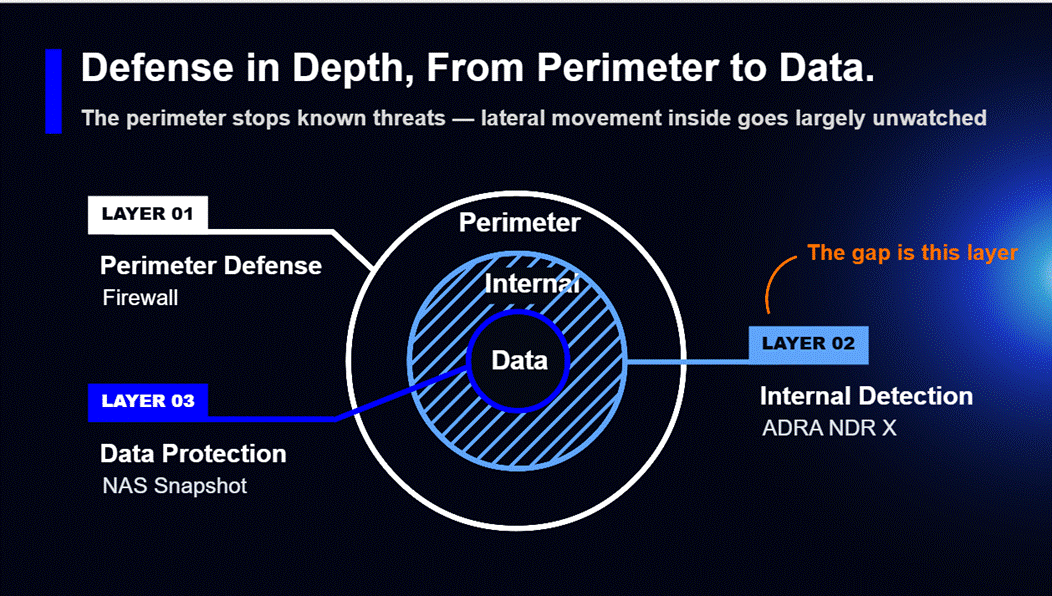
Many organizations assume that EDR on every computer plus a firewall adds up to a secure internal network. But the firewall only watches traffic in and out of the network, and antivirus or EDR only watches individual devices. Between them lies a large blind spot: lateral movement inside the network.
-
The limits of EDR: EDR needs an agent installed on each endpoint and server to monitor behavior. It works well on devices that can run that software, but printers, IP cameras, OT controllers on the production line and third-party NAS can’t run an EDR agent. EDR also observes behavior inside a single device, and seen from any one host, lateral movement often looks like an ordinary connection. Once attackers gain administrator rights, they can simply disable the agent.
-
Why NDR (network detection and response) offers broader, proactive defense: NDR works at the network layer, analyzing traffic between devices at the switch. With nothing to install device by device, every device connected to the network falls within its view, and it focuses on abnormal connections from one device to another.
EDR protects the endpoints themselves; NDR protects the paths between them. The two work hand in hand.
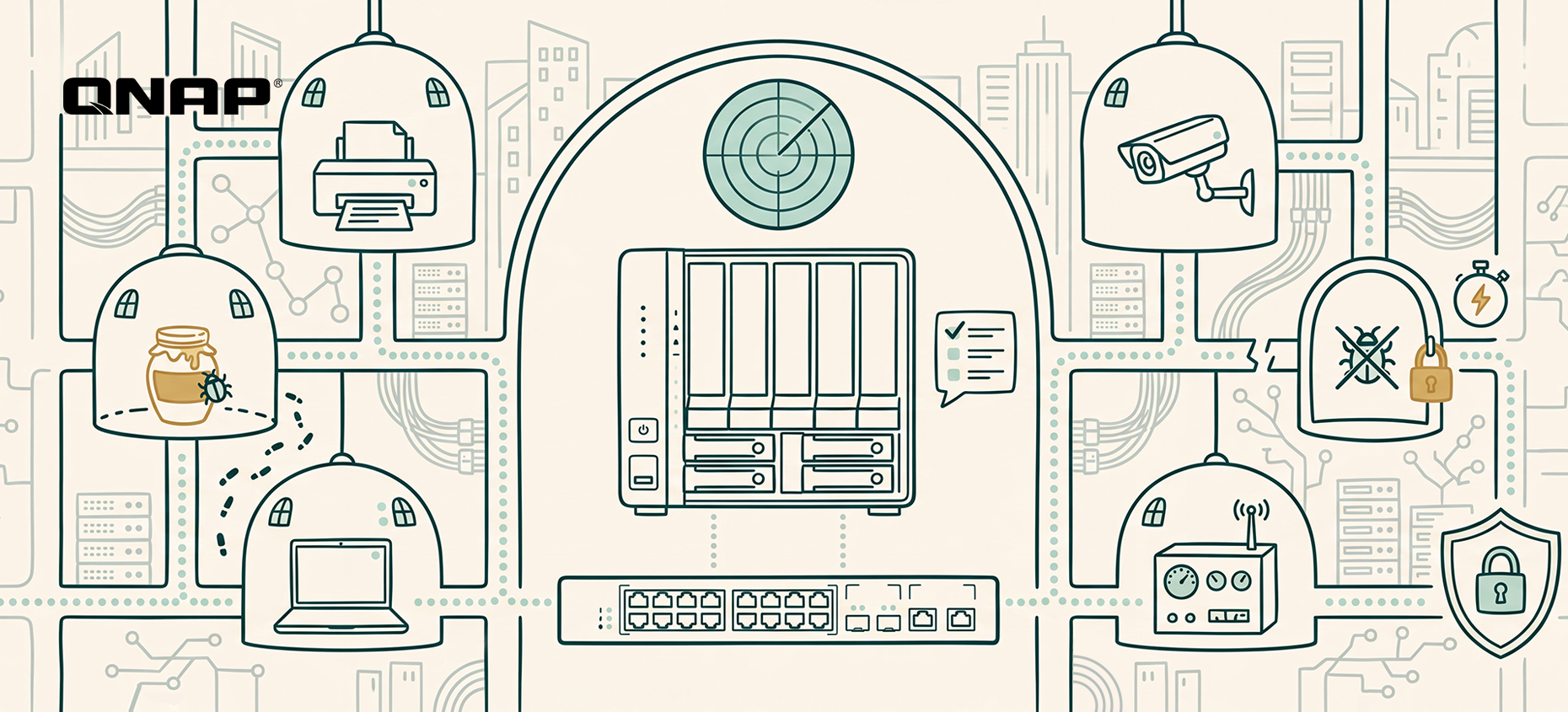
QNAP ADRA NDR X: turn your NAS into the brain of internal network defense that automatically detects, traps and isolates lateral threats
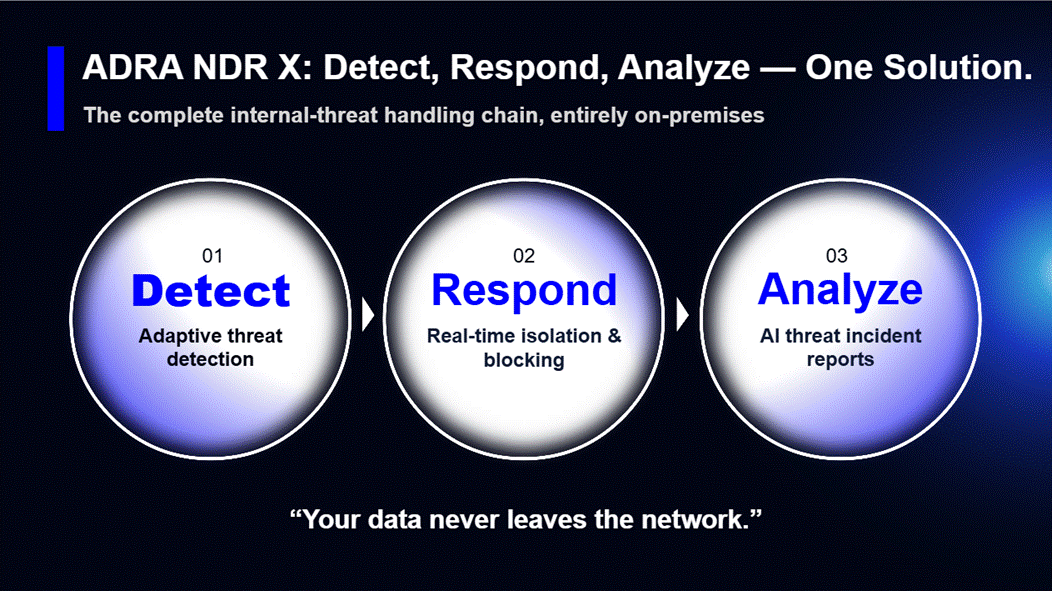
To lower the budget and skills barriers that small and mid-sized businesses face, QNAP offers ADRA NDR X, a dedicated network detection and response solution. It’s a free download from App Center with no per-device license fees. Once installed, your QNAP NAS becomes the NDR analysis hub for your internal network. Pair it with a compatible switch to get started, with no changes to your existing network architecture. Key capabilities include:
-
Catches new attacks, too: On top of more than 43,000 attack signatures, ADRA NDR X uses machine learning to learn each device’s normal activity and flags behavior that deviates from it.
-
Spots attackers before they move: ADRA NDR X sets decoys (honeypots) across the internal network to lure hidden malware into the open, so you can defend proactively instead of waiting for an alert.
-
Keeps the damage contained: Based on your policies, it automatically cuts off an infected device’s network connection while every other device keeps running, and NAS snapshots preserve a recoverable version of your files.
-
Clear answers without a security expert: Built-in AI instantly summarizes each threat and recommends a response, so IT knows what to do next and the business has an overall risk report to review and act on.
*Note: Higher-end NAS models are recommended for AI features.
Internal network health check: three questions that reveal your detection gaps
IT and security leaders can start by checking three things:
-
Visibility into blind spots: Are printers, IP cameras, IoT and other devices that can’t run antivirus being monitored today? Would you know if one of them were infected?
-
Automated blocking: If a computer on your network suddenly starts mass-accessing SMB shared folders, will the system alert on it and block it automatically, or is no automated process in place yet?
-
Response time: How long does it currently take your organization to go from spotting an anomaly to isolating the infected device?
Assess your organization’s security maturity now! See QNAP’s “Global Enterprise Cyber Resilience Survey 2026”: [Download the full report]
The report scores 1,838 organizations’ self-assessments across eleven controls spanning four stages: data protection and backup, identity and access control, threat monitoring and active defense, and business continuity and recovery. Results are cross-analyzed by region, industry and company size, so you can benchmark directly against peers. The report also sets out priority improvements for each maturity tier as a starting point for planning your next step.
Frequently asked questions (FAQ)
-
Is QNAP ADRA NDR X really free? Will we pay more in license fees as we add devices?
The ADRA NDR X software is completely free, with no per-device license fees at all. Most security vendors charge annual NDR fees based on the number of monitored IPs or traffic volume, so the more devices you have, the more you pay. QNAP makes it a free install straight from the QTS / QuTS hero App Center. As long as you have a supported QNAP NAS and a compatible switch, you won’t pay license fees whether your network has 50 devices or 500.
-
We already have a firewall and antivirus. Why do we still need NDR inside the network?
Because the firewall only watches traffic entering and leaving the network, and antivirus or EDR only watches individual devices. Between them lies a large blind spot: lateral movement inside the network. Attackers rarely break through firewalls head-on these days; they usually slip in through phishing emails or an employee’s laptop. Once inside, they hop between printers, NAS and colleagues’ computers over SMB file shares, and the firewall sees none of it. Only NDR, which monitors device traffic at the switch layer, can catch this kind of spread.
-
Our network printers and IP cameras can’t run antivirus. What if attackers use them as a stepping stone?
That is exactly why you need NDR: it’s agentless, so nothing has to be installed on the device. Printers, cameras, production machines and contractors’ laptops may not be able to run EDR, but any device that connects to the network has to go through the switch. NDR (such as QNAP’s NDR solution) monitors connection traffic directly at the switch, so if a printer suddenly starts making abnormal connections to other computers or scanning the network, it can be knocked offline at the network layer.
-
Will copying switch traffic to the NAS for security analysis slow down our network?
No. It won’t slow anything down or affect existing network traffic. ADRA NDR X works through port mirroring: the switch simply sends a copy of the packets to the NAS for inspection, rather than placing the NAS on the main data path. Even if the NAS reboots or runs at full load, office network traffic carries on as normal. The switch only cuts off an infected computer’s port when ransomware is detected.
-
We only have part-time IT and no dedicated security team. Will we understand NDR’s complex alerts?
Yes. The biggest headache with traditional security tools is the thousands of log entries they generate every day that nobody has time to read. ADRA NDR X’s built-in AI analysis translates complex attack data into plain-language threat summaries and recommended next steps. Even more important, its automatic isolation blocks the connection the moment ransomware is detected, with no need to wait for IT to read logs and pull cables by hand.
Solo il 13% delle aziende dispone di rilevamento interno delle minacce di livello enterprise, mentre il 29% non riesce a individuare il ransomware nascosto nella propria rete
Nel “Global Enterprise Cyber Resilience Survey 2026” di QNAP, 1.838 organizzazioni in 93 paesi hanno valutato la propria resilienza informatica. Una domanda chiedeva: se un ransomware fosse già nascosto nella tua rete, muovendosi lateralmente tramite condivisioni file SMB e preparandosi a criptare i file, la tua organizzazione sarebbe in grado di rilevarlo e fermarlo autonomamente? Solo il 13% ha implementato il rilevamento e la risposta di rete (NDR) a livello di rete, in grado di rilevare e isolare automaticamente la fonte dell’infezione. All’estremo opposto, il 29% ammette di non avere alcun rilevamento proattivo e si accorge di una violazione solo quando cambiano le estensioni dei file o l’antivirus segnala un allarme.
Il restante 58% dispone di soluzioni di rilevamento e risposta sugli endpoint (EDR) o firewall, ma non riesce comunque a monitorare ogni dispositivo sulla rete interna. Questo lascia zone cieche in cui gli attaccanti possono muoversi lateralmente senza che l’IT se ne accorga.
Il ransomware inizia a muoversi lateralmente in media dopo 29 minuti, ma le intrusioni vengono rilevate in media dopo 11 giorni
Velocità degli attaccanti (minuti): Il CrowdStrike 2026 Global Threat Report ha rilevato che i gruppi eCrime impiegano in media solo 29 minuti per passare dall’accesso iniziale al movimento laterale. È il 65% più veloce rispetto al 2024 e il caso più rapido ha richiesto solo 27 secondi.
Velocità dei difensori (giorni): Il M-Trends 2025 di Google Mandiant riporta una mediana di 11 giorni dal momento dell’intrusione al rilevamento, che si allunga a 26 giorni se l’allarme viene dato da una parte esterna.
Gli attaccanti agiscono in minuti; le organizzazioni rispondono in giorni. In questo intervallo, qualsiasi azione di isolamento che dipenda dalla lettura dei log e dalla disconnessione manuale di un cavo potrebbe arrivare troppo tardi. Se il rilevamento interno non può agire e bloccare autonomamente, quando l’IT se ne accorge il ransomware potrebbe aver già raggiunto database, file server e sistemi di backup, causando gravi danni all’azienda.
Perché l’EDR non basta? Come EDR e NDR si dividono la difesa della rete interna
Molte organizzazioni presumono che EDR su ogni computer più un firewall equivalgano a una rete interna sicura. Ma il firewall controlla solo il traffico in entrata e in uscita dalla rete, mentre l’antivirus o l’EDR monitorano solo i singoli dispositivi. Tra questi due rimane una grande zona cieca: il movimento laterale all’interno della rete.
-
I limiti dell’EDR: L’EDR richiede l’installazione di un agente su ogni endpoint e server per monitorare il comportamento. Funziona bene sui dispositivi che possono eseguire tale software, ma stampanti, telecamere IP, controller OT sulla linea di produzione e NAS di terze parti non possono eseguire un agente EDR. Inoltre, l’EDR osserva il comportamento all’interno di un singolo dispositivo e, visto da un host, il movimento laterale spesso appare come una normale connessione. Una volta ottenuti i diritti di amministratore, gli attaccanti possono semplicemente disabilitare l’agente.
-
Perché l’NDR (network detection and response) offre una difesa più ampia e proattiva: L’NDR opera a livello di rete, analizzando il traffico tra dispositivi allo switch. Senza nulla da installare dispositivo per dispositivo, ogni device collegato alla rete rientra nel suo campo visivo e si concentra sulle connessioni anomale tra dispositivi.
L’EDR protegge gli endpoint stessi; l’NDR protegge i percorsi tra di essi. I due lavorano in sinergia.
QNAP ADRA NDR X: trasforma il tuo NAS nel cervello della difesa della rete interna che rileva, intrappola e isola automaticamente le minacce laterali
Per abbattere le barriere di budget e competenze che le piccole e medie imprese affrontano, QNAP offre ADRA NDR X, una soluzione dedicata di network detection and response. È un download gratuito da App Center senza costi di licenza per dispositivo. Una volta installato, il tuo NAS QNAP diventa l’hub di analisi NDR per la rete interna. Basta abbinarlo a uno switch compatibile per iniziare, senza modifiche all’architettura di rete esistente. Le principali funzionalità includono:
-
Individua anche nuovi attacchi: Oltre a più di 43.000 firme di attacco, ADRA NDR X utilizza il machine learning per apprendere l’attività normale di ogni dispositivo e segnala i comportamenti che si discostano da essa.
-
Individua gli attaccanti prima che si muovano: ADRA NDR X posiziona esche (honeypot) nella rete interna per attirare il malware nascosto allo scoperto, così puoi difenderti in modo proattivo invece di aspettare un allarme.
-
Contiene i danni: In base alle tue policy, interrompe automaticamente la connessione di rete del dispositivo infetto mentre tutti gli altri dispositivi continuano a funzionare, e gli snapshot NAS preservano una versione recuperabile dei tuoi file.
-
Risposte chiare senza esperti di sicurezza: L’AI integrata riassume istantaneamente ogni minaccia e raccomanda una risposta, così l’IT sa cosa fare e l’azienda ha un report di rischio complessivo da esaminare e su cui agire.
*Nota: Si consigliano modelli NAS di fascia alta per le funzionalità AI.
Check-up della rete interna: tre domande che rivelano le tue lacune di rilevamento
I responsabili IT e della sicurezza possono iniziare verificando tre aspetti:
-
Visibilità sulle zone cieche: Stampanti, telecamere IP, IoT e altri dispositivi che non possono eseguire l’antivirus sono monitorati oggi? Sapresti se uno di questi fosse infetto?
-
Blocco automatico: Se un computer sulla rete inizia improvvisamente ad accedere in massa alle cartelle SMB condivise, il sistema lo segnalerà e lo bloccherà automaticamente, oppure non esiste ancora un processo automatico?
-
Tempo di risposta: Quanto tempo impiega attualmente la tua organizzazione a passare dall’individuazione di un’anomalia all’isolamento del dispositivo infetto?
Valuta ora la maturità della sicurezza della tua organizzazione! Consulta il “Global Enterprise Cyber Resilience Survey 2026” di QNAP: [Scarica il report completo]
Il report valuta l’autovalutazione di 1.838 organizzazioni su undici controlli che coprono quattro fasi: protezione e backup dei dati, controllo di identità e accessi, monitoraggio delle minacce e difesa attiva, continuità operativa e ripristino. I risultati sono analizzati per regione, settore e dimensione aziendale, così puoi confrontarti direttamente con i tuoi pari. Il report indica anche le priorità di miglioramento per ogni livello di maturità come punto di partenza per pianificare il prossimo passo.
Domande frequenti (FAQ)
-
QNAP ADRA NDR X è davvero gratuito? Pagheremo di più in licenze aggiungendo dispositivi?
Il software ADRA NDR X è completamente gratuito, senza alcun costo di licenza per dispositivo. La maggior parte dei fornitori di sicurezza applica tariffe annuali NDR in base al numero di IP monitorati o al volume di traffico, quindi più dispositivi hai, più paghi. QNAP lo rende un’installazione gratuita direttamente da QTS / QuTS hero App Center. Finché hai un NAS QNAP supportato e uno switch compatibile, non pagherai licenze sia che la tua rete abbia 50 dispositivi o 500.
-
Abbiamo già firewall e antivirus. Perché serve comunque l’NDR all’interno della rete?
Perché il firewall controlla solo il traffico in entrata e in uscita dalla rete, mentre l’antivirus o l’EDR monitorano solo i singoli dispositivi. Tra questi due rimane una grande zona cieca: il movimento laterale all’interno della rete. Gli attaccanti raramente sfondano i firewall frontalmente oggi; di solito entrano tramite email di phishing o il laptop di un dipendente. Una volta dentro, si spostano tra stampanti, NAS e computer dei colleghi tramite condivisioni file SMB, e il firewall non vede nulla di tutto ciò. Solo l’NDR, che monitora il traffico dei dispositivi a livello di switch, può rilevare questo tipo di propagazione.
-
Le nostre stampanti di rete e telecamere IP non possono eseguire l’antivirus. E se gli attaccanti le usano come trampolino di lancio?
È proprio per questo che serve l’NDR: è agentless, quindi non serve installare nulla sul dispositivo. Stampanti, telecamere, macchine di produzione e laptop di fornitori potrebbero non poter eseguire l’EDR, ma qualsiasi dispositivo che si collega alla rete deve passare dallo switch. L’NDR (come la soluzione NDR di QNAP) monitora direttamente il traffico delle connessioni allo switch, quindi se una stampante inizia improvvisamente a stabilire connessioni anomale con altri computer o a scansionare la rete, può essere disconnessa a livello di rete.
-
Copiare il traffico dello switch sul NAS per l’analisi di sicurezza rallenterà la nostra rete?
No. Non rallenterà nulla né influenzerà il traffico di rete esistente. ADRA NDR X funziona tramite port mirroring: lo switch invia semplicemente una copia dei pacchetti al NAS per l’ispezione, invece di posizionare il NAS sul percorso dati principale. Anche se il NAS si riavvia o lavora al massimo carico, il traffico di rete dell’ufficio continua normalmente. Lo switch interrompe solo la porta del computer infetto quando viene rilevato un ransomware.
-
Abbiamo solo IT part-time e nessun team di sicurezza dedicato. Capiremo gli avvisi complessi dell’NDR?
Sì. Il problema principale con gli strumenti di sicurezza tradizionali sono le migliaia di voci di log generate ogni giorno che nessuno ha tempo di leggere. L’analisi AI integrata di ADRA NDR X traduce i dati di attacco complessi in riepiloghi delle minacce in linguaggio semplice e suggerisce i prossimi passi. Ancora più importante, il suo isolamento automatico blocca la connessione non appena viene rilevato un ransomware, senza dover aspettare che l’IT legga i log e scolleghi i cavi manualmente.


 8 min di lettura