Only 13% of enterprises have enterprise-grade internal threat detection, while 29% can’t spot ransomware lurking on their network
In QNAP’s “Global Enterprise Cyber Resilience Survey 2026”, 1,838 organizations across 93 countries assessed their own cyber resilience. One question asked: if ransomware were already hiding on your network, moving laterally over SMB file shares and preparing to encrypt files, could your organization detect and stop it on its own? Only 13% have deployed network detection and response (NDR) at the network layer that can automatically detect and isolate the source of infection. At the other end, 29% admit they have no proactive detection at all, and typically realize they’ve been breached only when file extensions change or antivirus raises an alert.
The remaining 58% have endpoint detection and response (EDR) or firewalls in place, yet still can’t monitor every device on the internal network. That leaves blind spots where attackers can move laterally without IT ever seeing them.
Ransomware starts moving laterally within 29 minutes on average, yet intrusions take a median of 11 days to detect
Attacker speed (minutes): The CrowdStrike 2026 Global Threat Report found that eCrime groups need an average of just 29 minutes to move from initial access to lateral movement. That is 65% faster than in 2024, and the fastest case took only 27 seconds.
Defender speed (days): Google Mandiant’s M-Trends 2025 reports a median of 11 days from intrusion to detection, stretching to 26 days when an outside party is the one to raise the alarm.
Attackers work in minutes; organizations respond in days. In that gap, any isolation step that depends on someone reading logs and pulling a network cable by hand may come too late. If internal detection can’t act and block on its own, by the time IT notices, ransomware may already have reached core databases, file servers and backup systems, causing serious damage to the business.
Why isn’t EDR enough? How EDR and NDR divide internal network defense
Many organizations assume that EDR on every computer plus a firewall adds up to a secure internal network. But the firewall only watches traffic in and out of the network, and antivirus or EDR only watches individual devices. Between them lies a large blind spot: lateral movement inside the network.
-
The limits of EDR: EDR needs an agent installed on each endpoint and server to monitor behavior. It works well on devices that can run that software, but printers, IP cameras, OT controllers on the production line and third-party NAS can’t run an EDR agent. EDR also observes behavior inside a single device, and seen from any one host, lateral movement often looks like an ordinary connection. Once attackers gain administrator rights, they can simply disable the agent.
-
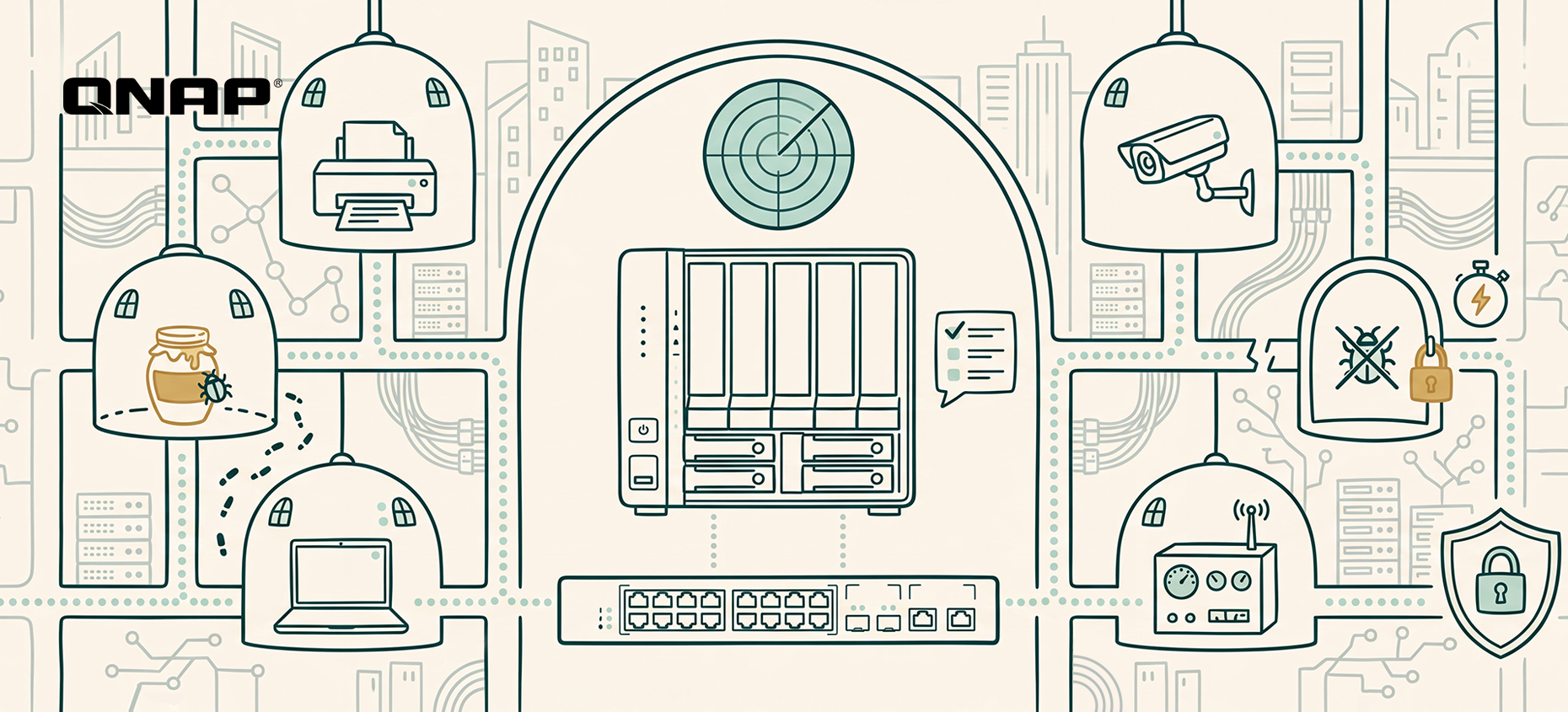
Why NDR (network detection and response) offers broader, proactive defense: NDR works at the network layer, analyzing traffic between devices at the switch. With nothing to install device by device, every device connected to the network falls within its view, and it focuses on abnormal connections from one device to another.
EDR protects the endpoints themselves; NDR protects the paths between them. The two work hand in hand.
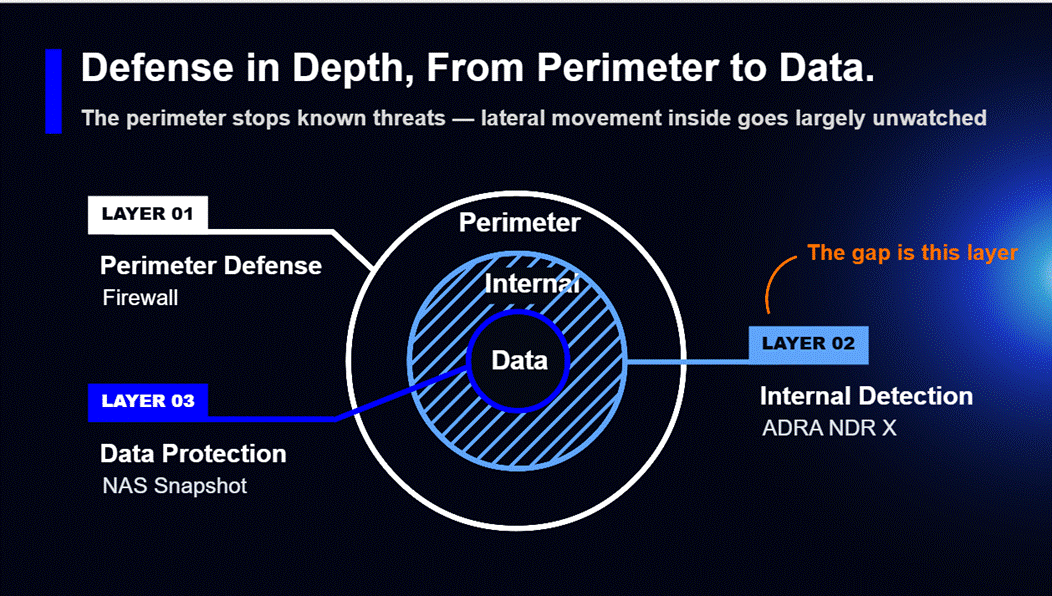
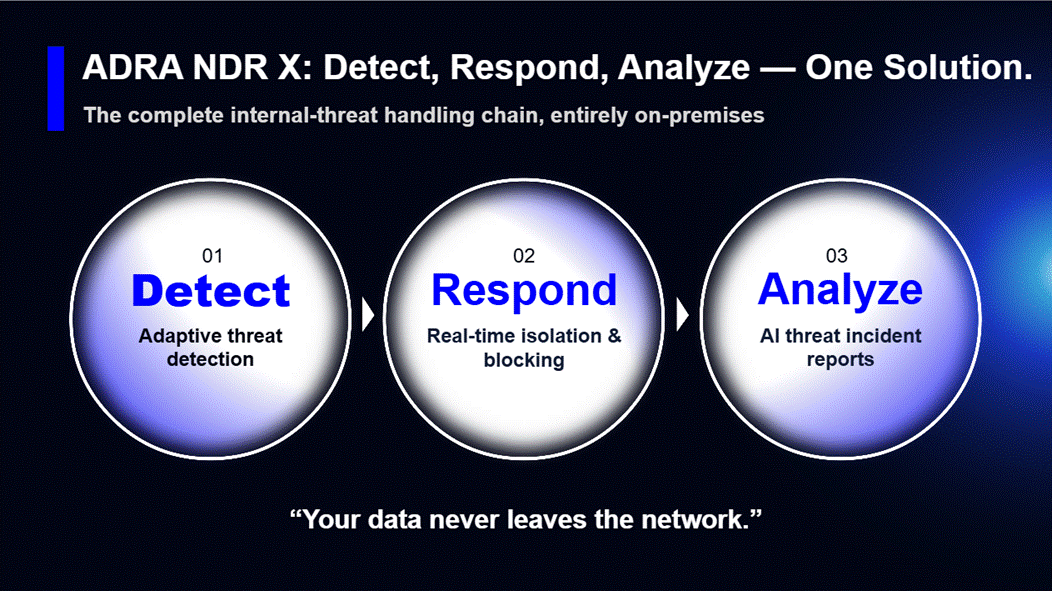
QNAP ADRA NDR X: turn your NAS into the brain of internal network defense that automatically detects, traps and isolates lateral threats
To lower the budget and skills barriers that small and mid-sized businesses face, QNAP offers ADRA NDR X, a dedicated network detection and response solution. It’s a free download from App Center with no per-device license fees. Once installed, your QNAP NAS becomes the NDR analysis hub for your internal network. Pair it with a compatible switch to get started, with no changes to your existing network architecture. Key capabilities include:
-
Catches new attacks, too: On top of more than 43,000 attack signatures, ADRA NDR X uses machine learning to learn each device’s normal activity and flags behavior that deviates from it.
-
Spots attackers before they move: ADRA NDR X sets decoys (honeypots) across the internal network to lure hidden malware into the open, so you can defend proactively instead of waiting for an alert.
-
Keeps the damage contained: Based on your policies, it automatically cuts off an infected device’s network connection while every other device keeps running, and NAS snapshots preserve a recoverable version of your files.
-
Clear answers without a security expert: Built-in AI instantly summarizes each threat and recommends a response, so IT knows what to do next and the business has an overall risk report to review and act on.
*Note: Higher-end NAS models are recommended for AI features.
Internal network health check: three questions that reveal your detection gaps
IT and security leaders can start by checking three things:
-
Visibility into blind spots: Are printers, IP cameras, IoT and other devices that can’t run antivirus being monitored today? Would you know if one of them were infected?
-
Automated blocking: If a computer on your network suddenly starts mass-accessing SMB shared folders, will the system alert on it and block it automatically, or is no automated process in place yet?
-
Response time: How long does it currently take your organization to go from spotting an anomaly to isolating the infected device?
Assess your organization’s security maturity now! See QNAP’s “Global Enterprise Cyber Resilience Survey 2026”: [Download the full report]
The report scores 1,838 organizations’ self-assessments across eleven controls spanning four stages: data protection and backup, identity and access control, threat monitoring and active defense, and business continuity and recovery. Results are cross-analyzed by region, industry and company size, so you can benchmark directly against peers. The report also sets out priority improvements for each maturity tier as a starting point for planning your next step.
Frequently asked questions (FAQ)
-
Is QNAP ADRA NDR X really free? Will we pay more in license fees as we add devices?
The ADRA NDR X software is completely free, with no per-device license fees at all. Most security vendors charge annual NDR fees based on the number of monitored IPs or traffic volume, so the more devices you have, the more you pay. QNAP makes it a free install straight from the QTS / QuTS hero App Center. As long as you have a supported QNAP NAS and a compatible switch, you won’t pay license fees whether your network has 50 devices or 500.
-
We already have a firewall and antivirus. Why do we still need NDR inside the network?
Because the firewall only watches traffic entering and leaving the network, and antivirus or EDR only watches individual devices. Between them lies a large blind spot: lateral movement inside the network. Attackers rarely break through firewalls head-on these days; they usually slip in through phishing emails or an employee’s laptop. Once inside, they hop between printers, NAS and colleagues’ computers over SMB file shares, and the firewall sees none of it. Only NDR, which monitors device traffic at the switch layer, can catch this kind of spread.
-
Our network printers and IP cameras can’t run antivirus. What if attackers use them as a stepping stone?
That is exactly why you need NDR: it’s agentless, so nothing has to be installed on the device. Printers, cameras, production machines and contractors’ laptops may not be able to run EDR, but any device that connects to the network has to go through the switch. NDR (such as QNAP’s NDR solution) monitors connection traffic directly at the switch, so if a printer suddenly starts making abnormal connections to other computers or scanning the network, it can be knocked offline at the network layer.
-
Will copying switch traffic to the NAS for security analysis slow down our network?
No. It won’t slow anything down or affect existing network traffic. ADRA NDR X works through port mirroring: the switch simply sends a copy of the packets to the NAS for inspection, rather than placing the NAS on the main data path. Even if the NAS reboots or runs at full load, office network traffic carries on as normal. The switch only cuts off an infected computer’s port when ransomware is detected.
-
We only have part-time IT and no dedicated security team. Will we understand NDR’s complex alerts?
Yes. The biggest headache with traditional security tools is the thousands of log entries they generate every day that nobody has time to read. ADRA NDR X’s built-in AI analysis translates complex attack data into plain-language threat summaries and recommended next steps. Even more important, its automatic isolation blocks the connection the moment ransomware is detected, with no need to wait for IT to read logs and pull cables by hand.
Solo el 13% de las empresas cuentan con detección interna de amenazas de nivel empresarial, mientras que el 29% no puede detectar ransomware oculto en su red
En la “Encuesta Global de Resiliencia Cibernética Empresarial 2026” de QNAP, 1.838 organizaciones de 93 países evaluaron su propia resiliencia cibernética. Una pregunta fue: si el ransomware ya estuviera oculto en su red, moviéndose lateralmente por comparticiones SMB y preparándose para cifrar archivos, ¿podría su organización detectarlo y detenerlo por sí misma? Solo el 13% ha implementado detección y respuesta de red (NDR) en la capa de red que puede detectar e aislar automáticamente la fuente de infección. En el otro extremo, el 29% admite que no tiene detección proactiva en absoluto, y normalmente se dan cuenta de que han sido vulnerados solo cuando cambian las extensiones de archivos o el antivirus genera una alerta.
El 58% restante cuenta con detección y respuesta en endpoints (EDR) o cortafuegos, pero aún así no pueden monitorear todos los dispositivos de la red interna. Esto deja puntos ciegos donde los atacantes pueden moverse lateralmente sin que TI los vea.
El ransomware comienza a moverse lateralmente en promedio en 29 minutos, pero las intrusiones tardan una mediana de 11 días en detectarse
Velocidad del atacante (minutos): El Informe Global de Amenazas CrowdStrike 2026 encontró que los grupos de eCrime necesitan en promedio solo 29 minutos para pasar del acceso inicial al movimiento lateral. Esto es un 65% más rápido que en 2024, y el caso más rápido tomó solo 27 segundos.
Velocidad del defensor (días): El M-Trends 2025 de Google Mandiant reporta una mediana de 11 días desde la intrusión hasta la detección, extendiéndose a 26 días cuando una parte externa es la que da la alarma.
Los atacantes actúan en minutos; las organizaciones responden en días. En ese intervalo, cualquier paso de aislamiento que dependa de que alguien lea registros y desconecte un cable de red manualmente puede llegar demasiado tarde. Si la detección interna no puede actuar y bloquear por sí sola, cuando TI se da cuenta, el ransomware ya puede haber alcanzado bases de datos centrales, servidores de archivos y sistemas de respaldo, causando daños graves al negocio.
¿Por qué EDR no es suficiente? Cómo EDR y NDR dividen la defensa de la red interna
Muchas organizaciones asumen que EDR en cada computadora más un cortafuegos suman una red interna segura. Pero el cortafuegos solo vigila el tráfico que entra y sale de la red, y el antivirus o EDR solo vigilan dispositivos individuales. Entre ambos hay un gran punto ciego: el movimiento lateral dentro de la red.
-
Los límites de EDR: EDR necesita un agente instalado en cada endpoint y servidor para monitorear el comportamiento. Funciona bien en dispositivos que pueden ejecutar ese software, pero impresoras, cámaras IP, controladores OT en la línea de producción y NAS de terceros no pueden ejecutar un agente EDR. EDR también observa el comportamiento dentro de un solo dispositivo, y visto desde cualquier host, el movimiento lateral suele parecer una conexión ordinaria. Una vez que los atacantes obtienen derechos de administrador, pueden simplemente desactivar el agente.
-
Por qué NDR (detección y respuesta de red) ofrece una defensa más amplia y proactiva: NDR opera en la capa de red, analizando el tráfico entre dispositivos en el switch. Sin necesidad de instalar nada dispositivo por dispositivo, cada dispositivo conectado a la red queda bajo su vigilancia, y se enfoca en conexiones anormales de un dispositivo a otro.
EDR protege los endpoints; NDR protege los caminos entre ellos. Ambos trabajan de la mano.
QNAP ADRA NDR X: convierte tu NAS en el cerebro de la defensa de la red interna que detecta, atrapa y aísla automáticamente amenazas laterales
Para reducir las barreras de presupuesto y habilidades que enfrentan las pequeñas y medianas empresas, QNAP ofrece ADRA NDR X, una solución dedicada de detección y respuesta de red. Es una descarga gratuita desde App Center sin tarifas de licencia por dispositivo. Una vez instalado, tu NAS QNAP se convierte en el centro de análisis NDR para tu red interna. Empareja con un switch compatible para comenzar, sin cambios en la arquitectura de red existente. Las capacidades clave incluyen:
-
Detecta ataques nuevos también: Además de más de 43.000 firmas de ataque, ADRA NDR X utiliza aprendizaje automático para aprender la actividad normal de cada dispositivo y marca comportamientos que se desvían de ella.
-
Detecta atacantes antes de que se muevan: ADRA NDR X coloca cebos (honeypots) en toda la red interna para atraer malware oculto y exponerlo, permitiendo una defensa proactiva en vez de esperar una alerta.
-
Mantiene el daño contenido: Según tus políticas, corta automáticamente la conexión de red de un dispositivo infectado mientras los demás siguen funcionando, y las instantáneas del NAS preservan una versión recuperable de tus archivos.
-
Respuestas claras sin un experto en seguridad: La IA integrada resume instantáneamente cada amenaza y recomienda una respuesta, para que TI sepa qué hacer y el negocio tenga un informe de riesgos general para revisar y actuar.
*Nota: Se recomiendan modelos NAS de gama alta para funciones de IA.
Chequeo de salud de la red interna: tres preguntas que revelan tus brechas de detección
Los líderes de TI y seguridad pueden comenzar revisando tres cosas:
-
Visibilidad en puntos ciegos: ¿Se están monitoreando hoy impresoras, cámaras IP, IoT y otros dispositivos que no pueden ejecutar antivirus? ¿Sabrías si uno de ellos estuviera infectado?
-
Bloqueo automatizado: Si una computadora en tu red comienza repentinamente a acceder masivamente a carpetas compartidas SMB, ¿el sistema lo alertará y lo bloqueará automáticamente, o aún no hay un proceso automatizado?
-
Tiempo de respuesta: ¿Cuánto tarda actualmente tu organización en pasar de detectar una anomalía a aislar el dispositivo infectado?
¡Evalúa la madurez de seguridad de tu organización ahora! Consulta la “Encuesta Global de Resiliencia Cibernética Empresarial 2026” de QNAP: [Descarga el informe completo]
El informe califica la autoevaluación de 1.838 organizaciones en once controles que abarcan cuatro etapas: protección y respaldo de datos, control de identidad y acceso, monitoreo de amenazas y defensa activa, y continuidad y recuperación del negocio. Los resultados se analizan por región, industria y tamaño de empresa, para que puedas comparar directamente con tus pares. El informe también establece mejoras prioritarias para cada nivel de madurez como punto de partida para planificar tu próximo paso.
Preguntas frecuentes (FAQ)
-
¿QNAP ADRA NDR X es realmente gratuito? ¿Pagaremos más en tarifas de licencia al agregar dispositivos?
El software ADRA NDR X es completamente gratuito, sin tarifas de licencia por dispositivo. La mayoría de los proveedores de seguridad cobran tarifas anuales de NDR según el número de IPs monitoreadas o el volumen de tráfico, así que cuantos más dispositivos tengas, más pagas. QNAP lo ofrece como una instalación gratuita directamente desde el App Center de QTS / QuTS hero. Mientras tengas un NAS QNAP compatible y un switch compatible, no pagarás tarifas de licencia ya sea que tu red tenga 50 dispositivos o 500.
-
Ya tenemos cortafuegos y antivirus. ¿Por qué necesitamos NDR dentro de la red?
Porque el cortafuegos solo vigila el tráfico que entra y sale de la red, y el antivirus o EDR solo vigilan dispositivos individuales. Entre ambos hay un gran punto ciego: el movimiento lateral dentro de la red. Los atacantes rara vez atraviesan los cortafuegos de frente hoy en día; suelen entrar por correos de phishing o el portátil de un empleado. Una vez dentro, saltan entre impresoras, NAS y computadoras de colegas por comparticiones SMB, y el cortafuegos no ve nada de esto. Solo NDR, que monitorea el tráfico de dispositivos en la capa del switch, puede detectar este tipo de propagación.
-
Nuestras impresoras de red y cámaras IP no pueden ejecutar antivirus. ¿Qué pasa si los atacantes las usan como trampolín?
Esa es exactamente la razón por la que necesitas NDR: es sin agente, así que no hay que instalar nada en el dispositivo. Impresoras, cámaras, máquinas de producción y portátiles de contratistas pueden no ser capaces de ejecutar EDR, pero cualquier dispositivo que se conecte a la red debe pasar por el switch. NDR (como la solución NDR de QNAP) monitorea el tráfico de conexiones directamente en el switch, así que si una impresora comienza a hacer conexiones anormales a otras computadoras o escanear la red, puede ser desconectada en la capa de red.
-
¿Copiar el tráfico del switch al NAS para análisis de seguridad ralentizará nuestra red?
No. No ralentizará nada ni afectará el tráfico de red existente. ADRA NDR X funciona mediante port mirroring: el switch simplemente envía una copia de los paquetes al NAS para inspección, en vez de colocar el NAS en la ruta principal de datos. Incluso si el NAS se reinicia o está a plena carga, el tráfico de la red de oficina sigue funcionando normalmente. El switch solo corta el puerto de una computadora infectada cuando se detecta ransomware.
-
Solo tenemos TI a tiempo parcial y ningún equipo de seguridad dedicado. ¿Entenderemos las alertas complejas de NDR?
Sí. El mayor dolor de cabeza con las herramientas de seguridad tradicionales son los miles de registros que generan cada día y que nadie tiene tiempo de leer. El análisis de IA integrado de ADRA NDR X traduce datos de ataques complejos en resúmenes de amenazas en lenguaje sencillo y pasos recomendados. Aún más importante, su aislamiento automático bloquea la conexión en el momento en que se detecta ransomware, sin necesidad de esperar a que TI lea registros y desconecte cables manualmente.


 8 min de lectura