Only 13% of enterprises have enterprise-grade internal threat detection, while 29% can’t spot ransomware lurking on their network
In QNAP’s “Global Enterprise Cyber Resilience Survey 2026”, 1,838 organizations across 93 countries assessed their own cyber resilience. One question asked: if ransomware were already hiding on your network, moving laterally over SMB file shares and preparing to encrypt files, could your organization detect and stop it on its own? Only 13% have deployed network detection and response (NDR) at the network layer that can automatically detect and isolate the source of infection. At the other end, 29% admit they have no proactive detection at all, and typically realize they’ve been breached only when file extensions change or antivirus raises an alert.
The remaining 58% have endpoint detection and response (EDR) or firewalls in place, yet still can’t monitor every device on the internal network. That leaves blind spots where attackers can move laterally without IT ever seeing them.
Ransomware starts moving laterally within 29 minutes on average, yet intrusions take a median of 11 days to detect
Attacker speed (minutes): The CrowdStrike 2026 Global Threat Report found that eCrime groups need an average of just 29 minutes to move from initial access to lateral movement. That is 65% faster than in 2024, and the fastest case took only 27 seconds.
Defender speed (days): Google Mandiant’s M-Trends 2025 reports a median of 11 days from intrusion to detection, stretching to 26 days when an outside party is the one to raise the alarm.
Attackers work in minutes; organizations respond in days. In that gap, any isolation step that depends on someone reading logs and pulling a network cable by hand may come too late. If internal detection can’t act and block on its own, by the time IT notices, ransomware may already have reached core databases, file servers and backup systems, causing serious damage to the business.
Why isn’t EDR enough? How EDR and NDR divide internal network defense
Many organizations assume that EDR on every computer plus a firewall adds up to a secure internal network. But the firewall only watches traffic in and out of the network, and antivirus or EDR only watches individual devices. Between them lies a large blind spot: lateral movement inside the network.
-
The limits of EDR: EDR needs an agent installed on each endpoint and server to monitor behavior. It works well on devices that can run that software, but printers, IP cameras, OT controllers on the production line and third-party NAS can’t run an EDR agent. EDR also observes behavior inside a single device, and seen from any one host, lateral movement often looks like an ordinary connection. Once attackers gain administrator rights, they can simply disable the agent.
-
Why NDR (network detection and response) offers broader, proactive defense: NDR works at the network layer, analyzing traffic between devices at the switch. With nothing to install device by device, every device connected to the network falls within its view, and it focuses on abnormal connections from one device to another.
EDR protects the endpoints themselves; NDR protects the paths between them. The two work hand in hand.
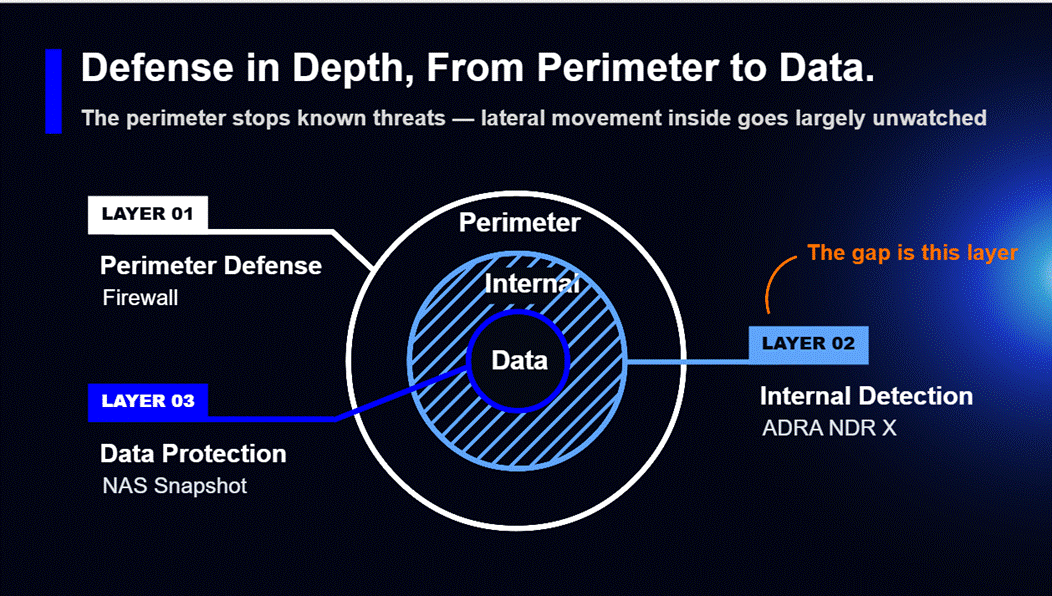
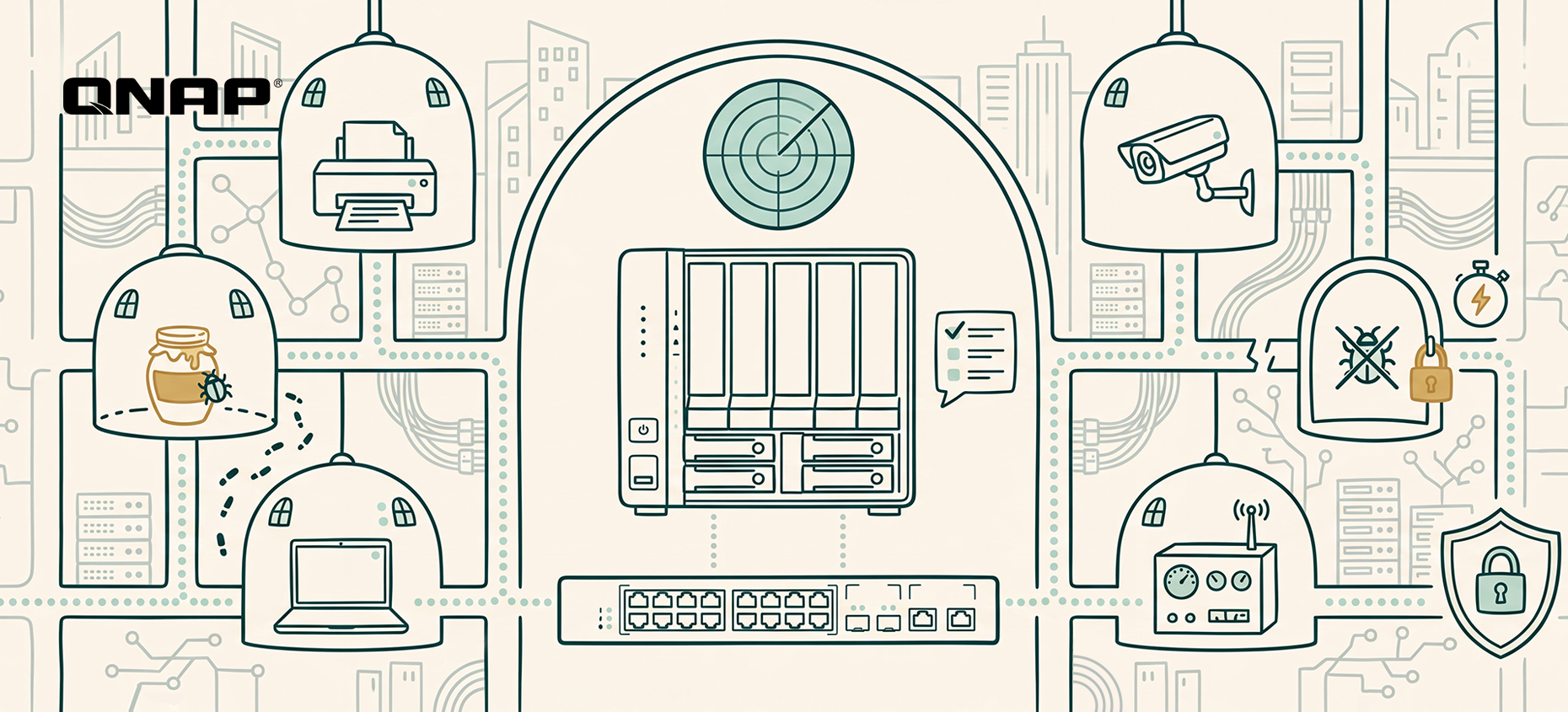
QNAP ADRA NDR X: turn your NAS into the brain of internal network defense that automatically detects, traps and isolates lateral threats
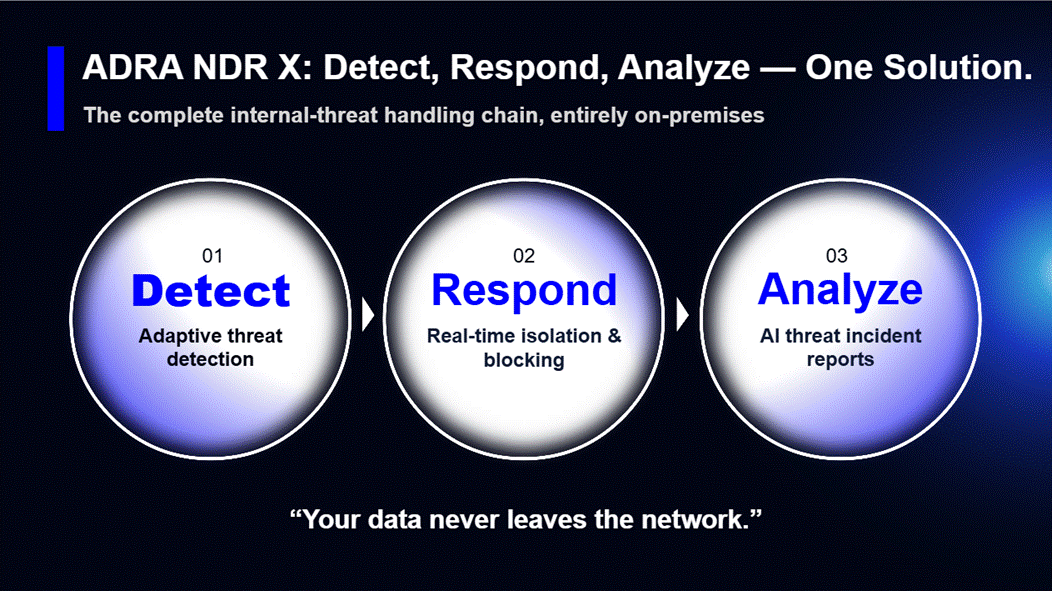
To lower the budget and skills barriers that small and mid-sized businesses face, QNAP offers ADRA NDR X, a dedicated network detection and response solution. It’s a free download from App Center with no per-device license fees. Once installed, your QNAP NAS becomes the NDR analysis hub for your internal network. Pair it with a compatible switch to get started, with no changes to your existing network architecture. Key capabilities include:
-
Catches new attacks, too: On top of more than 43,000 attack signatures, ADRA NDR X uses machine learning to learn each device’s normal activity and flags behavior that deviates from it.
-
Spots attackers before they move: ADRA NDR X sets decoys (honeypots) across the internal network to lure hidden malware into the open, so you can defend proactively instead of waiting for an alert.
-
Keeps the damage contained: Based on your policies, it automatically cuts off an infected device’s network connection while every other device keeps running, and NAS snapshots preserve a recoverable version of your files.
-
Clear answers without a security expert: Built-in AI instantly summarizes each threat and recommends a response, so IT knows what to do next and the business has an overall risk report to review and act on.
*Note: Higher-end NAS models are recommended for AI features.
Internal network health check: three questions that reveal your detection gaps
IT and security leaders can start by checking three things:
-
Visibility into blind spots: Are printers, IP cameras, IoT and other devices that can’t run antivirus being monitored today? Would you know if one of them were infected?
-
Automated blocking: If a computer on your network suddenly starts mass-accessing SMB shared folders, will the system alert on it and block it automatically, or is no automated process in place yet?
-
Response time: How long does it currently take your organization to go from spotting an anomaly to isolating the infected device?
Assess your organization’s security maturity now! See QNAP’s “Global Enterprise Cyber Resilience Survey 2026”: [Download the full report]
The report scores 1,838 organizations’ self-assessments across eleven controls spanning four stages: data protection and backup, identity and access control, threat monitoring and active defense, and business continuity and recovery. Results are cross-analyzed by region, industry and company size, so you can benchmark directly against peers. The report also sets out priority improvements for each maturity tier as a starting point for planning your next step.
Frequently asked questions (FAQ)
-
Is QNAP ADRA NDR X really free? Will we pay more in license fees as we add devices?
The ADRA NDR X software is completely free, with no per-device license fees at all. Most security vendors charge annual NDR fees based on the number of monitored IPs or traffic volume, so the more devices you have, the more you pay. QNAP makes it a free install straight from the QTS / QuTS hero App Center. As long as you have a supported QNAP NAS and a compatible switch, you won’t pay license fees whether your network has 50 devices or 500.
-
We already have a firewall and antivirus. Why do we still need NDR inside the network?
Because the firewall only watches traffic entering and leaving the network, and antivirus or EDR only watches individual devices. Between them lies a large blind spot: lateral movement inside the network. Attackers rarely break through firewalls head-on these days; they usually slip in through phishing emails or an employee’s laptop. Once inside, they hop between printers, NAS and colleagues’ computers over SMB file shares, and the firewall sees none of it. Only NDR, which monitors device traffic at the switch layer, can catch this kind of spread.
-
Our network printers and IP cameras can’t run antivirus. What if attackers use them as a stepping stone?
That is exactly why you need NDR: it’s agentless, so nothing has to be installed on the device. Printers, cameras, production machines and contractors’ laptops may not be able to run EDR, but any device that connects to the network has to go through the switch. NDR (such as QNAP’s NDR solution) monitors connection traffic directly at the switch, so if a printer suddenly starts making abnormal connections to other computers or scanning the network, it can be knocked offline at the network layer.
-
Will copying switch traffic to the NAS for security analysis slow down our network?
No. It won’t slow anything down or affect existing network traffic. ADRA NDR X works through port mirroring: the switch simply sends a copy of the packets to the NAS for inspection, rather than placing the NAS on the main data path. Even if the NAS reboots or runs at full load, office network traffic carries on as normal. The switch only cuts off an infected computer’s port when ransomware is detected.
-
We only have part-time IT and no dedicated security team. Will we understand NDR’s complex alerts?
Yes. The biggest headache with traditional security tools is the thousands of log entries they generate every day that nobody has time to read. ADRA NDR X’s built-in AI analysis translates complex attack data into plain-language threat summaries and recommended next steps. Even more important, its automatic isolation blocks the connection the moment ransomware is detected, with no need to wait for IT to read logs and pull cables by hand.
Slechts 13% van de bedrijven beschikt over interne dreigingsdetectie op ondernemingsniveau, terwijl 29% ransomware op hun netwerk niet kan opsporen
In QNAP’s “Global Enterprise Cyber Resilience Survey 2026” beoordeelden 1.838 organisaties uit 93 landen hun eigen cyberweerbaarheid. Eén van de vragen was: als ransomware zich al op uw netwerk zou bevinden, zich lateraal verspreidt via SMB-bestandsdeling en zich voorbereidt om bestanden te versleutelen, zou uw organisatie dit dan zelfstandig kunnen detecteren en stoppen? Slechts 13% heeft netwerkdetectie en -respons (NDR) op netwerkniveau geïmplementeerd die automatisch de bron van infectie kan detecteren en isoleren. Aan de andere kant geeft 29% toe helemaal geen proactieve detectie te hebben en merkt meestal pas een inbreuk op wanneer bestandsnaamextensies veranderen of antivirus een waarschuwing geeft.
De overige 58% beschikt over endpoint detectie en respons (EDR) of firewalls, maar kan nog steeds niet elk apparaat op het interne netwerk monitoren. Dat laat blinde vlekken waar aanvallers zich lateraal kunnen verplaatsen zonder dat IT het ziet.
Ransomware verspreidt zich gemiddeld binnen 29 minuten lateraal, terwijl het gemiddeld 11 dagen duurt om een inbraak te detecteren
Aanvallersnelheid (minuten): Het CrowdStrike 2026 Global Threat Report toont aan dat eCrime-groepen gemiddeld slechts 29 minuten nodig hebben om van initiële toegang naar laterale beweging te gaan. Dat is 65% sneller dan in 2024, en het snelste geval duurde slechts 27 seconden.
Verdedigingssnelheid (dagen): Google Mandiant’s M-Trends 2025 meldt een mediaan van 11 dagen van inbraak tot detectie, oplopend tot 26 dagen als een externe partij de alarmbel luidt.
Aanvallers werken in minuten; organisaties reageren in dagen. In die kloof kan elke isolatiestap die afhankelijk is van iemand die logs leest en handmatig een netwerkkabel loskoppelt, te laat komen. Als interne detectie niet zelfstandig kan handelen en blokkeren, kan ransomware al kern-databases, bestandsservers en back-ups hebben bereikt voordat IT het doorheeft, met ernstige gevolgen voor het bedrijf.
Waarom is EDR niet genoeg? Hoe EDR en NDR de interne netwerkverdediging verdelen
Veel organisaties gaan ervan uit dat EDR op elke computer plus een firewall samen zorgen voor een veilig intern netwerk. Maar de firewall kijkt alleen naar verkeer dat het netwerk in- en uitgaat, en antivirus of EDR kijkt alleen naar individuele apparaten. Daartussen zit een grote blinde vlek: laterale beweging binnen het netwerk.
-
De beperkingen van EDR: EDR vereist een agent op elk endpoint en elke server om gedrag te monitoren. Dit werkt goed op apparaten die die software kunnen draaien, maar printers, IP-camera’s, OT-controllers op de productielijn en externe NAS kunnen geen EDR-agent draaien. EDR observeert bovendien alleen gedrag binnen één apparaat, en vanaf één host lijkt laterale beweging vaak op een gewone verbinding. Zodra aanvallers beheerdersrechten krijgen, kunnen ze de agent eenvoudig uitschakelen.
-
Waarom NDR (network detection and response) bredere, proactieve verdediging biedt: NDR werkt op netwerkniveau en analyseert verkeer tussen apparaten op de switch. Zonder installatie per apparaat vallen alle verbonden apparaten binnen het zicht, en de focus ligt op abnormale verbindingen tussen apparaten.
EDR beschermt de endpoints zelf; NDR beschermt de paden ertussen. De twee werken samen.
QNAP ADRA NDR X: maak van uw NAS het brein van interne netwerkverdediging die automatisch laterale dreigingen detecteert, vangt en isoleert
Om de budget- en kennisdrempels voor kleine en middelgrote bedrijven te verlagen, biedt QNAP ADRA NDR X aan, een speciale netwerkdetectie- en responsoplossing. Het is gratis te downloaden via App Center, zonder licentiekosten per apparaat. Na installatie wordt uw QNAP NAS het NDR-analysecentrum voor uw interne netwerk. Koppel het aan een compatibele switch om te starten, zonder wijzigingen aan uw bestaande netwerkarchitectuur. Belangrijke mogelijkheden zijn:
-
Detecteert ook nieuwe aanvallen: Naast meer dan 43.000 aanvalssignaturen gebruikt ADRA NDR X machine learning om het normale gedrag van elk apparaat te leren en afwijkingen te signaleren.
-
Spoort aanvallers op vóór ze bewegen: ADRA NDR X plaatst lokaas (honeypots) in het interne netwerk om verborgen malware uit te lokken, zodat u proactief kunt verdedigen in plaats van te wachten op een waarschuwing.
-
Beperkt de schade: Op basis van uw beleid wordt de netwerkverbinding van een geïnfecteerd apparaat automatisch verbroken, terwijl alle andere apparaten blijven werken en NAS-snapshots een herstelbare versie van uw bestanden bewaren.
-
Duidelijke antwoorden zonder security-expert: Ingebouwde AI vat elke dreiging direct samen en adviseert een reactie, zodat IT weet wat te doen en het bedrijf een totaal risicorapport krijgt om te beoordelen en op te volgen.
*Let op: Voor AI-functies worden krachtigere NAS-modellen aanbevolen.
Gezondheidscheck intern netwerk: drie vragen die uw detectiegaten blootleggen
IT- en securityleiders kunnen beginnen met het controleren van drie zaken:
-
Zicht op blinde vlekken: Worden printers, IP-camera’s, IoT en andere apparaten die geen antivirus kunnen draaien momenteel gemonitord? Zou u het weten als één van hen geïnfecteerd raakt?
-
Automatisch blokkeren: Als een computer op uw netwerk plotseling massaal SMB-gedeelde mappen benadert, zal het systeem dit dan automatisch signaleren en blokkeren, of is er nog geen geautomatiseerd proces?
-
Reactietijd: Hoe lang duurt het momenteel voordat uw organisatie van het signaleren van een afwijking overgaat tot het isoleren van het geïnfecteerde apparaat?
Beoordeel nu de security-volwassenheid van uw organisatie! Bekijk QNAP’s “Global Enterprise Cyber Resilience Survey 2026”: [Download het volledige rapport]
Het rapport beoordeelt de zelfevaluaties van 1.838 organisaties op elf controles verdeeld over vier fasen: gegevensbescherming en back-up, identiteit en toegangsbeheer, dreigingsmonitoring en actieve verdediging, en bedrijfscontinuïteit en herstel. Resultaten zijn geanalyseerd per regio, sector en bedrijfsgrootte, zodat u direct kunt vergelijken met branchegenoten. Het rapport geeft ook prioritaire verbeteringen per volwassenheidsniveau als startpunt voor uw volgende stap.
Veelgestelde vragen (FAQ)
-
Is QNAP ADRA NDR X echt gratis? Gaan we meer betalen aan licenties als we meer apparaten toevoegen?
De ADRA NDR X-software is volledig gratis, zonder enige licentiekosten per apparaat. De meeste beveiligingsleveranciers rekenen jaarlijkse NDR-kosten op basis van het aantal gemonitorde IP’s of het datavolume, dus hoe meer apparaten, hoe hoger de kosten. QNAP maakt het een gratis installatie rechtstreeks vanuit het QTS / QuTS hero App Center. Zolang u een ondersteunde QNAP NAS en een compatibele switch heeft, betaalt u geen licentiekosten, of uw netwerk nu 50 of 500 apparaten heeft.
-
We hebben al een firewall en antivirus. Waarom hebben we dan nog NDR binnen het netwerk nodig?
Omdat de firewall alleen verkeer in en uit het netwerk monitort, en antivirus of EDR alleen individuele apparaten bekijkt. Daartussen zit een grote blinde vlek: laterale beweging binnen het netwerk. Aanvallers breken tegenwoordig zelden frontaal door firewalls; meestal komen ze binnen via phishingmails of de laptop van een medewerker. Eenmaal binnen springen ze tussen printers, NAS en computers van collega’s via SMB-bestandsdeling, en de firewall ziet daar niets van. Alleen NDR, dat apparaatverkeer op switch-niveau monitort, kan deze verspreiding detecteren.
-
Onze netwerkprinters en IP-camera’s kunnen geen antivirus draaien. Wat als aanvallers ze als springplank gebruiken?
Dat is precies waarom u NDR nodig heeft: het is agentloos, dus er hoeft niets op het apparaat geïnstalleerd te worden. Printers, camera’s, productiemachines en laptops van derden kunnen misschien geen EDR draaien, maar elk apparaat dat verbinding maakt met het netwerk moet via de switch. NDR (zoals QNAP’s NDR-oplossing) monitort het verbindingverkeer direct op de switch, dus als een printer plotseling abnormale verbindingen maakt met andere computers of het netwerk scant, kan deze op netwerkniveau offline worden gehaald.
-
Vertraagt het kopiëren van switchverkeer naar de NAS voor beveiligingsanalyse ons netwerk?
Nee. Het vertraagt niets en heeft geen invloed op het bestaande netwerkverkeer. ADRA NDR X werkt via port mirroring: de switch stuurt simpelweg een kopie van de pakketten naar de NAS voor inspectie, zonder de NAS op het hoofdpad van de data te plaatsen. Zelfs als de NAS opnieuw opstart of op volle belasting draait, blijft het kantoornetwerk normaal functioneren. De switch verbreekt alleen de poort van een geïnfecteerde computer wanneer ransomware wordt gedetecteerd.
-
We hebben alleen parttime IT en geen dedicated securityteam. Begrijpen we de complexe meldingen van NDR wel?
Ja. Het grootste probleem met traditionele beveiligingstools zijn de duizenden logregels die ze dagelijks genereren en die niemand leest. De ingebouwde AI-analyse van ADRA NDR X vertaalt complexe aanvalsinformatie naar begrijpelijke dreigingssamenvattingen en aanbevolen vervolgstappen. Nog belangrijker: de automatische isolatie blokkeert de verbinding zodra ransomware wordt gedetecteerd, zonder dat IT eerst logs hoeft te lezen of kabels met de hand hoeft los te trekken.


 8 min lezen