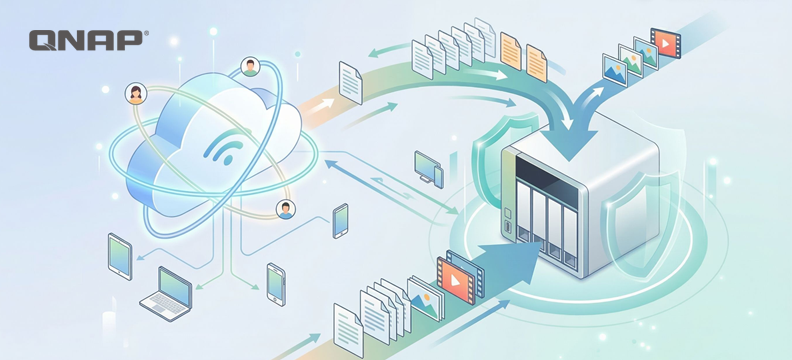
As AI functionalities are deeply integrated into cloud ecosystems, the pricing strategies of public cloud service providers (such as Google Cloud and Microsoft OneDrive) are gradually transforming. Providers tend to bundle Storage Space with AI computing power for sales, resulting in users facing significantly higher ownership costs when pursuing pure storage needs.
Although public clouds offer high convenience, users are often constrained by the stickiness of existing services (such as Gmail), making it difficult to fully migrate. Facing rising subscription costs and data privacy concerns, enterprises and advanced users should reconsider their datastorage architecture. By adopting a “Hybrid Cloud” strategy, combining the advantages of public and private clouds (NAS), a balance can be achieved between convenience, cost-effectiveness, and data security.
The irreplaceable value of public clouds: instant access and collaboration
The value of public cloud is difficult to be completely replaced, with its greatest advantages being “zero maintenance cost” and “instant scalability.” Enterprises and individuals do not need to worry about hardware procurement, power maintenance, or physical infrastructure issues such as server room cooling, and can instantly expand capacity as needed. In addition, the strong native collaborative ecosystem of public cloud, such as Google Workspace’s real-time multi-user editing, cross-device synchronization, and AI-powered intelligent search functions, are strengths that traditional on-premises storage can hardly match alone. For scenarios pursuing lightweight operations or requiring frequent cross-border collaboration, the public cloud is undoubtedly still the first choice.
The lack of upfront payment in the rental model is not a convenience trade-off
However, its advantages are also its blind spots. The business model of public cloud is essentially service rental, which means convenience is built on the foundation of continuous payment of premiums. In terms of efficiency, its architecture design prioritizes wide-area access rather than massive data ingestion and output, so when handling specific types of data, such as large-scale RAW file transfers or system image files restore, it is often limited by network speed and fails to perform as desired.
The latent risks of relying solely on public cloud
When evaluating solutions that rely exclusively on public cloud as the only datastorage option, it is usually necessary to consider the following three core risk aspects:
1. dataPrivacy and compliance risks
Although large public cloud service providers have basic security protection, data privacy and Security are two completely different concepts. Service terms usually grant the platform the right to review user content, and algorithms automatically scan for violations. However, algorithm errors do occur, and if the system mistakenly identifies backups or encrypted files as violations, users may face risks such as account suspension or data being deleted without warning. For users who require continuous operation, this introduces significant uncertainty that cannot be ignored.
2. Storage efficiency and latency
The operation of public clouds relies heavily on international Networking bandwidth. When synchronizing large volumes of high-resolution audio and video materials or massive data libraries, transmission bottlenecks will directly affect work efficiency. In comparison, the transmission bandwidth of local area networks is usually much higher than that of wide-area Networking, better meeting the demands of high-bandwidth operations.
3. Long-term ownership cost (Total Cost of Ownership, TCO)
From an economic perspective, the marginal benefit of Storage Space decreases as the amount of data increases. Storing infrequently accessed “cold data” (such as backups from several years ago) in high-priced, monthly-rent cloud spaces is like paying premium rent for prime real estate to store old items, which does not align with the principle of cost-effectiveness.
Absolute ownership and local efficiency are the advantages of private cloud
Compared to the rental nature of public clouds, private clouds represent asset ownership. Their greatest advantage is that data is stored entirely in the user's controlled physical unit, thoroughly blocking risks such as platform algorithmic deletion or covert privacy snooping. In terms of efficiency, private clouds leverage regional Networking transmission, providing high-speed read/write performance close to local hard disk drives, making them especially suitable for real-time editing and access of large-volume audio and video materials—this is a physical advantage that public clouds, limited by network speed, find hard to match.
In terms of user setup and functional scalability, private clouds are also more flexible, so you don't have to worry about idle accounts wasting resources and costs, or being restricted in specific applications.
Building your own cloud requires overcoming initial barriers and taking on maintenance responsibilities.
However, importing private cloud also comes with certain challenges. First is the initial setup cost, as enterprises need to make a one-time investment in hardware purchase expenses. Although the long-term amortization is reasonable, the entry threshold is relatively high. Next is maintenance, where users must pay attention to hard disk drives health, system updates, and power supply issues. Furthermore, a single physical data point in a private cloud faces various physical risks such as natural or man-made disasters, lacking the inherent advantage of offsite backup found in public clouds.
Because both public and private clouds have their own unavoidable shortcomings, the combination of the two—hybrid cloud—becomes the optimal solution.
Hybrid cloud architecture: Best practices for layered storage
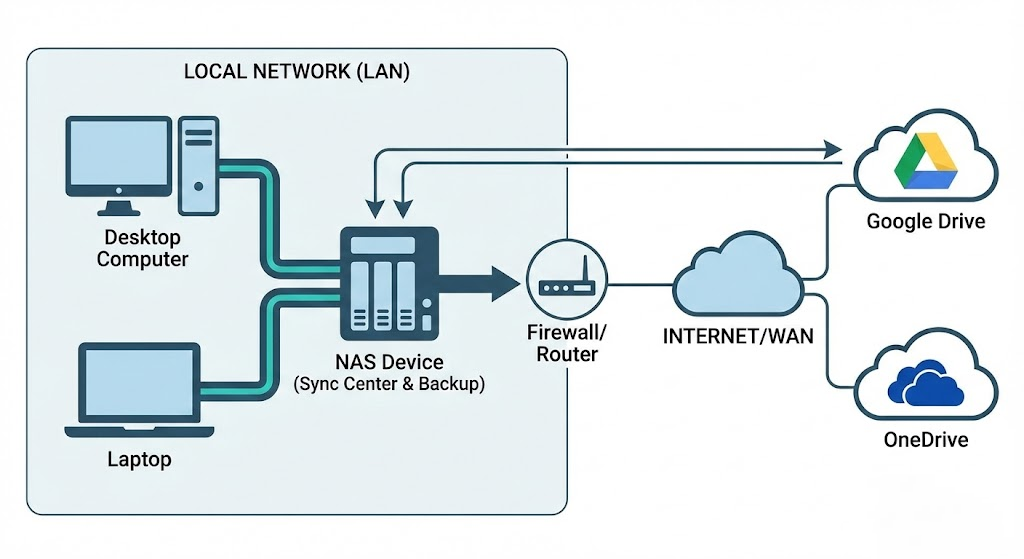
The core logic of hybrid cloud architecture lies in layered management. This architecture does not advocate complete separation from the public cloud, but rather views it as a subset of the overall data strategy, achieving complementary advantages:
- Public cloud: Used for storing projects that require cross-site instant access and high collaboration frequency data, as well as maintaining external service operations.
- Private cloud/NAS: Used for storing large volumes of historical archives, high-capacity Multimedia materials, and as a local backup point for public cloud data.
With this configuration, users only need to pay public cloud fees for the most flexible storage needs, the “hot data,” while content occupying large amounts of space can be migrated to single-unit storage cost-effective and highly reliable NAS hard drives.
Practical deployment and data mobility
In terms of technical implementation, modern NAS systems already provide mature hybrid cloud integration tools (such as QNAP HBS file backup and synchronization center). Their operating logic is as follows:
- Automated two-way synchronization: NAS can be configured to keep specific data folder and Google Drive or OneDrive in real-time sync. When users perform high-speed access operations locally, the changes are automatically reflected to the cloud, and vice versa.
- Channel and Security optimization: In this architecture, NAS takes on most of the data forwarding tasks, and can serve as a storage center within the subnet, reducing external bandwidth consumption and simplifying complex firewall and NAT configurations.
Capacity release strategies for specific services
For services with extremely high stickiness, such as Gmail and Google Photos, you can use standardized agreements to data "offload to the cloud" and free up space:
- Email archiving: Use the POP3 protocol or Google Takeout service to export old emails and migrate them to the mail server or archive file on NAS. This solves the problem of mailbox overload and also allows you to establish an offsite backup of your emails.
- Digital asset management: Photos and video can be batch exported via Google Takeout. After transferring to NAS, you can use AI photo management applications (such as QuMagie) for indexing and management. This allows you to enjoy smart classification experiences similar to cloud photo albums without paying extra subscription fees.
Take control of your digital asset ownership and leverage hybrid cloud as an ideal strategy.
The first step in building a hybrid cloud is to focus on the attribute of data, dividing content that must be uploaded to the cloud and content suitable for local storage. Through hybrid cloud strategies, users can not only avoid the price fluctuation risks of a single cloud service provider, but also ensure that the privacy and control of data remain in their own hands, achieving both cost optimization and comprehensive digital asset protection.
At the same time, eggs should never be placed in the same basket. By deploying a hybrid cloud, an extra layer of protection is added to the backup, and it is also a more efficient way to enhance Productivity.
Da KI-Funktionen tief in Cloud-Ökosysteme integriert sind, wandeln sich die Preisstrategien öffentlicher Cloud-Anbieter (wie Google Cloud und Microsoft OneDrive) allmählich. Anbieter neigen dazu, Speicherplatz mit KI-Rechenleistung zu bündeln und gemeinsam zu verkaufen, was dazu führt, dass Nutzer bei reinem Speicherbedarf mit deutlich höheren Besitzkosten konfrontiert werden.
Obwohl öffentliche Clouds eine hohe Bequemlichkeit bieten, sind Nutzer oft durch die Bindung an bestehende Dienste (wie Gmail) eingeschränkt, was eine vollständige Migration erschwert. Angesichts steigender Abonnementkosten und Bedenken hinsichtlich des Datenschutzes sollten Unternehmen und fortgeschrittene Nutzer ihre Speicherarchitektur überdenken. Durch die Einführung einer „Hybrid Cloud“-Strategie, die die Vorteile öffentlicher und privater Clouds (NAS) kombiniert, lässt sich ein Gleichgewicht zwischen Komfort, Kosteneffizienz und Datensicherheit erreichen.
Der unersetzbare Wert öffentlicher Clouds: Sofortiger Zugriff und Zusammenarbeit
Der Wert öffentlicher Clouds ist schwer vollständig zu ersetzen, wobei ihre größten Vorteile „keine Wartungskosten“ und „sofortige Skalierbarkeit“ sind. Unternehmen und Privatpersonen müssen sich keine Sorgen um Hardwarebeschaffung, Stromversorgung oder physische Infrastrukturprobleme wie Serverraumkühlung machen und können die Kapazität bei Bedarf sofort erweitern. Darüber hinaus ist das starke native Kollaborations-Ökosystem öffentlicher Clouds, wie die Echtzeit-Mehrbenutzerbearbeitung, geräteübergreifende Synchronisierung und KI-gestützte intelligente Suchfunktionen von Google Workspace, ein Vorteil, den traditionelle On-Premises-Speicherlösungen allein kaum bieten können. Für Szenarien, die auf schlanke Abläufe oder häufige standortübergreifende Zusammenarbeit abzielen, ist die Public Cloud nach wie vor die erste Wahl.
Das Fehlen einer Vorauszahlung im Mietmodell ist kein Komfortkompromiss
Ihre Vorteile sind jedoch auch ihre Schwachstellen. Das Geschäftsmodell der Public Cloud ist im Wesentlichen ein Servicemietmodell, das bedeutet, dass der Komfort auf der Grundlage kontinuierlicher Prämienzahlungen beruht. In Bezug auf die Effizienz ist das Architekturdesign auf Weitbereichszugriff und nicht auf massenhafte Datenaufnahme und -ausgabe ausgelegt. Daher ist sie beim Umgang mit bestimmten Datentypen, wie großflächigen RAW-Dateiübertragungen oder Systemabbild-Wiederherstellungen, oft durch die Netzwerkgeschwindigkeit limitiert und kann nicht wie gewünscht performen.
Die latenten Risiken einer ausschließlichen Abhängigkeit von Public Cloud
Bei der Bewertung von Lösungen, die ausschließlich auf Public Cloud als einzige Speicheroption setzen, müssen in der Regel folgende drei Kernrisiken berücksichtigt werden:
1. Datenschutz- und Compliance-Risiken
Obwohl große Public-Cloud-Anbieter grundlegenden Schutz bieten, sind Datenschutz und Sicherheit zwei völlig unterschiedliche Konzepte. Die Nutzungsbedingungen gewähren der Plattform in der Regel das Recht, Nutzerinhalte zu prüfen, und Algorithmen scannen automatisch auf Verstöße. Allerdings können Algorithmen Fehler machen, und wenn das System Backups oder verschlüsselte Dateien fälschlicherweise als Verstoß erkennt, drohen dem Nutzer Risiken wie Kontosperrung oder Datenlöschung ohne Vorwarnung. Für Nutzer, die auf kontinuierlichen Betrieb angewiesen sind, entsteht dadurch eine erhebliche Unsicherheit, die nicht ignoriert werden kann.
2. Speichereffizienz und Latenz
Der Betrieb öffentlicher Clouds ist stark von internationaler Netzwerkbandbreite abhängig. Beim Synchronisieren großer Mengen hochauflösender Audio- und Videodaten oder massiver Datenbanken wirken sich Übertragungsengpässe direkt auf die Arbeitseffizienz aus. Im Vergleich dazu ist die Übertragungsbandbreite von lokalen Netzwerken in der Regel deutlich höher als die von Weitverkehrsnetzen und erfüllt die Anforderungen bandbreitenintensiver Anwendungen besser.
3. Langfristige Besitzkosten (Total Cost of Ownership, TCO)
Aus wirtschaftlicher Sicht sinkt der Grenznutzen von Speicherplatz mit zunehmender Datenmenge. Selten genutzte „kalte Daten“ (wie Backups von vor mehreren Jahren) in teuren, monatlich gemieteten Cloud-Speichern zu lagern, ist wie eine hohe Miete für eine Top-Immobilie zu zahlen, um alte Gegenstände zu lagern – das widerspricht dem Prinzip der Kosteneffizienz.
Absolute Kontrolle und lokale Effizienz sind die Vorteile privater Clouds
Im Vergleich zum Mietmodell der Public Cloud steht die Private Cloud für Eigentum. Ihr größter Vorteil ist, dass die Daten vollständig in der vom Nutzer kontrollierten physischen Einheit gespeichert werden und Risiken wie algorithmische Löschung durch die Plattform oder heimliches Ausspähen der Privatsphäre effektiv ausgeschlossen werden. In puncto Effizienz nutzt die Private Cloud regionale Netzwerkübertragung und bietet eine Lese-/Schreibleistung nahe der lokalen Festplatte – ideal für die Echtzeitbearbeitung und den Zugriff auf große Audio- und Videodateien. Dies ist ein physischer Vorteil, den Public Clouds aufgrund der Netzwerkbeschränkungen kaum erreichen können.
Auch bei der Einrichtung und Funktionsskalierung sind private Clouds flexibler, sodass Sie sich keine Sorgen um ungenutzte Konten und damit verbundene Kosten oder Einschränkungen bei bestimmten Anwendungen machen müssen.
Die eigene Cloud aufzubauen, erfordert das Überwinden von Einstiegshürden und die Übernahme von Wartungsverantwortung
Die Einführung einer Private Cloud bringt jedoch auch Herausforderungen mit sich. Zunächst sind die Anfangsinvestitionen zu nennen, da Unternehmen einmalig in Hardware investieren müssen. Auch wenn sich diese Kosten langfristig amortisieren, ist die Einstiegshürde relativ hoch. Hinzu kommt die Wartung: Nutzer müssen auf den Zustand der Festplatten, Systemupdates und Stromversorgung achten. Zudem ist ein einzelner physischer Speicherpunkt in der Private Cloud verschiedenen Risiken wie Naturkatastrophen oder menschlichem Versagen ausgesetzt und bietet nicht den Vorteil des standortfernen Backups wie die Public Cloud.
Da sowohl Public als auch Private Cloud ihre eigenen, nicht zu vermeidenden Schwächen haben, ist die Kombination beider – die Hybrid Cloud – die optimale Lösung.
Hybrid-Cloud-Architektur: Best Practices für mehrstufige Speicherung
Das Kernprinzip der Hybrid-Cloud-Architektur liegt im Schichtenmanagement. Diese Architektur propagiert keine vollständige Abkehr von der Public Cloud, sondern betrachtet sie als Teilmenge der gesamten Datenstrategie, um komplementäre Vorteile zu erzielen:
- Public Cloud: Für Projekte, die standortübergreifenden Sofortzugriff und hohe Kollaborationsfrequenz erfordern, sowie für den Betrieb externer Dienste.
- Private Cloud/NAS: Für die Speicherung großer Mengen historischer Archive, hochkapazitiver Multimediadateien und als lokaler Backup-Punkt für Public-Cloud-Daten.
Mit dieser Konfiguration zahlen Nutzer nur für die flexibelsten Speicheranforderungen („heiße Daten“) Public-Cloud-Gebühren, während Inhalte mit großem Speicherbedarf auf kostengünstige und zuverlässige NAS-Festplatten migriert werden können.
Praktische Umsetzung und Datenmobilität
Technisch bieten moderne NAS-Systeme bereits ausgereifte Hybrid-Cloud-Integrationswerkzeuge (wie QNAP HBS File Backup und Synchronisationscenter). Die Funktionsweise ist wie folgt:
- Automatisierte bidirektionale Synchronisation: NAS kann so konfiguriert werden, dass bestimmte Datenordner und Google Drive oder OneDrive in Echtzeit synchronisiert werden. Lokale Hochgeschwindigkeitszugriffe werden automatisch in die Cloud gespiegelt und umgekehrt.
- Kanal- und Sicherheitsoptimierung: In dieser Architektur übernimmt das NAS den Großteil der Datenweiterleitung und kann als Speicherzentrum im Subnetz dienen, wodurch externer Bandbreitenverbrauch reduziert und komplexe Firewall- und NAT-Konfigurationen vereinfacht werden.
Kapazitätsfreigabe-Strategien für spezielle Dienste
Für besonders bindende Dienste wie Gmail und Google Fotos können Sie standardisierte Protokolle nutzen, um Daten „in die Cloud auszulagern“ und Speicherplatz freizugeben:
- E-Mail-Archivierung: Exportieren Sie alte E-Mails per POP3-Protokoll oder Google Takeout und migrieren Sie sie auf den Mailserver oder als Archivdatei auf das NAS. So lösen Sie das Problem überfüllter Postfächer und schaffen gleichzeitig ein standortfernes Backup Ihrer E-Mails.
- Digital Asset Management: Fotos und Videos können per Google Takeout im Batch exportiert werden. Nach dem Transfer auf das NAS können Sie KI-basierte Fotoverwaltungs-Apps (wie QuMagie) für Indexierung und Verwaltung nutzen. So genießen Sie smarte Kategorisierung wie in Cloud-Fotoalben, ohne zusätzliche Abogebühren zu zahlen.
Übernehmen Sie die Kontrolle über Ihre digitalen Assets und nutzen Sie Hybrid Cloud als ideale Strategie.
Der erste Schritt beim Aufbau einer Hybrid Cloud ist die Fokussierung auf die Datenattribute, indem Sie Inhalte, die zwingend in die Cloud müssen, und solche, die lokal gespeichert werden können, trennen. Mit Hybrid-Cloud-Strategien vermeiden Nutzer nicht nur Preisschwankungsrisiken eines einzelnen Cloud-Anbieters, sondern stellen auch sicher, dass Privatsphäre und Kontrolle über die Daten in den eigenen Händen bleiben – für Kostenoptimierung und umfassenden Schutz digitaler Assets.
Gleichzeitig sollten Sie nie alle Eier in einen Korb legen. Durch den Einsatz einer Hybrid Cloud erhält Ihr Backup eine zusätzliche Schutzschicht und Sie steigern Ihre Produktivität auf effiziente Weise.


 7 Min. Lesezeit