As AI functionalities are deeply integrated into cloud ecosystems, the pricing strategies of public cloud service providers (such as Google Cloud and Microsoft OneDrive) are gradually transforming. Providers tend to bundle Storage Space with AI computing power for sales, resulting in users facing significantly higher ownership costs when pursuing pure storage needs.
Although public clouds offer high convenience, users are often constrained by the stickiness of existing services (such as Gmail), making it difficult to fully migrate. Facing rising subscription costs and data privacy concerns, enterprises and advanced users should reconsider their datastorage architecture. By adopting a “Hybrid Cloud” strategy, combining the advantages of public and private clouds (NAS), a balance can be achieved between convenience, cost-effectiveness, and data security.
The irreplaceable value of public clouds: instant access and collaboration
The value of public cloud is difficult to be completely replaced, with its greatest advantages being “zero maintenance cost” and “instant scalability.” Enterprises and individuals do not need to worry about hardware procurement, power maintenance, or physical infrastructure issues such as server room cooling, and can instantly expand capacity as needed. In addition, the strong native collaborative ecosystem of public cloud, such as Google Workspace’s real-time multi-user editing, cross-device synchronization, and AI-powered intelligent search functions, are strengths that traditional on-premises storage can hardly match alone. For scenarios pursuing lightweight operations or requiring frequent cross-border collaboration, the public cloud is undoubtedly still the first choice.
The lack of upfront payment in the rental model is not a convenience trade-off
However, its advantages are also its blind spots. The business model of public cloud is essentially service rental, which means convenience is built on the foundation of continuous payment of premiums. In terms of efficiency, its architecture design prioritizes wide-area access rather than massive data ingestion and output, so when handling specific types of data, such as large-scale RAW file transfers or system image files restore, it is often limited by network speed and fails to perform as desired.
The latent risks of relying solely on public cloud
When evaluating solutions that rely exclusively on public cloud as the only datastorage option, it is usually necessary to consider the following three core risk aspects:
1. dataPrivacy and compliance risks
Although large public cloud service providers have basic security protection, data privacy and Security are two completely different concepts. Service terms usually grant the platform the right to review user content, and algorithms automatically scan for violations. However, algorithm errors do occur, and if the system mistakenly identifies backups or encrypted files as violations, users may face risks such as account suspension or data being deleted without warning. For users who require continuous operation, this introduces significant uncertainty that cannot be ignored.
2. Storage efficiency and latency
The operation of public clouds relies heavily on international Networking bandwidth. When synchronizing large volumes of high-resolution audio and video materials or massive data libraries, transmission bottlenecks will directly affect work efficiency. In comparison, the transmission bandwidth of local area networks is usually much higher than that of wide-area Networking, better meeting the demands of high-bandwidth operations.
3. Long-term ownership cost (Total Cost of Ownership, TCO)
From an economic perspective, the marginal benefit of Storage Space decreases as the amount of data increases. Storing infrequently accessed “cold data” (such as backups from several years ago) in high-priced, monthly-rent cloud spaces is like paying premium rent for prime real estate to store old items, which does not align with the principle of cost-effectiveness.
Absolute ownership and local efficiency are the advantages of private cloud
Compared to the rental nature of public clouds, private clouds represent asset ownership. Their greatest advantage is that data is stored entirely in the user's controlled physical unit, thoroughly blocking risks such as platform algorithmic deletion or covert privacy snooping. In terms of efficiency, private clouds leverage regional Networking transmission, providing high-speed read/write performance close to local hard disk drives, making them especially suitable for real-time editing and access of large-volume audio and video materials—this is a physical advantage that public clouds, limited by network speed, find hard to match.
In terms of user setup and functional scalability, private clouds are also more flexible, so you don't have to worry about idle accounts wasting resources and costs, or being restricted in specific applications.
Building your own cloud requires overcoming initial barriers and taking on maintenance responsibilities.
However, importing private cloud also comes with certain challenges. First is the initial setup cost, as enterprises need to make a one-time investment in hardware purchase expenses. Although the long-term amortization is reasonable, the entry threshold is relatively high. Next is maintenance, where users must pay attention to hard disk drives health, system updates, and power supply issues. Furthermore, a single physical data point in a private cloud faces various physical risks such as natural or man-made disasters, lacking the inherent advantage of offsite backup found in public clouds.
Because both public and private clouds have their own unavoidable shortcomings, the combination of the two—hybrid cloud—becomes the optimal solution.
Hybrid cloud architecture: Best practices for layered storage
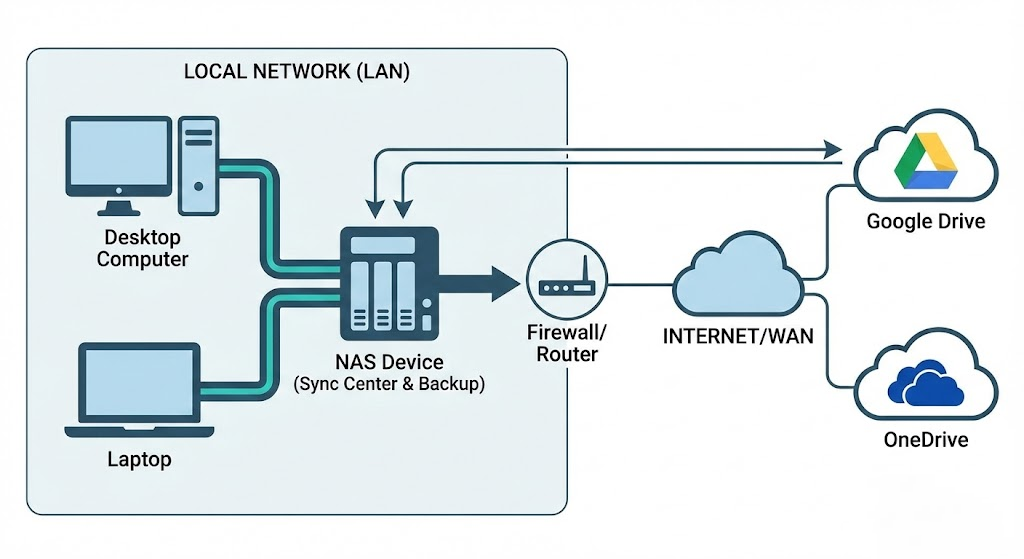
The core logic of hybrid cloud architecture lies in layered management. This architecture does not advocate complete separation from the public cloud, but rather views it as a subset of the overall data strategy, achieving complementary advantages:
- Public cloud: Used for storing projects that require cross-site instant access and high collaboration frequency data, as well as maintaining external service operations.
- Private cloud/NAS: Used for storing large volumes of historical archives, high-capacity Multimedia materials, and as a local backup point for public cloud data.
With this configuration, users only need to pay public cloud fees for the most flexible storage needs, the “hot data,” while content occupying large amounts of space can be migrated to single-unit storage cost-effective and highly reliable NAS hard drives.
Practical deployment and data mobility
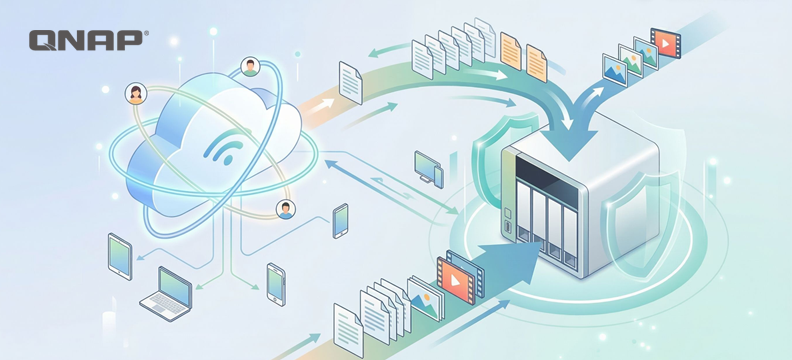
In terms of technical implementation, modern NAS systems already provide mature hybrid cloud integration tools (such as QNAP HBS file backup and synchronization center). Their operating logic is as follows:
- Automated two-way synchronization: NAS can be configured to keep specific data folder and Google Drive or OneDrive in real-time sync. When users perform high-speed access operations locally, the changes are automatically reflected to the cloud, and vice versa.
- Channel and Security optimization: In this architecture, NAS takes on most of the data forwarding tasks, and can serve as a storage center within the subnet, reducing external bandwidth consumption and simplifying complex firewall and NAT configurations.
Capacity release strategies for specific services
For services with extremely high stickiness, such as Gmail and Google Photos, you can use standardized agreements to data "offload to the cloud" and free up space:
- Email archiving: Use the POP3 protocol or Google Takeout service to export old emails and migrate them to the mail server or archive file on NAS. This solves the problem of mailbox overload and also allows you to establish an offsite backup of your emails.
- Digital asset management: Photos and video can be batch exported via Google Takeout. After transferring to NAS, you can use AI photo management applications (such as QuMagie) for indexing and management. This allows you to enjoy smart classification experiences similar to cloud photo albums without paying extra subscription fees.
Take control of your digital asset ownership and leverage hybrid cloud as an ideal strategy.
The first step in building a hybrid cloud is to focus on the attribute of data, dividing content that must be uploaded to the cloud and content suitable for local storage. Through hybrid cloud strategies, users can not only avoid the price fluctuation risks of a single cloud service provider, but also ensure that the privacy and control of data remain in their own hands, achieving both cost optimization and comprehensive digital asset protection.
At the same time, eggs should never be placed in the same basket. By deploying a hybrid cloud, an extra layer of protection is added to the backup, and it is also a more efficient way to enhance Productivity.
Naarmate AI-functionaliteiten diep geïntegreerd raken in cloud-ecosystemen, veranderen de prijsstrategieën van publieke cloudserviceproviders (zoals Google Cloud en Microsoft OneDrive) geleidelijk. Providers bundelen steeds vaker opslagruimte met AI-rekenkracht voor verkoop, waardoor gebruikers aanzienlijk hogere eigendomskosten ervaren wanneer ze puur opslag nodig hebben.
Hoewel publieke clouds veel gemak bieden, worden gebruikers vaak beperkt door de 'stickiness' van bestaande diensten (zoals Gmail), waardoor volledige migratie lastig is. Geconfronteerd met stijgende abonnementskosten en zorgen over dataprivacy, zouden bedrijven en gevorderde gebruikers hun dataopslagarchitectuur opnieuw moeten overwegen. Door een "hybride cloud"-strategie te hanteren, waarbij de voordelen van publieke en private clouds (NAS) worden gecombineerd, kan een balans worden gevonden tussen gemak, kostenefficiëntie en dataveiligheid.
De onvervangbare waarde van publieke clouds: directe toegang en samenwerking
De waarde van de publieke cloud is moeilijk volledig te vervangen, met als grootste voordelen "geen onderhoudskosten" en "directe schaalbaarheid". Bedrijven en individuen hoeven zich geen zorgen te maken over hardwareaankoop, stroomonderhoud of fysieke infrastructuurproblemen zoals serverruimtekoeling, en kunnen de capaciteit direct uitbreiden wanneer nodig. Daarnaast is het sterke, native samenwerkings-ecosysteem van de publieke cloud, zoals Google Workspace's realtime multi-user editing, cross-device synchronisatie en AI-gestuurde intelligente zoekfuncties, een kracht die traditionele on-premises opslag nauwelijks alleen kan evenaren. Voor scenario's die lichte operaties nastreven of frequente internationale samenwerking vereisen, blijft de publieke cloud ongetwijfeld de eerste keuze.
Het ontbreken van vooruitbetaling in het huurmodel is geen concessie aan gemak
Maar de voordelen zijn ook de blinde vlekken. Het bedrijfsmodel van de publieke cloud is in wezen servicehuur, wat betekent dat het gemak is gebaseerd op het continu betalen van premies. Qua efficiëntie geeft het architectuurontwerp prioriteit aan breedtoegankelijke toegang in plaats van massale data-inname en -uitvoer, dus bij het verwerken van specifieke soorten data, zoals grootschalige RAW-bestandsoverdrachten of systeemimage-bestandsherstel, wordt men vaak beperkt door netwerksnelheid en presteert het niet zoals gewenst.
De latente risico's van uitsluitend vertrouwen op publieke cloud
Bij het evalueren van oplossingen die uitsluitend afhankelijk zijn van de publieke cloud als enige dataopslagoptie, moeten doorgaans de volgende drie kernrisico's worden overwogen:
1. dataPrivacy en compliance-risico's
Hoewel grote publieke cloudserviceproviders basale beveiligingsbescherming bieden, zijn dataprivacy en security twee volledig verschillende concepten. De servicevoorwaarden geven het platform meestal het recht om gebruikersinhoud te beoordelen, en algoritmes scannen automatisch op overtredingen. Echter, algoritmefouten komen voor, en als het systeem per ongeluk back-ups of versleutelde bestanden als overtreding aanmerkt, kunnen gebruikers risico lopen zoals accountschorsing of data die zonder waarschuwing wordt verwijderd. Voor gebruikers die continu moeten kunnen werken, introduceert dit aanzienlijke onzekerheid die niet genegeerd mag worden.
2. Opslagefficiëntie en latency
De werking van publieke clouds is sterk afhankelijk van internationale netwerkbandbreedte. Bij het synchroniseren van grote hoeveelheden hoge-resolutie audio- en videomateriaal of massale databibliotheken, zullen transmissiebottlenecks direct de werk-efficiëntie beïnvloeden. Ter vergelijking: de transmissiebandbreedte van lokale netwerken is meestal veel hoger dan die van breedbandnetwerken, waardoor ze beter voldoen aan de eisen van high-bandwidth operaties.
3. Langetermijn eigendomskosten (Total Cost of Ownership, TCO)
Economisch gezien neemt het marginale voordeel van opslagruimte af naarmate de hoeveelheid data toeneemt. Het opslaan van zelden geraadpleegde "koude data" (zoals back-ups van jaren geleden) in dure, maandelijks gehuurde cloudruimtes is als het betalen van een hoge huur voor een toplocatie om oude spullen op te slaan, wat niet strookt met het principe van kostenefficiëntie.
Absolute eigendom en lokale efficiëntie zijn de voordelen van private cloud
In vergelijking met het huurkarakter van publieke clouds, vertegenwoordigen private clouds eigendom van activa. Het grootste voordeel is dat data volledig wordt opgeslagen in de door de gebruiker gecontroleerde fysieke eenheid, waardoor risico's zoals platform-algoritmische verwijdering of heimelijke privacy-inbreuk volledig worden geblokkeerd. Qua efficiëntie maken private clouds gebruik van regionale netwerktransmissie, wat zorgt voor hoge lees-/schrijfsnelheid die dicht bij lokale harde schijven ligt, en ze zijn vooral geschikt voor realtime bewerking en toegang tot grote hoeveelheden audio- en videomateriaal—dit is een fysiek voordeel dat publieke clouds, beperkt door netwerksnelheid, moeilijk kunnen evenaren.
Qua gebruikersinstellingen en functionele schaalbaarheid zijn private clouds ook flexibeler, zodat je je geen zorgen hoeft te maken over inactieve accounts die middelen en kosten verspillen, of beperkingen bij specifieke toepassingen.
Je eigen cloud bouwen vereist het overwinnen van initiële barrières en het nemen van onderhoudsverantwoordelijkheid
Het importeren van private cloud brengt echter ook bepaalde uitdagingen met zich mee. Ten eerste zijn er de initiële opstartkosten, aangezien bedrijven eenmalig moeten investeren in hardwareaankoop. Hoewel de langetermijnafschrijving redelijk is, is de instapdrempel relatief hoog. Vervolgens is er het onderhoud, waarbij gebruikers aandacht moeten besteden aan de gezondheid van harde schijven, systeemupdates en stroomvoorziening. Bovendien loopt een enkel fysiek datapunt in een private cloud diverse fysieke risico's zoals natuurlijke of menselijke rampen, en mist het het inherente voordeel van offsite back-up dat publieke clouds bieden.
Omdat zowel publieke als private clouds hun eigen onvermijdelijke tekortkomingen hebben, wordt de combinatie van beide—hybride cloud—de optimale oplossing.
Hybride cloudarchitectuur: Best practices voor gelaagde opslag
De kernlogica van hybride cloudarchitectuur ligt in gelaagd beheer. Deze architectuur pleit niet voor volledige scheiding van de publieke cloud, maar ziet deze als een subset van de totale datastrategie, waardoor complementaire voordelen worden bereikt:
- Publieke cloud: Gebruikt voor het opslaan van projecten die directe toegang op meerdere locaties en hoge samenwerkingsfrequentie vereisen, evenals het onderhouden van externe serviceactiviteiten.
- Private cloud/NAS: Gebruikt voor het opslaan van grote hoeveelheden historische archieven, hoge capaciteit multimediabestanden, en als lokaal back-uppunt voor publieke clouddata.
Met deze configuratie hoeven gebruikers alleen publieke cloudkosten te betalen voor de meest flexibele opslagbehoeften, de "hot data", terwijl content die veel ruimte inneemt kan worden gemigreerd naar single-unit opslag, kostenefficiënte en zeer betrouwbare NAS-harde schijven.
Praktische implementatie en datamobiliteit
Qua technische uitvoering bieden moderne NAS-systemen al volwassen hybride cloudintegratietools (zoals QNAP HBS-bestandsback-up en synchronisatiecentrum). Hun werkingslogica is als volgt:
- Geautomatiseerde tweerichtingssynchronisatie: NAS kan worden geconfigureerd om specifieke datafolders en Google Drive of OneDrive realtime te synchroniseren. Wanneer gebruikers lokaal snelle toegang uitvoeren, worden de wijzigingen automatisch doorgevoerd naar de cloud, en omgekeerd.
- Kanaal- en beveiligingsoptimalisatie: In deze architectuur neemt NAS het grootste deel van de dataforwarding op zich en kan het dienen als opslagcentrum binnen het subnet, waardoor extern bandbreedteverbruik wordt verminderd en complexe firewall- en NAT-configuraties worden vereenvoudigd.
Capaciteitsvrijgave-strategieën voor specifieke diensten
Voor diensten met extreem hoge stickiness, zoals Gmail en Google Foto's, kun je gestandaardiseerde protocollen gebruiken om data "naar de cloud te offloaden" en ruimte vrij te maken:
- E-mailarchivering: Gebruik het POP3-protocol of de Google Takeout-service om oude e-mails te exporteren en te migreren naar de mailserver of archiefbestand op NAS. Dit lost het probleem van mailbox-overbelasting op en stelt je ook in staat een offsite back-up van je e-mails te maken.
- Digitaal assetbeheer: Foto's en video's kunnen batchgewijs worden geëxporteerd via Google Takeout. Na overdracht naar NAS kun je AI-fotobeheerapplicaties (zoals QuMagie) gebruiken voor indexering en beheer. Zo kun je genieten van slimme classificatie-ervaringen vergelijkbaar met cloud-fotoalbums zonder extra abonnementskosten.
Neem de controle over je digitale eigendom en benut hybride cloud als ideale strategie.
De eerste stap bij het bouwen van een hybride cloud is te focussen op het attribuut van data, door content te verdelen die naar de cloud moet worden geüpload en content die geschikt is voor lokale opslag. Met hybride cloudstrategieën kunnen gebruikers niet alleen de prijsfluctuatierisico's van één enkele cloudserviceprovider vermijden, maar ook ervoor zorgen dat privacy en controle over data in eigen handen blijven, waardoor zowel kostenoptimalisatie als uitgebreide digitale assetbescherming wordt bereikt.
Tegelijkertijd mogen eieren nooit in één mand worden gelegd. Door een hybride cloud te implementeren, wordt een extra beschermingslaag toegevoegd aan de back-up, en het is ook een efficiëntere manier om de productiviteit te verhogen.


 7 min lezen