Applicable Products
- NAS with QTS or QuTS Hero system
- Storage Manager
Root Cause

The Inactive disk status means that your NAS cannot detect the disk in the drive bay. This can happen for several reasons, such as:
- The disk is not fully inserted or properly connected.
- There is a loose connection or hardware issue with the drive bay.
- The disk has failed and is no longer recognized by the system.
When a disk is inactive, it is unavailable for storage pools, volumes, or as a spare. Data redundancy may be affected if the inactive disk is part of a RAID group.
Solution
You can try the following steps to identify and resolve the issue:
- Power off the NAS if you need to remove or reseat the disk to avoid potential data loss. If your NAS supports hot swapping, refer to the user manual.
- Check that the disk is properly and securely inserted in the drive bay.
- If the disk was recently removed, reinsert it and wait for the NAS to detect the disk status.
- Inspect both the disk and the drive bay for any visible damage or connection issues such as bent pins or debris.
- If the disk remains inactive, test it in another slot to determine if the problem is with the disk or the NAS.
- If the disk is confirmed to be faulty, replace it with a new disk as soon as possible to maintain storage integrity and data protection. Follow QNAP guidelines when replacing drives in a RAID group.
Reminder: Always back up important data regularly. Do not attempt to forcibly remove or insert disks while the NAS is running unless your model supports hot swapping.
If you have followed these steps and the disk status remains inactive, or if you are unsure how to proceed, please contact QNAP support for further assistance.
Further Reading
対象製品
- NAS with QTS or QuTS Hero system
- Storage Manager
根本原因
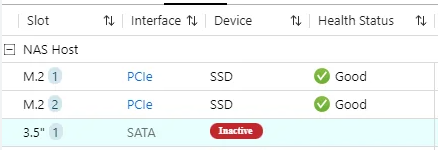
この非アクティブディスクのステータスは、NAS がドライブベイ内のディスクを検出できないことを意味します。これは、以下のような理由で発生する可能性があります:
- ディスクが完全に挿入されていないか、正しく接続されていない。
- ドライブベイに緩い接続やハードウェアの問題がある。
- ディスクが故障し、システムによって認識されなくなった。
ディスクが非アクティブな場合、ストレージプール、ボリューム、またはスペアとして利用できません。非アクティブなディスクが RAID グループの一部である場合、データの冗長性に影響を与える可能性があります。
解決策
問題を特定し解決するために、次の手順を試すことができます:
- ディスクを取り外したり再挿入する必要がある場合は、データ損失を避けるために NAS の電源をオフにしてください。NAS がホットスワップをサポートしている場合は、ユーザーマニュアルを参照してください。
- ディスクがドライブベイに正しくしっかりと挿入されていることを確認してください。
- ディスクが最近取り外された場合は、再挿入して NAS がディスクのステータスを検出するのを待ちます。
- ディスクとドライブベイの両方を目視で確認し、曲がったピンや異物などの損傷や接続の問題がないかを確認してください。
- ディスクが非アクティブのままである場合は、別のスロットでテストして、問題がディスクにあるのか NAS にあるのかを判断してください。
- ディスクが故障していると確認された場合は、ストレージの整合性とデータ保護を維持するために、できるだけ早く新しいディスクに交換してください。RAID グループ内のドライブを交換する際は、QNAP のガイドラインに従ってください。
リマインダー:重要なデータは定期的にバックアップしてください。モデルがホットスワップをサポートしていない限り、NAS が稼働中にディスクを無理に取り外したり挿入したりしないでください。
これらの手順を実行してもディスクのステータスが非アクティブのままである場合、または進め方がわからない場合は、さらなるサポートのためにQNAP サポートにお問い合わせください。
さらに読む