


Why does the disk status show as inactive in my NAS?
Applicable Products
- NAS with QTS or QuTS Hero system
- Storage Manager
Root Cause
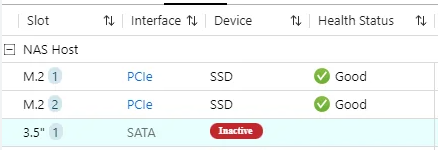
The Inactive disk status means that your NAS cannot detect the disk in the drive bay. This can happen for several reasons, such as:
- The disk is not fully inserted or properly connected.
- There is a loose connection or hardware issue with the drive bay.
- The disk has failed and is no longer recognized by the system.
When a disk is inactive, it is unavailable for storage pools, volumes, or as a spare. Data redundancy may be affected if the inactive disk is part of a RAID group.
Solution
You can try the following steps to identify and resolve the issue:
- Power off the NAS if you need to remove or reseat the disk to avoid potential data loss. If your NAS supports hot swapping, refer to the user manual.
- Check that the disk is properly and securely inserted in the drive bay.
- If the disk was recently removed, reinsert it and wait for the NAS to detect the disk status.
- Inspect both the disk and the drive bay for any visible damage or connection issues such as bent pins or debris.
- If the disk remains inactive, test it in another slot to determine if the problem is with the disk or the NAS.
- If the disk is confirmed to be faulty, replace it with a new disk as soon as possible to maintain storage integrity and data protection. Follow QNAP guidelines when replacing drives in a RAID group.
Reminder: Always back up important data regularly. Do not attempt to forcibly remove or insert disks while the NAS is running unless your model supports hot swapping.
If you have followed these steps and the disk status remains inactive, or if you are unsure how to proceed, please contact QNAP support for further assistance.
Further Reading
Để được hỗ trợ thêm, hãy hỏi những người dùng khác và chuyên gia QNAP trong cộng đồng. Đến Cộng đồng QNAP


