Applicable Products
- NAS with QTS or QuTS Hero system
- Storage Manager
Root Cause

The Inactive disk status means that your NAS cannot detect the disk in the drive bay. This can happen for several reasons, such as:
- The disk is not fully inserted or properly connected.
- There is a loose connection or hardware issue with the drive bay.
- The disk has failed and is no longer recognized by the system.
When a disk is inactive, it is unavailable for storage pools, volumes, or as a spare. Data redundancy may be affected if the inactive disk is part of a RAID group.
Solution
You can try the following steps to identify and resolve the issue:
- Power off the NAS if you need to remove or reseat the disk to avoid potential data loss. If your NAS supports hot swapping, refer to the user manual.
- Check that the disk is properly and securely inserted in the drive bay.
- If the disk was recently removed, reinsert it and wait for the NAS to detect the disk status.
- Inspect both the disk and the drive bay for any visible damage or connection issues such as bent pins or debris.
- If the disk remains inactive, test it in another slot to determine if the problem is with the disk or the NAS.
- If the disk is confirmed to be faulty, replace it with a new disk as soon as possible to maintain storage integrity and data protection. Follow QNAP guidelines when replacing drives in a RAID group.
Reminder: Always back up important data regularly. Do not attempt to forcibly remove or insert disks while the NAS is running unless your model supports hot swapping.
If you have followed these steps and the disk status remains inactive, or if you are unsure how to proceed, please contact QNAP support for further assistance.
Further Reading
적용되는 제품
- NAS with QTS or QuTS Hero system
- Storage Manager
근본 원인
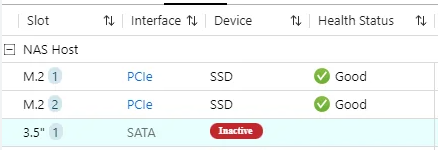
비활성화됨 디스크 상태는 NAS가 드라이브 베이의 디스크를 감지할 수 없음을 의미합니다. 이는 다음과 같은 여러 가지 이유로 발생할 수 있습니다:
- 디스크가 완전히 삽입되지 않았거나 제대로 연결되지 않았습니다.
- 드라이브 베이에 연결이 느슨하거나 하드웨어 문제가 있습니다.
- 디스크가 고장 나서 시스템에서 더 이상 인식되지 않습니다.
디스크가 비활성화되면스토리지풀, 볼륨 또는 예비로 사용할 수 없습니다. 비활성화된 디스크가 RAID 그룹의 일부인 경우 데이터 중복성이 영향을 받을 수 있습니다.
해결책
문제를 식별하고 해결하기 위해 다음 단계를 시도할 수 있습니다:
- 디스크를 제거하거나 다시 삽입해야 하는 경우 잠재적인 데이터 손실을 방지하기 위해 NAS의 전원을 끄십시오. NAS가 핫 스왑을 지원하는 경우 사용자 설명서를 참조하십시오.
- 디스크가 드라이브 베이에 제대로 안전하게 삽입되어 있는지 확인하십시오.
- 디스크가 최근에 제거된 경우 다시 삽입하고 NAS가 디스크 상태를 감지할 때까지 기다리십시오.
- 디스크와 드라이브 베이를 검사하여 휘어진 핀이나 이물질과 같은 눈에 보이는 손상이나 연결 문제를 확인하십시오.
- 디스크가 여전히 비활성화된 경우 다른 슬롯에서 테스트하여 문제가 디스크에 있는지 NAS에 있는지 확인하십시오.
- 디스크가 결함이 있는 것으로 확인되면스토리지무결성과 데이터 보호를 유지하기 위해 가능한 한 빨리 새 디스크로 교체하십시오. RAID 그룹에서 드라이브를 교체할 때 QNAP 지침을 따르십시오.
알림: 중요한 데이터를 정기적으로 백업하십시오. 모델이 핫 스왑을 지원하지 않는 한 NAS가 실행 중일 때 디스크를 강제로 제거하거나 삽입하지 마십시오.
이 단계를 따랐음에도 불구하고 디스크 상태가 여전히 비활성화되어 있거나 진행 방법이 확실하지 않은 경우, 추가 지원을 위해QNAP 지원에 문의하십시오.
추가 읽기