Applicable Products
- All QNAP NAS models that support volume encryption in QTS
Explanation
QTS uses 256-bit AES (Advanced Encryption Standard) to secure all data on encrypted volumes. The encryption password or key file is required each time you want to unlock and access your encrypted data. For security reasons, QNAP does not store your password and cannot retrieve or reset it if lost.
Note: The encryption key file is a backup file that can unlock your encrypted volume if you forget the password. Make sure you store this file safely.
Solution
- If you have forgotten your encryption password but still have the encryption key file:
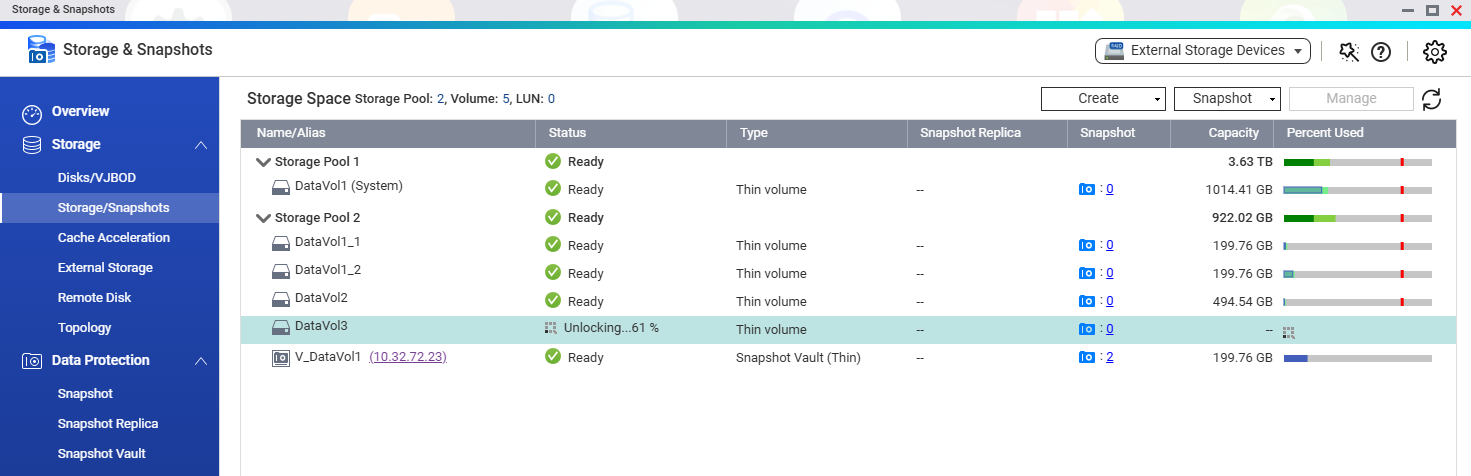
- You can unlock the encrypted volume by uploading the encryption key file in QTS.

- After unlocking the volume, back up your data to another location immediately. You can then delete and re-create the volume if necessary.
- If you have forgotten your password and lost the encryption key file:
- Without the correct password or key file, QNAP cannot recover your encrypted data due to security protection.
- If the encrypted volume is currently unlocked, immediately back up your data to another location. Then you can delete and re-create the volume if necessary.
Reminder: Once a volume is encrypted, it is not possible to remove encryption or reset the password without the original credentials.
Best Practices
- Always save your encryption password and key file in a safe place after configuring an encrypted volume.
- Regularly back up your important data to avoid data loss in case of password loss or hardware failure.
Further Reading
対象製品
- All QNAP NAS models that support volume encryption in QTS
説明
QTS は 256 ビット AES(Advanced Encryption Standard)を使用して暗号化されたボリューム上のすべてのデータを保護します。暗号化されたデータを解除してアクセスするには、毎回暗号化パスワードまたはキー ファイルが必要です。セキュリティ上の理由から、QNAP はパスワードを保存せず、紛失した場合に取得またはリセットすることはできません。
注意:暗号化キー ファイルは、パスワードを忘れた場合に暗号化されたボリュームを解除できるバックアップ ファイルです。このファイルを安全に保管してください。
ソリューション
- 暗号化パスワードを忘れたが、暗号化キー ファイルをまだ持っている場合:
- 暗号化キー ファイルを QTS にアップロードすることで、暗号化されたボリュームを解除できます。

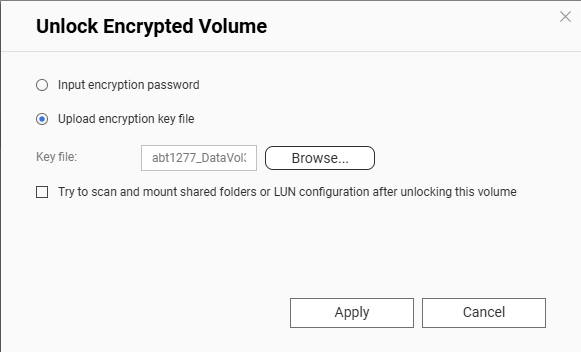
- ボリュームを解除した後、すぐにデータを別の場所にバックアップしてください。必要に応じてボリュームを削除して再作成することができます。
- パスワードを忘れ、暗号化キー ファイルを紛失した場合:
- 正しいパスワードまたはキー ファイルがない場合、セキュリティ保護のために QNAP は暗号化されたデータを復旧できません。
- 暗号化されたボリュームが現在解除されている場合、すぐにデータを別の場所にバックアップしてください。必要に応じてボリュームを削除して再作成することができます。
リマインダー:一度ボリュームが暗号化されると、元の資格情報なしで暗号化を解除したりパスワードをリセットしたりすることはできません。
ベストプラクティス
- 暗号化されたボリュームを設定した後は、暗号化パスワードとキー ファイルを安全な場所に保存してください。
- パスワードの紛失やハードウェアの故障によるデータ損失を避けるために、定期的に重要なデータをバックアップしてください。
さらに読む