Applicable Products
Qsirch 5.6.0 or later versions on all platforms
What is "OpenAI-Compatible"?
Some language-model providers offer APIs that match OpenAI's REST format (same request and response structure). Qsirch can connect to these services by configuring three fields: API endpoint URL, API key, and Model name. Once set, Qsirch's RAG workflow - retrieving content from your selected files and returning answers with source citations - operates the same as with OpenAI.
Recomended services for OpenAI-Compatible
The services listed below are the ones we have validated with Qsirch using the OpenAI-compatible interface. Other providers may also work - refer to each provider's OpenAI-compatible documentation for details.
xAI Grok
Grok provides an OpenAI-compatible REST API that can be used as a drop-in alternative.
- Sign up in the xAI Console: https://console.x.ai/.
- Create an API key in your account.
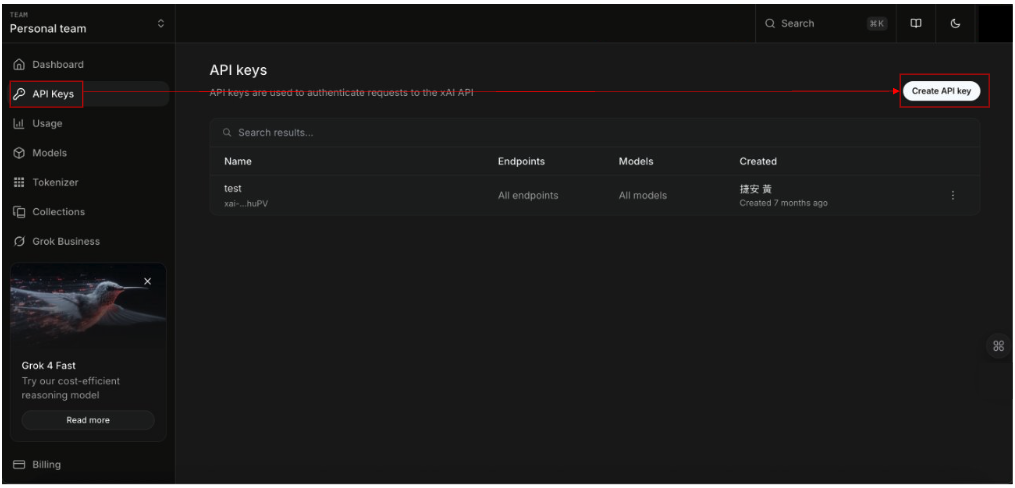
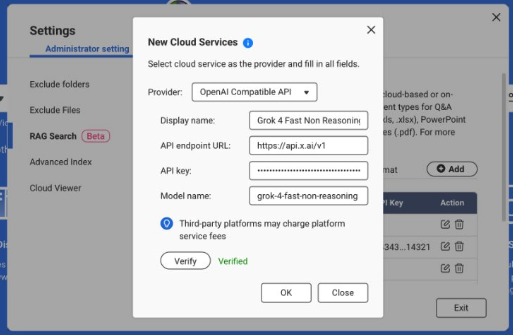
3.Note the API endpoint URL: https://api.x.ai/v1
4.Pick a Model name, e.g., grok-4-fast-non-reasoning
5.In Qsirch → Settings → Administrator setting → RAG Search → Cloud Services → Add, choose OpenAI-Compatible, then enter the API endpoint URL, API key, and Model name.
For more information, see the xAI API Documentation: https://docs.x.ai/docs/api-reference.
DeepSeek
DeepSeek offers OpenAI-style endpoints for chat and reasoning models.
1. Open the DeepSeek API portal: https://platform.deepseek.com/api_keys.
2. Create an API key.
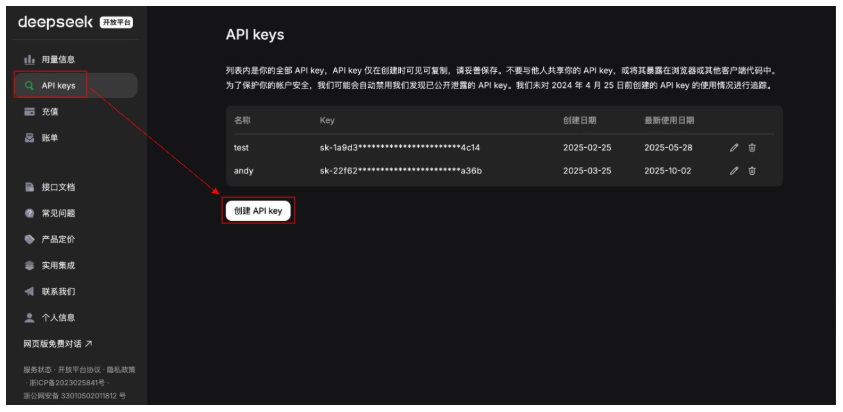
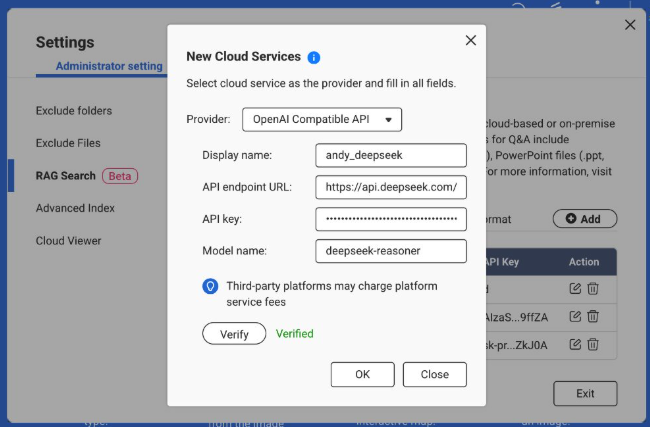
3. Note the API endpoint URL: https://api.deepseek.com (some environments use …/v1).
4. Choose a Model, e.g., deepseek-chat or deepseek-reasoner.
5. In Qsirch → Settings → Administrator setting → RAG Search → Cloud Services → Add, select OpenAI-Compatible and enter the API endpoint URL, API key, and Model name.
For more information, see the DeepSeek API Documentation: https://api-docs.deepseek.com/.
Baidu Qianfan
Qianfan provides ERNIE and other models; some routes emulate OpenAI patterns, but authentication typically uses AK/SK and provider-specific endpoints.
1. Sign in to Baidu AI Cloud and enable Qianfan: https://cloud.baidu.com/doc/qianfan-api/s/3m7of64lb.
2. Create an API key https://cloud.baidu.com/doc/qianfan-api/s/ym9chdsy5.
3. Note the API endpoint URL: https://qianfan.baidubce.com/v2.
4. Choose a Model, e.g., ernie-4.5-turbo-128k . https://cloud.baidu.com/doc/qianfan-docs/s/7m95lyy43.
5. In Qsirch → Settings → Administrator setting → RAG Search → Cloud Services → Add, choose OpenAI-Compatible, then enter the API endpoint URL, API key, and Model name.
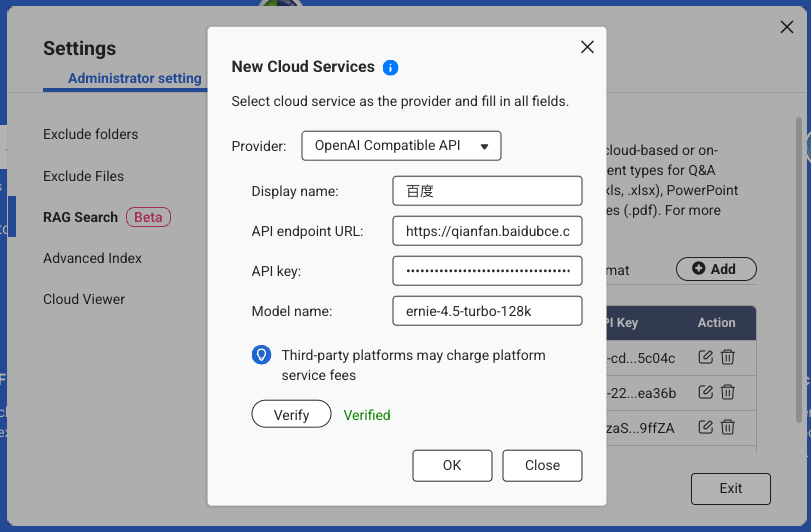
For more information, see the Qianfan Documentation: https://cloud.baidu.com/doc/WENXINWORKSHOP/index.html
Alibaba Cloud
DashScope exposes OpenAI-compatible endpoints for Qwen models and can be used as a drop-in provider.
Sign in to Alibaba Cloud Model Studio (DashScope) and create an API key: https://dashscope.console.aliyun.com/apiKey.
Note the API endpoint (Base URL):
Pick a Model, e.g., qwen-turbo, qwen-plus, or qwen-max. (Availability varies by region/account.)
In Qsirch → Settings → Administrator setting → RAG Search → Cloud Services → Add, choose OpenAI-Compatible, then enter the API endpoint URL, API key, and Model name.
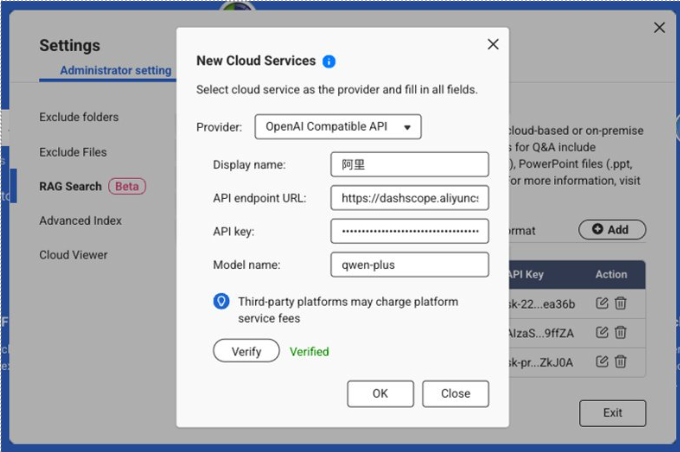
For more information, see Qwen API Documentation: https://bailian.console.aliyun.com/?spm=5176.29597918.J_SEsSjsNv72yRuRFS2VknO.2.40e47b08Xrh14n&tab=api#/api/?type=model&url=2833609
対象製品
すべてのプラットフォームでの Qsirch 5.6.0 以降のバージョン
「OpenAI 互換」とは何ですか?
一部の言語モデルプロバイダーは、OpenAI の RAG ワークフローに一致する API を提供しています - 選択したファイルからコンテンツを取得し、ソース引用付きで回答を返す - OpenAI と同様に動作します。
OpenAI 互換の推奨サービス
以下にリストされているサービスは、OpenAI 互換インターフェースを使用して Qsirch で検証したものです。他のプロバイダーも動作する可能性があります - 各プロバイダーの OpenAI 互換ドキュメントを参照してください。
xAI Grok
Grok は、代替として使用できる OpenAI 互換の REST API を提供します。
- xAI コンソールでサインアップ: https://console.x.ai/。
- アカウントで API キーを作成します。
3.API エンドポイント URL をメモ: https://api.x.ai/v1
4. モデル名を選択します。例: grok-4-fast-non-reasoning
5. Qsirch → 設定 → 管理者設定 → RAG 検索 → クラウドサービス → 追加、選択 OpenAI 互換、次に API エンドポイント URL、API キー、モデル名を入力します。
詳細については、xAI API ドキュメントを参照してください: https://docs.x.ai/docs/api-reference。
DeepSeek
DeepSeek は、チャットおよび推論モデル用の OpenAI スタイルのエンドポイントを提供します。
1. DeepSeek API ポータルを開く: https://platform.deepseek.com/api_keys。
2. API キーを作成します。
3.API エンドポイント URL をメモ: https://api.deepseek.com (一部の環境では…/v1 を使用)。
4. モデルを選択します。例: deepseek-chat または deepseek-reasoner。
5. Qsirch → 設定 → 管理者設定 → RAG Search → クラウドサービス → 追加、選択 OpenAI 互換 そして API エンドポイント URL、API キー、モデル名を入力します。
詳細については、DeepSeek API ドキュメントをご覧ください: https://api-docs.deepseek.com/。
百度 Qianfan
Qianfan は ERNIE やその他のモデルを提供します。一部のルートは OpenAI パターンを模倣しますが、認証は通常 AK/SK とプロバイダー固有のエンドポイントを使用します。
1. Baidu AI Cloud にサインインして Qianfan を有効にします: https://cloud.baidu.com/doc/qianfan-api/s/3m7of64lb。
2. API キーを作成しますhttps://cloud.baidu.com/doc/qianfan-api/s/ym9chdsy5。
3. API エンドポイント URL をメモします: https://qianfan.baidubce.com/v2。
4. モデルを選択します。例: ernie-4.5-turbo-128k 。https://cloud.baidu.com/doc/qianfan-docs/s/7m95lyy43。
5. Qsirch → 設定 → 管理者設定 → RAG Search → クラウドサービス → 追加、選択 OpenAI 互換、次に API エンドポイント URL、API キー、モデル名を入力します。
詳細については、Qianfan ドキュメントを参照してください: https://cloud.baidu.com/doc/WENXINWORKSHOP/index.html
Alibaba Cloud
DashScope は Qwen モデル用の OpenAI 互換エンドポイントを公開しており、ドロップインプロバイダーとして使用できます。
Alibaba Cloud Model Studio (DashScope) にサインインして API キーを作成します: https://dashscope.console.aliyun.com/apiKey.
API エンドポイント (ベース URL) をメモしてください:
モデルを選択します。例: qwen-turbo、qwen-plus、または qwen-max。(地域 / アカウントによって利用可能性が異なります。)
Qsirch → 設定 → 管理者設定 → RAG 検索 → クラウドサービス → 追加、選択OpenAI 互換、次に API エンドポイント URL、API キー、モデル名を入力します。
詳細については、Qwen API ドキュメントを参照してください: https://bailian.console.aliyun.com/?spm=5176.29597918.J_SEsSjsNv72yRuRFS2VknO.2.40e47b08Xrh14n&tab=api#/api/?type=model&url=2833609


