Applicable Products
Qsirch 5.6.0 or later versions on all platforms
What is "OpenAI-Compatible"?
Some language-model providers offer APIs that match OpenAI's REST format (same request and response structure). Qsirch can connect to these services by configuring three fields: API endpoint URL, API key, and Model name. Once set, Qsirch's RAG workflow - retrieving content from your selected files and returning answers with source citations - operates the same as with OpenAI.
Recomended services for OpenAI-Compatible
The services listed below are the ones we have validated with Qsirch using the OpenAI-compatible interface. Other providers may also work - refer to each provider's OpenAI-compatible documentation for details.
xAI Grok
Grok provides an OpenAI-compatible REST API that can be used as a drop-in alternative.
- Sign up in the xAI Console: https://console.x.ai/.
- Create an API key in your account.
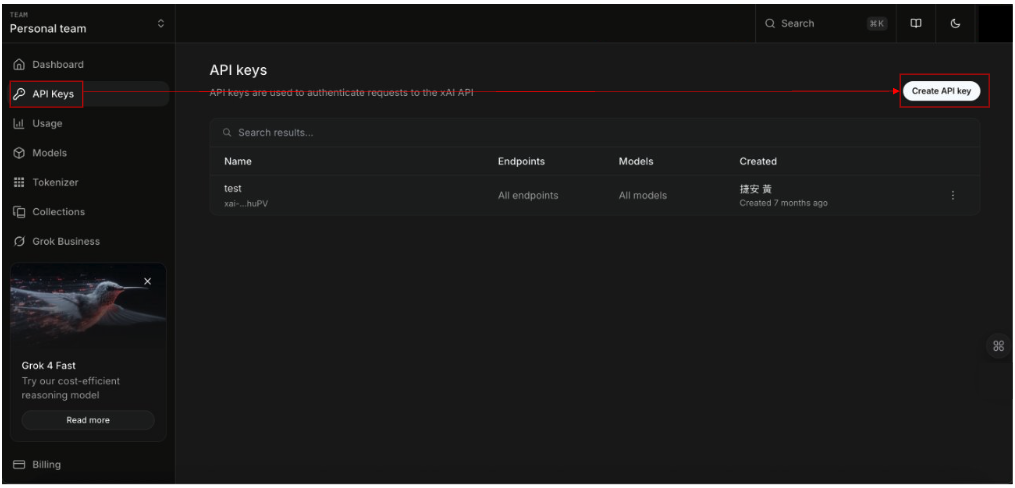
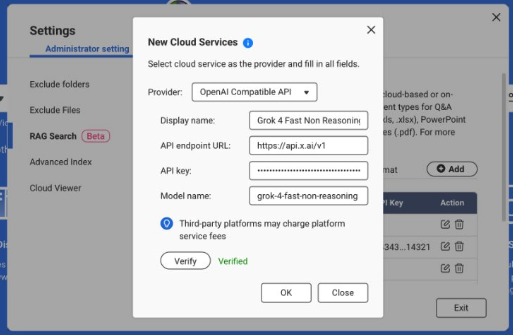
3.Note the API endpoint URL: https://api.x.ai/v1
4.Pick a Model name, e.g., grok-4-fast-non-reasoning
5.In Qsirch → Settings → Administrator setting → RAG Search → Cloud Services → Add, choose OpenAI-Compatible, then enter the API endpoint URL, API key, and Model name.
For more information, see the xAI API Documentation: https://docs.x.ai/docs/api-reference.
DeepSeek
DeepSeek offers OpenAI-style endpoints for chat and reasoning models.
1. Open the DeepSeek API portal: https://platform.deepseek.com/api_keys.
2. Create an API key.
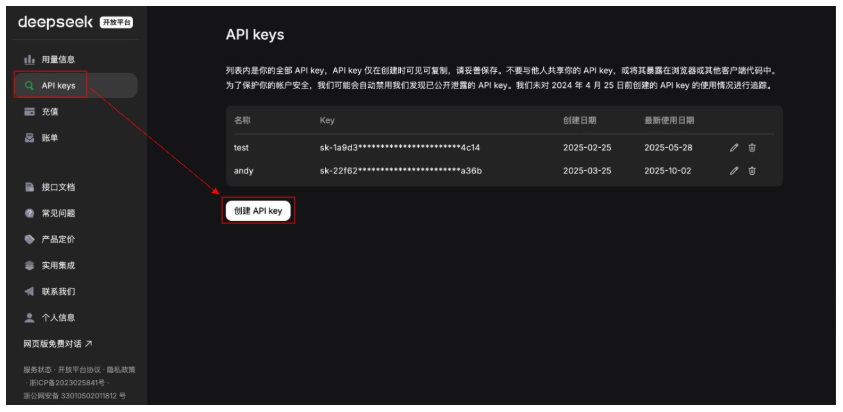
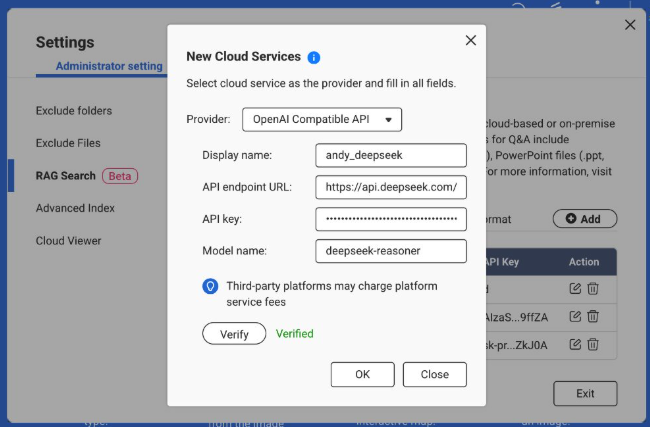
3. Note the API endpoint URL: https://api.deepseek.com (some environments use …/v1).
4. Choose a Model, e.g., deepseek-chat or deepseek-reasoner.
5. In Qsirch → Settings → Administrator setting → RAG Search → Cloud Services → Add, select OpenAI-Compatible and enter the API endpoint URL, API key, and Model name.
For more information, see the DeepSeek API Documentation: https://api-docs.deepseek.com/.
Baidu Qianfan
Qianfan provides ERNIE and other models; some routes emulate OpenAI patterns, but authentication typically uses AK/SK and provider-specific endpoints.
1. Sign in to Baidu AI Cloud and enable Qianfan: https://cloud.baidu.com/doc/qianfan-api/s/3m7of64lb.
2. Create an API key https://cloud.baidu.com/doc/qianfan-api/s/ym9chdsy5.
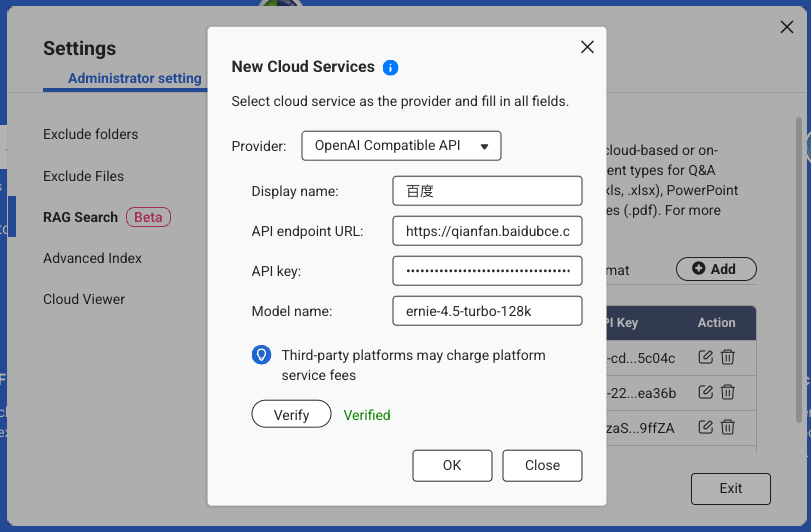
3. Note the API endpoint URL: https://qianfan.baidubce.com/v2.
4. Choose a Model, e.g., ernie-4.5-turbo-128k . https://cloud.baidu.com/doc/qianfan-docs/s/7m95lyy43.
5. In Qsirch → Settings → Administrator setting → RAG Search → Cloud Services → Add, choose OpenAI-Compatible, then enter the API endpoint URL, API key, and Model name.
For more information, see the Qianfan Documentation: https://cloud.baidu.com/doc/WENXINWORKSHOP/index.html
Alibaba Cloud
DashScope exposes OpenAI-compatible endpoints for Qwen models and can be used as a drop-in provider.
Sign in to Alibaba Cloud Model Studio (DashScope) and create an API key: https://dashscope.console.aliyun.com/apiKey.
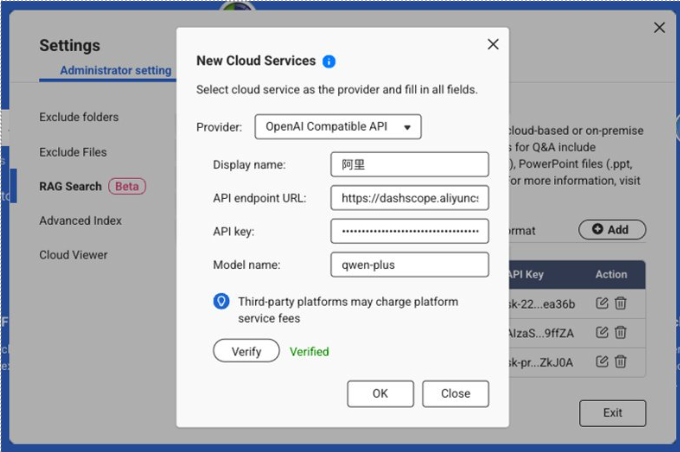
Note the API endpoint (Base URL):
Pick a Model, e.g., qwen-turbo, qwen-plus, or qwen-max. (Availability varies by region/account.)
In Qsirch → Settings → Administrator setting → RAG Search → Cloud Services → Add, choose OpenAI-Compatible, then enter the API endpoint URL, API key, and Model name.
For more information, see Qwen API Documentation: https://bailian.console.aliyun.com/?spm=5176.29597918.J_SEsSjsNv72yRuRFS2VknO.2.40e47b08Xrh14n&tab=api#/api/?type=model&url=2833609
적용되는 제품
모든 플랫폼에서 Qsirch 5.6.0 또는 이후 버전
"OpenAI 호환 가능"이란 무엇인가요?
일부 언어 모델 제공자는 OpenAI의 RAG 워크플로우와 일치하는 API를 제공합니다 - 선택한 파일에서 콘텐츠를 검색하고 출처 인용과 함께 답변을 반환 - OpenAI와 동일하게 작동합니다.
OpenAI 호환 가능 추천 서비스
아래 나열된 서비스는 OpenAI 호환 인터페이스를 사용하여 Qsirch와 함께 검증한 서비스입니다. 다른 공급자도 작동할 수 있으며, 각 공급자의 OpenAI 호환 문서를 참조하십시오.
xAI Grok
Grok은 대체로 사용할 수 있는 OpenAI 호환 REST API를 제공합니다.
- xAI 콘솔에서 가입하세요: https://console.x.ai/.
- 계정에서 API 키를 생성하세요.
3.API 엔드포인트 URL을 기록하세요: https://api.x.ai/v1
4.모델 이름을 선택하세요, 예: grok-4-fast-non-reasoning
5.Qsirch → 설정 → 관리자설정 → RAG 검색 → 클라우드 서비스 → 추가, 선택OpenAI 호환 가능, 그런 다음 API 엔드포인트 URL, API 키 및 모델 이름을 입력하세요.
자세한 내용은 xAI API 문서를 참조하세요: https://docs.x.ai/docs/api-reference.
DeepSeek
DeepSeek은 채팅 및 추론 모델을 위한 OpenAI 스타일의 엔드포인트를 제공합니다.
1. DeepSeek API 포털을 엽니다: https://platform.deepseek.com/api_keys.
2.API 키를 생성하세요.
3.API 엔드포인트 URL을 기록하세요: https://api.deepseek.com (일부 환경에서는 …/v1 사용).
4.모델을 선택하세요, 예: deepseek-chat 또는 deepseek-reasoner.
5.Qsirch → 설정 → 관리자설정 → RAG 검색 → 클라우드 서비스 → 추가, 선택 OpenAI 호환 가능 그리고 API 엔드포인트 URL, API 키, 모델 이름을 입력합니다.
자세한 내용은 DeepSeek API 문서를 참조하십시오: https://api-docs.deepseek.com/.
바이두 Qianfan
Qianfan은 ERNIE 및 기타 모델을 제공합니다. 일부 경로는 OpenAI 패턴을 모방하지만 인증은 일반적으로 AK/SK와 공급자별 엔드포인트를 사용합니다.
1. 바이두 AI 클라우드에 로그인하고 Qianfan을 활성화합니다: https://cloud.baidu.com/doc/qianfan-api/s/3m7of64lb.
2. API 키를 생성합니다https://cloud.baidu.com/doc/qianfan-api/s/ym9chdsy5.
3. API 엔드포인트 URL을 기록합니다: https://qianfan.baidubce.com/v2.
4. 모델을 선택하세요, 예: ernie-4.5-turbo-128k . https://cloud.baidu.com/doc/qianfan-docs/s/7m95lyy43.
5. Qsirch → 설정 → 관리자설정 → RAG 검색 → 클라우드 서비스 → 추가, 선택 OpenAI 호환 가능, 그런 다음 API 엔드포인트 URL, API 키 및 모델 이름을 입력합니다.
자세한 내용은 Qianfan 문서를 참조하십시오: https://cloud.baidu.com/doc/WENXINWORKSHOP/index.html
Alibaba Cloud
DashScope는 Qwen 모델에 대해 OpenAI 호환 가능한 엔드포인트를 제공하며 드롭인 공급자로 사용할 수 있습니다.
Alibaba Cloud Model Studio (DashScope)에 로그인하여 API 키를 생성합니다: https://dashscope.console.aliyun.com/apiKey.
API 엔드포인트(기본 URL)를 기록하십시오:
모델을 선택하십시오, 예를 들어 qwen-turbo, qwen-plus 또는 qwen-max. (지역/계정에 따라 사용 가능 여부가 다릅니다.)
Qsirch → 설정 → 관리자설정 → RAG 검색 → 클라우드 서비스 → 추가, 선택OpenAI 호환 가능, 그런 다음 API 엔드포인트 URL, API 키 및 모델 이름을 입력합니다.
자세한 내용은 Qwen API 문서를 참조하십시오: https://bailian.console.aliyun.com/?spm=5176.29597918.J_SEsSjsNv72yRuRFS2VknO.2.40e47b08Xrh14n&tab=api#/api/?type=model&url=2833609


