


How to set up Qsirch with OpenAI-Compatible APIs
Applicable Products
Qsirch 5.6.0 or later versions on all platforms
What is "OpenAI-Compatible"?
Some language-model providers offer APIs that match OpenAI's REST format (same request and response structure). Qsirch can connect to these services by configuring three fields: API endpoint URL, API key, and Model name. Once set, Qsirch's RAG workflow - retrieving content from your selected files and returning answers with source citations - operates the same as with OpenAI.
Recomended services for OpenAI-Compatible
The services listed below are the ones we have validated with Qsirch using the OpenAI-compatible interface. Other providers may also work - refer to each provider's OpenAI-compatible documentation for details.
xAI Grok
Grok provides an OpenAI-compatible REST API that can be used as a drop-in alternative.
- Sign up in the xAI Console: https://console.x.ai/.
- Create an API key in your account.
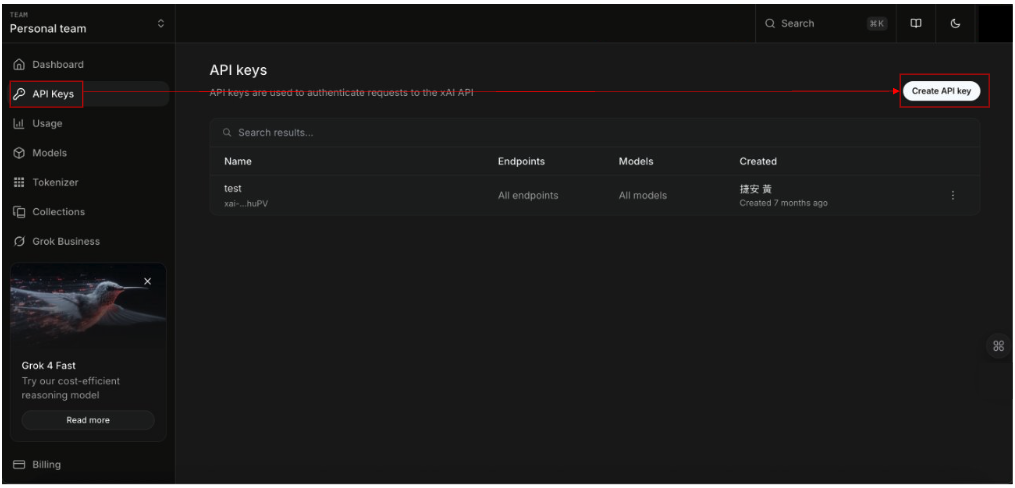
3.Note the API endpoint URL: https://api.x.ai/v1
4.Pick a Model name, e.g., grok-4-fast-non-reasoning
5.In Qsirch → Settings → Administrator setting → RAG Search → Cloud Services → Add, choose OpenAI-Compatible, then enter the API endpoint URL, API key, and Model name.
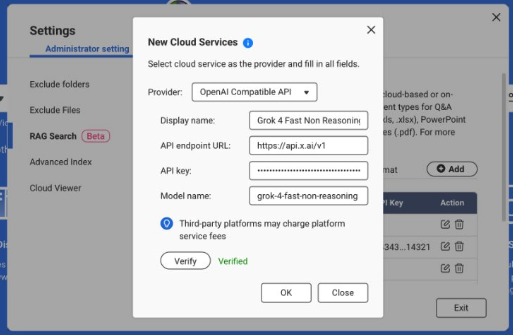
For more information, see the xAI API Documentation: https://docs.x.ai/docs/api-reference.
DeepSeek
DeepSeek offers OpenAI-style endpoints for chat and reasoning models.
1. Open the DeepSeek API portal: https://platform.deepseek.com/api_keys.
2. Create an API key.
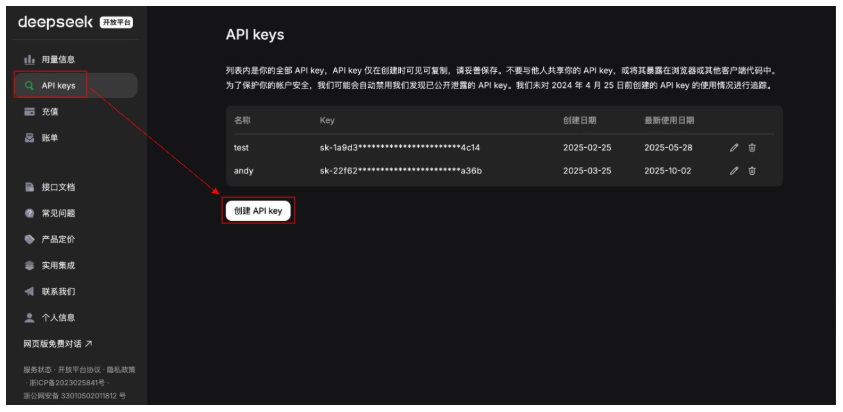
3. Note the API endpoint URL: https://api.deepseek.com (some environments use …/v1).
4. Choose a Model, e.g., deepseek-chat or deepseek-reasoner.
5. In Qsirch → Settings → Administrator setting → RAG Search → Cloud Services → Add, select OpenAI-Compatible and enter the API endpoint URL, API key, and Model name.
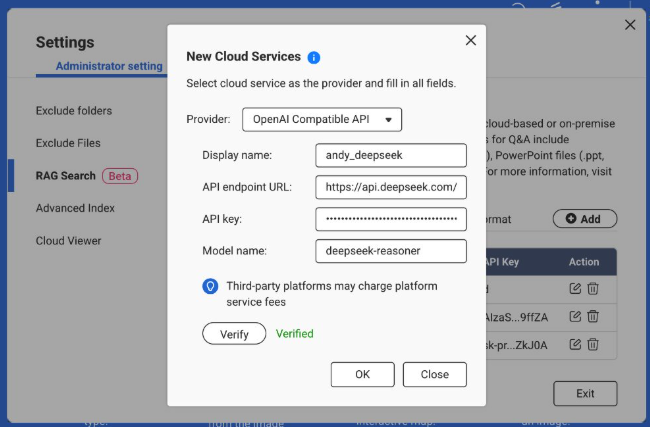
For more information, see the DeepSeek API Documentation: https://api-docs.deepseek.com/.
Baidu Qianfan
Qianfan provides ERNIE and other models; some routes emulate OpenAI patterns, but authentication typically uses AK/SK and provider-specific endpoints.
1. Sign in to Baidu AI Cloud and enable Qianfan: https://cloud.baidu.com/doc/qianfan-api/s/3m7of64lb.
2. Create an API key https://cloud.baidu.com/doc/qianfan-api/s/ym9chdsy5.
3. Note the API endpoint URL: https://qianfan.baidubce.com/v2.
4. Choose a Model, e.g., ernie-4.5-turbo-128k . https://cloud.baidu.com/doc/qianfan-docs/s/7m95lyy43.
5. In Qsirch → Settings → Administrator setting → RAG Search → Cloud Services → Add, choose OpenAI-Compatible, then enter the API endpoint URL, API key, and Model name.
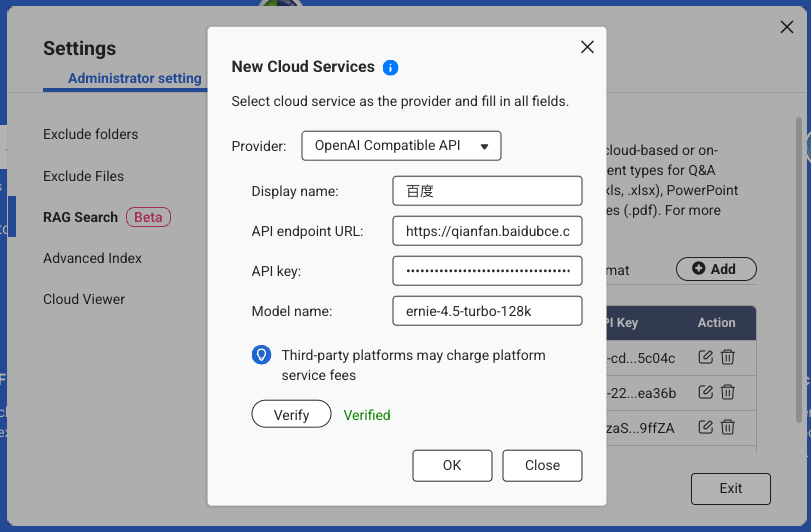
For more information, see the Qianfan Documentation: https://cloud.baidu.com/doc/WENXINWORKSHOP/index.html
Alibaba Cloud
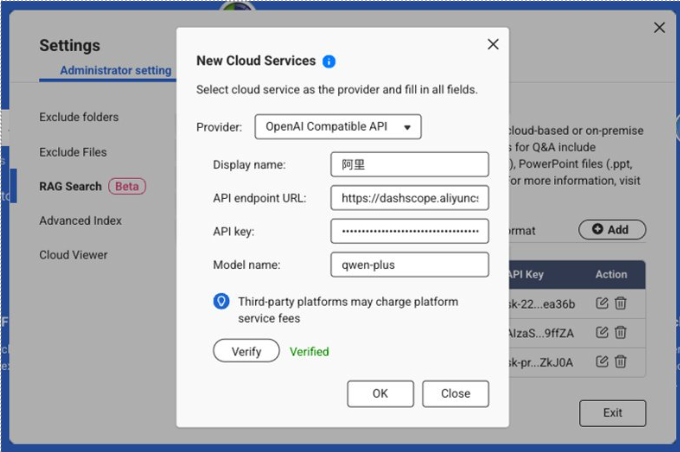
DashScope exposes OpenAI-compatible endpoints for Qwen models and can be used as a drop-in provider.
Sign in to Alibaba Cloud Model Studio (DashScope) and create an API key: https://dashscope.console.aliyun.com/apiKey.
Note the API endpoint (Base URL):
International (Singapore): https://dashscope-intl.aliyuncs.com/compatible-mode/v1
China (Beijing): https://dashscope.aliyuncs.com/compatible-mode/v1
Pick a Model, e.g., qwen-turbo, qwen-plus, or qwen-max. (Availability varies by region/account.)
In Qsirch → Settings → Administrator setting → RAG Search → Cloud Services → Add, choose OpenAI-Compatible, then enter the API endpoint URL, API key, and Model name.
Để được hỗ trợ thêm, hãy hỏi những người dùng khác và chuyên gia QNAP trong cộng đồng. Đến Cộng đồng QNAP


