


What is the difference between QVR Pro/Elite and QVR Surveillance?
QVR Surveillance 3.0 is the upgraded NVR solution for QVR Elite, and will be directly updated from QVR Elite.
In the NAS App Center, the icon will automatically change to “QVR Surveillance,” even if the system hasn’t been updated yet (this is by design in App Center).
Comparison Table
| Feature | QVR Pro | QVR Elite | QVR Surveillance |
|---|---|---|---|
| Free Channels | 8 channels | 2 channels | 8 channels (2 Standard + 6 Bonus) |
| AI Pack / SmartSearch | Paid add-on | Paid add-on | Included for free |
| Licensing Options | Buy-out focus | Subscription focus | Lifetime & Subscription available |
| Central Management | Requires QVR Pro Gold or QVR Center License | Requires QVR Center License | Free QVR Center complete integration |
| Cloud Integration | With HBS or HybridMount | With HBS or HybridMount | Native myQNAPcloud Surveillance support |
Frequently Asked Questions
1. How do I transition from my current version?
- For QVR Elite users: The update to 3.0 is seamless. No data migration is required, and your existing licenses will carry over automatically.
- For QVR Pro users: Version 2.8.x (releasing in 2026) will include a migration tool to transfer your configurations to the new platform. QVR Pro will receive security updates for approximately 3 more years.
- Note for developers: QVR Surveillance uses API that begins with /qvrsurveillance/ while QVR Pro begins with /qvrpro/ and QVR Elite begins with /qvrelite/. Make sure the paths are adjusted accordingly.
2. How do I claim the 6 extra free channels?
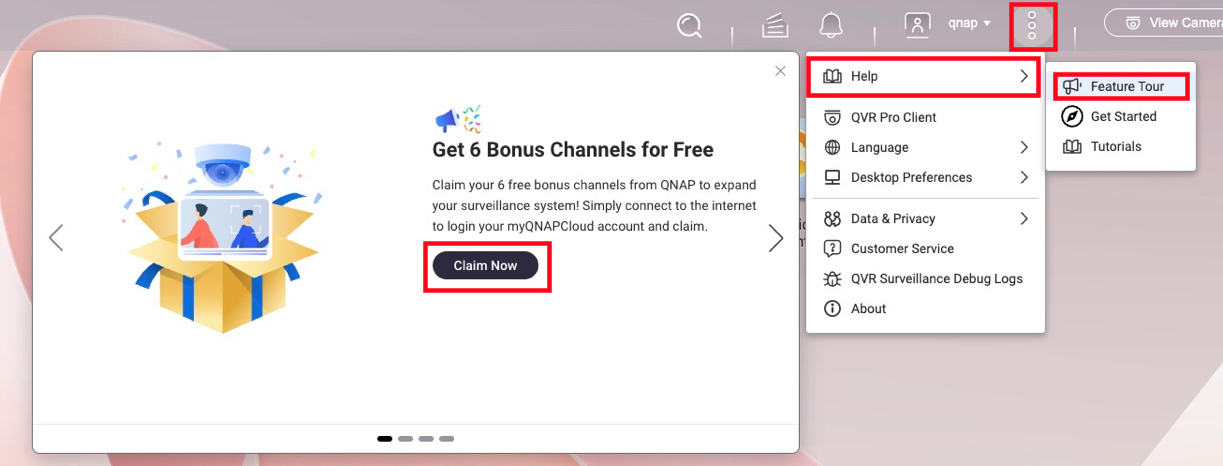
To activate a total of 8 free channels, follow these steps below:
- Ensure your NAS is linked to your QID (QNAP ID).
- Launch QVR Surveillance 3.0 and click Activate on the initial prompt.
- Missed the prompt? Navigate to
...→Help→Feature Tourto trigger it again. - Once activated, you can log out of QID; the channels remain active offline.
3. What happens to my paid licenses?
All existing licenses (Gold, Lifetime from QVR Pro, or Subscription from QVR Elite) are recognized.
Calculation Example:
If you have QVR Pro (built-in 8ch) + [GOLD (+8ch) + 4ch lifetime licenses], you will have: 2 (built-in) + 6 (bonus) + 8 + 4 = 20 channels total in the new version, ensuring no loss of capacity.
4. Are Face and Human Detection free?
Yes. As long as the camera source is managed within QVR Surveillance, you can create analysis tasks without extra licenses.
- Face Detection: Supported on Celeron-based NAS or higher.
- Human Detection: Requires Core i-series (Intel) or higher due to processing demands.
- Requirement: Ensure CAYIN Media Viewer is installed and activated for obtain streams from cameras.
5. How does High Availability (HA) work in QTS 6?
While QTS 6 supports HA for QVR Surveillance 3.0, there is a 50% performance trade-off.
For more information on QTS 6 High Availability's compatibility with QVR Surveillance, see the FAQ page: Can I continue recording via QVR Surveillance before/after creating Cluster in HA Manager?
6. What is "myQNAPcloud Surveillance"?
Launching alongside the update, this is a subscription-based cloud backup service. It allows you to back up specific camera channels to the cloud and access them via a web interface for playback and sharing, independent of your local storage.
For more information on myQNAPcloud Surveillance, see product page; for how to start using myQNAPcloud Surveillance, see the tutorial page How to start uploading recordings to myQNAPcloud Surveillance?
For further assistance, ask other users and QNAP experts in the community. Go to QNAP Community


