QVR Surveillance 3.0 is the upgraded NVR solution for QVR Elite, and will be directly updated from QVR Elite.
In the NAS App Center, the icon will automatically change to “QVR Surveillance,” even if the system hasn’t been updated yet (this is by design in App Center).
Note
If you’re currently using QVR Elite 2.7.1, upgrading to Surveillance 3.0.0 requires no data migration, and all existing licenses remain valid.
Comparison Table
| Feature | QVR Pro | QVR Elite | QVR Surveillance |
|---|
| Free Channels | 8 channels | 2 channels | 8 channels (2 Standard + 6 Bonus) |
| AI Pack / SmartSearch | Paid add-on | Paid add-on | Included for free |
| Licensing Options | Buy-out focus | Subscription focus | Lifetime & Subscription available |
| Central Management | Requires QVR Pro Gold or QVR Center License | Requires QVR Center License | Free QVR Center complete integration |
| Cloud Integration | With HBS or HybridMount | With HBS or HybridMount | Native myQNAPcloud Surveillance support |
Frequently Asked Questions
1. How do I transition from my current version?
- For QVR Elite users: The update to 3.0 is seamless. No data migration is required, and your existing licenses will carry over automatically.
- For QVR Pro users: Version 2.8.x (releasing in 2026) will include a migration tool to transfer your configurations to the new platform. QVR Pro will receive security updates for approximately 3 more years.
- Note for developers: QVR Surveillance uses API that begins with /qvrsurveillance/ while QVR Pro begins with /qvrpro/ and QVR Elite begins with /qvrelite/. Make sure the paths are adjusted accordingly.
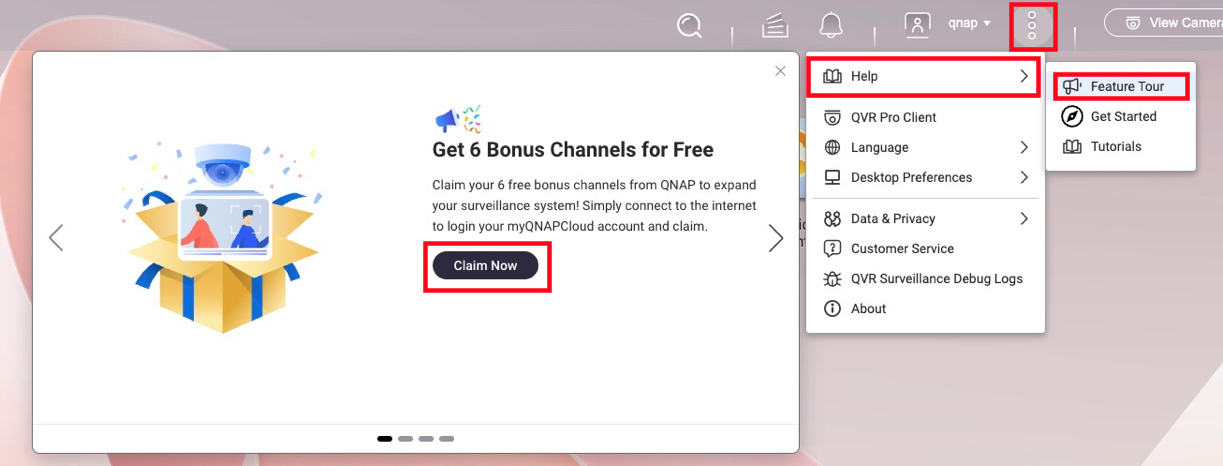
2. How do I claim the 6 extra free channels?
To activate a total of 8 free channels, follow these steps below:
- Ensure your NAS is linked to your QID (QNAP ID).
- Launch QVR Surveillance 3.0 and click Activate on the initial prompt.
- Missed the prompt? Navigate to
... → Help → Feature Tour to trigger it again. - Once activated, you can log out of QID; the channels remain active offline.
3. What happens to my paid licenses?
All existing licenses (Gold, Lifetime from QVR Pro, or Subscription from QVR Elite) are recognized.
Calculation Example:
If you have QVR Pro (built-in 8ch) + [GOLD (+8ch) + 4ch lifetime licenses], you will have: 2 (built-in) + 6 (bonus) + 8 + 4 = 20 channels total in the new version, ensuring no loss of capacity.
4. Are Face and Human Detection free?
Yes. As long as the camera source is managed within QVR Surveillance, you can create analysis tasks without extra licenses.
- Face Detection: Supported on Celeron-based NAS or higher.
- Human Detection: Requires Core i-series (Intel) or higher due to processing demands.
- Requirement: Ensure CAYIN Media Viewer is installed and activated for obtain streams from cameras.
5. How does High Availability (HA) work in QTS 6?
While QTS 6 supports HA for QVR Surveillance 3.0, there is a 50% performance trade-off.
For more information on QTS 6 High Availability's compatibility with QVR Surveillance, see the FAQ page: Can I continue recording via QVR Surveillance before/after creating Cluster in HA Manager?
Note
For surveillance workloads, QVR Center Failover is more efficient than native QTS 6 HA when handling multiple recording NAS servers.
6. What is "myQNAPcloud Surveillance"?
Launching alongside the update, this is a subscription-based cloud backup service. It allows you to back up specific camera channels to the cloud and access them via a web interface for playback and sharing, independent of your local storage.
For more information on myQNAPcloud Surveillance, see product page; for how to start using myQNAPcloud Surveillance, see the tutorial page How to start uploading recordings to myQNAPcloud Surveillance?
QVR Surveillance 3.0 QVR Elite의 업그레이드된 NVR 솔루션이며, 는 QVR Elite에서 직접 업데이트됩니다.
NAS App Center에서는 시스템이 아직 업데이트되지 않았더라도 아이콘이 자동으로 "QVR Surveillance"로 변경됩니다(이는App Center의 설계에 따른 것입니다).
참고
현재 사용 중인 경우 QVR Elite 2.7.1, Surveillance 3.0.0으로 업그레이드하려면 데이터 마이그레이션이 필요 없습니다, 기존의 모든라이선스가 유효합니다.
비교표
| 기능 | QVR Pro | QVR Elite | QVR Surveillance |
|---|
| 무료 채널 | 8채널 | 2채널 | 8채널 (2 표준 + 6 보너스) |
| AI Pack / SmartSearch | 유료 추가 기능 | 유료 추가 기능 | 포함됨 무료 |
| 라이센스 옵션 | 구매 집중 | 구독 집중 | 평생 및 구독 사용 가능 |
| 중앙 관리 | QVR Pro Gold 또는QVR Center 라이선스필요 | QVR Center 라이선스필요 | 무료 QVR Center완전 통합 |
| 클라우드 통합 | HBS 또는HybridMount와 함께 | HBS 또는HybridMount와 함께 | 네이티브 myQNAPcloud Surveillance 지원 |
자주 묻는 질문
1. 현재 버전에서 어떻게 전환합니까?
- QVR Elite사용자에게: 3.0으로의 업데이트는 원활합니다. 데이터 마이그레이션이 필요 없으며, 기존라이선스가 자동으로 유지됩니다.
- QVR Pro 사용자에게: 2026년에 출시될 버전 2.8.x에는 새로운 플랫폼으로 설정을 전송할 수 있는 마이그레이션 도구가 포함됩니다. QVR Pro는 약 3년 더보안 업데이트를 받을 것입니다.
- 개발자 참고: QVR Surveillance는 /qvrsurveillance/로 시작하는 API를 사용하며, QVR Pro는 /qvrpro/로 시작하고QVR Elite는 /qvrelite/로 시작합니다. 경로가 적절히 조정되었는지 확인하십시오.
2. 6개의 추가 무료 채널을 어떻게 신청하나요?
총 8개의 무료 채널을 활성화하려면 아래 단계를 따르십시오:
- NAS가 QID(QNAP ID)에 연결되어 있는지 확인합니다.
- QVR Surveillance 3.0을 실행하고 활성화를 초기 프롬프트에서 클릭합니다.
- 프롬프트를 놓쳤나요? 다음으로 이동합니다
... → 도움말 → 기능 투어를 다시 트리거합니다. - 활성화되면 QID에서 로그아웃할 수 있으며, 채널은 오프라인 상태에서도 활성 상태로 유지됩니다.
3. 유료라이선스는 어떻게 되나요?
모든 기존라이선스(Gold, QVR Pro의 Lifetime 또는QVR Elite의 구독)는 인식됩니다.
계산 예:
QVR Pro(내장8ch) + [GOLD (+8ch) + 4ch lifetime 라이선스]가 있는 경우, 다음을 갖게 됩니다: 2 (내장) + 6 (보너스) + 8 + 4 = 20총 채널새 버전에서 용량 손실 없이.
4. 얼굴 및 사람 감지는 무료인가요?
예. 카메라 소스가 QVR Surveillance 내에서 관리되는 한 추가라이선스없이 분석 작업을 생성할 수 있습니다.
- 얼굴 감지: Celeron 기반 NAS 이상에서 지원됩니다.
- 인간 감지: 처리 요구로 인해 Core i 시리즈(Intel) 이상이 필요합니다.
- 요구 사항: 보장 CAYIN Media Viewer 카메라에서 스트림을 얻기 위해 설치 및 활성화됩니다.
5. QTS 6에서고가용성 (HA)는 어떻게 작동합니까?
QTS 6는 QVR Surveillance 3.0에 대한 HA를 지원하지만, 50% 성능 저하가 있습니다.
QTS 6 고가용성의 QVR Surveillance 호환성에 대한 자세한 내용은 FAQ 페이지를 참조하십시오: HA Manager에서 클러스터를 생성하기 전/후에 QVR Surveillance를 통해 계속 녹화할 수 있습니까?
참고
감시 작업의 경우, QVR Center 장애 조치 여러 녹화 NAS 서버를 처리할 때 기본 QTS 6 HA보다 더 효율적입니다.
6. "myQNAPcloud Surveillance"란 무엇입니까?
업데이트와 함께 출시되는 이 서비스는 구독 기반의 클라우드 백업 서비스입니다. 특정 카메라 채널을 클라우드에 백업하고 웹 인터페이스를 통해 재생 및 공유할 수 있으며, 로컬스토리지와 독립적으로 작동합니다.
myQNAPcloud Surveillance에 대한 자세한 내용은 제품 페이지; myQNAPcloud Surveillance 사용 시작 방법은 튜토리얼 페이지를 참조하십시오 myQNAPcloud Surveillance에 녹화를 업로드하는 방법은?


