QVR Surveillance 3.0 is the upgraded NVR solution for QVR Elite, and will be directly updated from QVR Elite.
In the NAS App Center, the icon will automatically change to “QVR Surveillance,” even if the system hasn’t been updated yet (this is by design in App Center).
Note
If you’re currently using QVR Elite 2.7.1, upgrading to Surveillance 3.0.0 requires no data migration, and all existing licenses remain valid.
Comparison Table
| Feature | QVR Pro | QVR Elite | QVR Surveillance |
|---|
| Free Channels | 8 channels | 2 channels | 8 channels (2 Standard + 6 Bonus) |
| AI Pack / SmartSearch | Paid add-on | Paid add-on | Included for free |
| Licensing Options | Buy-out focus | Subscription focus | Lifetime & Subscription available |
| Central Management | Requires QVR Pro Gold or QVR Center License | Requires QVR Center License | Free QVR Center complete integration |
| Cloud Integration | With HBS or HybridMount | With HBS or HybridMount | Native myQNAPcloud Surveillance support |
Frequently Asked Questions
1. How do I transition from my current version?
- For QVR Elite users: The update to 3.0 is seamless. No data migration is required, and your existing licenses will carry over automatically.
- For QVR Pro users: Version 2.8.x (releasing in 2026) will include a migration tool to transfer your configurations to the new platform. QVR Pro will receive security updates for approximately 3 more years.
- Note for developers: QVR Surveillance uses API that begins with /qvrsurveillance/ while QVR Pro begins with /qvrpro/ and QVR Elite begins with /qvrelite/. Make sure the paths are adjusted accordingly.
2. How do I claim the 6 extra free channels?
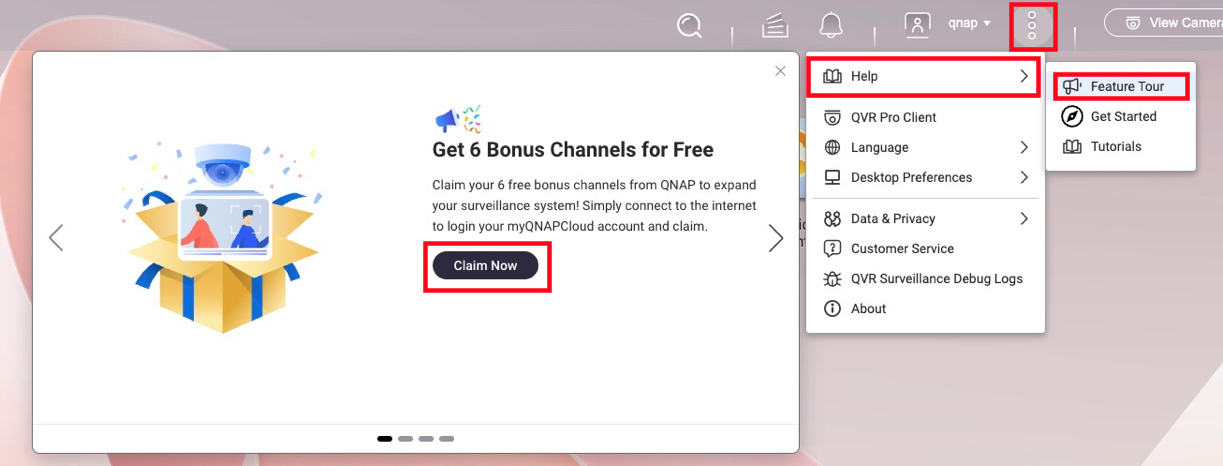
To activate a total of 8 free channels, follow these steps below:
- Ensure your NAS is linked to your QID (QNAP ID).
- Launch QVR Surveillance 3.0 and click Activate on the initial prompt.
- Missed the prompt? Navigate to
... → Help → Feature Tour to trigger it again. - Once activated, you can log out of QID; the channels remain active offline.
3. What happens to my paid licenses?
All existing licenses (Gold, Lifetime from QVR Pro, or Subscription from QVR Elite) are recognized.
Calculation Example:
If you have QVR Pro (built-in 8ch) + [GOLD (+8ch) + 4ch lifetime licenses], you will have: 2 (built-in) + 6 (bonus) + 8 + 4 = 20 channels total in the new version, ensuring no loss of capacity.
4. Are Face and Human Detection free?
Yes. As long as the camera source is managed within QVR Surveillance, you can create analysis tasks without extra licenses.
- Face Detection: Supported on Celeron-based NAS or higher.
- Human Detection: Requires Core i-series (Intel) or higher due to processing demands.
- Requirement: Ensure CAYIN Media Viewer is installed and activated for obtain streams from cameras.
5. How does High Availability (HA) work in QTS 6?
While QTS 6 supports HA for QVR Surveillance 3.0, there is a 50% performance trade-off.
For more information on QTS 6 High Availability's compatibility with QVR Surveillance, see the FAQ page: Can I continue recording via QVR Surveillance before/after creating Cluster in HA Manager?
Note
For surveillance workloads, QVR Center Failover is more efficient than native QTS 6 HA when handling multiple recording NAS servers.
6. What is "myQNAPcloud Surveillance"?
Launching alongside the update, this is a subscription-based cloud backup service. It allows you to back up specific camera channels to the cloud and access them via a web interface for playback and sharing, independent of your local storage.
For more information on myQNAPcloud Surveillance, see product page; for how to start using myQNAPcloud Surveillance, see the tutorial page How to start uploading recordings to myQNAPcloud Surveillance?
QVR Surveillance 3.0 は、QVR Eliteのアップグレードされた NVR ソリューションであり、はQVR Eliteから直接更新されます。
NAS App Center では、システムがまだ更新されていなくてもアイコンが自動的に「QVR Surveillance」に変更されます(これは App Center の設計によるものです)。
注意
現在使用している場合QVR Elite 2.7.1、Surveillance 3.0.0 へのアップグレードにはデータ移行は不要です、既存のライセンスはすべて有効です。
比較表
| 特長 | QVR Pro | QVR Elite | QVR Surveillance |
|---|
| 無料チャンネル | 8 チャンネル | 2 チャンネル | 8 チャンネル(2 標準 + 6 ボーナス) |
| AI パック / スマート検索 | 有料アドオン | 有料アドオン | 無料で含まれています |
| ライセンスオプション | 買い切り重視 | サブスクリプション重視 | ライフタイム & サブスクリプション 利用可能 |
| 中央管理 | QVR Pro Gold または QVR Center ライセンスが必要 | QVR Center ライセンスが必要 | 無料QVR Center 完全統合 |
| クラウド統合 | HBS または HybridMount と共に | HBS または HybridMount と共に | ネイティブmyQNAPcloud Surveillanceサポート |
よくある質問
1. 現在のバージョンからの移行方法は?
- QVR Elite ユーザー向け:3.0 へのアップデートはシームレスです。データ移行は不要で、既存のライセンスは自動的に引き継がれます。
- QVR Pro ユーザー向け:2026 年にリリースされるバージョン 2.8.x には、新しいプラットフォームへの設定を移行するためのツールが含まれます。QVR Pro は約 3 年間セキュリティ更新を受け取ります。
- 開発者向けの注意: QVR Surveillance は /qvrsurveillance/ で始まる API を使用し、QVR Pro は /qvrpro/ で始まり、QVR Elite は /qvrelite/ で始まります。パスが適切に調整されていることを確認してください。
2. 6 つの追加無料チャンネルをどのように請求しますか?
合計 8 つの無料チャンネルをアクティベートするには、以下の手順に従ってください:
- NAS があなたのQID (QNAP ID) にリンクされていることを確認してください。
- QVR Surveillance 3.0 を起動し、アクティベートを初期プロンプトでクリックします。
- プロンプトを見逃しましたか?次に移動します
... → ヘルプ → 機能ツアーで再度トリガーします。 - アクティベート後、QID からログアウトできます。チャンネルはオフラインでもアクティブのままです。
3. 私の有料のライセンスはどうなりますか?
すべての既存のライセンス(Gold、QVR Pro からの Lifetime、または QVR Elite からのサブスクリプション)は認識されます。
計算例:
QVR Pro(内蔵8ch)+ [GOLD (+8ch) + 4ch Lifetime ライセンス ] を持っている場合、新バージョンでは2(内蔵)+ 6(ボーナス)+ 8 + 4 = 20チャンネル合計があり、容量の損失はありません.
4. 顔と人の検出は無料ですか?
はい。カメラソースが QVR Surveillance 内で管理されている限り、追加のライセンスなしで分析タスクを作成できます。
- 顔検出: Celeron ベースの NAS 以上でサポートされています。
- 人検出: 処理要求のため、Core i シリーズ(Intel)以上が必要です。
- 要件: 確保する CAYIN Media Viewer がインストールされ、カメラからストリームを取得するためにアクティブ化されています。
5. QTS 6 で高可用性 (HA) はどのように機能しますか?
QTS 6 は QVR Surveillance 3.0 の HA をサポートしていますが、50% の性能トレードオフがあります。
QTS 6 高可用性の QVR Surveillance との互換性についての詳細は、FAQ ページをご覧ください: HA Manager でクラスターを作成する前後に QVR Surveillance を通じて録画を続けることはできますか?
注意
監視ワークロードの場合、QVR Center フェイルオーバー は、複数の録画 NAS サーバーを処理する際に、ネイティブ QTS 6 HA よりも効率的です。
6. 「myQNAPcloud Surveillance」とは何ですか?
アップデートと同時に開始される、サブスクリプションベースのクラウドバックアップサービスです。特定のカメラチャンネルをクラウドにバックアップし、ウェブインターフェースを通じて再生や共有が可能で、ローカルストレージに依存しません。
myQNAPcloud Surveillance の詳細については、 製品ページ; myQNAPcloud Surveillance の使用開始方法については、チュートリアルページをご覧ください 録画を myQNAPcloud Surveillance にアップロードする方法は?


