


Hvad er standard administrator adgangskoden til mit NAS?
Anvendelige produkter
- QTS
- QuTS hero
Introduktion
Alle NAS-enheder har standard system administrator-kontoen "admin". Denne konto kan konfigurere indstillinger, oprette brugere og installere applikationer. Denne konto kan ikke slettes og afhængigt af din QTS/QuTS hero version kan den være deaktiveret som standard.
Standardadgangskoden for "admin" -kontoen varierer afhængigt af dine QTS/QuTS hero versioner. Tjek venligst dine versioner, før du fortsætter.
Koncepter
Forståelse af NAS-konto & Cloud Key & QNAP ID
- Vi anbefaler at forstå forskellene mellem disse tre koncepter, før du går videre til trin.
- Når du logger ind på din NAS eller en QNAP-tjeneste, skal du dobbelttjekke den kontotype, du bliver bedt om at angive.
NAS-konto: En NAS-konto er en lokal konto på din QNAP NAS, der bruges til at logge ind på denne specifikke enhed. "admin" er NAS-kontoen, der oprettes som standard på hver NAS. For QTS/QuTS hero 5.2.0 og senere er denne konto deaktiveret som standard og aktiveres automatisk igen efter en systemnulstilling. Denne FAQ forklarer, hvordan du gendanner adgangskoden til denne standard "admin" NAS-konto. Hvis du har oprettet en anden administrator konto under enhedsopsætningen, gælder de adgangskoder, der er beskrevet i denne FAQ, ikke for den konto.
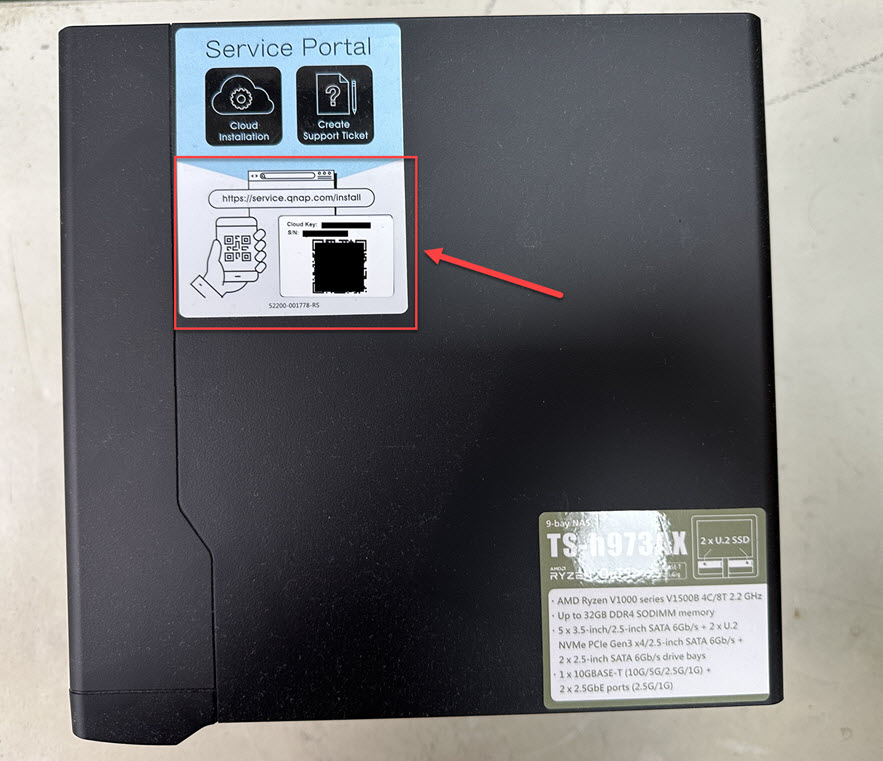
Cloud Key: En Cloud Key er en unik identifikator, der følger med hver QNAP NAS, uanset om du har konfigureret nogen cloud-indstillinger. Du kan normalt finde Cloud Key på et klistermærke på din enhed, i din Quick Installation Guide eller i dine enhedsdetaljer på Qfinder Pro. For QTS/QuTS hero 5.2.0 og senere fungerer denne Cloud Key som standardadgangskoden til "admin" NAS-kontoen. Uden for denne specifikke brug skal du ikke betragte din Cloud Key som et login-legitimationsoplysning.
QNAP ID (QNAP-konto): Et QNAP ID (QNAP-konto) er en konto (typisk din e-mailadresse eller telefonnummer), der bruges til at få adgang til forskellige QNAP-tjenester (såsom myQNAPcloud) og til at administrere din NAS eksternt. Dit QNAP ID og din NAS-konto er separate legitimationsoplysninger med separate adgangskoder.
Detaljer
QTS/QuTS hero 5.2.0 og senere (såsom 5.2.x, 5.3.x, 6.0.0)
- Standardkontoen "admin" er deaktiveret som standard, men vil automatisk blive aktiveret efter en systemnulstilling eller systemgendannelse. For at beskytte dit system mod ondsindede angreb anbefaler vi at oprette en ny administrator-konto og deaktivere standard administrator-kontoen "admin".
- For at overholde EU's krav til cybersikkerhed skal producenter undgå universelle standardoplysninger. De tilsvarende EU-/industristandarder kræver ingen universelle standardadgangskoder, hvilket kræver unikke legitimationsoplysninger pr. enhed eller håndhævelse af en adgangskodeændring ved første brug. Derfor blev standard administrator-adgangskoden fra og med QTS/QuTS hero 5.2.0 ændret til enhedens Cloud Key (tidligere versioner brugte den første NIC's MAC; meget ældre versioner brugte admin/admin), i overensstemmelse med disse krav.
Legitimationsoplysningerne for standard administrator NAS-kontoen:
- Brugernavn: admin
- Adgangskode: Enhedens Cloud Key med store bogstaver og uden specialtegn. For eksempel, hvis Cloud Key er Q1234-5678, er adgangskoden Q12345678
Find din enheds Cloud Key
Du kan finde enhedens Cloud Key med en af følgende metoder:Metode A: Fra enhedens klistermærke eller Quick Installation Guide
Du kan finde din Cloud Key fra klistermærket på din NAS' cover eller fra Quick Installation Guide, der følger med din NAS.
Metode B: Brug Qfinder Pro
- Brug Qfinder Pro uden en NAS-brugerkonto:
- Sluk din NAS.
- Fjern alle harddiske fra din NAS.
- Fjern alle interne M.2 SSD'er og QM2 PCIe-udvidelseskort, hvis der er nogen.
- Tænd for din NAS.
- Download og installer Qfinder Pro.
- Åbn Qfinder Pro.
- Vælg din enhed.
- Klik på Detaljer.
- Enhedens detaljer vinduet vises.
Din enheds Cloud Key vises i Enhedens detaljer vinduet.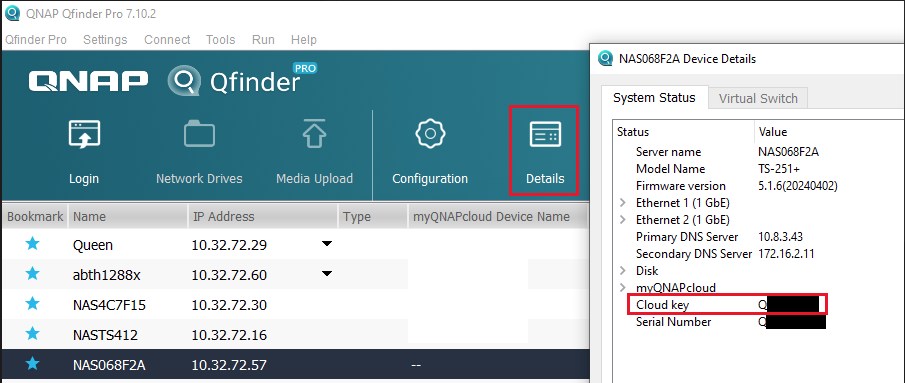
- Brug Qfinder Pro med en NAS-brugerkonto:
- Download og installer Qfinder Pro.
- Åbn Qfinder Pro.
- Vælg din enhed.
- Klik på Detaljer.
Vinduet Login vises. Indtast dit NAS-konto brugernavn og adgangskode, og klik på OK.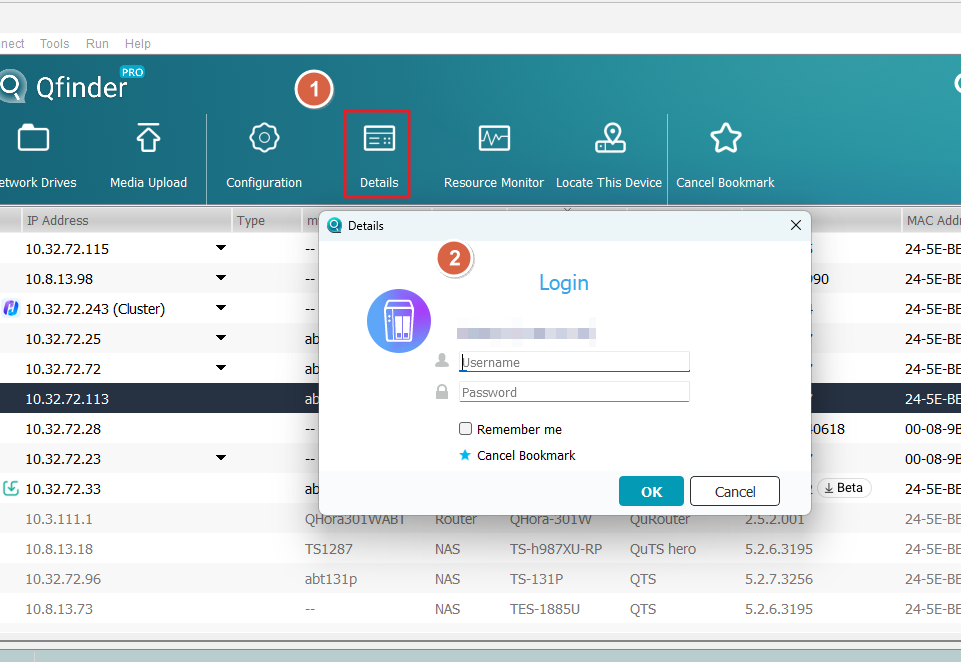
- Enhedsdetaljer vinduet vises.
Din enheds Cloud Key vises i Enhedsdetaljer vinduet.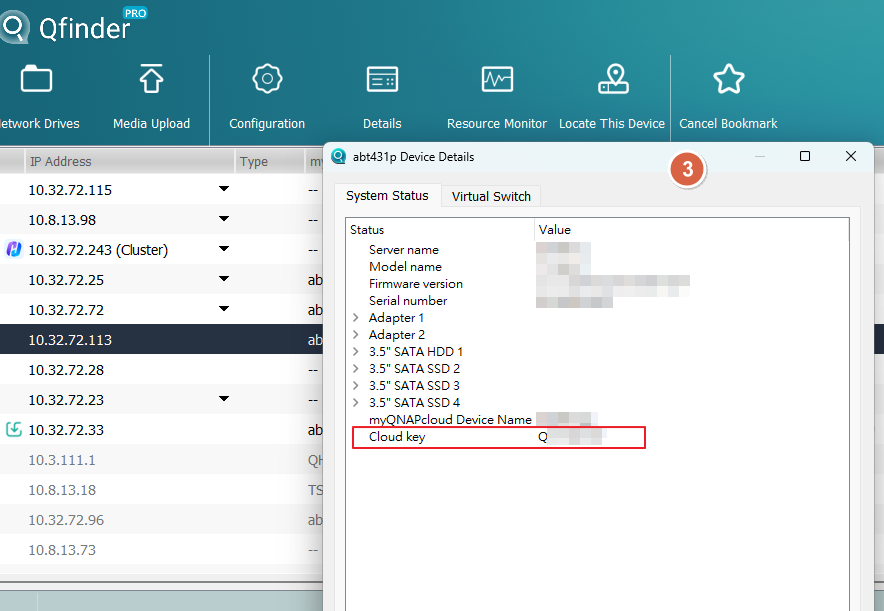
Metode C: Brug myQNAPcloud
- Log ind på myQNAPcloud med din QNAP ID:
- Log ind på myQNAPcloud.
- Gå til Enhedshåndtering.
- Find og klik på din enhed.
- Klik på Enhed Detalje.
Din enheds Cloud Key vises i Enhedsdetalje fanen.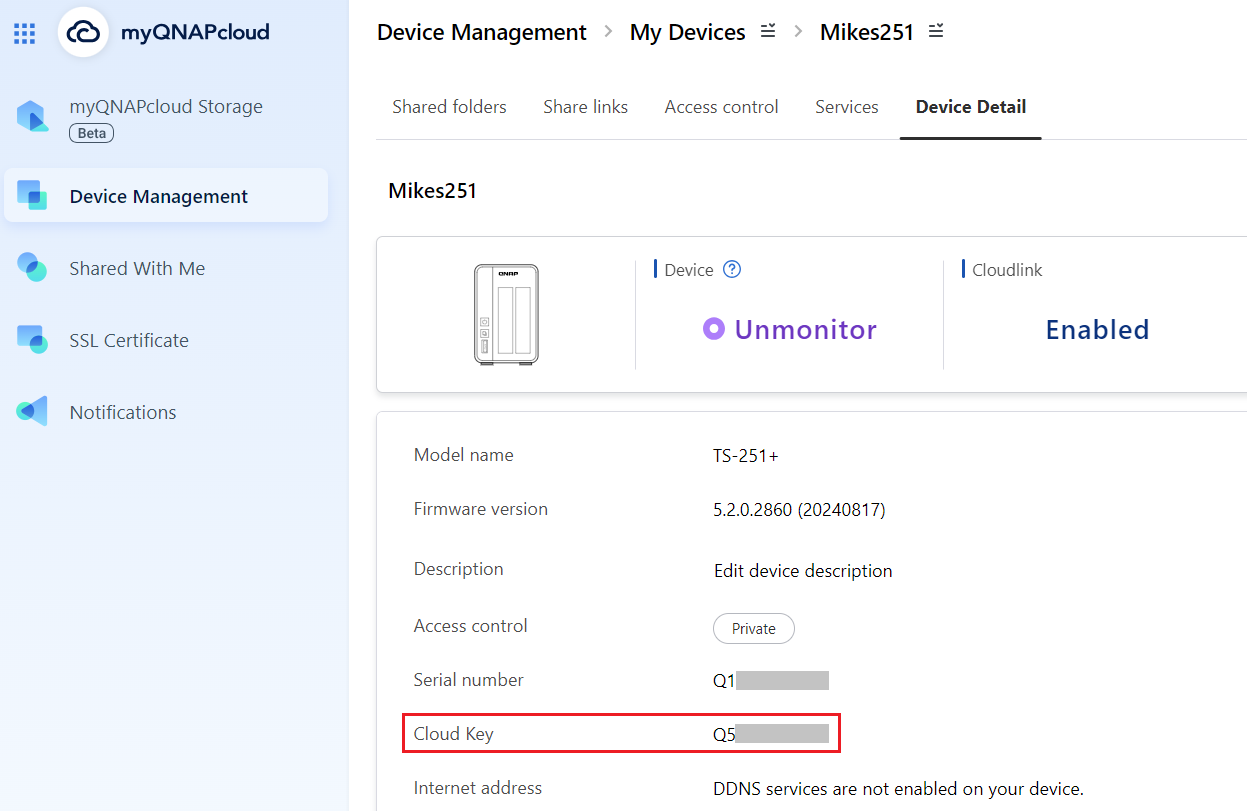
Hvis du ikke kan finde din enheds Cloud Key med ovenstående metoder, bedes du kontakte QNAP kundesupport.
Hvis du manuelt aktiverer "admin"-kontoen i Kontrolpanel, skal du angive en ny adgangskode, der er forskellig fra din enheds Cloud Key. Hvis din Firmware blev opdateret fra version 5.1.x eller tidligere, og du brugte standard "admin"-kontoen med standardadgangskoden, vil du blive bedt om at ændre adgangskoden til noget andet end din enheds Cloud Key.
QTS/QuTS hero 4.4.2 - 5.1.x
Den følgende standard system administrator konto bruges:
- Brugernavn: admin
- Adgangskode: Den første MAC-adresse på NAS'en i store bogstaver og uden specialtegn. For eksempel, hvis MAC-adressen var 00-08-9B-F6-15-75, er adgangskoden 00089BF61575
MAC-adresse klistermærket er fysisk fastgjort på bagsiden af NAS'en. Hvis din NAS har flere NIC'er, skal du bruge MAC-adressen angivet som MAC1: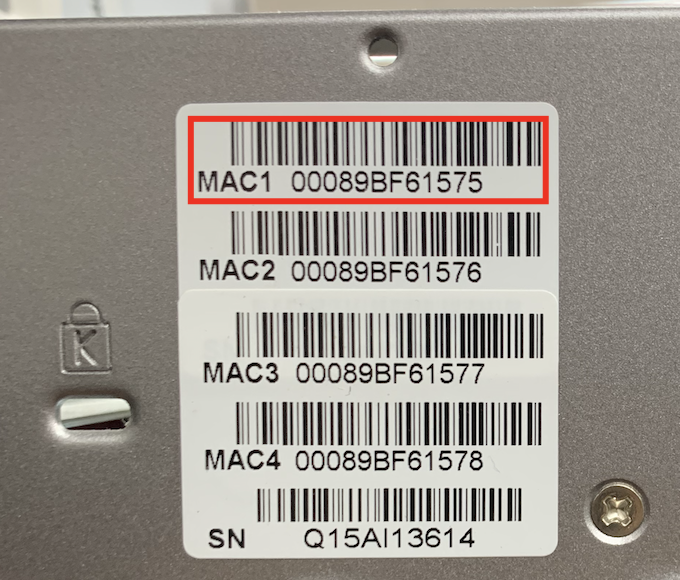
I Qfinder Pro er værdien angivet i MAC-adresse kolonnen: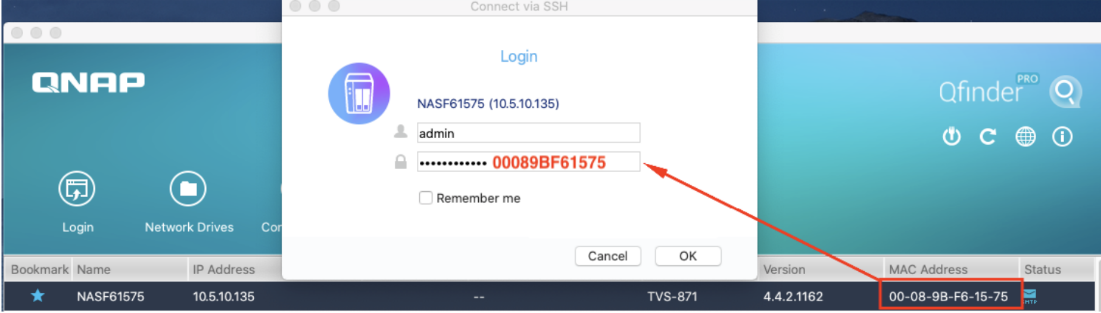
QTS/QuTS hero 4.4.1 - 4.3.6 eller tidligere
Den følgende standard system administrator konto bruges:
- Brugernavn: admin
- Adgangskode: admin
Yderligere læsning
Hvordan nulstiller jeg administrator adgangskoden på min NAS?
Hvordan deaktiverer jeg ''admin'' brugerkontoen?
Er der nogen konsekvenser, hvis jeg deaktiverer standard admin kontoen?
For yderligere hjælp kan du spørge andre brugere og QNAP-eksperter i vores community. Gå til QNAP Community


