QVR Surveillance 3.0 is the upgraded NVR solution for QVR Elite, and will be directly updated from QVR Elite.
In the NAS App Center, the icon will automatically change to “QVR Surveillance,” even if the system hasn’t been updated yet (this is by design in App Center).
Note
If you’re currently using QVR Elite 2.7.1, upgrading to Surveillance 3.0.0 requires no data migration, and all existing licenses remain valid.
Comparison Table
| Feature | QVR Pro | QVR Elite | QVR Surveillance |
|---|
| Free Channels | 8 channels | 2 channels | 8 channels (2 Standard + 6 Bonus) |
| AI Pack / SmartSearch | Paid add-on | Paid add-on | Included for free |
| Licensing Options | Buy-out focus | Subscription focus | Lifetime & Subscription available |
| Central Management | Requires QVR Pro Gold or QVR Center License | Requires QVR Center License | Free QVR Center complete integration |
| Cloud Integration | With HBS or HybridMount | With HBS or HybridMount | Native myQNAPcloud Surveillance support |
Frequently Asked Questions
1. How do I transition from my current version?
- For QVR Elite users: The update to 3.0 is seamless. No data migration is required, and your existing licenses will carry over automatically.
- For QVR Pro users: Version 2.8.x (releasing in 2026) will include a migration tool to transfer your configurations to the new platform. QVR Pro will receive security updates for approximately 3 more years.
- Note for developers: QVR Surveillance uses API that begins with /qvrsurveillance/ while QVR Pro begins with /qvrpro/ and QVR Elite begins with /qvrelite/. Make sure the paths are adjusted accordingly.
2. How do I claim the 6 extra free channels?
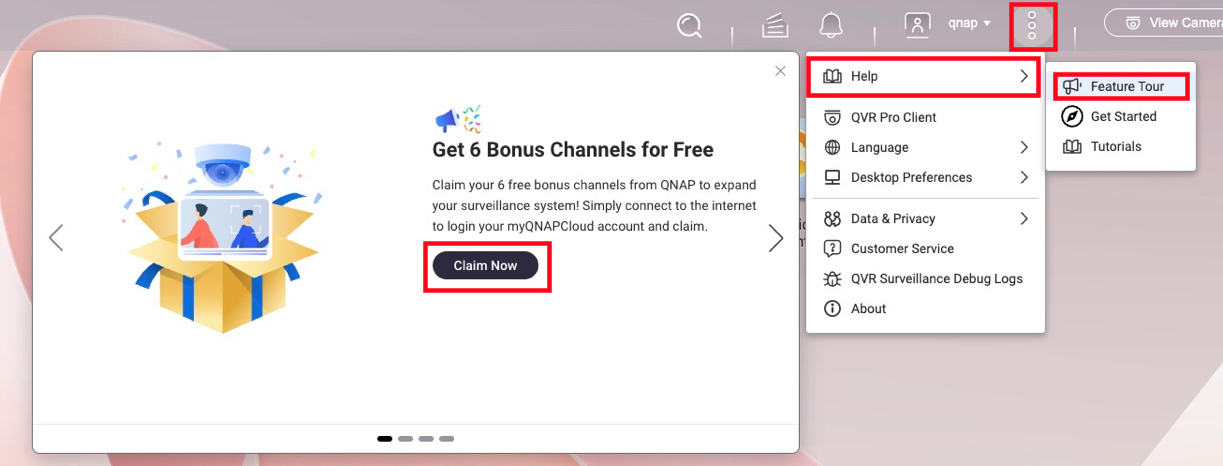
To activate a total of 8 free channels, follow these steps below:
- Ensure your NAS is linked to your QID (QNAP ID).
- Launch QVR Surveillance 3.0 and click Activate on the initial prompt.
- Missed the prompt? Navigate to
... → Help → Feature Tour to trigger it again. - Once activated, you can log out of QID; the channels remain active offline.
3. What happens to my paid licenses?
All existing licenses (Gold, Lifetime from QVR Pro, or Subscription from QVR Elite) are recognized.
Calculation Example:
If you have QVR Pro (built-in 8ch) + [GOLD (+8ch) + 4ch lifetime licenses], you will have: 2 (built-in) + 6 (bonus) + 8 + 4 = 20 channels total in the new version, ensuring no loss of capacity.
4. Are Face and Human Detection free?
Yes. As long as the camera source is managed within QVR Surveillance, you can create analysis tasks without extra licenses.
- Face Detection: Supported on Celeron-based NAS or higher.
- Human Detection: Requires Core i-series (Intel) or higher due to processing demands.
- Requirement: Ensure CAYIN Media Viewer is installed and activated for obtain streams from cameras.
5. How does High Availability (HA) work in QTS 6?
While QTS 6 supports HA for QVR Surveillance 3.0, there is a 50% performance trade-off.
For more information on QTS 6 High Availability's compatibility with QVR Surveillance, see the FAQ page: Can I continue recording via QVR Surveillance before/after creating Cluster in HA Manager?
Note
For surveillance workloads, QVR Center Failover is more efficient than native QTS 6 HA when handling multiple recording NAS servers.
6. What is "myQNAPcloud Surveillance"?
Launching alongside the update, this is a subscription-based cloud backup service. It allows you to back up specific camera channels to the cloud and access them via a web interface for playback and sharing, independent of your local storage.
For more information on myQNAPcloud Surveillance, see product page; for how to start using myQNAPcloud Surveillance, see the tutorial page How to start uploading recordings to myQNAPcloud Surveillance?
QVR Surveillance 3.0 是升級版的QVR Elite NVR 解決方案,並且將直接從 QVR Elite更新。
在 NAS App Center 中,即使系統尚未更新,圖示也會自動變更為「QVR Surveillance」(這是 App Center 的設計)。
註
如果您目前正在使用 QVR Elite 2.7.1,升級到 Surveillance 3.0.0 不需要 資料遷移,所有現有的授權仍然有效。
比較表
| 功能 | QVR Pro | QVR Elite | QVR Surveillance |
|---|
| 免費頻道 | 8 個頻道 | 2 個頻道 | 8 個頻道 (2 標準 + 6 額外) |
| AI 套件 / SmartSearch | 付費附加 | 付費附加 | 包含於 免費 |
| 授權選項 | 買斷為主 | 訂閱為主 | 終身 & 訂閱 可用 |
| 集中管理 | 需要 QVR Pro Gold 或 QVR Center 授權 | 需要 QVR Center 授權 | 免費 QVR Center 完整整合 |
| 雲端整合 | 使用 HBS 或 HybridMount | 使用 HBS 或 HybridMount | 原生 myQNAPcloud Surveillance 支援 |
常見問題
1. 如何從目前版本過渡?
- 對 QVR Elite 使用者: 更新到 3.0 是無縫的。不需要資料遷移,您現有的授權將自動保留。
- 對 QVR Pro 使用者: 版本 2.8.x(將於 2026 年發布)將包含一個遷移工具,以將您的配置轉移到新平台。QVR Pro 將在大約 3 年內收到安全更新。
- 開發者注意:QVR Surveillance 使用以 /qvrsurveillance/ 開頭的 API,而 QVR Pro 使用以 /qvrpro/ 開頭的 API,QVR Elite 則以 /qvrelite/ 開頭。請確保路徑已相應調整。
2. 如何申請額外的 6 個免費頻道?
要啟用共 8 個免費頻道,請依照以下步驟操作:
- 確保您的 NAS 已連結至您的 QID (QNAP ID)。
- 啟動 QVR Surveillance 3.0 並點選 啟用 在初始提示上。
- 錯過提示? 瀏覽至
... → 說明 → 功能導覽 以再次觸發。 - 啟用後,您可以登出 QID;頻道在離線時仍保持啟用。
3. 我的付費授權會怎麼樣?
所有現有的授權 (Gold、QVR Pro 的終身版或 QVR Elite 的訂閱版) 都會被認可。
計算範例:
如果您有 QVR Pro ( 內建8頻道 ) + [GOLD (+8頻道 ) + 4頻道終身授權 ],您將擁有:2 (內建) + 6 (額外) + 8 + 4 = 20總頻道在新版本中,確保容量不減。
4. 人臉和人體偵測是免費的嗎?
是的。只要攝影機來源在 QVR Surveillance 中管理,您就可以創建分析任務而無需額外的授權。
- 人臉偵測: 支援 Celeron 等級或更高的 NAS。
- 人形偵測: 由於處理需求,需要 Core i 系列 (Intel) 或更高。
- 需求: 確保 CAYIN Media Viewer 已安裝並啟用以從攝影機獲取串流。
5. 高可用性 (HA) 在 QTS 6 中如何運作?
雖然 QTS 6 支援 QVR Surveillance 3.0 的 HA,但有 50% 的效能折衷。
如需 QTS 6 高可用性與 QVR Surveillance 相容性的更多資訊,請參見 FAQ 頁面:在 HA Manager 中建立叢集之前 / 之後,我可以繼續透過 QVR Surveillance 錄影嗎?
註
對於監控工作負載,QVR Center 容錯移轉 在處理多臺錄影 NAS 伺服器時,比原生 QTS 6 HA 更有效率。
6. 什麼是「myQNAPcloud Surveillance」?
隨著更新推出,這是一項訂閱制的雲端備份服務。它允許您備份特定攝影機頻道至雲端,並透過網頁介面進行播放和分享,獨立於您的本地儲存空間。
如需 myQNAPcloud Surveillance 的更多資訊,請參見 產品頁面;如需如何開始使用 myQNAPcloud Surveillance,請參見教學頁面 如何開始將錄影上傳至 myQNAPcloud Surveillance?


