Applicable Products
Software
- QuWAN Orchestrator 2.9 and later versions
- QVPN Service 3.3 and later
Hardware
Overview
QuWAN Express allows a QNAP NAS to join the QuWAN network quickly with minimal configuration. It provides secure connectivity for remote access and inter-device communication without requiring manual port forwarding or complicated VPN setup.
When a QNAP router (hub) is available, the NAS automatically establishes an IPSec tunnel with the hub to support secure, high-performance data transfer within the organization.
If a hub is not deployed, you can use the Super Node service. Super Node is a cloud gateway that provides an IPSec tunnel for the NAS, assigns a public IP and port for secure external access, and enables NAS-to-NAS communication inside the QuWAN virtual network.
Note
- Super Node is designed for environments without a QuWAN hub router and supports up to three edge NAS devices for remote access. If additional devices need to connect, you can update the allowed NAS list in the QuWAN Orchestrator cloud platform.
- The service includes a monthly free data transmission limit of 15 GB. After this limit is reached, transmission speed is reduced, and you can upgrade your license plan in the QNAP Software Store if more capacity is needed.
Key features
- QuWAN Express allows you to join the QuWAN network with a single click in QVPN Service, and the system automatically handles network configuration on your behalf.
- It enables secure remote access to NAS data from any location by routing traffic through the QuWAN overlay network.
- The Super Node service provides cloud-based connectivity that ensures reliable external access and seamless communication between NAS devices, even when a hub router is unavailable.
- The service assigns a virtual IP address to the NAS so it can communicate with other QuWAN devices without exposing internal network details.
Prerequisites
- Update the NAS firmware and QVPN Service to the versions listed in Applicable Products.
- Ensure the NAS has an active internet connection.
- Disable the L2TP/IPSec server on the NAS before enabling QuWAN Express.
- Sign in to the NAS with a QNAP ID so it can register with QuWAN Orchestrator.
- Make sure the hub router you plan to use supports QuWAN configuration and is registered to the same QuWAN organization that you will select when configuring the QuWAN Express settings.
Procedure
This section describes how to configure access QuWAN Express on QVPN Service, configure device information, and register the NAS as an edge device in QuWAN Orchestrator.
Configure QuWAN Express on your QNAP NAS
- Log in to your NAS as an administrator.
- Open QVPN Service.
- Go to QuWAN > QuWAN Express.
- Click Join.
- Click Start to run prerequisite checks.
QVPN Service verifies the following:- The NAS must have an active internet connection for the check to pass.
- The check confirms whether the L2TP/IPSec server is disabled because it must be turned off before you continue.
- The check verifies that the NAS is signed in with a QNAP ID and prompts you to log in when necessary.
When all prerequisite checks complete successfully, QVPN Service displays the Device Information. - Optional: Configure the QuWAN organization and region settings.
- Click
 .
.
The Edit Device Information window appears.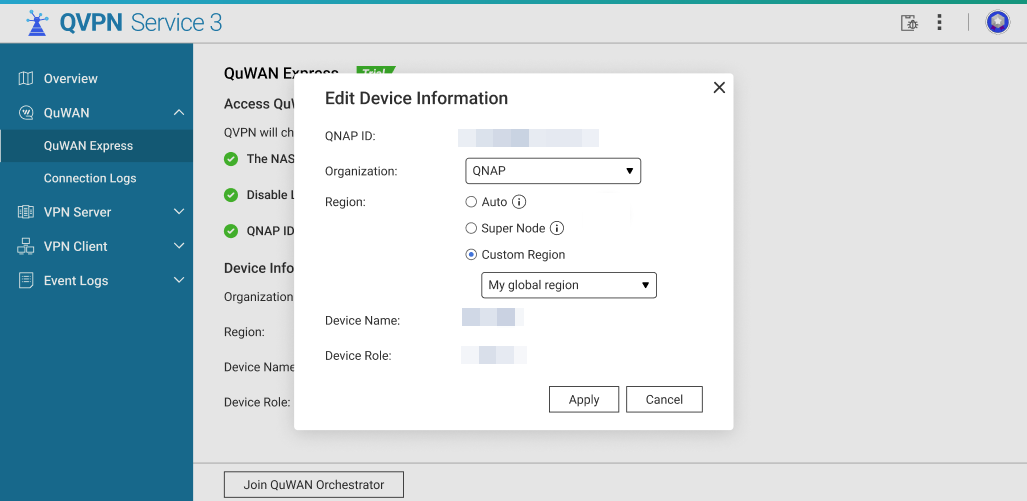
- Optional: Select the QuWAN Organization from the dropdown.
If your QNAP ID is a member of multiple organizations, select the organization that will manage this NAS. - Optional: Select an option to determine the region where the NAS establishes its QuWAN connection:
- Auto (Recommended): QVPN Service automatically chooses the best region. It prioritizes regions where a hub router exists for your organization. If a hub is unavailable, it falls back to a Super Node region.
- Super Node: Force connection to the QuWAN Super Node cloud endpoint.
Note
Use when there is no hub in your organization or when you want immediate cloud endpoint access. When using Super Node, the NAS receives a cloud-assigned public IP and port for external connectivity without port forwarding.
- Custom Region: Manually select a region when you want the NAS to join a particular segment of your QuWAN organization.
- Click Apply.
QVPN Service updates the device registration settings locally and prepares to register the device with QuWAN Orchestrator.
- Click Join QuWAN Orchestrator.
The NAS is registered to QuWAN Orchestrator and becomes an edge NAS.
Once the NAS successfully joins the QuWAN organization, the following actions occur automatically:
- The QuWAN Orchestrator assigns a Virtual IP address to the NAS inside the QuWAN overlay network.
- If a hub router exists in the assigned region, the NAS will automatically establish an IPSec tunnel with that hub.
- If connected to a Super Node, the NAS will receive a public IP address and port assigned by the cloud endpoint enabling secure external access without manual port forwarding.
- Wait until the connection status updates to Connected on the QuWAN Express page.
Once connected the NAS is reachable via the QuWAN virtual network by other edge devices and by users who have appropriate QuWAN access (for example, remote clients or other NAS devices).
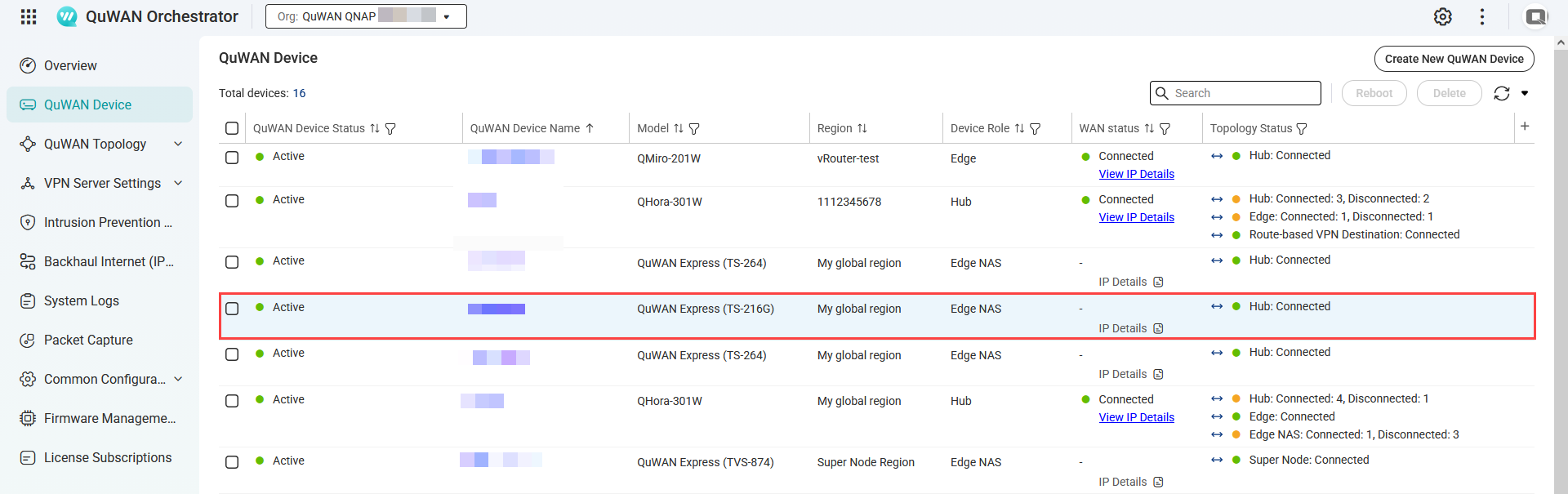
- Optional: Verify the NAS appears in QuWAN Orchestrator.
- Log into QuWAN Orchestrator.
- Select your organization.
- Go to QuWAN Device.
- Locate the NAS by the device name.
- Under Topology Status, check if the status is Connected.
Manage Super Node connections
- Log in to QuWAN Orchestrator.
- Select your organization.
- Go to QuWAN Topology > Super Node (QuWAN Express) > Status.
- Click Manage Super Node Connections.
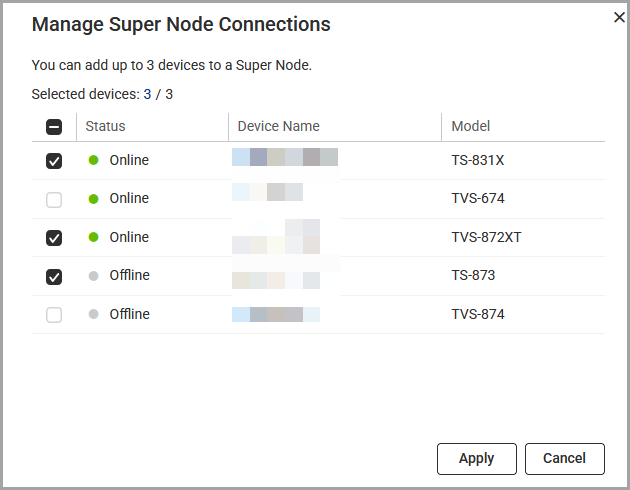
- Select between 1 to 3 edge NAS devices.
- Click Apply.
QuWAN Orchestrator updates the Super Node connections.
Modifying the virtual IP address of the edge NAS
- Log in to your edge NAS.
- Open QVPN Service.
- Go to QuWAN > QuWAN Express.
- Click
 .
.
The Edit Virtual IP window appears. - Enter a different virtual IP address.
- Click Check.
QVPN Service checks the virtual IP address. - Click Apply.
Accessing the NAS remotely via QuWAN Express
- From another QuWAN edge device or routed network, use the assigned Virtual IP address to connect to services on the NAS (e.g., SMB, AFP, HTTP(S), SSH) depending on your NAS access rules and port configuration.
- When using a hub, traffic between NAS and hub-connected devices remains within the IPSec tunnels and private networks, providing lower latency and better throughput for in-organization transfers.
Troubleshooting
- Network connection check failed
- Verify that the NAS has a working internet connection.
- Make sure the DNS settings are correct, because incorrect DNS configuration can cause the NAS to appear offline to QuWAN services.
- L2TP/IPSec conflict check failed
- Disable any local L2TP/IPSec server instance in QVPN Service before activating QuWAN Express, since both services cannot run simultaneously.
- QNAP ID verification failed
- Log in with a QNAP ID that belongs to the organization you want to use, then try joining again. Also confirm that the NAS system date and time are accurate so the authentication tokens can be validated.
- Edge shows "Connecting" but never "Connected"
- Verify that the NAS and the router have working internet connections.
- Check the firewall rules on both your network and the NAS. IPSec and NAT traversal ports, such as UDP 500 and 4500, must be allowed for outbound traffic.
Further Reading
対象製品
ソフトウェア
- QuWAN Orchestrator 2.9 以降のバージョン
- QVPN Service 3.3 以降
ハードウェア
概要
QuWAN Express は、QNAP NAS が最小限の設定で QuWAN ネットワークに迅速に参加できるようにします。手動のポートフォワーディングや複雑な VPN 設定を必要とせずに、リモートアクセスとデバイス間通信のための安全な接続を提供します。
QNAP ルーター(ハブ)が利用可能な場合、NAS はハブと IPSec トンネルを自動的に確立し、組織内で安全で高性能なデータ転送をサポートします。
ハブが導入されていない場合、Super Node サービスを利用できます。Super Node はクラウドゲートウェイで、NAS に IPSec トンネルを提供し、安全な外部アクセスのためにパブリック IP とポートを割り当て、QuWAN 仮想ネットワーク内での NAS 間通信を可能にします。
注意
- Super Node は QuWAN ハブルーターがない環境向けに設計されており、最大 3 台のエッジ NAS デバイスのリモートアクセスをサポートします。追加のデバイスが接続する必要がある場合は、QuWAN Orchestrator クラウドプラットフォームで許可された NAS リストを更新できます。
- このサービスには月間 15GB の無料データ転送制限が含まれています。この制限に達すると、転送速度が低下し、より多くの容量が必要な場合はQNAP ソフトウェアストアでライセンスプランをアップグレードできます。
主な特徴
- QuWAN Express は、QVPN Service でワンクリックで QuWAN ネットワークに参加でき、システムがネットワーク設定を自動的に処理します。
- QuWAN オーバーレイネットワークを通じてトラフィックをルーティングすることで、どこからでも NAS データへの安全なリモートアクセスを可能にします。
- Super Node サービスは、ハブルーターが利用できない場合でも、NAS デバイス間の信頼性のある外部アクセスとシームレスな通信を保証するクラウドベースの接続を提供します。
- このサービスは、NAS に仮想 IP アドレスを割り当て、内部ネットワークの詳細を公開せずに他の QuWAN デバイスと通信できるようにします。
前提条件
- 対象製品に記載されているバージョンに NAS のファームウェアと QVPN Service を更新します。
- NAS がインターネットに接続されていることを確認してください。
- QuWAN Express を有効にする前に、NAS 上の L2TP/IPSec サーバーを無効にしてください。
- NAS に QNAP ID でサインインし、QuWAN Orchestrator に登録できるようにします。
- 使用する予定のハブルーターが QuWAN 設定をサポートし、QuWAN Express 設定を行う際に選択する同じ QuWAN 組織に登録されていることを確認してください。
手順
このセクションでは、QVPN Service で QuWAN Express へのアクセスを設定し、デバイス情報を設定し、NAS を QuWAN Orchestrator でエッジデバイスとして登録する方法を説明します。
QNAP NAS で QuWAN Express を設定する
- NAS に管理者としてログインします。
- QVPN Serviceを開きます。
- QuWAN > QuWAN Expressに移動します。
- 参加をクリックします。
- 開始 をクリックして前提条件チェックを実行します。
QVPN Service は次のことを確認します:- チェックが通過するためには、NAS がアクティブなインターネット接続を持っている必要があります。
- チェックは L2TP/IPSec サーバーが無効であるかどうかを確認し、続行する前にオフにする必要があります。
- チェックは NAS が QNAP ID でサインインしていることを確認し、必要に応じてログインを促します。
すべての前提条件チェックが正常に完了すると、QVPN Service はデバイス情報を表示します。 - オプション: QuWAN 組織と地域設定を構成します。
- をクリックします。
デバイス情報の編集ウィンドウが表示されます。 - オプション: ドロップダウンからQuWAN 組織を選択します。
QNAP ID が複数の組織のメンバーである場合、この NAS を管理する組織を選択します。 - オプション: NAS が QuWAN 接続を確立する地域を決定するためのオプションを選択します:
- 自動 (推奨): QVPN Service は最適な地域を自動的に選択します。組織にハブルーターが存在する地域を優先します。ハブが利用できない場合は、Super Node 地域にフォールバックします。
- Super Node: QuWAN Super Node クラウドエンドポイントへの接続を強制します。
注意
組織にハブがない場合や、即座にクラウドエンドポイントにアクセスしたい場合に使用します。Super Node を使用すると、NAS はクラウドから割り当てられたパブリック IP とポートを受け取り、ポートフォワーディングなしで外部接続が可能になります。
- カスタム地域: NAS が QuWAN 組織の特定のセグメントに参加したい場合に地域を手動で選択します。
- 適用をクリックします。
QVPN Service はデバイス登録設定をローカルで更新し、QuWAN Orchestrator へのデバイス登録の準備をします。
- 参加 QuWAN Orchestratorをクリックします。
NAS は QuWAN Orchestrator に登録され、エッジ NAS になります。
NAS が QuWAN 組織に正常に参加すると、以下のアクションが自動的に行われます:
- QuWAN Orchestrator は QuWAN オーバーレイネットワーク内で NAS に仮想 IP アドレスを割り当てます。
- 割り当てられた地域にハブルーターが存在する場合、NAS はそのハブと IPSec トンネルを自動的に確立します。
- Super Node に接続されている場合、NAS はクラウドエンドポイントによって割り当てられたパブリック IP アドレスとポートを受け取り、手動のポートフォワーディングなしで安全な外部アクセスを可能にします。
- 接続ステータスが接続済みに更新されるまで待ちます。
接続されると、NAS は他のエッジデバイスや適切な QuWAN アクセスを持つユーザー(例えば、リモートクライアントや他の NAS デバイス)によって QuWAN 仮想ネットワーク経由でアクセス可能になります。
- オプション: NAS が QuWAN Orchestrator に表示されることを確認します。
- QuWAN Orchestrator にログインします。
- 組織を選択します。
- QuWAN デバイスに移動します。
- デバイス名で NAS を探します。
- トポロジーステータスの下で、ステータスが接続済みであるか確認します。
スーパーノード接続を管理します
- QuWAN オーケストレーター。にログインします
- 組織を選択します。
- QuWAN トポロジー > スーパーノード (QuWAN Express) > ステータスに移動します。
- スーパーノード接続を管理をクリックします。
- 1 から 3 のエッジ NAS デバイスを選択します。
- 適用をクリックします。
QuWAN Orchestrator がスーパーノード接続を更新します。
エッジ NAS の仮想 IP アドレスを変更します
- エッジ NAS にログインします。
- QVPN Service を開きます。
- QuWAN > QuWAN Expressに移動します。
- をクリックします。
仮想 IP 編集ウィンドウが表示されます。 - 異なる仮想 IP アドレスを入力します。
- チェックをクリックします。
QVPN Service が仮想 IP アドレスをチェックします。 - 適用をクリックします。
QuWAN Express を介して NAS にリモートアクセス
- 別の QuWAN エッジデバイスまたはルーティングされたネットワークから、割り当てられた仮想 IP アドレスを使用して、NAS 上のサービス(例:SMB、AFP、HTTP(S)、SSH)に接続します。これは、NAS のアクセスルールとポート設定に依存します。
- ハブを使用する場合、NAS とハブ接続デバイス間のトラフィックは IPSec トンネルとプライベートネットワーク内に留まり、組織内転送に対して低遅延とより良いスループットを提供します。
トラブルシューティング
- ネットワーク接続チェックに失敗しました
- NAS が正常にインターネットに接続されていることを確認してください。
- DNS 設定が正しいことを確認してください。DNS 設定が誤っていると、NAS が QuWAN サービスに対してオフラインに見える可能性があります。
- L2TP/IPSec 競合チェックに失敗しました
- QuWAN Express を有効にする前に、QVPN Service 内のローカル L2TP/IPSec サーバーインスタンスを無効にしてください。両方のサービスは同時に実行できません。
- QNAP ID 検証に失敗しました
- 使用したい組織に属する QNAP ID でログインし、再度参加を試みてください。また、認証トークンが検証できるように、NAS のシステム日付と時刻が正確であることを確認してください。
- エッジが「接続中」と表示されるが、「接続済み」とはならない
- NAS とルーターが正常にインターネットに接続されていることを確認してください。
- ネットワークと NAS のファイアウォールルールを確認してください。IPSec と NAT トラバーサルポート(UDP 500 および 4500 など)は、アウトバウンドトラフィックに対して許可されている必要があります。
さらに読む


