Applicable Products
Overview
Port breakout enables you to split a high-speed QSFP port into multiple lower-speed interfaces, increasing flexibility and port utilization on your QNAP switch. The most common use case is breaking out a QSFP28 100GbE port into four independent 25GbE interfaces using a breakout cable and compatible SFP28 modules.
The QNAP M7308R-4X also supports breaking out a QSFP+ 40GbE port into four 10GbE interfaces with SFP+ modules and the appropriate breakout cable.
Note: A breakout cable is a special cable that allows a single high-speed port to function as several independent, lower-speed ports, often called "sub-interfaces."
Important: Configuring or changing breakout modes may interrupt data traffic. If your switch is in production use, consider performing these operations during scheduled downtime.
Procedure: Configuring 100GbE to 4x25GbE breakout
- Log in to the switch management interface.
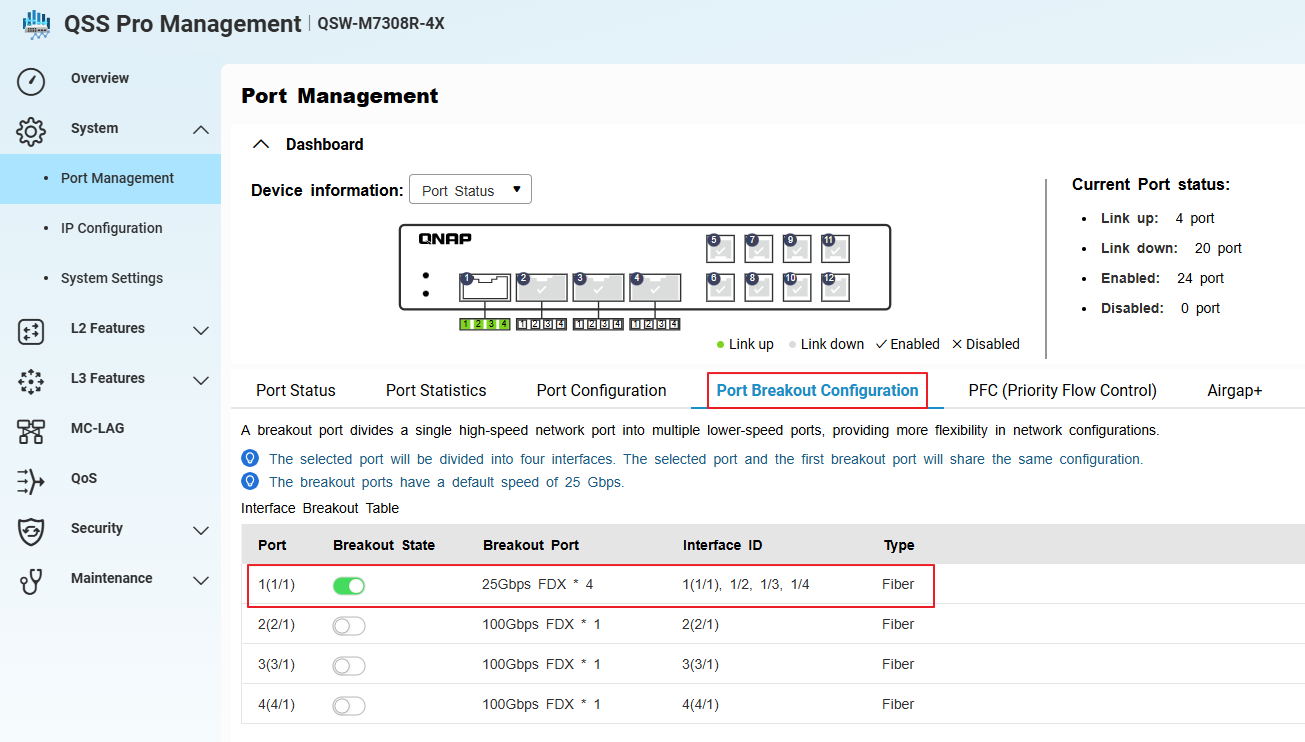
- Go to System > Port Management > Port Breakout Configuration.
- Select the QSFP28 100GbE port you want to break out.
- Enable breakout mode and select 4x25GbE as the breakout option.
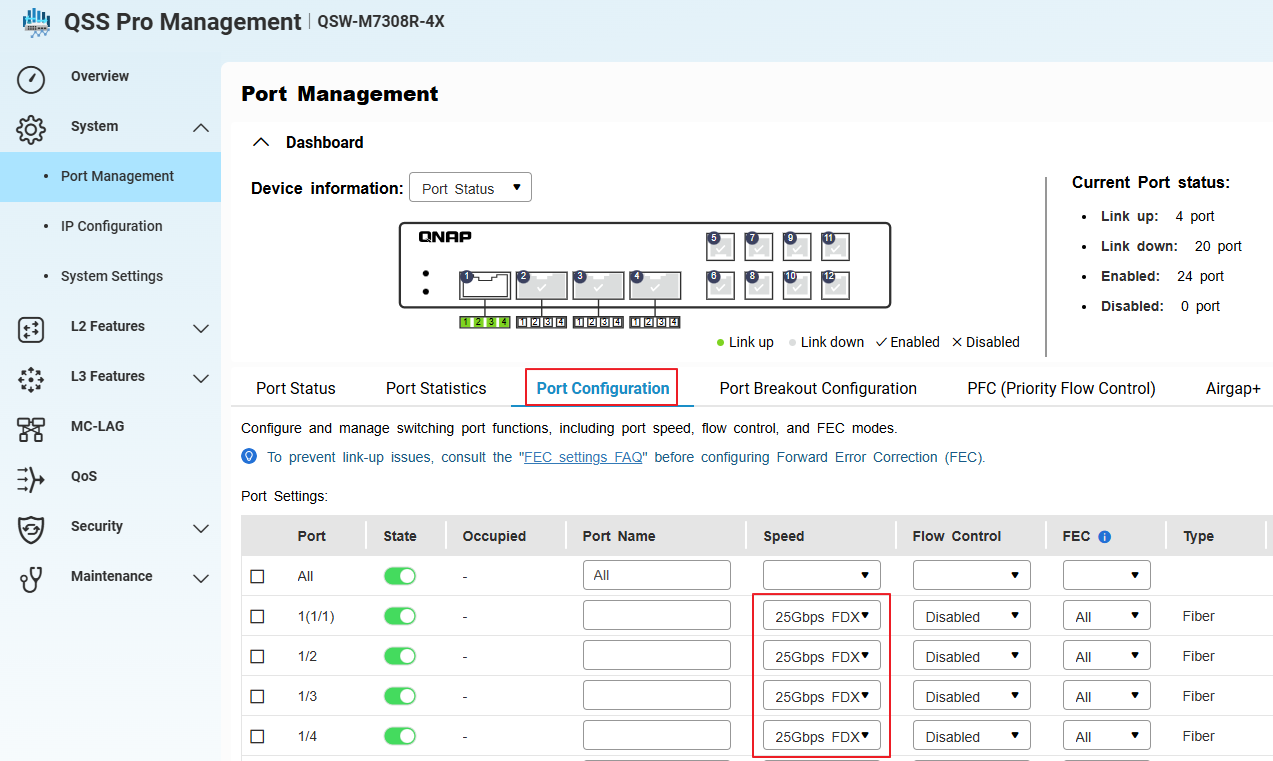
- Go to System > Port Management > Port Configuration.
- Confirm that the system has created four sub-interfaces (virtual ports) for the selected port, each operating at 25GbE.
- Install compatible SFP28 modules and connect the 100GbE-to-4x25GbE breakout cable to the QSFP28 port.
- Apply and save the configuration.
Each breakout port will now function as an independent 25GbE interface. Make sure all connected devices, cables, and modules support 25GbE operation.
Procedure: Configuring 40GbE to 4x10GbE breakout or switching from 100GbE to 40GbE breakout
- Physically disconnect any existing 100GbE breakout cable and SFP28 modules from the QSFP28 port. (if any)
- Install a compatible QSFP+ 40GbE breakout cable and SFP+ modules for each intended 10GbE sub-interface.
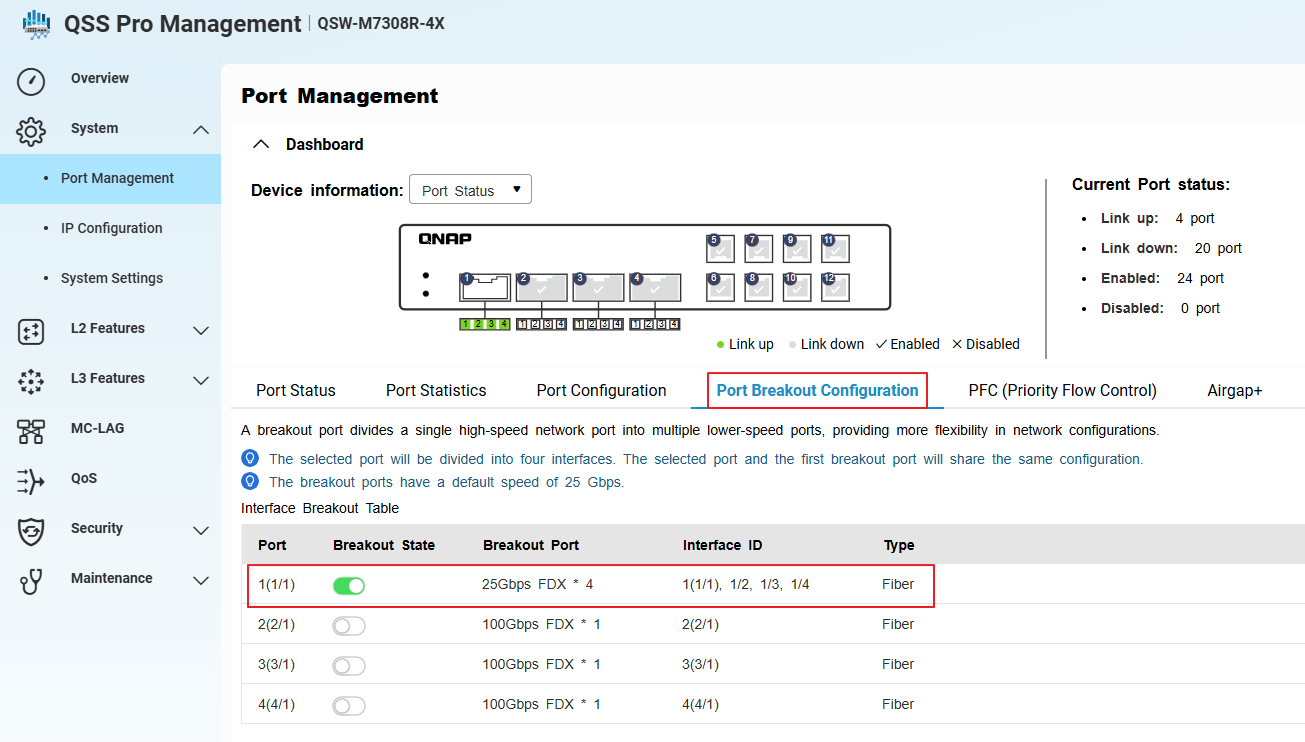
- In the switch management interface, go to System > Port Management > Port Breakout Configuration.
- Select the same QSFP port (now using a 40GbE cable and modules).
- Enable breakout mode.
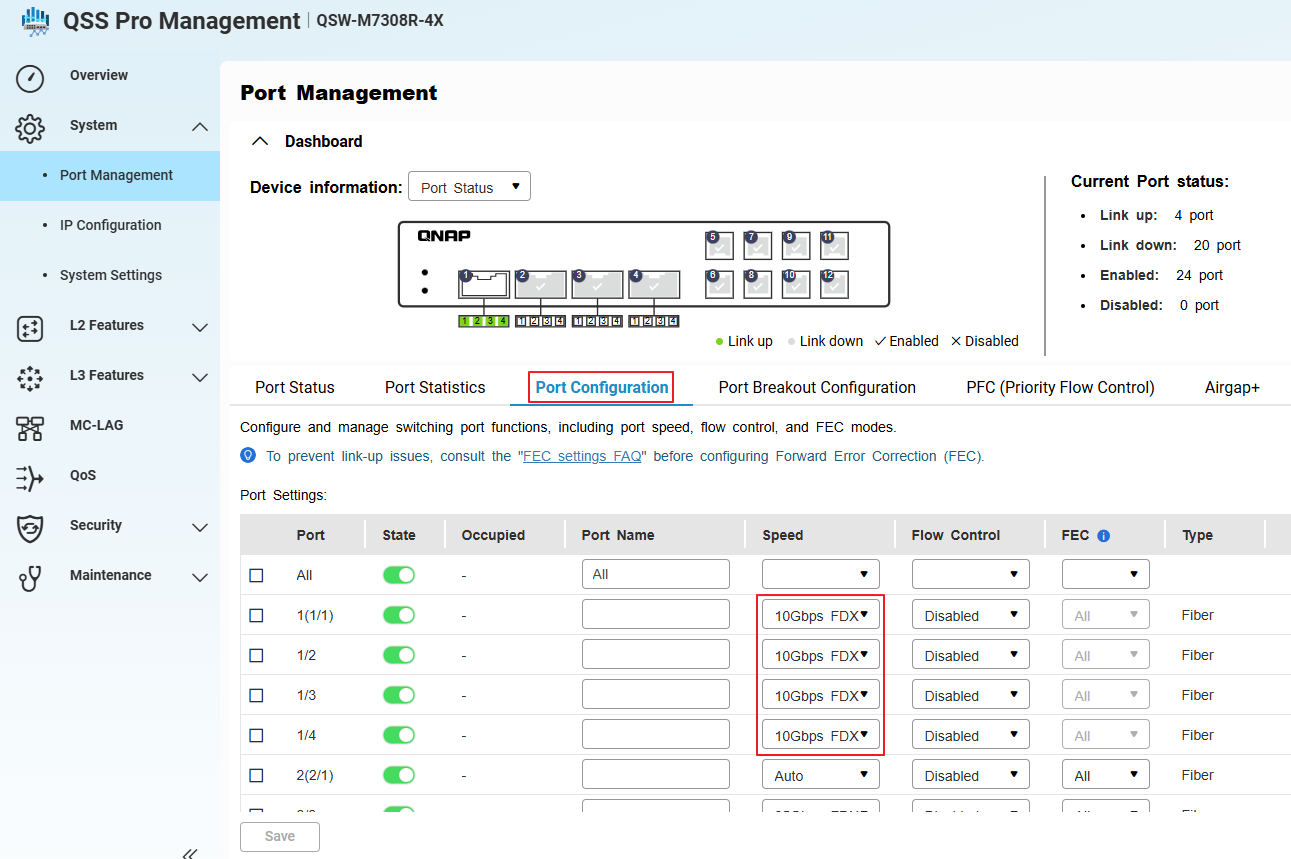
- Go to System > Port Management > Port Configuration.
- Confirm that the system has created four sub-interfaces (virtual ports) for the selected port, each operating at 10GbE.
- Apply and save the configuration.
When switching from a 100GbE to 40GbE breakout, always physically replace the cables and modules before reconfiguring in the management interface.
Tip: Verify that all connected devices support 10GbE speeds.
適用產品
概覽
埠分解功能可讓您將高速 QSFP 埠分解為多個低速介面,增加 QNAP 交換機的靈活性和埠利用率。最常見的使用情境是使用分解線纜和相容的 SFP28 模組將 QSFP28 100GbE 埠分解為四個獨立的 25GbE 介面。
QNAP M7308R-4X 也支援將 QSFP+ 40GbE 埠分解為四個 10GbE 介面,需搭配 SFP+ 模組和適當的分解線纜。
注意:分解線纜是一種特殊的線纜,允許單一高速埠作為多個獨立的低速埠運作,通常稱為「子介面」。
重要: 配置或更改分解模式可能會中斷資料流量。如果您的交換機正在生產使用中,請考慮在計劃停機時間進行這些操作。
程式:配置 100GbE 至 4x25GbE 分解
- 登入交換機管理介面。
- 前往 系統 > 埠管理 > 埠分解配置。
- 選擇 QSFP28 100GbE 您想要分解的埠。
- 啟用分解模式並選擇4x25GbE作為分解選項。
- 前往 系統 > 埠管理 > 埠配置。
- 確認系統已為所選埠創建四個子介面(虛擬埠),每個埠運行於 25GbE。
- 安裝相容的 SFP28模組並將 100GbE-to-4x25GbE 分線纜線連線到 QSFP28 埠。
- 套用並儲存設定。
每個分線埠現在將作為獨立的 25GbE 介面運作。確保所有連線的裝置、纜線和模組支援 25GbE 操作。
程式:配置 40GbE 至 4x10GbE 分線或從 100GbE 切換至 40GbE 分線
- 實體斷開任何現有的 100GbE 分線纜線和 SFP28 模組與 QSFP28 埠的連線。(如果有的話)
- 安裝相容的QSFP+ 40GbE分線纜線和SFP+模組以用於每個預定的 10GbE 子介面。
- 在交換器管理介面中,前往系統 > 埠管理 > 埠分線配置。
- 選擇相同的 QSFP 埠(現在使用 40GbE 纜線和模組)。
- 啟用分線模式。
- 前往系統 > 埠管理 > 埠配置。
- 確認系統已為選定的埠創建四個子介面(虛擬埠),每個運行於 10GbE。
- 套用並儲存設定。
從 100GbE 切換至 40GbE 分線時,請務必在管理介面重新配置之前,實體更換纜線和模組。
提示:確認所有連接的裝置支援 10GbE 速度。


