


How can I collect more information when my NAS gets stuck during startup?
Last modified date:
2026-07-10
Applicable Products
- NAS models with HDMI™ output (like TVS series)
Solution
If your NAS gets stuck during startup, the most important thing is to identify where the boot process stops and capture the on-screen messages.
Prerequisites
- A monitor or TV with HDMI™ input.
- An HDMI™ cable.
- A USB keyboard.
- A phone or camera to take clear photos of the screen.
For TVS models that provide HDMI™ and USB ports, you can connect a monitor and keyboard to collect first-hand boot information for troubleshooting.
e.g. TVS-673e
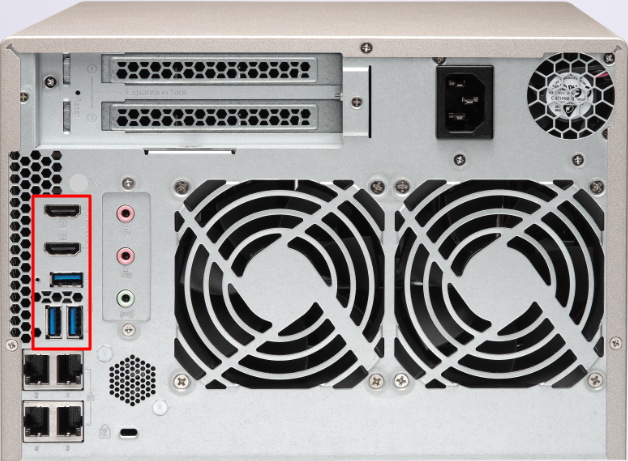
- Power off the NAS.
- Connect the NAS HDMI™ port to a monitor/TV.
- Connect a USB keyboard to the NAS.
- Switch the monitor/TV to the correct HDMI™ input source.
- Power on the NAS and watch the startup messages from the beginning.
- If startup appears stuck for more than 5-10 minutes, do not force power off immediately. First record:
- The exact last line shown on screen.
- Any error keywords such as "failed", "error", "timeout", or "kernel panic".
- Whether the cursor is still blinking or messages are still updating.
- NAS LED behavior and whether there is a buzzer/beep sound.
- Approximate time since power-on when it stops.
- Take one or more clear photos of the screen, including the last few lines.
- If available, capture additional photos from different angles or screens for context.
Additional system details to provide
- NAS model and serial number.
- Firmware version (if known).
- Any recent changes, such as:
- Firmware update.
- Unexpected power outage.
- Disk replacement or re-seating.
- Memory upgrade.
- New external device (USB/PCIe expansion card).
- Reproducibility: always stuck or only intermittent.
Minimum information package for support
- NAS model (for example, TVS-673e).
- Problem summary (startup stuck and approximate time to freeze).
- HDMI™ screen photos with readable error/last lines.
- LED and buzzer status.
- Recent environment or hardware changes.
Further Reading
Bạn vẫn cần hỗ trợ?
Hãy đăng câu hỏi của bạn trong Cộng đồng QNAP. Nhân viên QNAP và những người dùng giàu kinh nghiệm sẽ trả lời.


