


How do I collect the debug logs from HBS3 and all the necessary information to send for analysis?
Applied models:
Applied Firmware:
Please, make sure to have the NAS fully updated with the latest firmware and also the latest version installed of the HBS3 app.
When having errors on the tasks created in Hybrid Backup Sync, it is not a good experience and to order to facilitate the analysis from the QNAP Support Team, please, it is required to collecting the following.
1) Provide the NAS firmware version and the HBS3 app version;
2) The picture of the error message;
3) Debug Logs from HBS3, it is showed on the picture below where it can be collected;
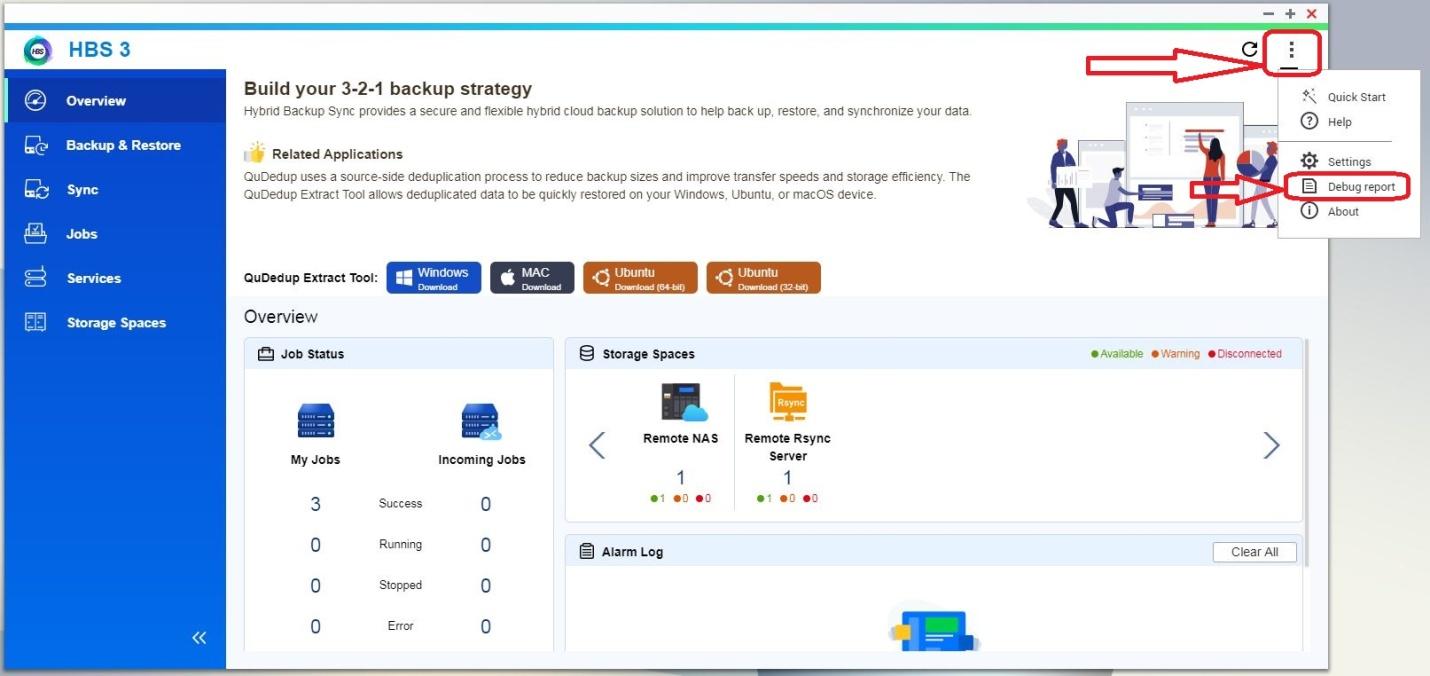
4) Print screen of the configuration pages of the task created in HBS3 (preferable in English);
5) Dump logs from the NAS, see more information below.
How to download the Dump logs:
I. Login to QTS;
II. Open the Main Menu and select the application "Helpdesk";
III. Navigate to "Diagnostic Tool" on the left side of the menu;
IV. Press the "Download Logs" button below;
V. The log file will download as a ZIP file as soon as you press the "Download" button.
With all the provided information above, the troubleshooting of the problem, as well the solution will be given much faster.
Thank you for your help.
還有疑問?
在 QNAP 官方社群提問,獲得 QNAP 官方與熱心用戶的第一手建議。


