


Remote Backup and Big Data Migration Solutions
Deploy a comprehensive disaster recovery plan for enhanced data security! QNAP NAS integrates multiple communication protocols, multi-cloud storage services, data recovery, cloud seeding, and other technologies allowing you to back up files to different remote devices or the cloud with high flexibility, efficiency, and security.
Why you need remote backup
QNAP NAS provides dependable backup storage, but its true strength is centralizing a multi-site and multi-service backup solution. To avoid potential downtime and data loss, QNAP strongly recommends implementing a “3-2-1” backup plan: keep at least 3 copies on 2 types of storage, and store 1 copy off-site to ensure high-level data security. The more backups you keep, the more comprehensive your disaster recovery plan will be, and the more resilient your data will be to threats caused by viruses, human error, and ransomware.

Keep 3 copies

On 2 types of storage
Store 1 copy off-site
Quickly restore data with the well-rounded disaster recovery plan
-

Disaster recovery
Through diverse network protocols and multi-cloud services, back up and recover files to remote device and the cloud – to anywhere at any time.
-

Secure and convenient
Ensure remote backup security with QNAP’s unique backup technology, data encryption, multi-version backup, and fast recovery.
-

Big data migration
Optimal streamlined experience for migrating Big Data to remote sites or cloud storage.
Multi-protocol support for remote data backup
Supports mainstream protocols for easy backup to remote QNAP NAS, servers, and cloud storage.


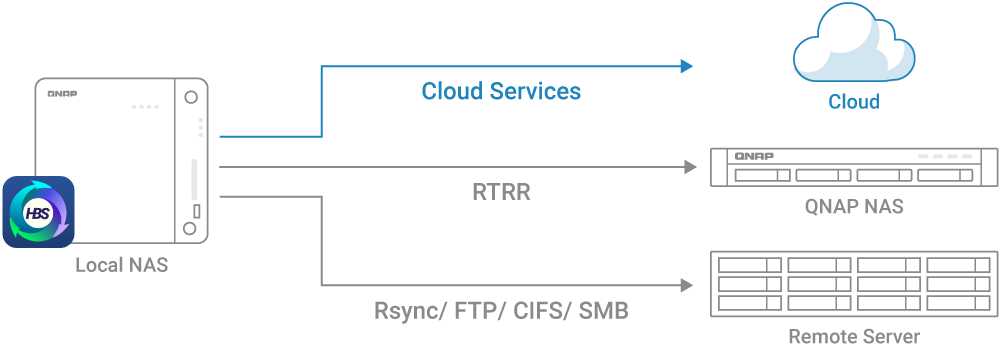
Back up data to the Cloud
Leverage private and public clouds to create a hybrid cloud solution - deploy an agile remote backup strategy.

Alibaba Cloud

Amazon Glacier

Amazon S3

Azure

Backblaze B2

Baidu Wangpan

Box

Catalyst Cloud

Citrix ShareFile

Cynny Space

DigitalOcean Spaces

DreamObjects

Dropbox
Alibaba Cloud
Amazon Glacier
Amazon S3
Azure
Backblaze B2
Baidu Wangpan
Box
Catalyst Cloud
Citrix ShareFile
Cynny Space
DigitalOcean Spaces
DreamObjects
Dropbox

Google Cloud

Google Drive

HiCloud

HiDrive

HKT

HUAWEI Cloud

hubiC

IBM Cloud

IONOS

luckycloud

Lyve Cloud

OneDrive for Business
Google Cloud
Google Drive
HiCloud
HiDrive
HKT
HUAWEI Cloud
hubiC
IBM Cloud
IONOS
luckycloud
Lyve Cloud
OneDrive for Business

OneDrive

OpenStack

Oracle Cloud

OVHcloud

QCloud IT

Rackspace

SFR Cloud

Tencent Cloud

SharePoint

Wasabi

WebDAV

Yandex Disk

Jotelulu
OneDrive
OpenStack
Oracle Cloud
OVHcloud
QCloud IT
Rackspace
SFR Cloud
Tencent Cloud
SharePoint
Wasabi
WebDAV
Yandex Disk
Jotelulu
Highly efficient multi-version backup
Additional backup versions reduce data loss risks. Hybrid Backup Sync supports multi-version backup to cloud storage and remote NAS and allows setting version limits and retention time. QNAP’s unique QuDedup technology also supports block-level data deduplication and encryption at the source to reduce backup size, completing backup/recovery jobs quicker with optimized bandwidth.
Recover files on NAS, computers, and the cloud
After backing up deduped, encrypted or compressed data to a QNAP NAS, remote server or cloud storage, you can recover and view them on Windows, Ubuntu, or macOS computers.
-
Recover .qdff files
Use QuDedup Extract Tool to directly view and recover .qdff files on your computer or cloud storage - greatly reducing cloud data transfer costs. Deduped files can also be viewed and opened in File Station.
Download: QuDedup Extract Tool

-
Decrypt and decompress files
Files that are encrypted/compressed using Hybrid Backup Sync can be decrypted/decompressed using QENC Decrypter utility on your computer or cloud workstation to decrypt/decompress and view files.
Download: QENC Decrypter

Efficiently move massive data
Experience fast NAS data transfer and cloud migration to accelerate first-time large data migration.
-
Move to another NAS (JBOD Migration)
QJBOD Express (JBOD enclosure roaming) provides a secure and convenient way to move your NAS data to other NAS devices via compatible expansion enclosures, with no Internet connection required.
Learn more: JBOD Migration with QJBOD Express

-
Move to the cloud (Cloud Seeding)
For first-time large cloud data migration, hardware appliances from cloud service providers can be used to quickly move terabytes of data.
Hybrid Backup Sync provides a relink function to establish a link between the on-premises original and the cloud copy, so you can continue incremental backup or synchronization tasks.Learn more: Cloud Seeding with Hybrid Backup Sync
QNAP Complete Backup and Data Protection Solutions
A lifetime of comprehensive coverage for virtually all your data protection needs. Explore a range of apps and utilities for complete backup planning, including:


