Applicable products
- QNAP NAS running Plex Media Server 1.43.2 or earlier.
Overview
Plex2Shell refers to four vulnerabilities in the third-party application Plex Media Server, affecting version 1.43.2 and earlier: CVE-2026-96652, CVE-2026-96654, CVE-2026-96655, and CVE-2026-96656. Each presents limited risk on its own, but chained together they allow an unauthenticated remote attacker to execute arbitrary code with the privileges of the Plex Media Server process.
According to Plex, a public proof of concept was released on October 16, and internet-facing servers that have not been updated have since been subject to widespread attacks. Compromised servers have been used to run cryptocurrency miners and proxy software.
The fixed release, Plex Media Server 1.43.3 (build 1.43.3.10861 and later), is available in the QNAP App Center. The vulnerabilities reside in Plex Media Server only; QNAP operating systems such as QTS and QuTS hero are not themselves affected.
Important: If Plex on your NAS was reachable from the Internet while running 1.43.2 or earlier, updating alone is not enough. Treat the NAS as potentially compromised and complete the clean reinstall, compromise check, and credential reset described below.
Q1. Is my NAS affected?
Only a NAS with Plex Media Server 1.43.2 or earlier installed is affected. QNAP operating systems are not themselves affected, and a NAS without Plex needs no action.
To check the version:
- App Center > My Apps shows 1.43.3 for the patched release.
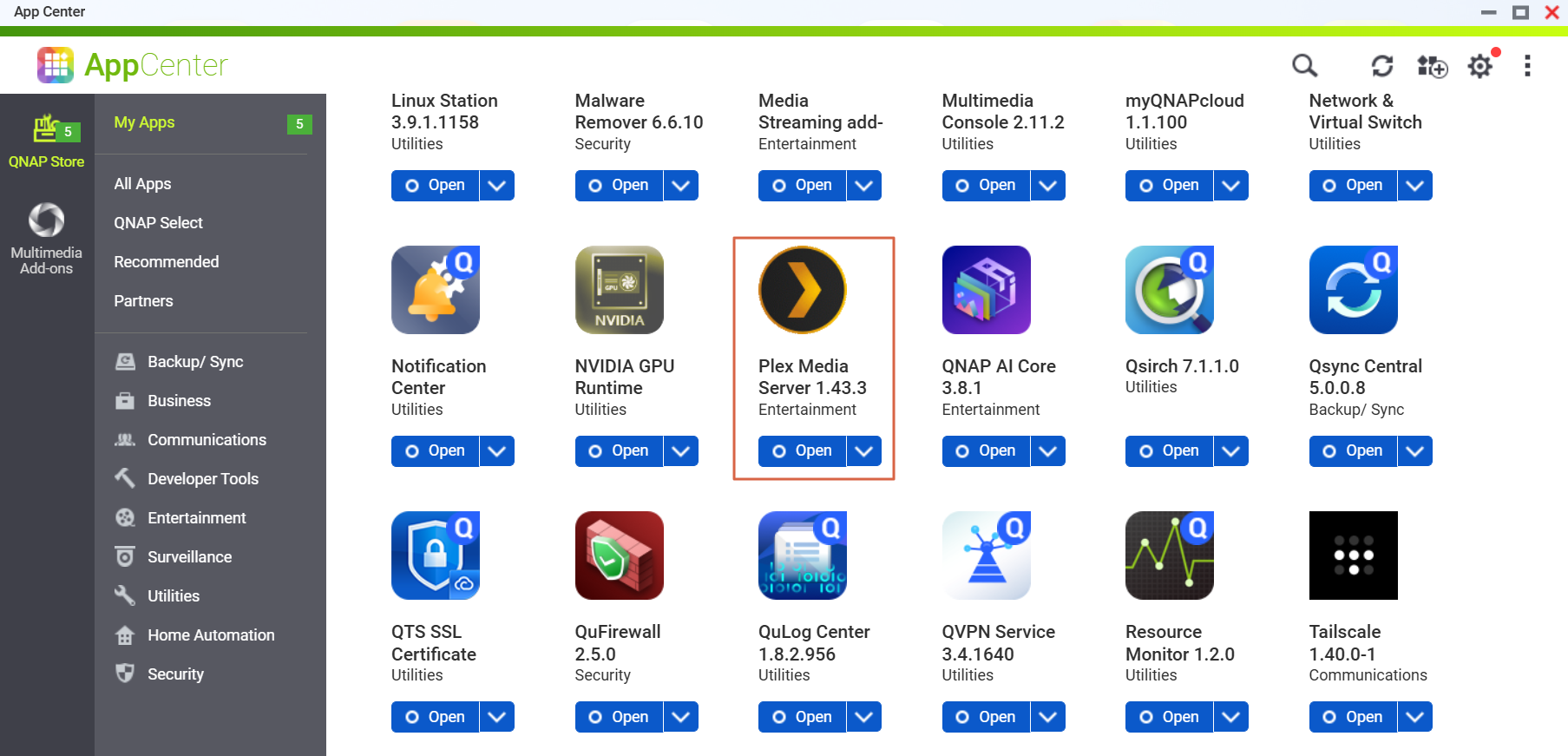
Q2. How do I know whether my Plex was reachable from the Internet?
If any of the following applied while you were running 1.43.2 or earlier, or if you upgraded to a non-affected version only after the PoC was publicly disclosed on October 16, treat the NAS as potentially compromised and complete Q4 to Q8:
- Remote Access was enabled in Plex Web > Settings > Remote Access;
- your router forwards port 32400;
- UPnP is enabled on your router and Plex Remote Access was enabled (Plex opens the port automatically);
- Plex was exposed through myQNAPcloud auto router configuration or any other means.
Q3. How do I update?
- Go to App Center > My Apps > Plex Media Server > Update.
- Confirm that the version is 1.43.3. or later.
If no update is shown, refresh App Center and make sure the NAS can reach the Internet.
Later Plex releases (with other security fixes) will also be published once verified; update again when they appear, but do not wait for them – update now.
Q4. I have updated. Is there anything else to do?
- If Plex was never reachable from the Internet: updating is enough; we still recommend the exposure-reduction settings in Q7.
- If it was reachable: updating only closes the entry point and does not remove anything already installed. Complete Q5 (clean reinstall), Q6 (indicators of compromise), and Q8 (credential reset), in that order.
Q5. How do I perform a clean reinstall?
- If you would like QNAP to help confirm a compromise, first copy the Plex Logs folder (under "Plex Media Server" in the PlexData shared folder) to another location.
- Go to App Center > My Apps > Plex Media Server and select Remove.
- Use File Station to check whether a "Plex Media Server" folder still exists in the PlexData shared folder. If it does, do not reuse it: at minimum delete everything in the Codecs folder and review Preferences.xml for transcoder-related options you did not set.
- Reinstall 1.43.3 or later from App Center.
- After reinstalling, do not restore the previous contents of the Codecs folder. Plex will download the components it needs.
Q6. How do I check for indicators of compromise?
Look for any of the following:
- Unknown processes started by Plex Media Server, in particular names such as
myawesomeproxy, mylovelyminer, or x12345;
- unfamiliar
.so or .dll files in the Codecs folder;
- outbound connections to
proxystream.st;
- sustained high CPU usage while nothing is playing (see Resource Monitor);
- a Malware Remover detection (for example, detection code MR2104).
If you find any of these, do not just remove the suspicious program; other components or persistence mechanisms may remain. Complete the clean reinstall in Q5 and the credential reset in Q8. If you need QNAP's help, preserve the Logs folder first and open a case with Technical Support.
Q7. How do I reduce exposure?
- Disable Remote Access in Plex Web > Settings > Remote Access if you do not need it;
- remove the port 32400 forwarding rule on your router and disable UPnP; remove any myQNAPcloud auto router configuration for Plex;
- use a VPN (for example, QVPN Service on the NAS) when you need remote access;
- keep QTS or QuTS hero and all apps up to date, and enable Malware Remover scheduled scans and QuFirewall;
- if your device is beyond its software support period and cannot run the latest operating system, review its overall security posture as well.
Q8. Which credentials should I reset?
- Plex account: sign out all devices in your Plex account settings first, then change your Plex password. Because the administrator token may have been exposed, changing the password alone is not enough.
- NAS accounts: shared folders that Plex Media Server could access, and credentials stored on the NAS, should be treated as potentially exposed. Change the NAS administrator and user passwords, enable two-step verification, and rotate passwords or access keys stored by other services on the NAS (for example, backup jobs and cloud connections).
Q9. Will later Plex versions be published? Should I wait?
Later Plex releases will be published in App Center once verified; they contain other security fixes. Version 1.43.3 already fixes Plex2Shell, so do not wait.
Q10. How do I get help from QNAP?
Open a case with QNAP Technical Support and include your Plex version, whether Plex was reachable from the Internet, and any indicators you found. If you want QNAP to help confirm a compromise, preserve the Logs folder before removing Plex.
Further Reading
対象製品
- Plex Media Server 1.43.2 以前を実行している QNAP NAS。
概要
Plex2Shell は、サードパーティアプリケーション Plex Media Server の 4 つの脆弱性を指し、バージョン1.43.2 以前に影響を与えます:CVE-2026-96652、CVE-2026-96654、CVE-2026-96655、およびCVE-2026-96656。それぞれ単独ではリスクが限定的ですが、連鎖すると認証されていないリモート攻撃者が任意のコードを実行できるようになります。
Plex によると、10 月 16 日に公開された概念実証が発表され、更新されていないインターネットに接続されたサーバーはその後広範囲にわたる攻撃を受けています。侵害されたサーバーは、暗号通貨マイナーやプロキシソフトウェアの実行に使用されています。
修正されたリリースPlex Media Server 1.43.3 (ビルド 1.43.3.10861 以降)は QNAP App Center で利用可能です。脆弱性は Plex Media Server のみに存在し、QTS や QuTS hero などの QNAP オペレーティングシステム自体には影響を与えません。
重要: NAS 上の Plex が 1.43.2 以前を実行している間にインターネットからアクセス可能だった場合、更新だけでは不十分です。NAS が侵害された可能性があるとみなし、以下に記載されているクリーン再インストール、侵害チェック、資格情報のリセットを完了してください。
Q1. 私の NAS は影響を受けていますか?
Plex Media Server 1.43.2 またはそれ以前がインストールされている NAS のみが影響を受けます。QNAP のオペレーティングシステム自体は影響を受けず、Plex がインストールされていない NAS には対応は不要です。
バージョンを確認するには:
- App Center > My Appsで、パッチが適用されたリリースとして1.43.3が表示されます。
Q2. 私の Plex がインターネットからアクセス可能だったかどうかを知るにはどうすればよいですか?
以下のいずれかが1.43.2 またはそれ以前を実行している間に適用されていた場合、または10 月 16 日に PoC が公開された後にのみ影響を受けないバージョンにアップグレードした場合、NAS が潜在的に侵害されているとみなし、Q4 から Q8 を完了してください:
- Plex Web > Settings > Remote Accessでリモートアクセスが有効になっていた;
- ルーターがポート32400を転送している;
- ルーターで UPnP が有効になっており、Plex リモートアクセスが有効になっていた (Plex がポートを自動的に開きます);
- Plex が myQNAPcloud 自動ルーター構成またはその他の手段を通じて公開されていた。
Q3. どのように更新すればよいですか?
- App Center > My Apps > Plex Media Server > Updateに移動します。
- バージョンが1.43.3 以降であることを確認してください。
更新が表示されない場合は、App Center を更新し、NAS がインターネットに接続できることを確認してください。
後の Plex リリース(他のセキュリティ修正を含む)も確認後に公開されます。それらが表示されたら再度更新してください。ただし、それらを待たずに今すぐ更新してください。
Q4. 更新しました。他に何かすることはありますか?
- Plex がインターネットからアクセスできなかった場合:更新だけで十分です。Q7 の露出削減設定をお勧めします。
- アクセス可能だった場合:更新は入口を閉じるだけで、すでにインストールされたものを削除しません。Q5(クリーン再インストール)、Q6(侵害の指標)、Q8(資格情報のリセット)をその順で完了してください。
Q5. クリーン再インストールを行う方法は?
- QNAP が侵害を確認するのを手伝う場合は、まず Plex のLogsフォルダー(PlexData共有フォルダー内の「Plex Media Server」下)を別の場所にコピーしてください。
- App Center > My Apps > Plex Media Serverに移動し、Removeを選択してください。
- File Station を使用して、PlexData共有フォルダ内に「Plex Media Server」フォルダがまだ存在するかどうかを確認します。存在する場合は再利用しないでください。最低限、Codecsフォルダ内のすべてを削除し、設定していないトランスコーダー関連のオプションについてPreferences.xmlを確認してください。
- App Center から1.43.3 以降を再インストールします。
- 再インストール後、Codecs フォルダの以前の内容を復元しないでください。Plex は必要なコンポーネントをダウンロードします。
Q6. 侵害の兆候を確認するにはどうすればよいですか?
以下のいずれかを探してください:
- Plex Media Server によって開始された不明なプロセス、特に
myawesomeproxy、mylovelyminer、またはx12345のような名前;
.soまたは.dllファイルがCodecsフォルダ内にある;proxystream.stへの外部接続;- 何も再生されていないときの持続的な高 CPU 使用率(リソースモニターを参照);
- Malware Remover による検出(例えば、検出コードMR2104)。
これらのいずれかを見つけた場合、疑わしいプログラムを単に削除しないでください。他のコンポーネントや永続化メカニズムが残っている可能性があります。Q5 で完全な再インストールと Q8 で資格情報のリセットを完了してください。QNAP の助けが必要な場合は、まず Logs フォルダを保存し、テクニカルサポートにケースを開いてください。
Q7. 露出を減らすにはどうすればよいですか?
- Plex Web > 設定 > リモートアクセスでリモートアクセスを無効にします(必要ない場合)。
- ルーターでポート 32400 の転送ルールを削除し、UPnP を無効にします。Plex 用の myQNAPcloud 自動ルーター構成を削除します。
- リモートアクセスが必要な場合は、VPN(例えば、NAS 上の QVPN Service)を使用してください。
- QTS または QuTS hero とすべてのアプリを最新の状態に保ち、Malware Remover の定期スキャンと QuFirewall を有効にしてください。
- デバイスがソフトウェアサポート期間を過ぎており、最新のオペレーティングシステムを実行できない場合は、全体的なセキュリティ状況も確認してください。
Q8. どの資格情報をリセットすべきですか?
- Plex アカウント:まず Plex アカウント設定で全デバイスからサインアウトし、Plex パスワードを変更してください。管理者トークンが漏洩している可能性があるため、パスワードの変更だけでは不十分です。
- NAS アカウント: Plex Media Server がアクセスできる共有フォルダーや NAS に保存された資格情報は漏洩の可能性があると考えられます。NAS の管理者とユーザーパスワードを変更し、二段階認証を有効にし、NAS 上の他のサービス(例えば、バックアップジョブやクラウド接続)で保存されているパスワードやアクセスキーを更新してください。
Q9. 後の Plex バージョンは公開されますか?待つべきですか?
後の Plex リリースは App Center で検証後に公開され、他のセキュリティ修正が含まれています。バージョン1.43.3 はすでに Plex2Shellを修正しているので、待つ必要はありません。
Q10. QNAP からのサポートを受けるにはどうすればいいですか?
QNAP テクニカルサポートでケースを開き、Plex バージョン、インターネットから Plex にアクセス可能だったかどうか、見つけたインジケーターを含めてください。QNAP に侵害の確認を依頼する場合は、Plex を削除する前に Logs フォルダーを保存してください。
さらに読む


