Applicable Products
Overview
Port breakout enables you to split a high-speed QSFP port into multiple lower-speed interfaces, increasing flexibility and port utilization on your QNAP switch. The most common use case is breaking out a QSFP28 100GbE port into four independent 25GbE interfaces using a breakout cable and compatible SFP28 modules.
The QNAP M7308R-4X also supports breaking out a QSFP+ 40GbE port into four 10GbE interfaces with SFP+ modules and the appropriate breakout cable.
Note: A breakout cable is a special cable that allows a single high-speed port to function as several independent, lower-speed ports, often called "sub-interfaces."
Important: Configuring or changing breakout modes may interrupt data traffic. If your switch is in production use, consider performing these operations during scheduled downtime.
Procedure: Configuring 100GbE to 4x25GbE breakout
- Log in to the switch management interface.
- Go to System > Port Management > Port Breakout Configuration.
- Select the QSFP28 100GbE port you want to break out.
- Enable breakout mode and select 4x25GbE as the breakout option.
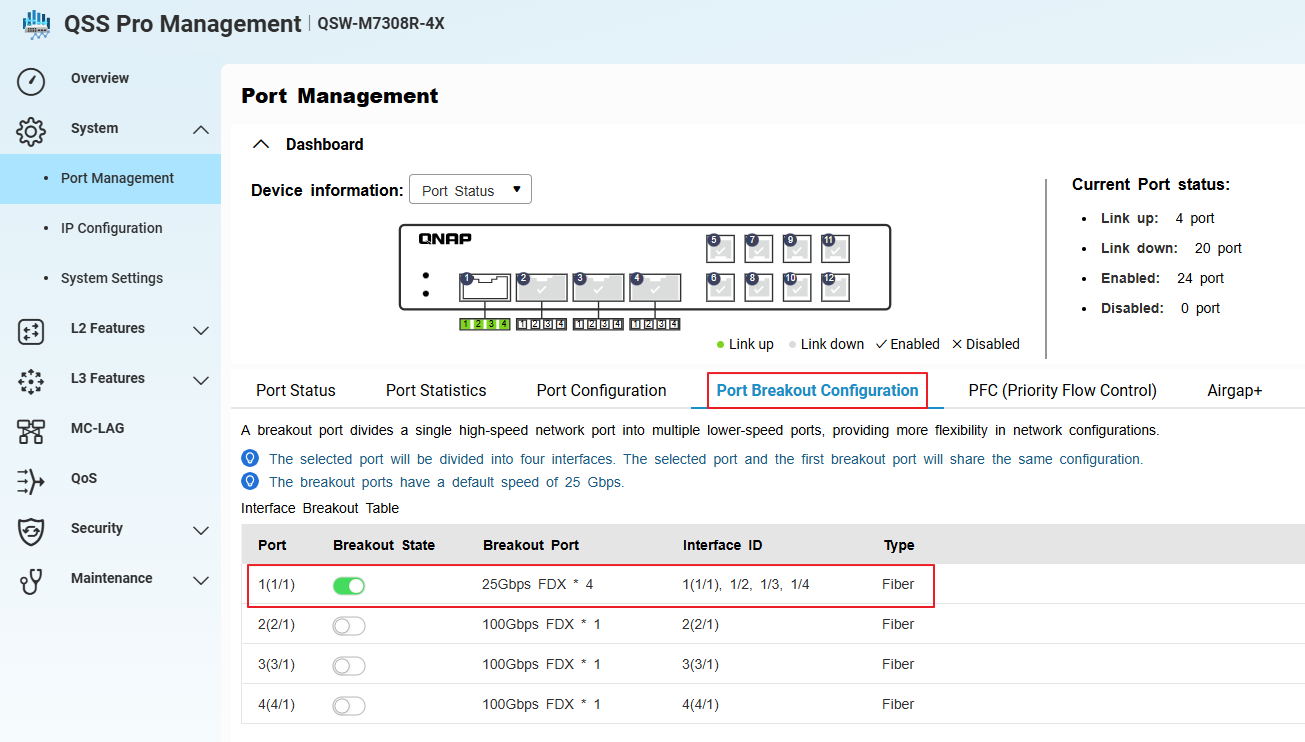
- Go to System > Port Management > Port Configuration.
- Confirm that the system has created four sub-interfaces (virtual ports) for the selected port, each operating at 25GbE.
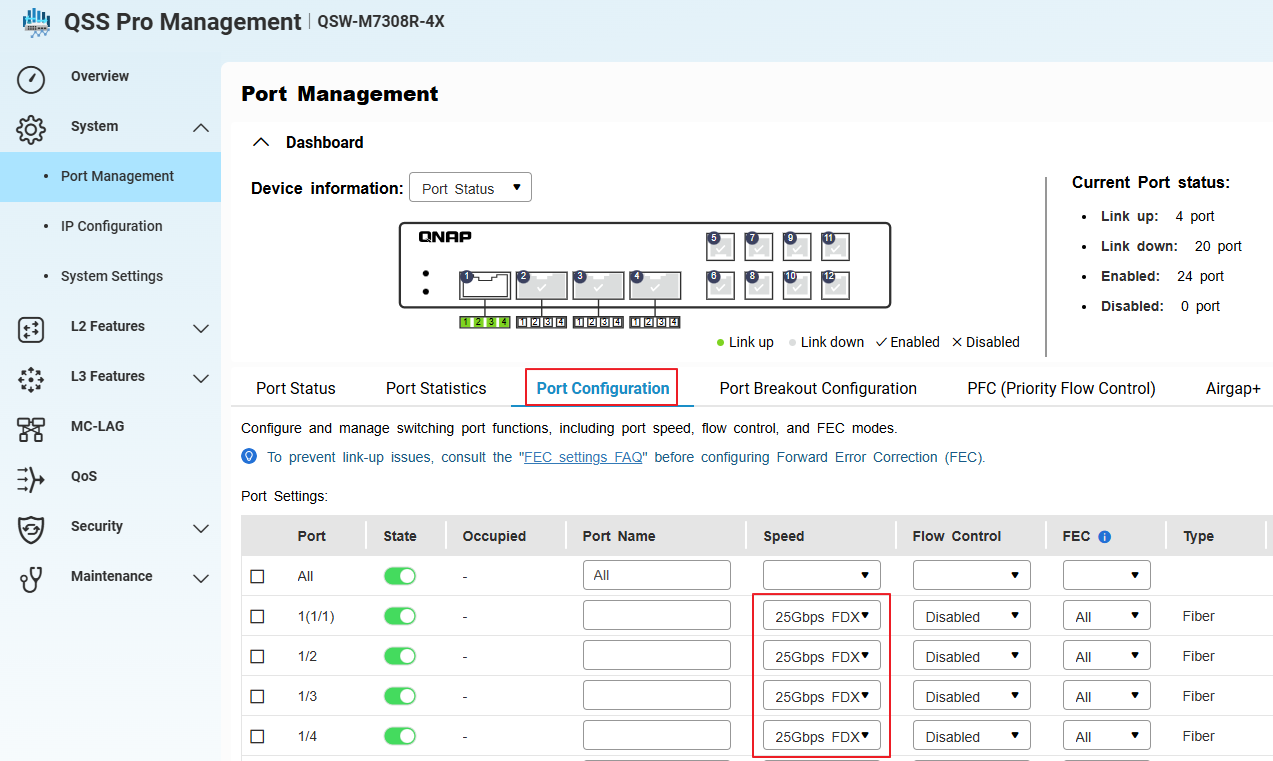
- Install compatible SFP28 modules and connect the 100GbE-to-4x25GbE breakout cable to the QSFP28 port.
- Apply and save the configuration.
Each breakout port will now function as an independent 25GbE interface. Make sure all connected devices, cables, and modules support 25GbE operation.
Procedure: Configuring 40GbE to 4x10GbE breakout or switching from 100GbE to 40GbE breakout
- Physically disconnect any existing 100GbE breakout cable and SFP28 modules from the QSFP28 port. (if any)
- Install a compatible QSFP+ 40GbE breakout cable and SFP+ modules for each intended 10GbE sub-interface.
- In the switch management interface, go to System > Port Management > Port Breakout Configuration.
- Select the same QSFP port (now using a 40GbE cable and modules).
- Enable breakout mode.
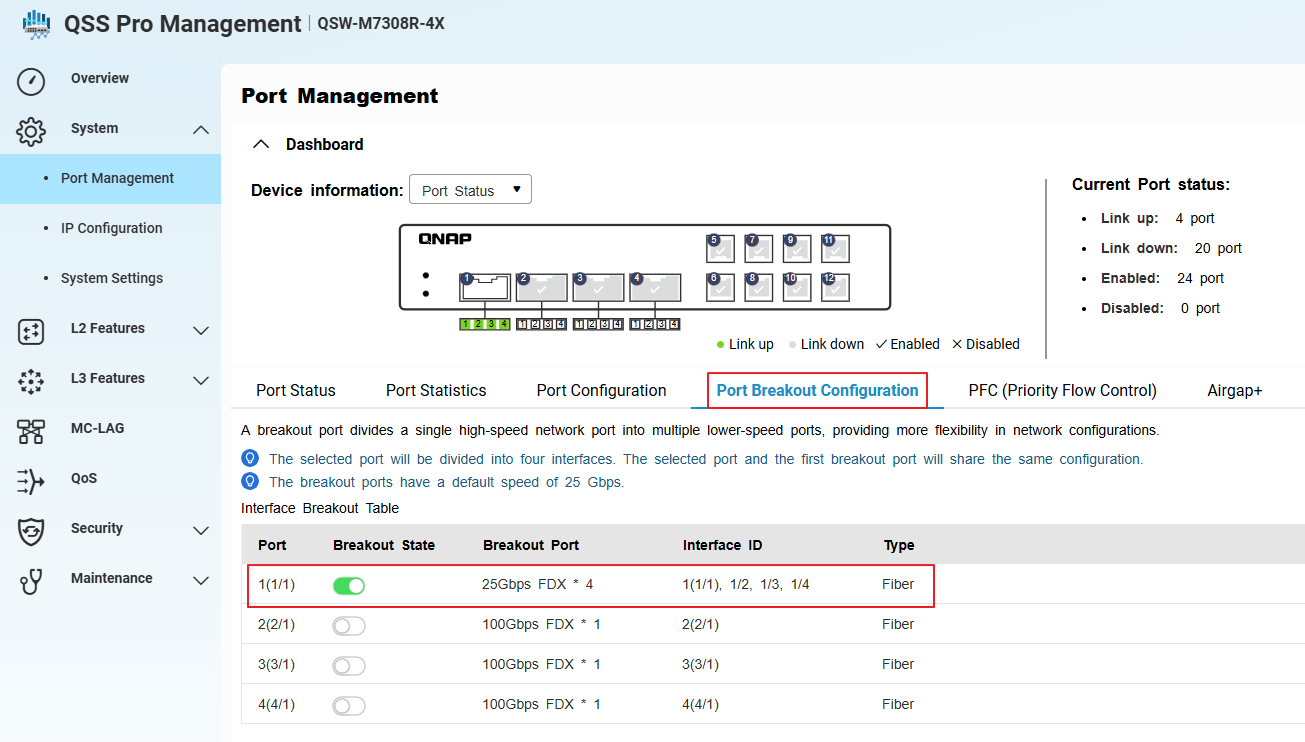
- Go to System > Port Management > Port Configuration.
- Confirm that the system has created four sub-interfaces (virtual ports) for the selected port, each operating at 10GbE.
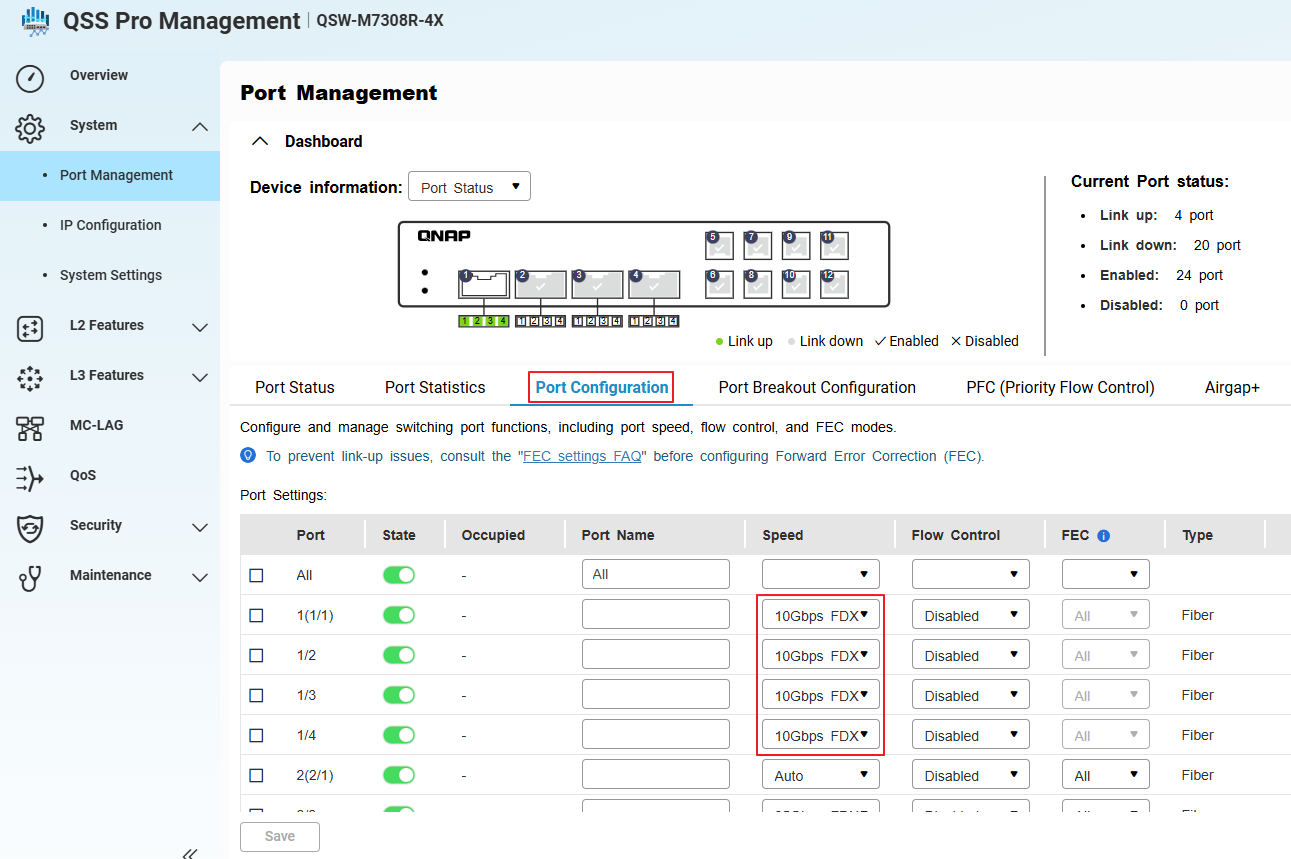
- Apply and save the configuration.
When switching from a 100GbE to 40GbE breakout, always physically replace the cables and modules before reconfiguring in the management interface.
Tip: Verify that all connected devices support 10GbE speeds.
対象製品
概要
ポートブレイクアウトにより、高速 QSFP ポートを複数の低速インターフェースに分割し、QNAP スイッチの柔軟性とポート利用率を向上させます。最も一般的な使用例は、QSFP28 100GbE ポートをブレイクアウトケーブルと互換性のある SFP28 モジュールを使用して、4 つの独立した 25GbE インターフェースに分割することです。
QNAP M7308R-4X は、QSFP+ 40GbE ポートを SFP+ モジュールと適切なブレイクアウトケーブルを使用して、4 つの 10GbE インターフェースに分割することもサポートしています。
注意:ブレイクアウトケーブルは、単一の高速ポートを複数の独立した低速ポートとして機能させる特別なケーブルで、しばしば「サブインターフェース」と呼ばれます。
重要: ブレイクアウトモードの設定や変更はデータトラフィックを中断する可能性があります。スイッチが稼働中の場合、これらの操作は予定されたダウンタイム中に行うことを検討してください。
手順: 100GbE から 4x25GbE へのブレイクアウトの設定
- スイッチ管理インターフェースにログインします。
- 移動先 システム > ポート管理 > ポートブレイクアウト設定。
- 選択する QSFP28 100GbE ブレイクアウトしたいポート。
- ブレイクアウトモードを有効にし、ブレイクアウトオプションとして4x25GbEを選択します。
- 移動先 システム > ポート管理 > ポート設定。
- システムが選択したポートに対して 4 つのサブインターフェース(仮想ポート)を作成し、それぞれが 25GbE で動作していることを確認します。
- 互換性のある SFP28モジュールを接続し、100GbE から 4x25GbE ブレイクアウトケーブルを QSFP28 ポートに接続します。
- 設定を適用して保存します。
各ブレイクアウトポートは、独立した 25GbE インターフェースとして機能します。接続されたすべてのデバイス、ケーブル、モジュールが 25GbE 動作をサポートしていることを確認してください。
手順:40GbE から 4x10GbE ブレイクアウトの設定または 100GbE から 40GbE ブレイクアウトへの切り替え
- 既存の 100GbE ブレイクアウトケーブルと SFP28 モジュールを QSFP28 ポートから物理的に切断します。(ある場合)
- 互換性のあるQSFP+ 40GbEブレイクアウトケーブルとSFP+各予定された 10GbE サブインターフェース用のモジュール。
- スイッチ管理インターフェースで、システム > ポート管理 > ポートブレイクアウト設定に移動します。
- 同じ QSFP ポートを選択します(現在 40GbE ケーブルとモジュールを使用しています)。
- ブレイクアウトモードを有効にします。
- 移動しますシステム > ポート管理 > ポート設定。
- システムが選択されたポートに対して 4 つのサブインターフェース(仮想ポート)を作成し、それぞれが 10GbE で動作していることを確認します。
- 設定を適用して保存します。
100GbE から 40GbE ブレイクアウトに切り替える際は、管理インターフェースで再設定する前に、常にケーブルとモジュールを物理的に交換してください。
ヒント:接続されたすべてのデバイスが 10GbE 速度をサポートしていることを確認してください。


