


What are the additional ports on the QSW managed switch series?
Last modified date:
2023-02-13
Applicable Products
- QSW-M2106-4C
- QSW-M2106-4S
- QSW-M2106PR-2S2T
- QSW-M2106R-2S2T
- QSW-M408-4C
- QSW-M408-2C
- QSW-M408S
- QSW-M1208-8C
- QSW-M1204-4C
- QSW-M804-4C
- QSW-M5216-1T
- QSW-IM1200-8C
- QSW-M2108-2C
- QSW-M2108-2S
- QSW-M2108R-2C
- QSW-M2116P-2T2S
Answer
| Port | Description |
|---|---|
| Console port | Certain QSW managed switches are equipped with a console port (serial RS-232 port), which can be used specifically to access the command line interface (CLI) for diagnostic purposes. |
| Management (MGMT) port | The management port on the managed switch can be used exclusively to access the QSS interface. |
You can refer to the following table to distinguish between console and management ports in your QSW managed switch.
| Port Name | Port Image | Desktop Models | Rackmount Models |
|---|---|---|---|
| Console port |  | QSW-M2106-4C QSW-M2106-4S QSW-M408-4C QSW-M408-2C QSW-M408S | QSW-M2108-2C QSW-M2108-2S |
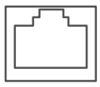 | - | QSW-M2106PR-2S2T QSW-M2106R-2S2T | |
 | - | QSW-M2108-8C QSW-M2108-4C QSW-M804-4C QSW-M5216-1T QSW-IM1200-8C | |
| Maintenance port |  | - | QSW-M1208-8C QSW-1204-4C QSW-M804-4C QSW-M5216-1T QSW-IM1200-8C QSW-M2108R-2C QSW-M2116P-2T2S |
For further assistance, ask other users and QNAP experts in the community. Go to QNAP Community


