


How do I get NAS iSCSI LUN OID info from the NAS "NAS.mib" file
Last modified date:
2022-06-24
Applicable Products:
Download NAS MIB file from NAS Control Panel > SNMP page first, then download MIB browser tool to open NAS MIB file,
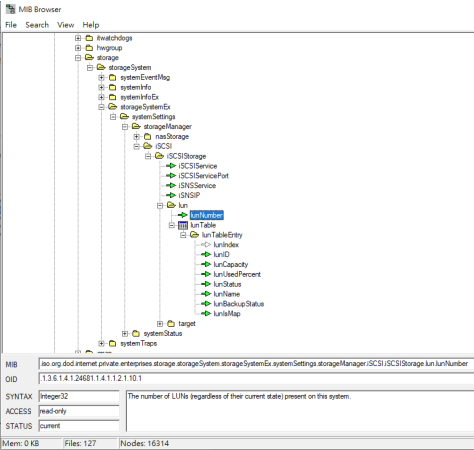
Use MIB browser to open NAS MIB file, click “Search” > “Find name”, type “LUN” to find NAS “lunTable”. The MIB Browser tool will show NAS iSCSI LUN OID info in lunTable.
MIB Browser tool can be downloaded here.
- All NAS Series
Download NAS MIB file from NAS Control Panel > SNMP page first, then download MIB browser tool to open NAS MIB file,
Use MIB browser to open NAS MIB file, click “Search” > “Find name”, type “LUN” to find NAS “lunTable”. The MIB Browser tool will show NAS iSCSI LUN OID info in lunTable.
MIB Browser tool can be downloaded here.
For further assistance, ask other users and QNAP experts in the community. Go to QNAP Community


