ADRA NDR Standalone
ADRA NDR Standalone is a network security solution built for SMEs, instantly transforming your QNAP NAS into an enterprise-grade Network Detection and Response (NDR) center. Simply connect a compatible QNAP switch to automatically identify malicious behaviors and isolate high-risk devices before threats escalate.
System Requirements
Hardware
- NAS device: Supports X73A series or higher models. (See the list below.)
- Switch: QNAP switch with NDR mode support. (See the list below.)
- Network Interface Card: Recommended to install 10GbE or higher expansion cards. (See the list below.)
Software Version
- QTS or QuTS hero 5.2.x
Important
The current version does not support High Availability (HA) architecture, which means ADRA NDR Standalone cannot be installed on QTS or QuTS hero 5.3.x.
Account Permissions
- Administrator User Group privileges required
Network Configuration
- NAS requires at least two physical network ports:
- One for management (Management Port)
- One for receiving mirrored traffic from the switch (Mirrored Port)
Step 1: Install ADRA NDR Standalone
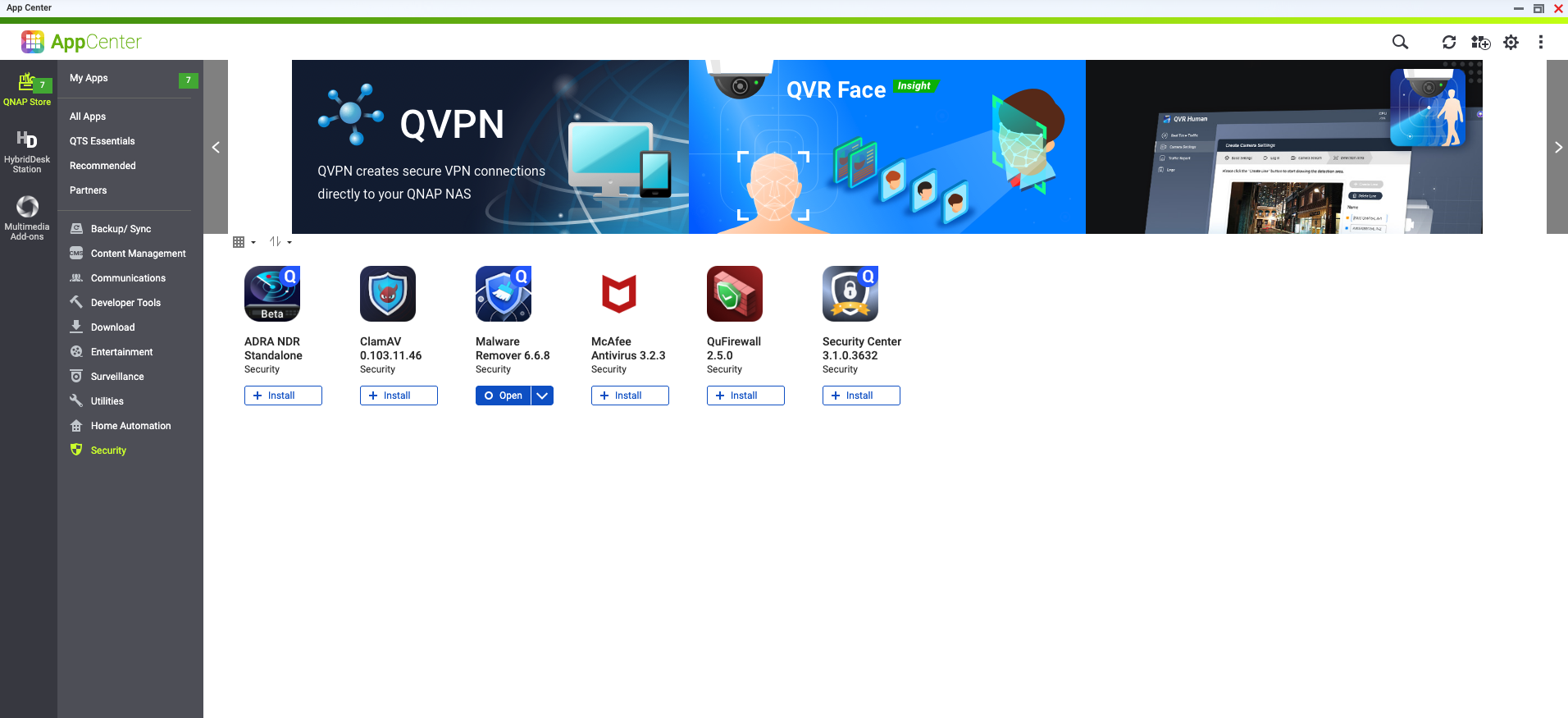
- Log in to the QTS/QuTS hero management interface.
- Open App Center.
- Enter "ADRA NDR Standalone" in the search bar, or find the application in the "Security" category.
- Click "Install".
Step 2: Register QNAP Switch
After installation, you need to register the switch to establish an analysis channel.
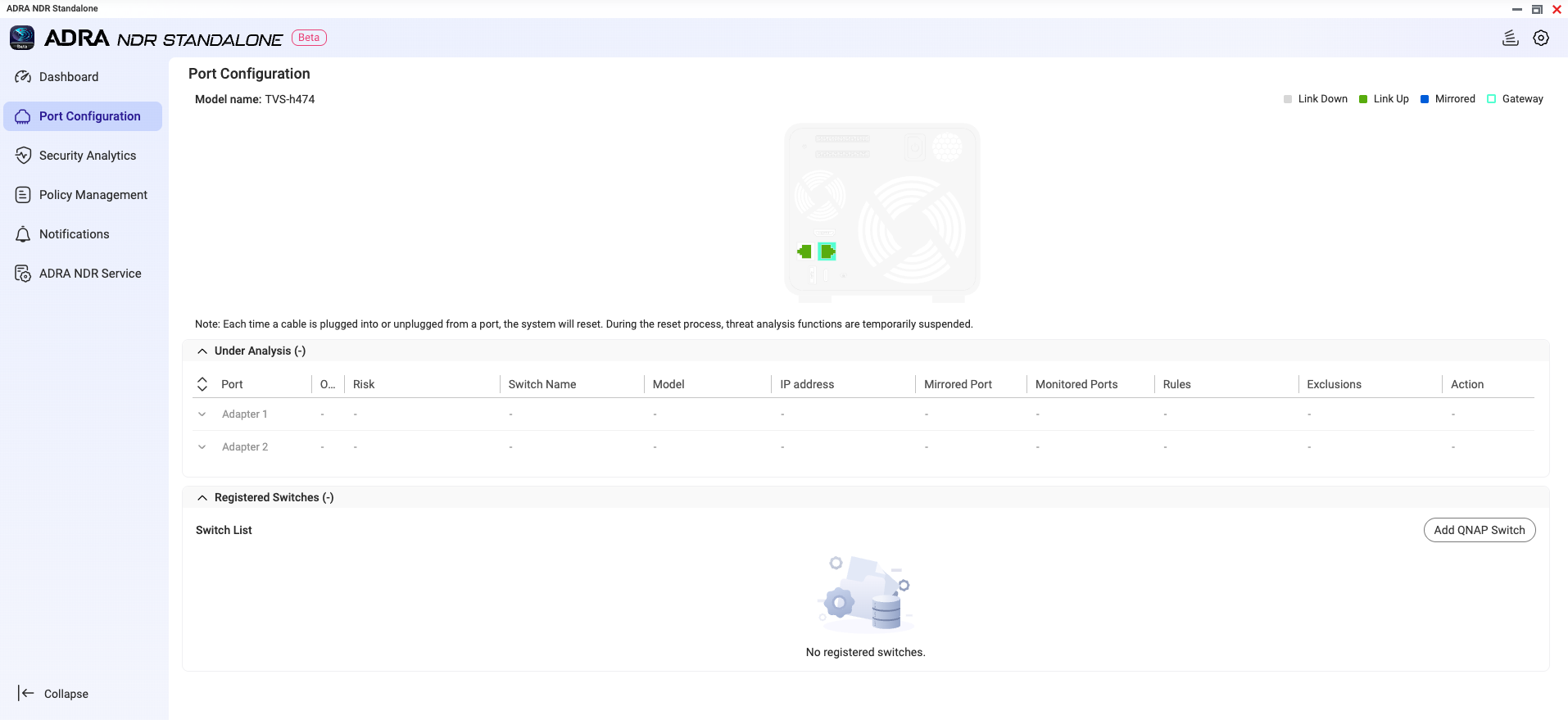
- Open the ADRA NDR Standalone application.
- Navigate to "Port Configuration" page.
- Click "Add QNAP Switch".
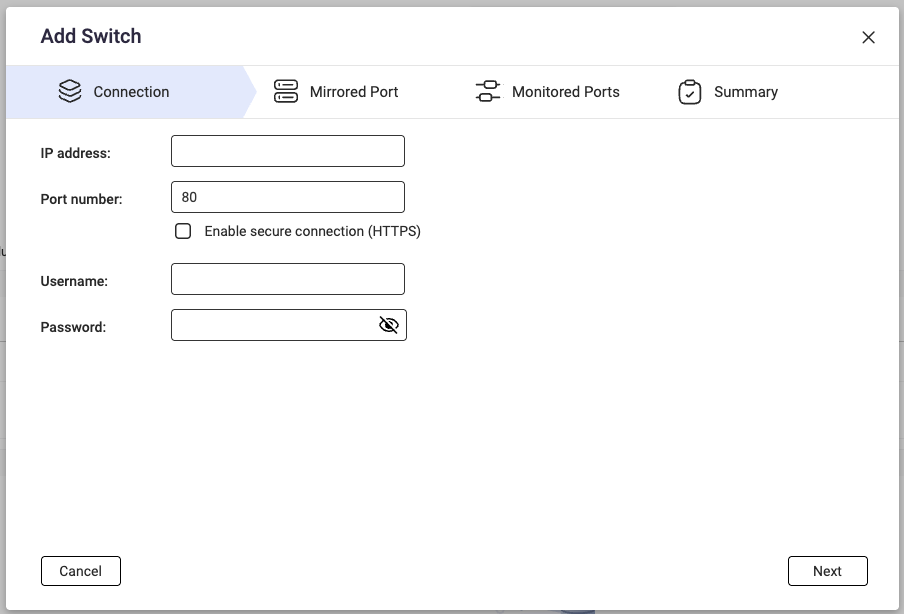
- Enter the switch connection information:
- IP Address
- Port Number
- Username
- Password
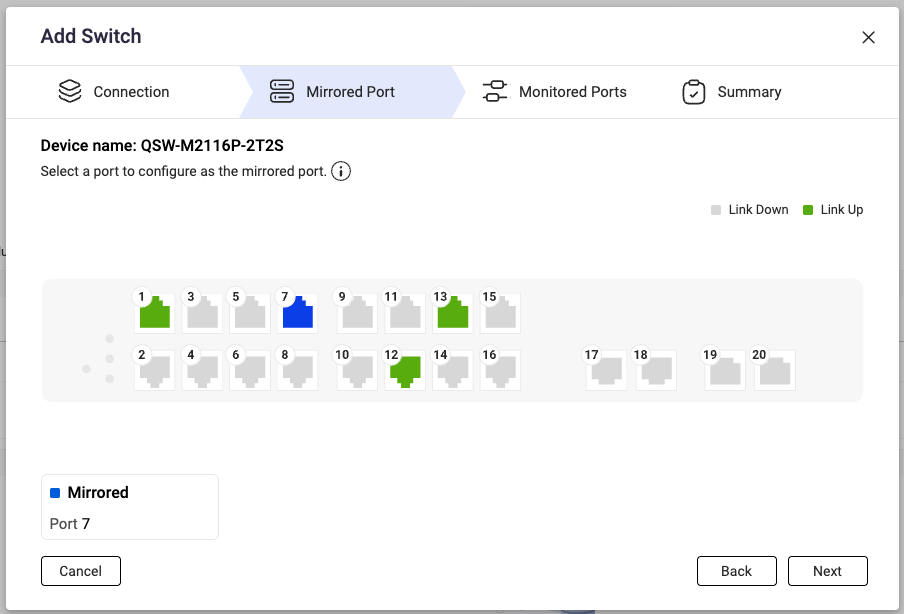
- Select the switch's Mirrored Port (the interface used to mirror traffic to the NAS).
- Select the interfaces to monitor (Monitored Ports).
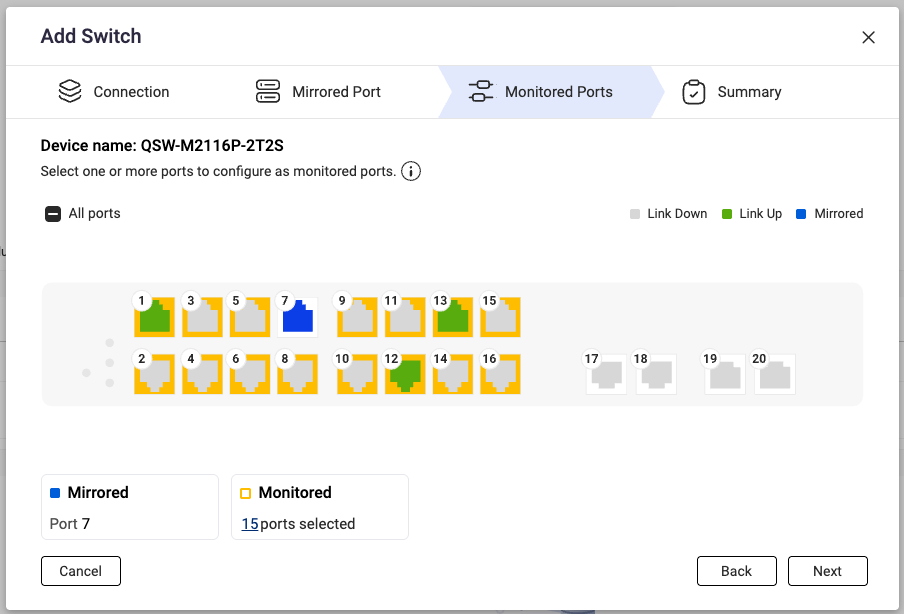
- After successful registration, the system will display a confirmation message. You can click "Configure now" to proceed to configure rules and exclusions.
Step 3: Connect Physical Network Cable
After completing switch registration, use a network cable to connect the switch's Mirrored Port to the NAS to begin receiving traffic for analysis.
Other Configuration (Optional)
Rules
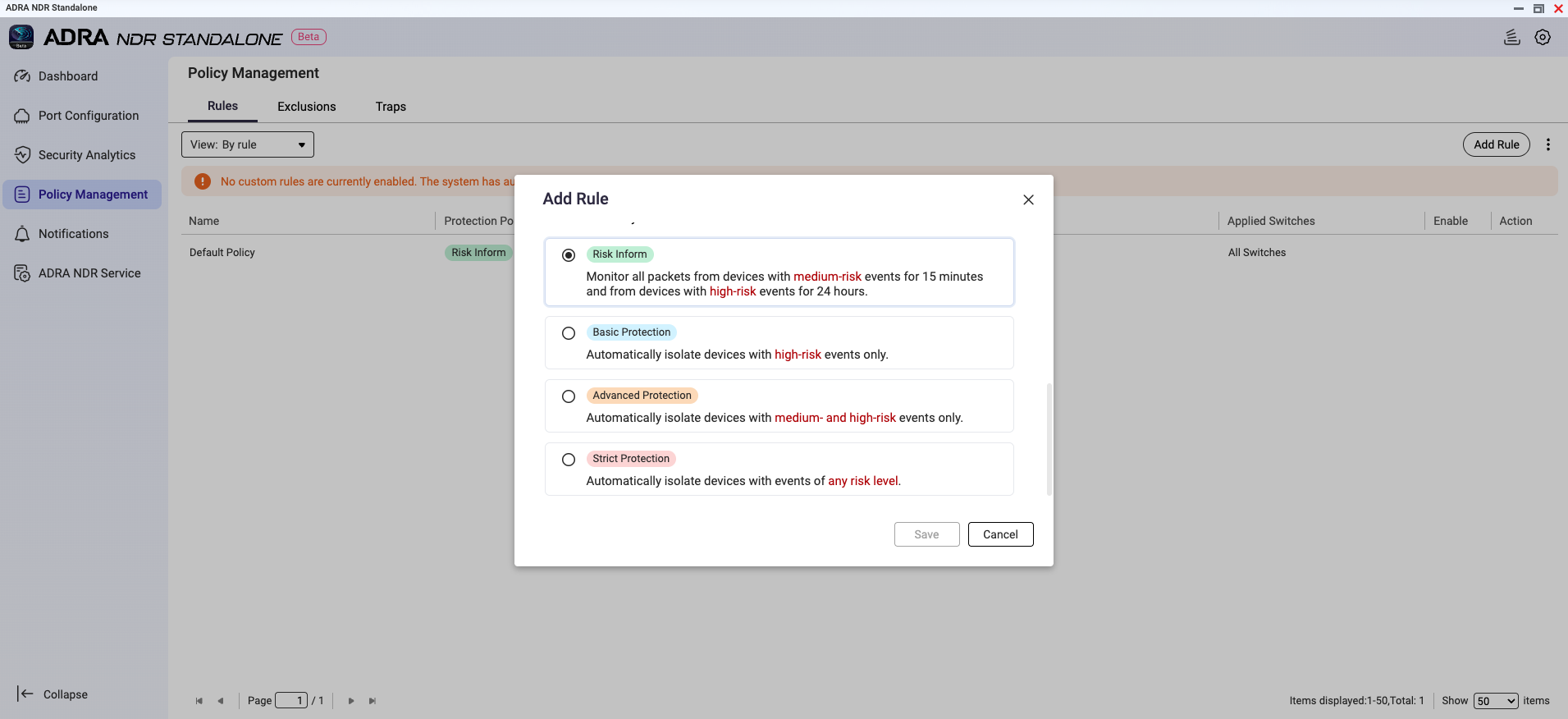
ADRA NDR Standalone provides multiple protection policies. You can select the appropriate rule based on your organization's risk tolerance.
- Navigate to "Policy Management" > "Rules".
- Select one of the following protection policies:
- Strict Protection: Automatically blocks all potentially risky devices
- Advanced Protection: Automatically blocks medium and high-risk devices
- Basic Protection: Automatically blocks high-risk devices only
- Risk Inform: Only sends alert notifications without actively intervening connections (suitable for observation period during initial deployment)
Exclusion List
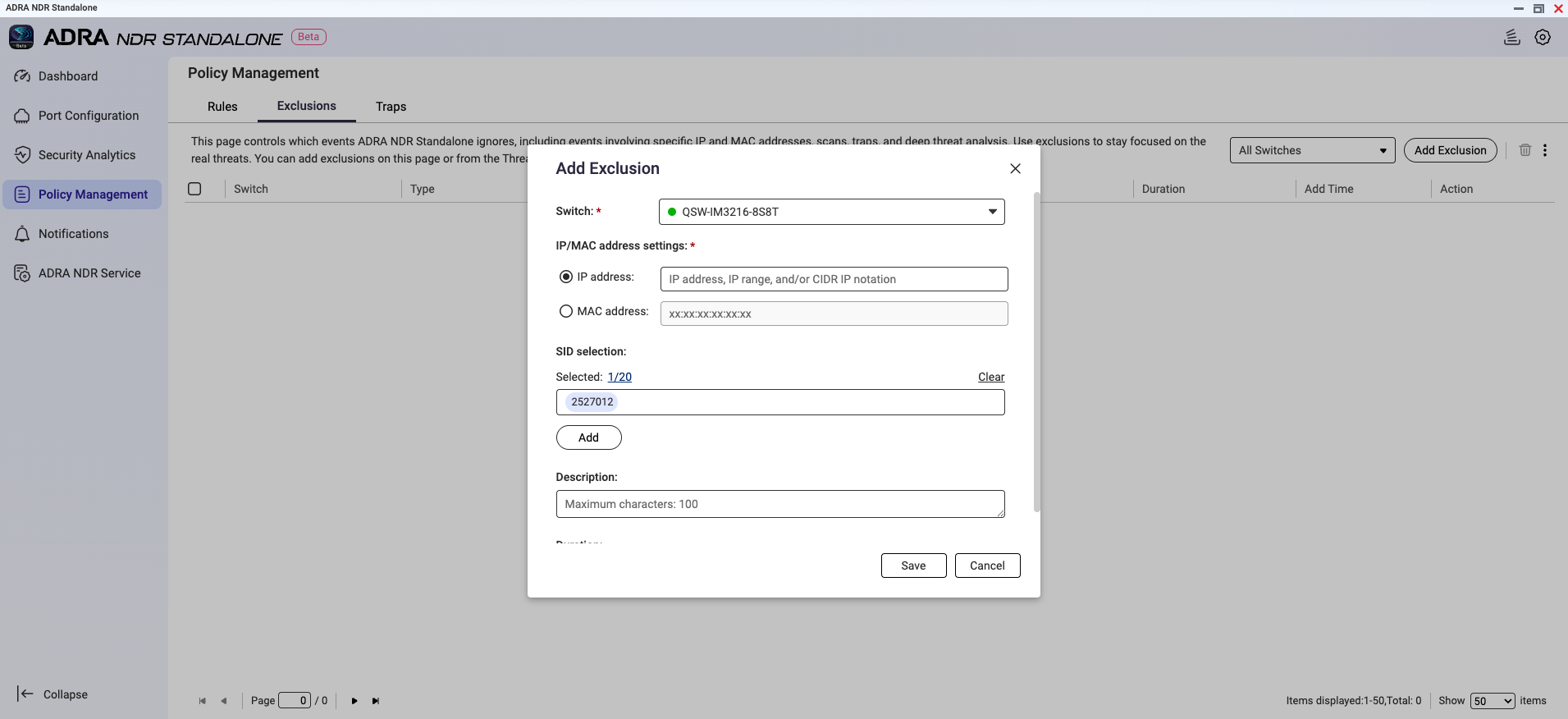
To avoid false alarms from specific devices or events, you can configure an exclusion list.
- Navigate to "Policy Management" > "Exclusions".
- Add devices to exclude or select specific SIDs for granular exclusions.
Traps
ADRA NDR Standalone features built-in honeypot technology that can create virtual traps in your internal network to detect potential attackers.
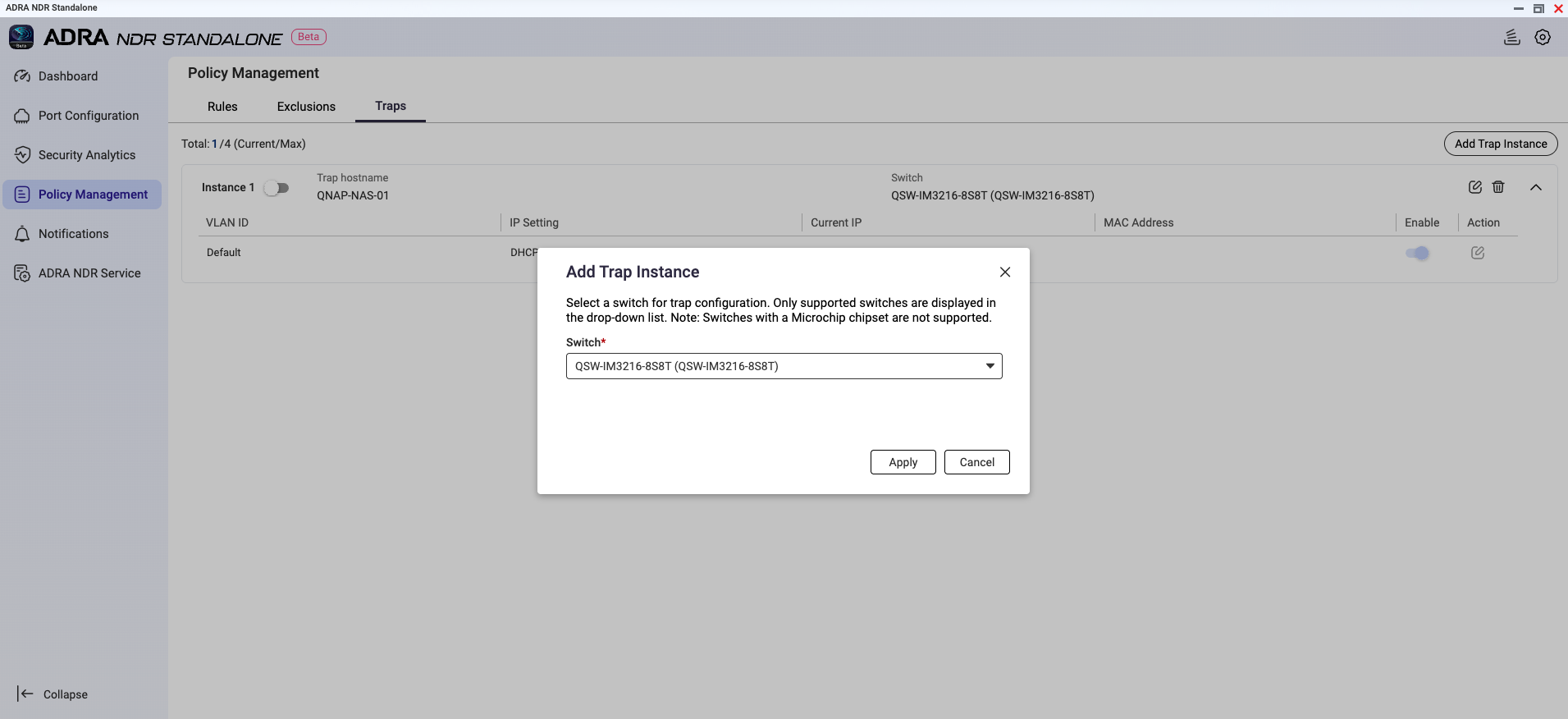
- Navigate to "Policy Management" > "Traps".
- Select a switch to configure trap instances.
Important
QSW-M2116P-2T2S does not support trap configuration due to chipset limitations.
- Once a device accesses these non-existent IPs, the system will identify it as a potential attacker and issue an alert.
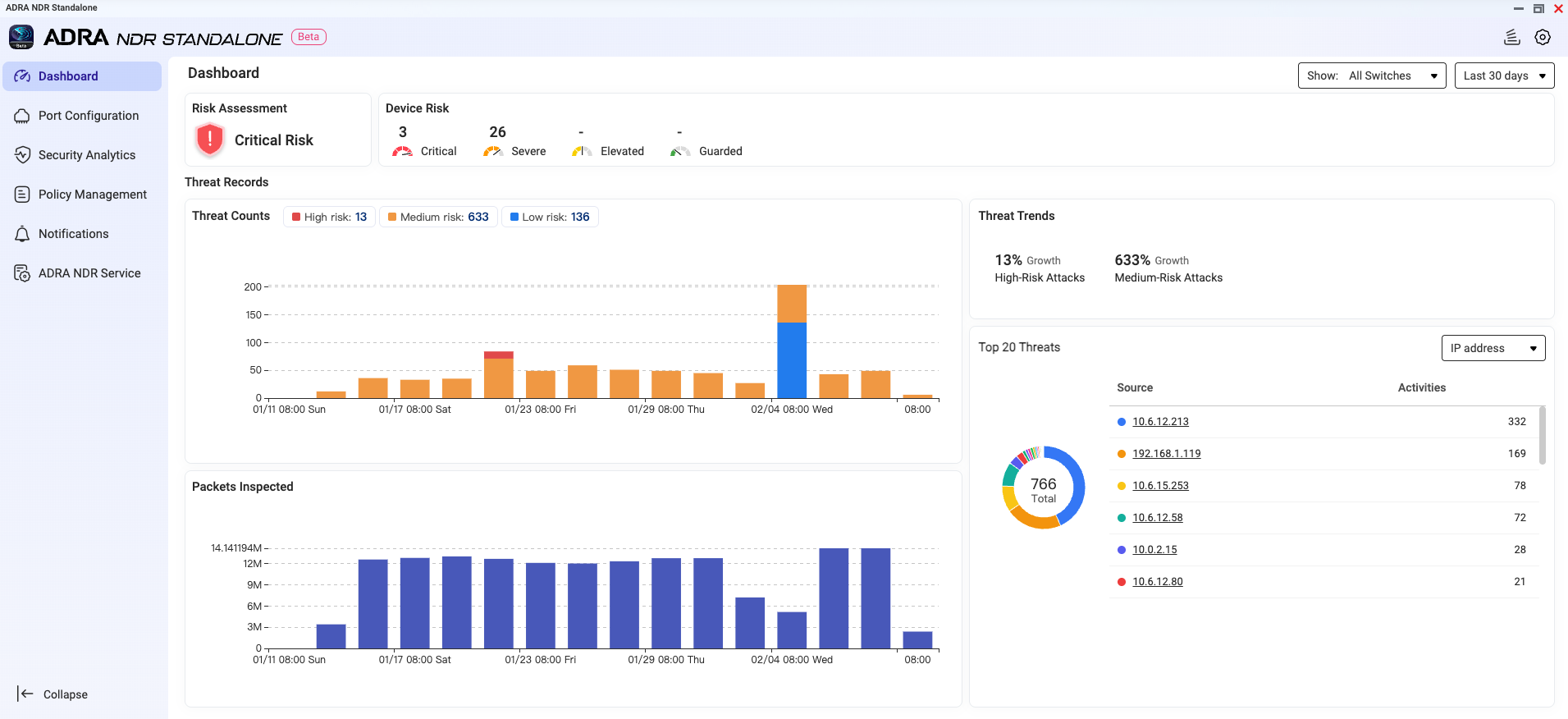
Monitor Dashboard
After completing all configurations, you can monitor your internal network's security status in real-time through the Dashboard.
The dashboard displays:
- Current environment risk level
- Number of detected risky devices
- Recent threat event trends
Frequently Asked Questions
Q: Why can't I find ADRA NDR Standalone in App Center?
A: Please verify the following:
- Your NAS model is in the supported list
- Operating system has been updated to QTS/QuTS hero 5.2.x
- Your account has Administrator privileges
Q: What are Mirrored Port and Monitored Port?
A: Monitored Port is the interface on the switch where traffic needs to be monitored. Mirrored Port is the interface that copies traffic from Monitored Ports and sends it to the NAS.
Q: Does it support High Availability (HA) architecture?
A: Currently, v0.9.0 Beta does not support HA architecture, which means ADRA NDR Standalone cannot be installed on QTS or QuTS hero 5.3.x.
Support NAS Model
| TS-473A / TS-673A / TS-873A / TS-h973AX |
| TS-1273AU-RP / TS-1273AU / TS-1673AU-RP / TS-873AU-RP / TS-873AU / TS-873AeU-RP / TS-873AeU |
| TVS-h474 / TVS-h674 / TVS-h874 / TVS-h474X / TVS-h674T / TVS-h674X / TVS-h874T / TVS-h874X |
| TS-1277 / TS-1677X / TS-677 / TS-877 |
| TS-1277XU-RP / TS-1277XU / TS-1677XU-RP / TS-1677XU / TS-2477XU-RP / TS-2477XU / TS-877XU-RP / TS-877XU / TS-h977XU-RP / TS-h977XU |
| TVS-1282 / TVS-682 / TVS-882 / TVS-882BR |
| TS-h1283XU-RP / TS-1283XU-RP / TS-1283XU / TS-h1683XU-RP / TS-1683XU-RP / TS-1683XU / TS-h2483XU-RP / TS-2483XU-RP / TS-2483XU / TS-883XU-RP/ TS-883XU / TS-983XU-RP / TS-983XU |
| TES-1885U / TES-3085U / TS-h1886XU R2 / TS-h1886XU-RP R2 / TS-1886XU-RP / TS-1886XU |
| TS-h1887XU-RP / TS-h1887XU / TS-h2287XU-RP / TS-h2287XU / TS-h3087XU-RP / TS-h3087XU / TS-h987XU-RP / TS-h987XU |
| TS-2888X / TVS-h1288X / TVS-h1688X |
| TS-h3088XU-RP / TS-3088XU-RP / TS-h3088XU |
| TDS-h2489FU R2 / TDS-h2489FU |
| QAI-h1290FX / TS-h1290FX |
| TS-h1090FU / TS-h2490FU |
Compatible QNAP Switch
| QSW-M2116P-2T2S |
| QSW-M3212R-8S4T / QSW-M3216R-8S8T / QSW-IM3216-8S8T / QSW-M3224-24T |
| QSW-M7308R-4X |
Compatible Network Interface Card
QXG-100G2SF-E810
|
QXG-25G2SF-E810
|
QXG-10G2SF-NXE
|
QXG-ES10G1T
|
QXG-10G1T
|
QXG-10G1TB
|
QM2-10G2T
|
QM2-2P10G1TB
|
QXG-2G4T-I225
|
ADRA NDR 獨立版
ADRA NDR 獨立版是一款為中小企業打造的網路安全解決方案,能夠立即將您的 QNAP NAS 轉變為企業級的網路偵測與回應 (NDR) 中心。只需連線相容的 QNAP 交換器,即可自動識別惡意行為並在威脅升級前隔離高風險裝置。
系統需求
硬體
- NAS 裝置:支援 X73A 系列或更高型號。(請參閱下方清單。)
- 交換器:支援 NDR 模式的 QNAP 交換器。(請參閱下方清單。)
- 網路介面卡:建議安裝 10GbE 或更高的擴充卡。(請參閱下方清單。)
軟體版本
- QTS 或 QuTS hero 5.2.x
重要
目前版本不支援高可用性 (HA) 架構,這意味著 ADRA NDR 獨立版無法安裝在 QTS 或 QuTS hero 5.3.x 上。
帳號許可權
網路配置
- NAS 需要至少兩個實體網路埠:
- 一個用於管理(管理埠)
- 一個用於接收來自交換器的映象流量(映象埠)
步驟 1:安裝 ADRA NDR 獨立版
- 登入 QTS/QuTS hero 管理介面。
- 開啟App Center。
- 在搜尋欄中輸入 "ADRA NDR 獨立版",或在"Security" 類別中找到該應用程式。
- 點擊 "安裝"。
步驟 2:註冊 QNAP 交換器
安裝後,您需要註冊交換器以建立分析通道。
- 開啟 ADRA NDR 獨立版應用程式。
- 瀏覽至「Port Configuration」頁面。
- 按一下「Add QNAP Switch」。
- 輸入交換器連線資訊:
- IP 位址
- 埠號
- 使用者名稱
- 密碼
- 選擇交換器的Mirrored Port (用於將流量鏡像到 NAS 的介面)。
- 選擇要監控的介面(Monitored Ports)。
- 註冊成功後,系統會顯示確認訊息。您可以按一下「Configure now」以繼續配置規則和排除項目。
步驟 3:連線實體網路線
完成交換器註冊後,使用網路線將交換器的 Mirrored Port 連線到 NAS,以開始接收流量進行分析。
其他設定(選用)
規則
ADRA NDR Standalone 提供多種保護政策。您可以根據組織的風險承受能力選擇適當的規則。
- 瀏覽至「Policy Management」>「Rules」。
- 選擇以下其中一種保護政策:
- 嚴格保護:自動封鎖所有潛在風險裝置
- 進階保護:自動封鎖中高風險裝置
- 基本保護:僅自動封鎖高風險裝置
- 風險通知:僅傳送警示通知,不主動幹預連線(適合初始部署的觀察期)
排除清單
為避免特定裝置或事件的誤報,您可以配置排除清單。
- 瀏覽至「Policy Management」>「Exclusions」。
- 新增要排除的裝置或選擇特定 SID 以進行細緻排除。
陷阱
ADRA NDR Standalone 具備內建蜜罐技術,可在內部網路中建立虛擬陷阱以偵測潛在攻擊者。
- 瀏覽至「Policy Management」>「Traps」。
- 選擇一個交換器以配置陷阱例項。
重要
由於晶片組限制,QSW-M2116P-2T2S 不支援陷阱配置。
- 一旦裝置訪問這些不存在的 IP,系統將識別其為潛在攻擊者並發出警報。
監控儀表板
完成所有配置後,您可以透過儀表板即時監控內部網路的安全狀態。
儀表板顯示:
- 當前環境風險等級
- 檢測到的風險裝置數量
- 近期威脅事件趨勢
常見問題
問:為什麼我在 App Center 中找不到 ADRA NDR Standalone?
答:請確認以下事項:
- 您的 NAS 型號在支援清單中
- 作業系統已更新至 QTS/QuTS hero 5.2.x
- 您的帳戶具有系統管理員權限
問:什麼是映象埠和監控埠?
答:監控埠是交換機上需要監控流量的介面。鏡像埠是從監控埠複製流量並將其發送到 NAS 的介面。
問:是否支援高可用性 (HA) 架構?
答:目前,v0.9.0 Beta 不支援 HA 架構,這意味著 ADRA NDR Standalone 無法安裝在 QTS 或 QuTS hero 5.3.x 上。
支援的 NAS 型號
| TS-473A / TS-673A / TS-873A / TS-h973AX |
| TS-1273AU-RP / TS-1273AU / TS-1673AU-RP / TS-873AU-RP / TS-873AU / TS-873AeU-RP / TS-873AeU |
| TVS-h474 / TVS-h674 / TVS-h874 / TVS-h474X / TVS-h674T / TVS-h674X / TVS-h874T / TVS-h874X |
| TS-1277 / TS-1677X / TS-677 / TS-877 |
| TS-1277XU-RP / TS-1277XU / TS-1677XU-RP / TS-1677XU / TS-2477XU-RP / TS-2477XU / TS-877XU-RP / TS-877XU / TS-h977XU-RP / TS-h977XU |
| TVS-1282 / TVS-682 / TVS-882 / TVS-882BR |
| TS-h1283XU-RP / TS-1283XU-RP / TS-1283XU / TS-h1683XU-RP / TS-1683XU-RP / TS-1683XU / TS-h2483XU-RP / TS-2483XU-RP / TS-2483XU / TS-883XU-RP/ TS-883XU / TS-983XU-RP / TS-983XU |
| TES-1885U / TES-3085U / TS-h1886XU R2 / TS-h1886XU-RP R2 / TS-1886XU-RP / TS-1886XU |
| TS-h1887XU-RP / TS-h1887XU / TS-h2287XU-RP / TS-h2287XU / TS-h3087XU-RP / TS-h3087XU / TS-h987XU-RP / TS-h987XU |
| TS-2888X / TVS-h1288X / TVS-h1688X |
| TS-h3088XU-RP / TS-3088XU-RP / TS-h3088XU |
| TDS-h2489FU R2 / TDS-h2489FU |
| QAI-h1290FX / TS-h1290FX |
| TS-h1090FU / TS-h2490FU |
相容的 QNAP 交換器
| QSW-M2116P-2T2S |
| QSW-M3212R-8S4T / QSW-M3216R-8S8T / QSW-IM3216-8S8T / QSW-M3224-24T |
| QSW-M7308R-4X |
相容的網路介面卡
QXG-100G2SF-E810
|
QXG-25G2SF-E810
|
QXG-10G2SF-NXE
|
QXG-ES10G1T
|
QXG-10G1T
|
QXG-10G1TB
|
QM2-10G2T
|
QM2-2P10G1TB
|
QXG-2G4T-I225
|


