


Why do I get the error message “This NAS is not on the QNAP ID list” after signing in my QNAP ID in a mobile APP?
最後修訂日期:
2022-06-24
Applicable products:
- All NAS series
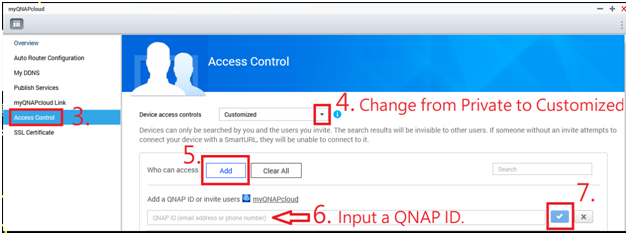
First, please use the admin account to log into your NAS web administration interface > myQNAPlcoud > check what the QNAP ID is in use. Is it the same one as used in the mobile APP?

If it’s different from the one used in the mobile APP, please follow the steps in the pictures below to add the QNAP ID into the NAS.
需要進一步協助,歡迎前往官方社群發文,與其他用戶及 QNAP 專家交流。 前往 QNAP 官方社群


