I would like to set the system for only alarm (motion) recordings. How do I disable continuously recording?
Date de la dernière modification :
2022-03-30
Applied products:
VioStor NVR, Surveillance Station and QVR Pro
Applied firmware:
All QVR and QTS
Scenarios:
I would like to set the system for only alarm (motion) recordings. How do I not continuously record? In Event Management I have checked the "Enable Alarm Recording" box. How do I disable continuous recording?
Solution:
On the VioStor NVR and Surveillance Station, you can refer to the picture below to disable the “schedule recording” option.
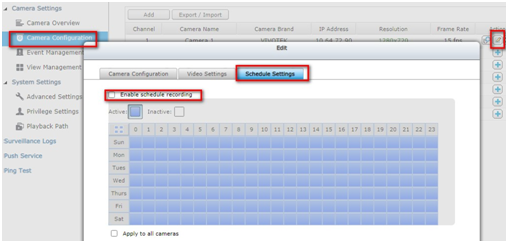
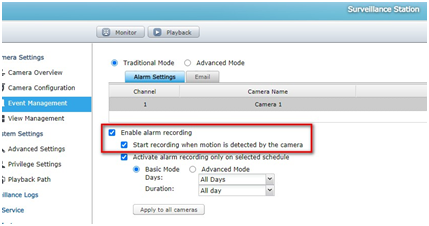
Then the “alarm recording option” and “when motion is detected” options must be enabled, you will get the alarm (motion) recording only.
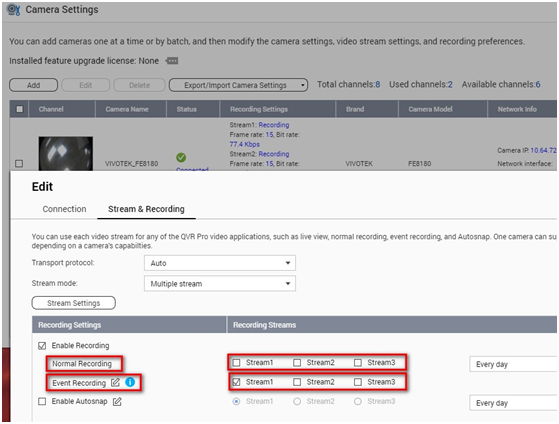
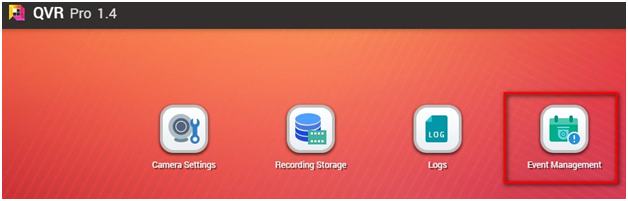
On QVR Pro, you can disable all streams (if have) of Normal Recording. Then enable the stream option of Event Recording and add an event rule in Event Management.