Applicable Products
QTS, QuTS hero
Introduction
All NAS devices have the default system administrator account "admin". This "admin" account can configure settings, create users, and install applications. This account cannot be deleted and depending on your QTS/QuTS hero version may be disabled by default. To protect your system from malicious attacks, we recommend creating a new administrator account and disable the "admin" account. A new administrator account can perform the same actions as the "admin" account and helps keep your device secure.
To comply with the EU’s cybersecurity requirements, manufacturers must avoid universal default credentials. Corresponding EU/industry standards require no universal default passwords, mandating unique per-device credentials or enforcing a password change on first use. Accordingly, starting with QTS/QuTS hero 5.2.0, the default administrator password was changed to the device’s Cloud Key (earlier versions used the first NIC’s MAC; much older versions used admin/admin), aligning with these requirements.
Details
QTS/QuTS hero 5.2.0 and later (such as 5.2.x, 5.3.x, 6.0.0)
Warning
The default "admin" account is disabled by default but will be automatically enabled after a system reset or system restore. To protect your system from malicious attacks, it is recommended to create a new administrator account and disable the default administrator account "admin".
The following default system administrator account is used:
- Username: admin
- Password: The Cloud Key of your device in uppercase letters and without any special characters. For example, if the Cloud Key is Q1234-5678, the password is Q12345678
Finding your device's Cloud Key
You can find the Cloud Key of your device with any of the following methods:
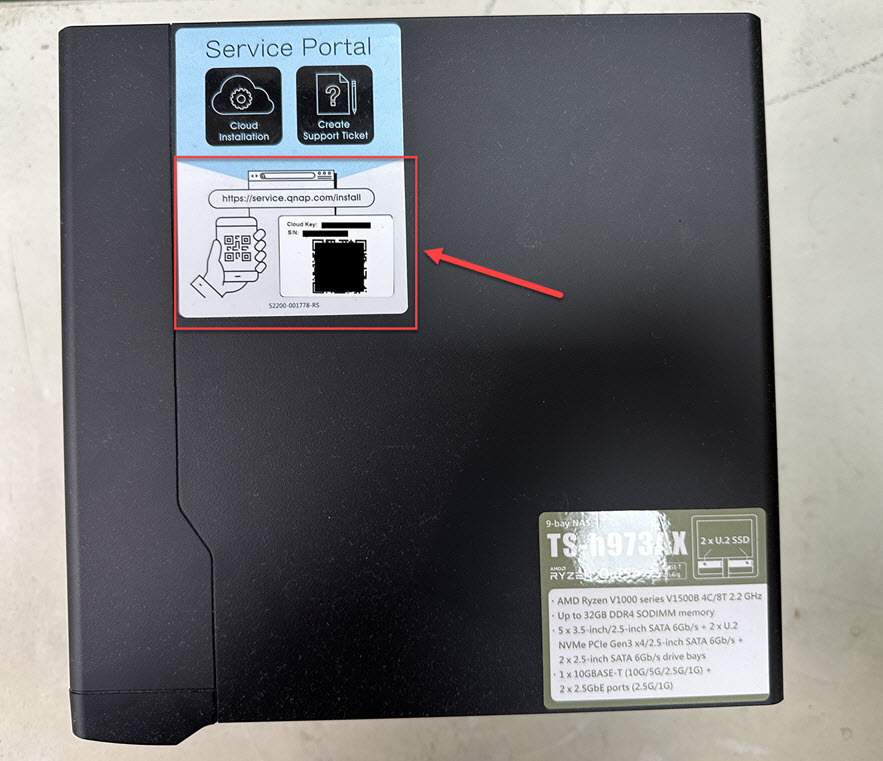
Method A: From the device sticker or the Quick Installation Guide
You can find your Cloud Key from the sticker attached to the cover of your NAS or from the Quick Installation Guide that comes with your NAS.
Method B: Use Qfinder Pro
- Use Qfinder Pro without a NAS user account:
- Power off your NAS.
- Remove all hard drives from your NAS.
- Remove all internal M.2 SSDs and QM2 PCIe expansion card if any.
- Power on your NAS.
- Download and install Qfinder Pro.
- Open Qfinder Pro.
- Select your device.
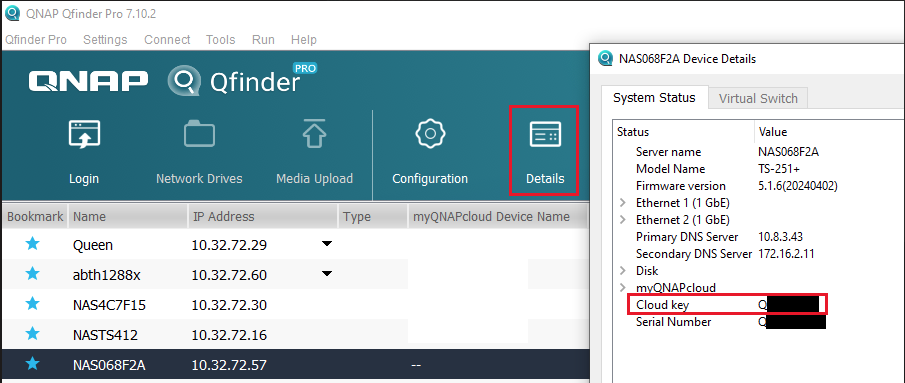
- Click Details.
- The Device Details window appears.
Your device's Cloud Key is displayed in the Device Details window.
- Use Qfinder Pro with a NAS user account:
- Download and install Qfinder Pro.
- Open Qfinder Pro.
- Select your device.
- Click Details.
The Login window appears. Enter your NAS account username and password and click OK.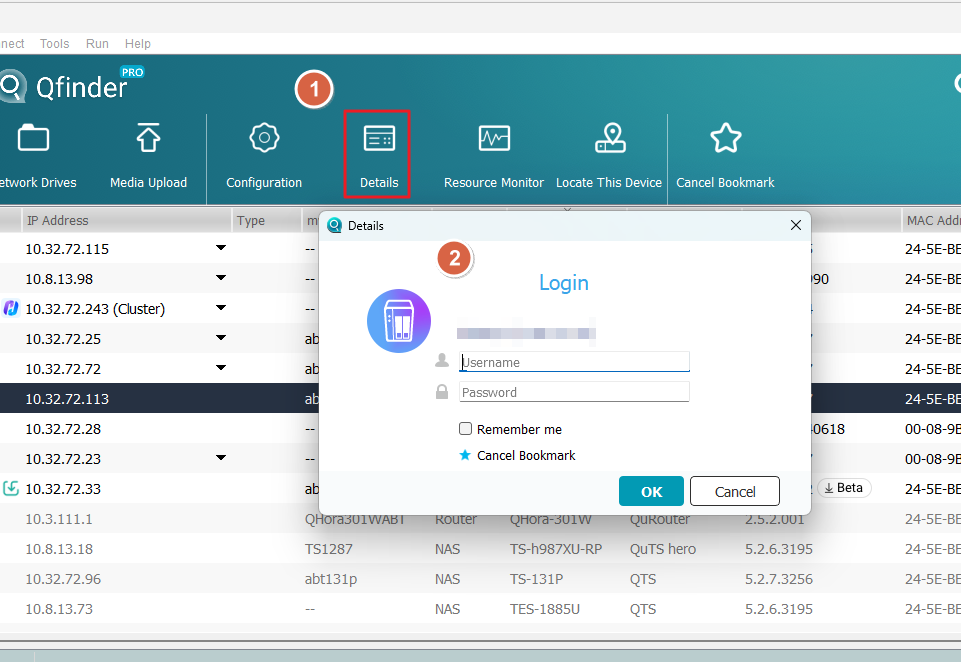
- The Device Details window appears.
Your device's Cloud Key is displayed in the Device Details window.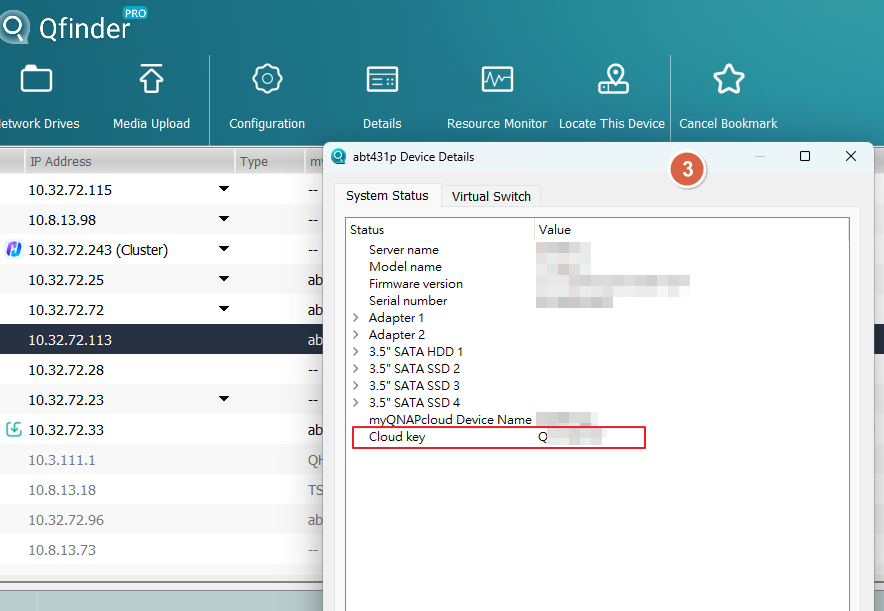
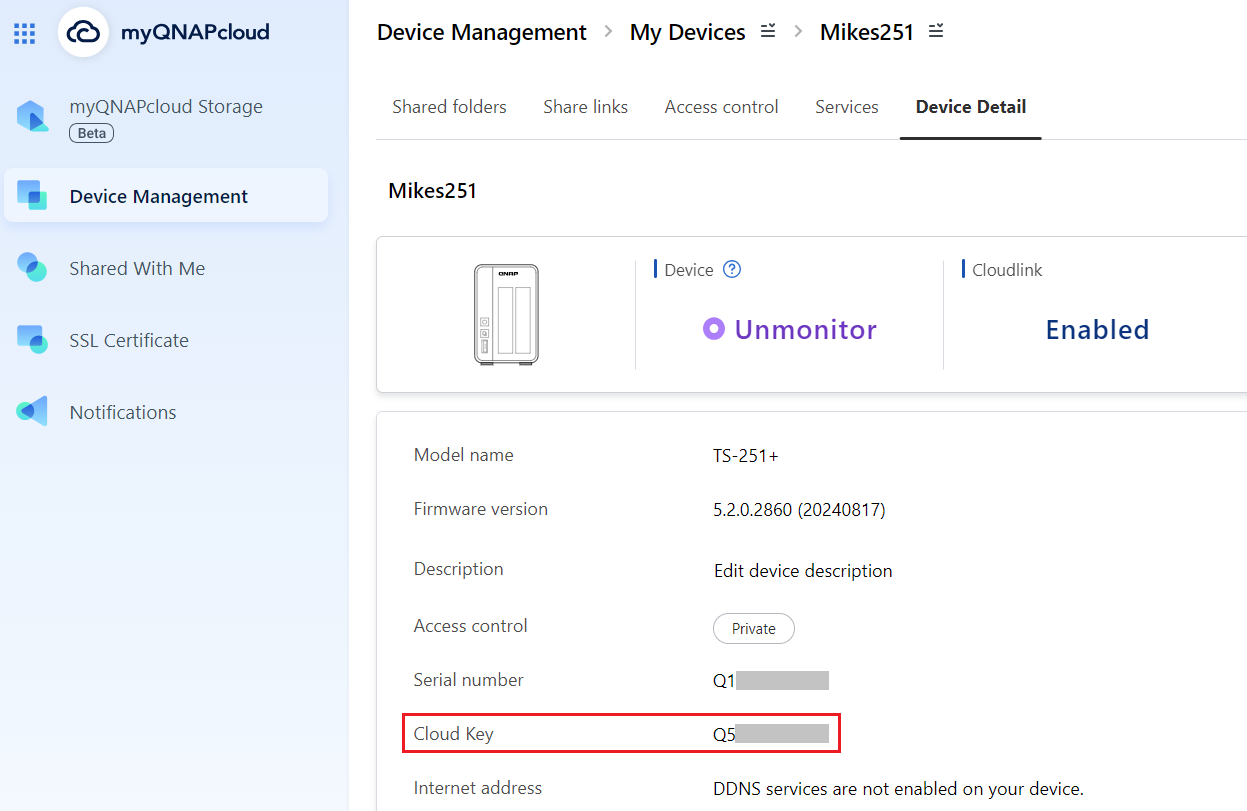
Method C: Use myQNAPcloud
- Log in to myQNAPcloudwith your QNAP ID:
- Login to myQNAPcloud.
- Go to Device Management.
- Locate and click on your device.
- Click Device Detail.
Your device's Cloud Key is displayed in the Device Detail tab.
If you cannot find your device's Cloud Key from the above methods, please contact QNAP customer support.
If you manually enable the "admin" account in Control Panel, you will need to specify a new password that is different from the Cloud Key of your device. If your firmware was updated from version 5.1.x or earlier, and you were using the default "admin" account with the default password, you will be required to change the password to something different than the Cloud Key of your device.
QTS/QuTS hero 4.4.2 - 5.1.x
The following default system administrator account is used:
Warning
To protect your system from malicious attacks, it is recommended to create a new administrator account and disable the default administrator account "admin".
- Username: admin
- Password: The first MAC address of the NAS in uppercase letters and without special characters. For example, if the MAC address was 00-08-9B-F6-15-75, the password is 00089BF61575
The MAC address sticker is physically attached to the rear of the NAS. If your NAS has multiple NICs, use the MAC address listed as MAC1: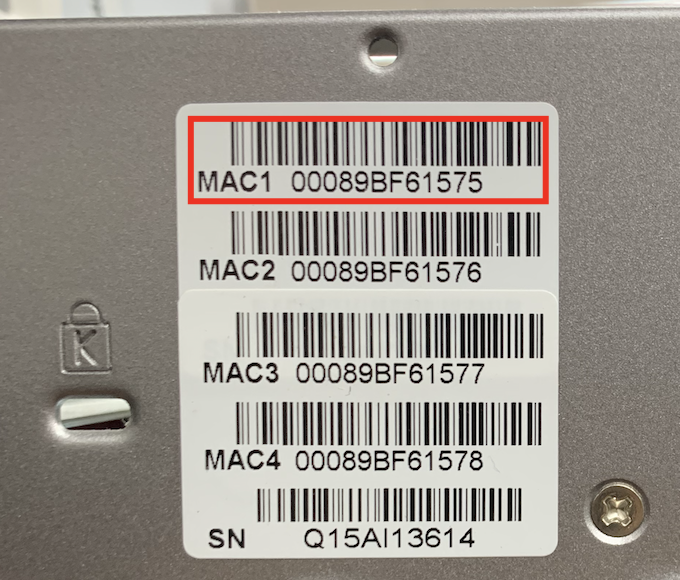
In Qfinder Pro, the value is listed in the MAC Address column: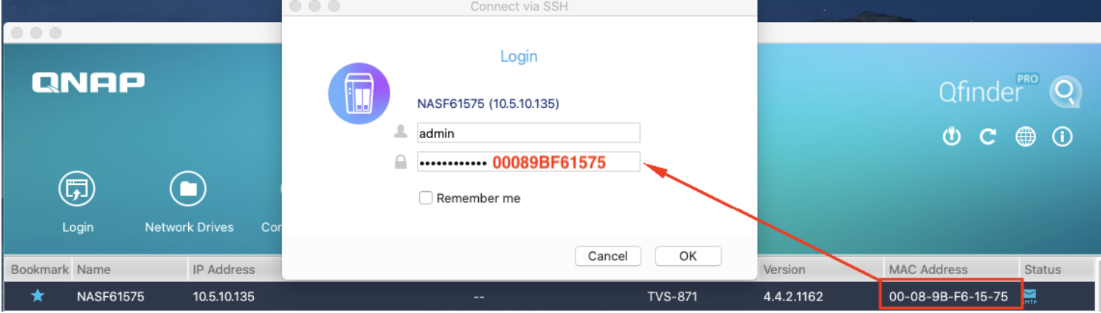
QTS/QuTS hero 4.4.1 - 4.3.6 or earlier
The following default system administrator account is used:
Warning
To protect your system from malicious attacks, it is recommended to create a new administrator account and disable the default administrator account "admin".
- Username: admin
- Password: admin
Further Reading
How do I reset the administrator password of my NAS?
How to disable the ''admin'' user account?
Are there any impacts if I disable the default admin account?
Why can't I disable admin account?
ผลิตภัณฑ์ที่รองรับ
QTS, QuTS hero
บทนำ
อุปกรณ์ NAS ทุกตัวมีบัญชี ผู้ดูแลระบบ ระบบเริ่มต้น "admin" บัญชี "admin" นี้สามารถกำหนดค่าการตั้งค่า สร้างผู้ใช้ และติดตั้งแอปพลิเคชันได้ บัญชีนี้ไม่สามารถลบได้และขึ้นอยู่กับเวอร์ชัน QTS/QuTS hero ของคุณ อาจถูกปิดใช้งานโดยค่าเริ่มต้น เพื่อปกป้องระบบของคุณจากการโจมตีที่เป็นอันตราย เราแนะนำให้สร้างบัญชี ผู้ดูแลระบบ ใหม่และปิดใช้งานบัญชี "admin" บัญชี ผู้ดูแลระบบ ใหม่สามารถทำงานเดียวกันกับบัญชี "admin" และช่วยให้เครื่องของคุณปลอดภัย
เพื่อให้สอดคล้องกับข้อกำหนดด้านความปลอดภัยทางไซเบอร์ของสหภาพยุโรป ผู้ผลิตต้องหลีกเลี่ยงการใช้ข้อมูลประจำตัวเริ่มต้นที่เป็นสากล มาตรฐานของสหภาพยุโรป/อุตสาหกรรมที่เกี่ยวข้องกำหนดให้ ไม่มีรหัสผ่านเริ่มต้นที่เป็นสากล, กำหนดให้ ข้อมูลประจำตัวที่ไม่ซ้ำกันต่ออุปกรณ์ หรือบังคับให้ เปลี่ยนรหัสผ่านในการใช้งานครั้งแรก ดังนั้น เริ่มต้นจาก QTS/QuTS hero 5.2.0 รหัสผ่าน ผู้ดูแลระบบ เริ่มต้นถูกเปลี่ยนเป็น Cloud Key ของอุปกรณ์ (เวอร์ชันก่อนหน้านี้ใช้ MAC ของ NIC แรก; เวอร์ชันที่เก่ากว่ามากใช้ admin/admin) ให้สอดคล้องกับข้อกำหนดเหล่านี้
รายละเอียด
QTS/QuTS hero 5.2.0 และใหม่กว่า (เช่น 5.2.x, 5.3.x, 6.0.0)
คำเตือน
บัญชี "admin" เริ่มต้นถูกปิดใช้งานโดยค่าเริ่มต้น แต่จะถูกเปิดใช้งานโดยอัตโนมัติหลังจากรีเซ็ตระบบหรือกู้คืนระบบ เพื่อปกป้องระบบของคุณจากการโจมตีที่เป็นอันตราย แนะนำให้สร้างบัญชี ผู้ดูแลระบบ ใหม่และปิดใช้งานบัญชี ผู้ดูแลระบบ เริ่มต้น "admin"
บัญชี ผู้ดูแลระบบ ระบบเริ่มต้นต่อไปนี้ถูกใช้:
- ชื่อผู้ใช้: admin
- รหัสผ่าน: Cloud Key ของอุปกรณ์ของคุณในตัวอักษรตัวพิมพ์ใหญ่และไม่มีอักขระพิเศษ ตัวอย่างเช่น หาก Cloud Key คือ Q1234-5678 รหัสผ่านคือ Q12345678
ค้นหา Cloud Key ของอุปกรณ์ของคุณ
คุณสามารถค้นหา Cloud Key ของอุปกรณ์ของคุณได้ด้วยวิธีใดวิธีหนึ่งต่อไปนี้:
วิธี A: จากสติกเกอร์บนอุปกรณ์หรือคู่มือการติดตั้งอย่างรวดเร็ว
คุณสามารถค้นหา Cloud Key ของคุณจากสติกเกอร์ที่ติดอยู่บนฝาครอบของ NAS หรือจากคู่มือการติดตั้งอย่างรวดเร็วที่มาพร้อมกับ NAS ของคุณ
วิธี B: ใช้ Qfinder Pro
- ใช้ Qfinder Pro โดยไม่ต้องมีบัญชีผู้ใช้ NAS:
- ปิดเครื่อง NAS ของคุณ
- ถอดฮาร์ดไดรฟ์ทั้งหมดออกจาก NAS ของคุณ
- ถอด M.2 SSD ภายในและการ์ดขยาย QM2 PCIe ออกหากมี
- เปิดเครื่อง NAS ของคุณ
- ดาวน์โหลดและติดตั้ง Qfinder Pro
- เปิด Qfinder Pro
- เลือกอุปกรณ์ของคุณ
- คลิก รายละเอียด
- หน้าต่าง รายละเอียดอุปกรณ์ ปรากฏขึ้น
แสดง Cloud Key ของอุปกรณ์ของคุณในหน้าต่าง รายละเอียดอุปกรณ์
- ใช้ Qfinder Pro กับบัญชีผู้ใช้ NAS:
- ดาวน์โหลดและติดตั้ง Qfinder Pro
- เปิด Qfinder Pro
- เลือกอุปกรณ์ของคุณ
- คลิก รายละเอียด.
หน้าต่าง เข้าสู่ระบบ ปรากฏขึ้น ป้อนชื่อผู้ใช้และรหัสผ่านบัญชี NAS ของคุณแล้วคลิก ตกลง. - หน้าต่าง รายละเอียดอุปกรณ์ ปรากฏขึ้น
Cloud Key ของอุปกรณ์ของคุณจะแสดงในหน้าต่าง รายละเอียดอุปกรณ์
วิธี C: ใช้ myQNAPcloud
- เข้าสู่ระบบ myQNAPcloud ด้วย QNAP ID ของคุณ:
- เข้าสู่ระบบ myQNAPcloud
- ไปที่ การจัดการอุปกรณ์
- ค้นหาและคลิกที่อุปกรณ์ของคุณ
- คลิก อุปกรณ์ รายละเอียด
Cloud Key ของอุปกรณ์ของคุณจะแสดงในแท็บ รายละเอียดอุปกรณ์
หากคุณไม่สามารถหา Cloud Key ของอุปกรณ์ของคุณจากวิธีข้างต้นได้ กรุณาติดต่อ ฝ่ายสนับสนุนลูกค้า QNAP
หากคุณเปิดใช้งานบัญชี "admin" ด้วยตนเองใน แผงควบคุม คุณจะต้องระบุรหัสผ่านใหม่ที่แตกต่างจาก Cloud Key ของอุปกรณ์ของคุณ หาก เฟิร์มแวร์ ของคุณได้รับการอัปเดตจากเวอร์ชัน 5.1.x หรือก่อนหน้านั้น และคุณใช้บัญชี "admin" เริ่มต้นพร้อมรหัสผ่านเริ่มต้น คุณจะต้องเปลี่ยนรหัสผ่านให้แตกต่างจาก Cloud Key ของอุปกรณ์ของคุณ
QTS/QuTS hero 4.4.2 - 5.1.x
บัญชี ผู้ดูแลระบบ ระบบเริ่มต้นต่อไปนี้ถูกใช้:
คำเตือน
เพื่อปกป้องระบบของคุณจากการโจมตีที่เป็นอันตราย แนะนำให้สร้างบัญชี ผู้ดูแลระบบ ใหม่และปิดใช้งานบัญชี ผู้ดูแลระบบ เริ่มต้น "admin"
- ชื่อผู้ใช้: admin
- รหัสผ่าน: ที่อยู่ MAC แรกของ NAS ในตัวอักษรพิมพ์ใหญ่และไม่มีอักขระพิเศษ ตัวอย่างเช่น หากที่อยู่ MAC คือ 00-08-9B-F6-15-75 รหัสผ่านคือ 00089BF61575
สติกเกอร์ที่อยู่ MAC ติดอยู่ที่ด้านหลังของ NAS หาก NAS ของคุณมี NIC หลายตัว ให้ใช้ที่อยู่ MAC ที่ระบุว่า MAC1:
ใน Qfinder Pro ค่าจะถูกระบุใน ที่อยู่ MAC คอลัมน์:
QTS/QuTS hero 4.4.1 - 4.3.6 หรือก่อนหน้านั้น
บัญชี ผู้ดูแลระบบ ระบบเริ่มต้นต่อไปนี้ถูกใช้:
คำเตือน
เพื่อปกป้องระบบของคุณจากการโจมตีที่เป็นอันตราย แนะนำให้สร้างบัญชี ผู้ดูแลระบบ ใหม่และปิดใช้งานบัญชี ผู้ดูแลระบบ เริ่มต้น "admin"
- ชื่อผู้ใช้: admin
- รหัสผ่าน: admin
อ่านเพิ่มเติม
ฉันจะรีเซ็ตรหัสผ่าน ผู้ดูแลระบบ ของ NAS ได้อย่างไร?
วิธีปิดใช้งานบัญชีผู้ใช้ ''admin''?
มีผลกระทบใดบ้างหากฉันปิดใช้งานบัญชี admin เริ่มต้น?
ทำไมฉันถึงไม่สามารถปิดใช้งานบัญชี admin ได้?


