


How does RAID synchronization differ when I build a storage pool in QTS compared to QuTS hero?
Last modified date:
2025-10-15
Applicable Products
- NAS (QTS / QuTS hero)
Overview
This FAQ compares RAID synchronization times when creating a storage pool in QTS (using mdadm) and QuTS hero (using ZFS). It outlines architectural differences affecting synchronization speed and provides guidance for optimal setup.
- QTS (mdadm-based RAID): When you create a new RAID 1 volume, QTS uses the Linux mdadm utility, which performs a full initial synchronization (resync) of all data blocks, ensuring both drives are identical—even if no data has been written yet.
- QuTS hero (ZFS-based): QuTS hero uses ZFS, which only synchronizes data blocks as they are written. No lengthy initial resync is required for empty or newly created pools.
QTS RAID synchronization
- When you create a new RAID 1 group in QTS, the system uses the Linux mdadm utility to perform a full initial synchronization (resync) of all data blocks, even if no user data exists yet. This ensures both drives are fully identical.
- The RAID group is usable immediately, but performance may be reduced until resync finishes.
- To minimize delays, avoid heavy write operations during synchronization.
- Monitor the synchronization process via Storage & Snapshots > Storage/Snapshots > Storage Pool Management.
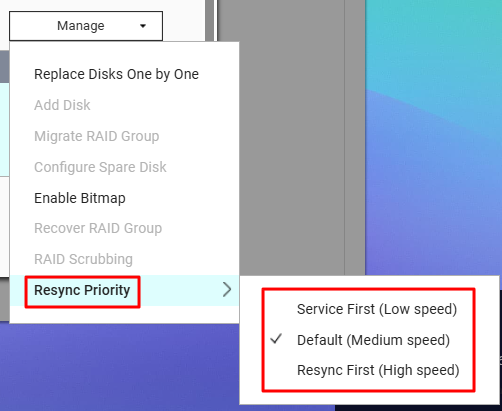
- You can adjust Resync Priority (Service First, Default, Resync First) to control sync speed versus system responsiveness.
QuTS hero RAID synchronization
- QuTS hero uses ZFS, which initializes mirrored pools quickly—no full-disk initial resync is required. Only data that you actually write is checked and mirrored.
- If Optimize Performance is enabled during pool creation (default setting), the pool may be unavailable until optimization completes. This usually takes only a few minutes.

- ZFS automatically performs scrubs (background data integrity checks) and resilvering(rebuilding redundancy after a disk replacement), processing only data that actually exists, not the whole disk.
- Scrub: Verifies data integrity during normal operation.
- Resilver: Synchronizes new or replacement disks, but only used data is processed.
Recommendation
- Use identical disks (size and type) within a RAID group for best performance and compatibility.
- Minimize heavy workloads during RAID synchronization or initialization to reduce total sync time and avoid potential slowdowns.
- Regularly monitor the health and status of your storage pool using the management interface.
Further Reading
For further assistance, ask other users and QNAP experts in the community. Go to QNAP Community


