


Why didn't I get more free space after deleting snapshots?
Applicable Products
- All NAS running QTS
Scenario
After deleting snapshots, the snapshot space usage does not decrease as expected. The storage pool still shows significant space being used by snapshots even though all visible snapshots have been deleted.
Solution
Use the tools in Storage & Snapshots to identify where snapshot space is used and to free up additional space in the storage pool.
- Go to Storage & Snapshots > Storage > Storage/Snapshots.
(This is the entry point for increasing free space in a storage pool.) - Select the relevant storage pool.
- Click Manage.
The Storage Pool Management window opens. - Click Actions, and then select Free some space.
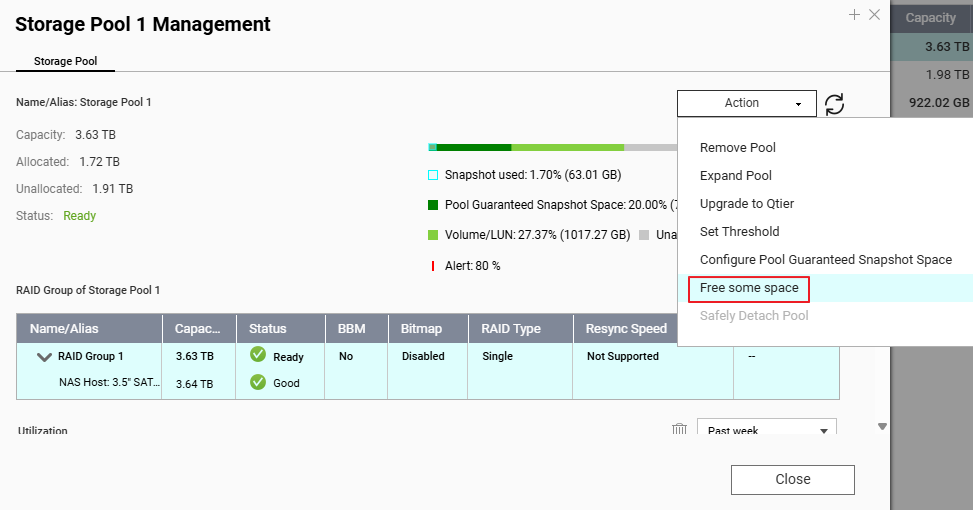 The Increase Pool Free Space window opens.
 - In the Increase Pool Free Space window, perform one or more of the available actions.
Note: Some options are only available if the storage pool has the corresponding configuration or contains the corresponding storage objects.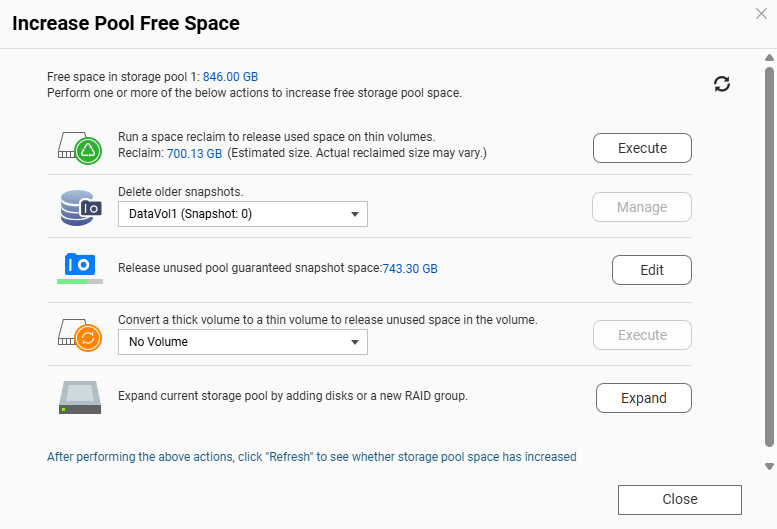
- Run a space reclaim to release used space in thin volumes
Available only if the storage pool has at least one thin volume with reclaimable space.
To create reclaimable space in a thin volume, you can delete unwanted files in that volume first, and then:- Click Execute.
A dialog box appears. - Click OK to reclaim the available storage space.
The system releases the used space to the storage pool. A dialog box appears. - Click OK to close the dialog box.
- Click Execute.
- Delete older snapshots (from the pool-level tool)
If you still have older snapshots in volumes or LUNs in this pool:- Select a volume or LUN.
- Click Manage.
The Snapshot Manager window opens. - Optional: Click the view icon to change to list view.
- Select one or more snapshots to delete.
- Click the Delete icon.
- Run a space reclaim to release used space in thin volumes
If you only deleted snapshots directly from Snapshot Manager (without running space reclaim or checking pool-level options), the storage pool may still show limited free space, especially when thin volumes or reserved snapshot space are involved.
Further Reading
For further assistance, ask other users and QNAP experts in the community. Go to QNAP Community


