


How to Deploy UniFi Network Application via Docker on QNAP NAS?
Applicable Products
- All models supporting Container Station
Background
UniFi Network Application is a network management software developed by Ubiquiti for managing UniFi network devices (access points, switches, gateways, etc.). Many users want to run UniFi Network Application on their QNAP NAS using Docker containers instead of dedicating a separate device (like a Raspberry Pi).
The main challenges when deploying UniFi via Docker on QNAP include:
- Understanding Docker Compose YAML file placement
- Configuring persistent storage correctly
- Setting up network access with static IP using QNAP's QNET driver
- Ensuring the container can be accessed from UniFi devices on the network
Solution
Prerequisites
- Container Station must be installed on your QNAP NAS
- A shared folder for storing UniFi container data (e.g.,
/share/Container) - Knowledge of your NAS network interface (can be found via SSH with
ifconfig)
Step-by-Step Deployment
Step 1: Find Your Network Interface Name
- Enable SSH on your QNAP NAS:
- Go to Control Panel > Network & File Services > Telnet / SSH
- Enable Allow SSH connection
- Connect via SSH and run:
ifconfig - Note your network interface name (e.g.,
eth0,br0, or the adapter connected to your target network)
Step 2: Create the Docker Compose YAML File
Create a file named docker-compose.yml with the following content:
Template with Variables:
version: "3.8"

services:
  unifi:
    image: jacobalberty/unifi:latest
    container_name: unifi-controller
    restart: unless-stopped

    networks:
      qnet-network:
        ipv4_address: ${QNET_STATIC_IP}

    environment:
      TZ: ${TZ}

    volumes:
      - ${SHARE_FOLDER}/unifi:/unifi

networks:
  qnet-network:
    driver_opts:
      iface: ${QNET_INTERFACE}
    driver: qnet
    ipam:
      driver: qnet
      options:
        iface: ${QNET_INTERFACE}
      config:
        - subnet: ${QNET_SUBNET}
          gateway: ${QNET_GATEWAY}
Example with Actual Values:
version: "3.8"

services:
  unifi:
    image: jacobalberty/unifi:latest
    container_name: unifi-controller
    restart: unless-stopped

    networks:
      qnet-network:
        ipv4_address: 10.8.32.26

    environment:
      TZ: Asia/Taipei

    volumes:
      - /share/Container/unifi:/unifi

networks:
  qnet-network:
    driver_opts:
      iface: br0
    driver: qnet
    ipam:
      driver: qnet
      options:
        iface: br0
      config:
        - subnet: 10.8.32.0/24
          gateway: 10.8.32.1
Step 3: Variable Reference
| Variable | Description | Example |
|---|---|---|
${QNET_STATIC_IP} | Static IP address for the container | 10.8.32.26 |
${TZ} | Timezone for the container | Asia/Taipei |
${SHARE_FOLDER} | Path to your shared folder | /share/Container |
${QNET_INTERFACE} | Network interface from Step 1 | br0 |
${QNET_SUBNET} | Your network subnet in CIDR notation | 10.8.32.0/24 |
${QNET_GATEWAY} | Your network gateway IP | 10.8.32.1 |
Step 4: Deploy the Container
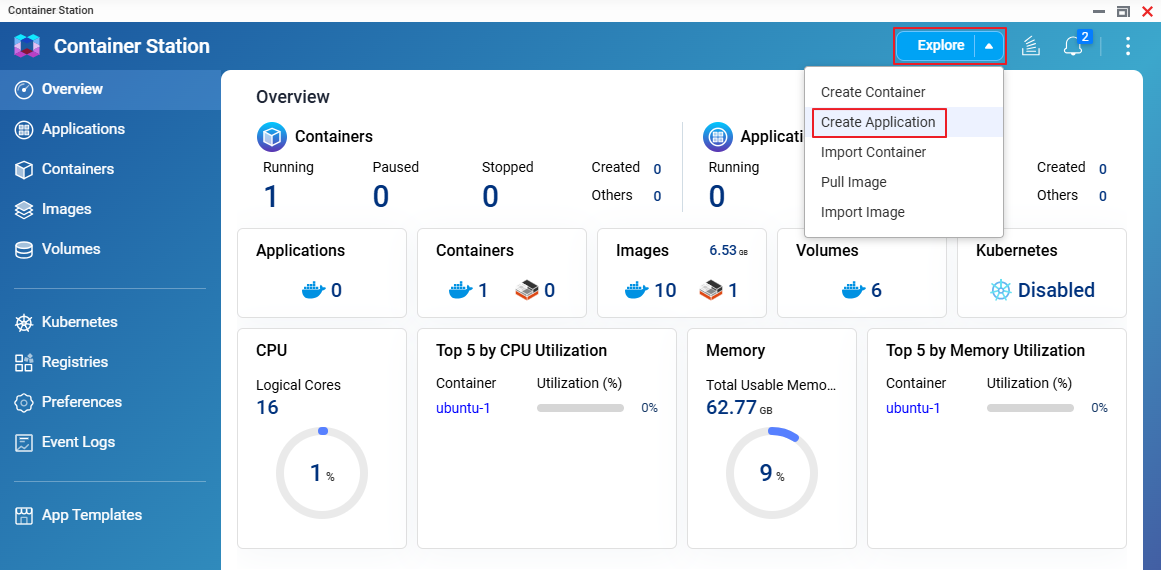
- Open Container Station on your QNAP NAS
- Go to Explore pull-down menu and choose Create Application
- Name your application (e.g., unifina-1) and paste contents of the docker-compose.yaml that we just filled out with actual values.
- Click on Validate button to verify the YAML codes.
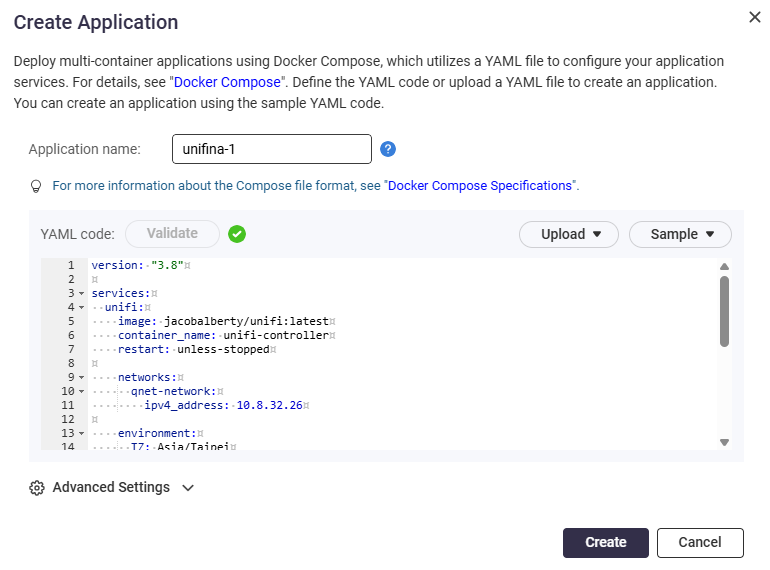
- Paste your YAML content or impo
- Click Create to deploy
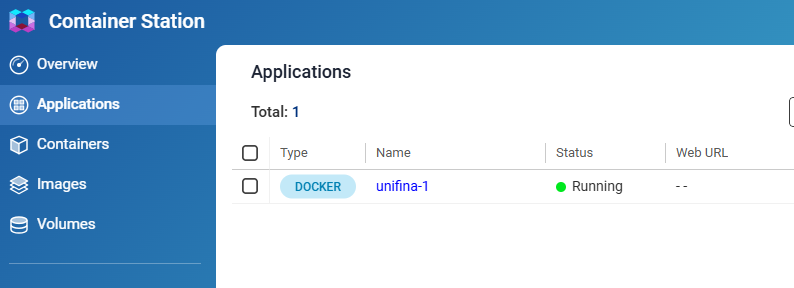
- Once it is done, the container is up and running.
Important Notes
The jacobalberty/unifi Docker image is a third-party application, not an official QNAP product. Please note:
- Data Backup: Regularly back up the
/share/Container/unifidirectory - Stability: Performance depends on the Docker image maintainer's updates
- Support: For UniFi-specific issues, consult the Docker image documentation or Ubiquiti community forums
For further assistance, ask other users and QNAP experts in the community. Go to QNAP Community


