Applicable Products
QTS, QuTS hero
Introduction
All NAS devices have the default system administrator account "admin". This "admin" account can configure settings, create users, and install applications. This account cannot be deleted and depending on your QTS/QuTS hero version may be disabled by default. To protect your system from malicious attacks, we recommend creating a new administrator account and disable the "admin" account. A new administrator account can perform the same actions as the "admin" account and helps keep your device secure.
To comply with the EU’s cybersecurity requirements, manufacturers must avoid universal default credentials. Corresponding EU/industry standards require no universal default passwords, mandating unique per-device credentials or enforcing a password change on first use. Accordingly, starting with QTS/QuTS hero 5.2.0, the default administrator password was changed to the device’s Cloud Key (earlier versions used the first NIC’s MAC; much older versions used admin/admin), aligning with these requirements.
Details
QTS/QuTS hero 5.2.0 and later (such as 5.2.x, 5.3.x, 6.0.0)
Warning
The default "admin" account is disabled by default but will be automatically enabled after a system reset or system restore. To protect your system from malicious attacks, it is recommended to create a new administrator account and disable the default administrator account "admin".
The following default system administrator account is used:
- Username: admin
- Password: The Cloud Key of your device in uppercase letters and without any special characters. For example, if the Cloud Key is Q1234-5678, the password is Q12345678
Finding your device's Cloud Key
You can find the Cloud Key of your device with any of the following methods:
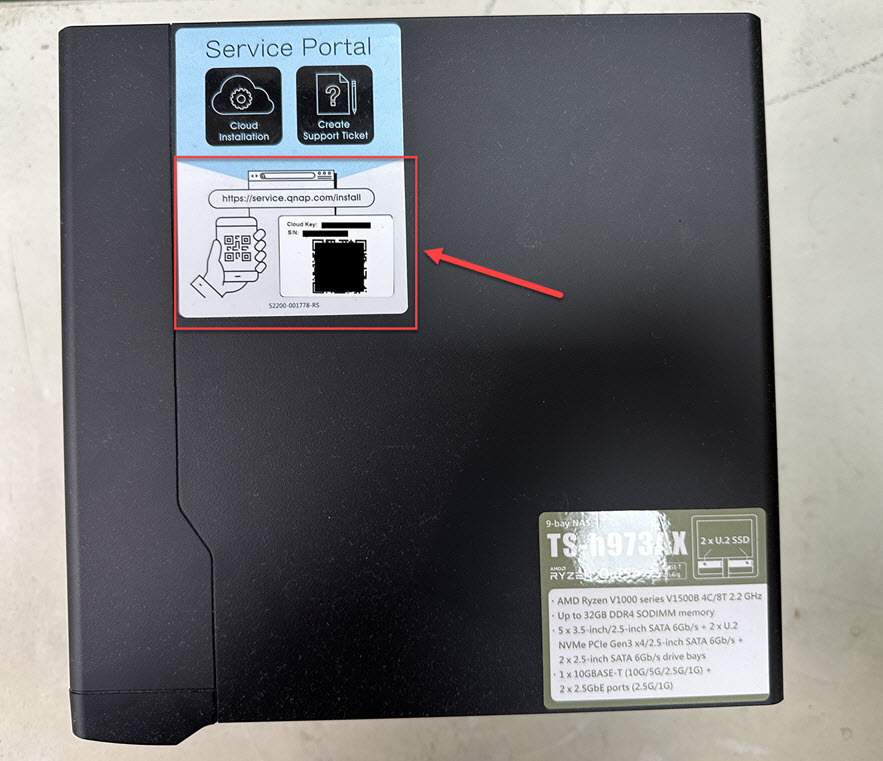
Method A: From the device sticker or the Quick Installation Guide
You can find your Cloud Key from the sticker attached to the cover of your NAS or from the Quick Installation Guide that comes with your NAS.
Method B: Use Qfinder Pro
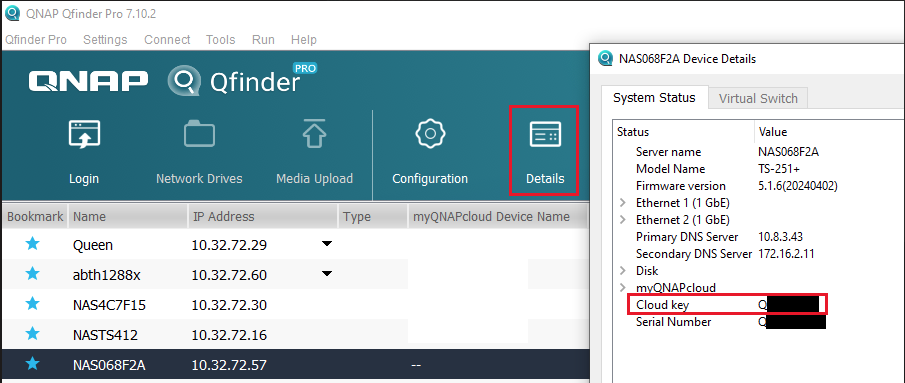
- Use Qfinder Pro without a NAS user account:
- Power off your NAS.
- Remove all hard drives from your NAS.
- Remove all internal M.2 SSDs and QM2 PCIe expansion card if any.
- Power on your NAS.
- Download and install Qfinder Pro.
- Open Qfinder Pro.
- Select your device.
- Click Details.
- The Device Details window appears.
Your device's Cloud Key is displayed in the Device Details window.
- Use Qfinder Pro with a NAS user account:
- Download and install Qfinder Pro.
- Open Qfinder Pro.
- Select your device.
- Click Details.
The Login window appears. Enter your NAS account username and password and click OK.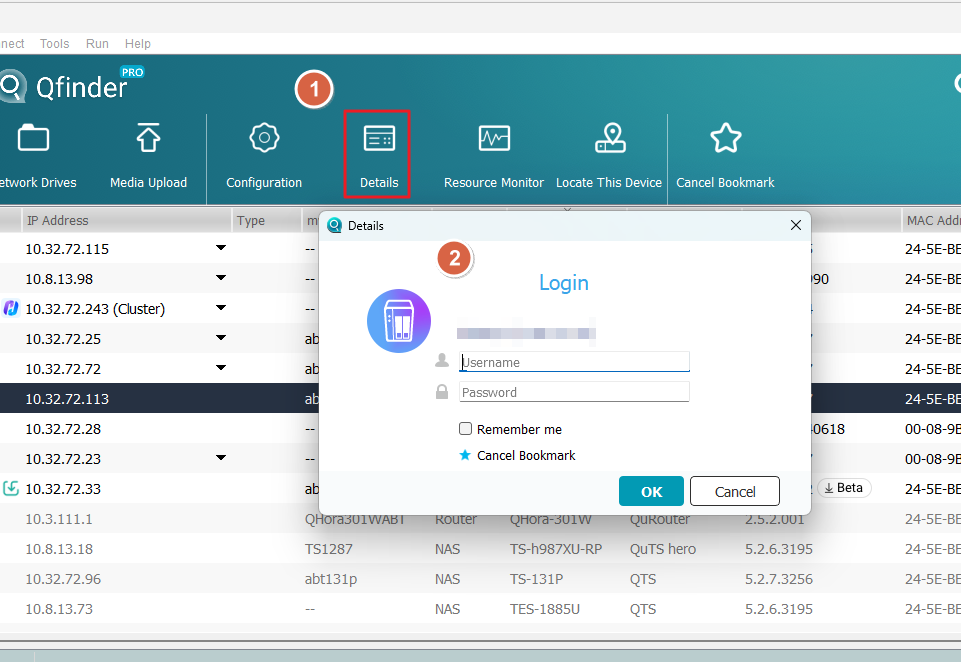
- The Device Details window appears.
Your device's Cloud Key is displayed in the Device Details window.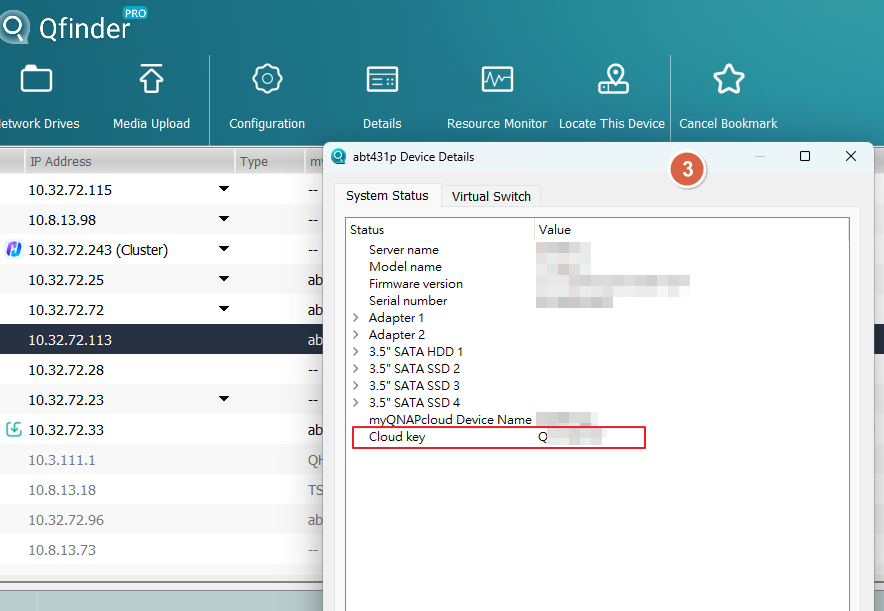
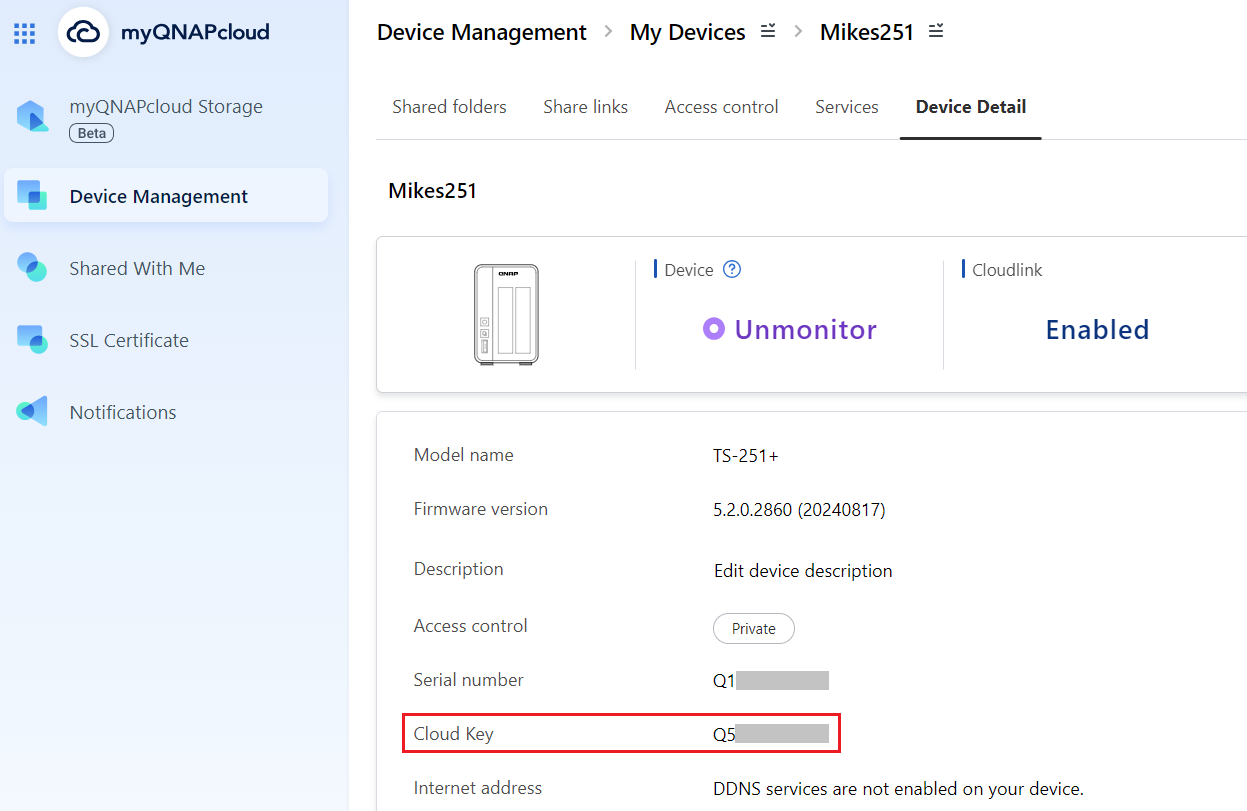
Method C: Use myQNAPcloud
- Log in to myQNAPcloudwith your QNAP ID:
- Login to myQNAPcloud.
- Go to Device Management.
- Locate and click on your device.
- Click Device Detail.
Your device's Cloud Key is displayed in the Device Detail tab.
If you cannot find your device's Cloud Key from the above methods, please contact QNAP customer support.
If you manually enable the "admin" account in Control Panel, you will need to specify a new password that is different from the Cloud Key of your device. If your firmware was updated from version 5.1.x or earlier, and you were using the default "admin" account with the default password, you will be required to change the password to something different than the Cloud Key of your device.
QTS/QuTS hero 4.4.2 - 5.1.x
The following default system administrator account is used:
Warning
To protect your system from malicious attacks, it is recommended to create a new administrator account and disable the default administrator account "admin".
- Username: admin
- Password: The first MAC address of the NAS in uppercase letters and without special characters. For example, if the MAC address was 00-08-9B-F6-15-75, the password is 00089BF61575
The MAC address sticker is physically attached to the rear of the NAS. If your NAS has multiple NICs, use the MAC address listed as MAC1: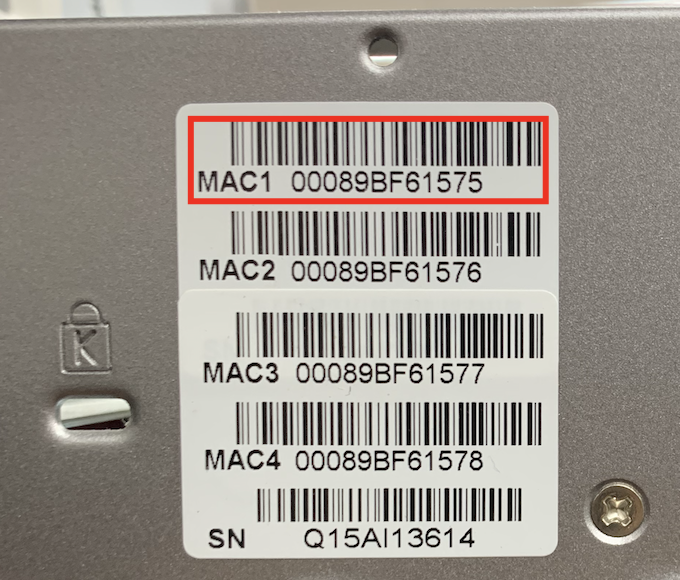
In Qfinder Pro, the value is listed in the MAC Address column: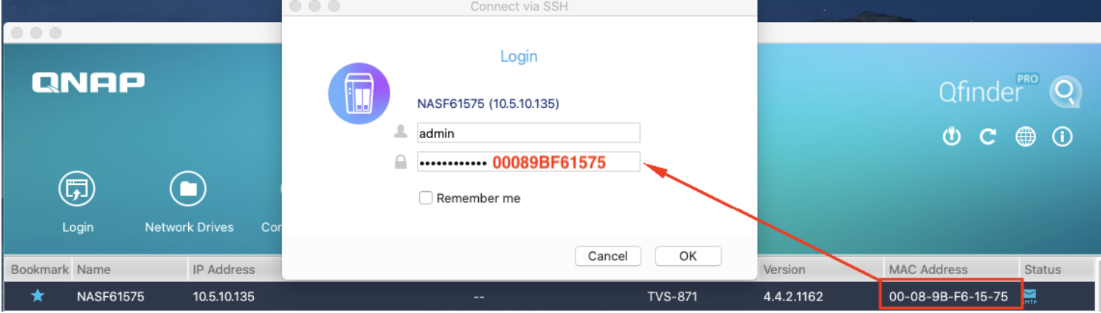
QTS/QuTS hero 4.4.1 - 4.3.6 or earlier
The following default system administrator account is used:
Warning
To protect your system from malicious attacks, it is recommended to create a new administrator account and disable the default administrator account "admin".
- Username: admin
- Password: admin
Further Reading
How do I reset the administrator password of my NAS?
How to disable the ''admin'' user account?
Are there any impacts if I disable the default admin account?
Why can't I disable admin account?
Geçerli Ürünler
QTS, QuTS hero
Giriş
Tüm NAS cihazlarında varsayılan sistem yönetici hesabı "admin" bulunmaktadır. Bu "admin" hesabı ayarları yapılandırabilir, kullanıcılar oluşturabilir ve uygulamalar yükleyebilir. Bu hesap silinemez ve QTS/QuTS hero sürümünüze bağlı olarak varsayılan olarak devre dışı bırakılabilir. Sisteminizin kötü niyetli saldırılardan korunması için yeni bir yönetici hesabı oluşturmanızı ve "admin" hesabını devre dışı bırakmanızı öneririz. Yeni bir yönetici hesabı, "admin" hesabı ile aynı işlemleri gerçekleştirebilir ve cihazınızı güvende tutmaya yardımcı olur.
AB'nin siber güvenlik gereksinimlerine uymak için, üreticiler evrensel varsayılan kimlik bilgilerini önlemelidir. İlgili AB/endüstri standartları gerektirir evrensel varsayılan parolalar olmamalıdır, zorunlu kılar cihaza özgü kimlik bilgileri veya ilk kullanımda parola değişikliği. Buna göre, QTS/QuTS hero 5.2.0 ile başlayarak, varsayılan yönetici parolası cihazın Cloud Key (önceki sürümler ilk NIC'in MAC adresini kullanıyordu; çok daha eski sürümler admin/admin kullanıyordu), bu gereksinimlerle uyumlu hale getirildi.
Ayrıntılar
QTS/QuTS hero 5.2.0 ve sonrası (örneğin 5.2.x, 5.3.x, 6.0.0)
Uyarı
Varsayılan "admin" hesabı varsayılan olarak devre dışıdır ancak bir sistem sıfırlaması veya sistem geri yüklemesinden sonra otomatik olarak etkinleştirilecektir. Sisteminizin kötü niyetli saldırılardan korunması için yeni bir yönetici hesabı oluşturmanız ve varsayılan yönetici hesabı "admin"'yi devre dışı bırakmanız önerilir.
Aşağıdaki varsayılan sistem yönetici hesabı kullanılır:
- Kullanıcı adı: admin
- Parola: Cihazınızın Cloud Key'ü büyük harflerle ve özel karakterler olmadan. Örneğin, Cloud Key Q1234-5678 ise, parola Q12345678
Cihazınızın Cloud Key bulma
Cihazınızın Cloud Key aşağıdaki yöntemlerden herhangi biriyle bulabilirsiniz:
Yöntem A: Cihaz etiketinden veya Hızlı Kurulum Kılavuzundan
Cloud Key NAS'ınızın kapağına yapıştırılmış etiketten veya NAS'ınızla birlikte gelen Hızlı Kurulum Kılavuzundan bulabilirsiniz.
Yöntem B: Qfinder Pro kullanın
- NAS kullanıcı hesabı olmadan Qfinder Pro kullanın:
- NAS'ınızı kapatın.
- Tüm sabit diskleri NAS'ınızdan çıkarın.
- Tüm dahili M.2 SSD'leri ve varsa QM2 PCIe genişletme kartını çıkarın.
- NAS'ınızı açın.
- Qfinder Pro indirin ve yükleyin.
- Aç Qfinder Pro.
- Cihazınızı seçin.
- Tıklayın Ayrıntılar.
- Aygıt Ayrıntıları penceresi açılır.
Cihazınızın Cloud Key Aygıt Ayrıntıları penceresinde görüntülenir.
- Bir NAS kullanıcı hesabı ile Qfinder Pro kullanın:
- Qfinder Pro indirip yükleyin.
- Aç Qfinder Pro.
- Cihazınızı seçin.
- Ayrıntılar tıklayın.
Giriş penceresi açılır. NAS hesap kullanıcı adınızı ve şifrenizi girin ve Tamam tıklayın. - Aygıt Detayları penceresi açılır.
Aygıtınızın Cloud Key'i Aygıt Detayları penceresinde görüntülenir.
Yöntem C: myQNAPcloud Kullan
- myQNAPcloud 'ye QNAP ID'nizle giriş yapın:
- Giriş yap myQNAPcloud.
- Aygıt Yönetimi 'ne gidin.
- Aygıtınızı bulun ve tıklayın.
- Tıklayın Aygıt Detay.
Aygıtınızın Cloud Key'i Aygıt Detay sekmesinde görüntülenir.
Yukarıdaki yöntemlerle aygıtınızın Cloud Key'ini bulamazsanız, lütfen QNAP müşteri desteği ile iletişime geçin.
Eğer "admin" hesabını manuel olarak etkinleştirirseniz Kontrol Paneli
QTS/QuTS hero 4.4.2 - 5.1.x
Aşağıdaki varsayılan sistem yönetici hesabı kullanılır:
Uyarı
Sisteminizi kötü amaçlı saldırılardan korumak için yeni bir yönetici hesabı oluşturmanız ve varsayılan yönetici hesabı "admin"'i devre dışı bırakmanız önerilir.
- Kullanıcı adı: admin
- Parola: NAS'ın ilk MAC adresi büyük harflerle ve özel karakterler olmadan. Örneğin, MAC adresi 00-08-9B-F6-15-75 ise, parola 00089BF61575
MAC adresi etiketi NAS'ın arka tarafına fiziksel olarak yapıştırılmıştır. NAS'ınızda birden fazla NIC varsa, MAC1:
Qfinder Pro içinde, değer MAC Adresi sütununda listelenmiştir:
QTS/QuTS hero 4.4.1 - 4.3.6 veya daha eski
Aşağıdaki varsayılan sistem yönetici hesabı kullanılır:
Uyarı
Sisteminizi kötü amaçlı saldırılardan korumak için yeni bir yönetici hesabı oluşturmanız ve varsayılan yönetici hesabı "admin"'i devre dışı bırakmanız önerilir.
- Kullanıcı adı: admin
- Parola: admin
Daha Fazla Okuma
NAS'ımın yönetici parolasını nasıl sıfırlarım?
''admin'' kullanıcı hesabı nasıl devre dışı bırakılır?
Varsayılan admin hesabını devre dışı bırakırsam herhangi bir etkisi olur mu?
Neden admin hesabını devre dışı bırakamıyorum?


