


How to enable SMB write-through for a shared folder?
Applicable Products
QTS, QuTS her
Concept
SMB write-through is a data transfer option that forces a server to write data directly to the physical storage media, bypassing its cache. This guarantees that data is durably written to the disk before the write operation is acknowledged as complete, which improves data reliability at the expense of write performance.
You may enable SMB write-through if data reliability matters more to you than performance.
Procedure
To enable SMB write-through, follow these steps.
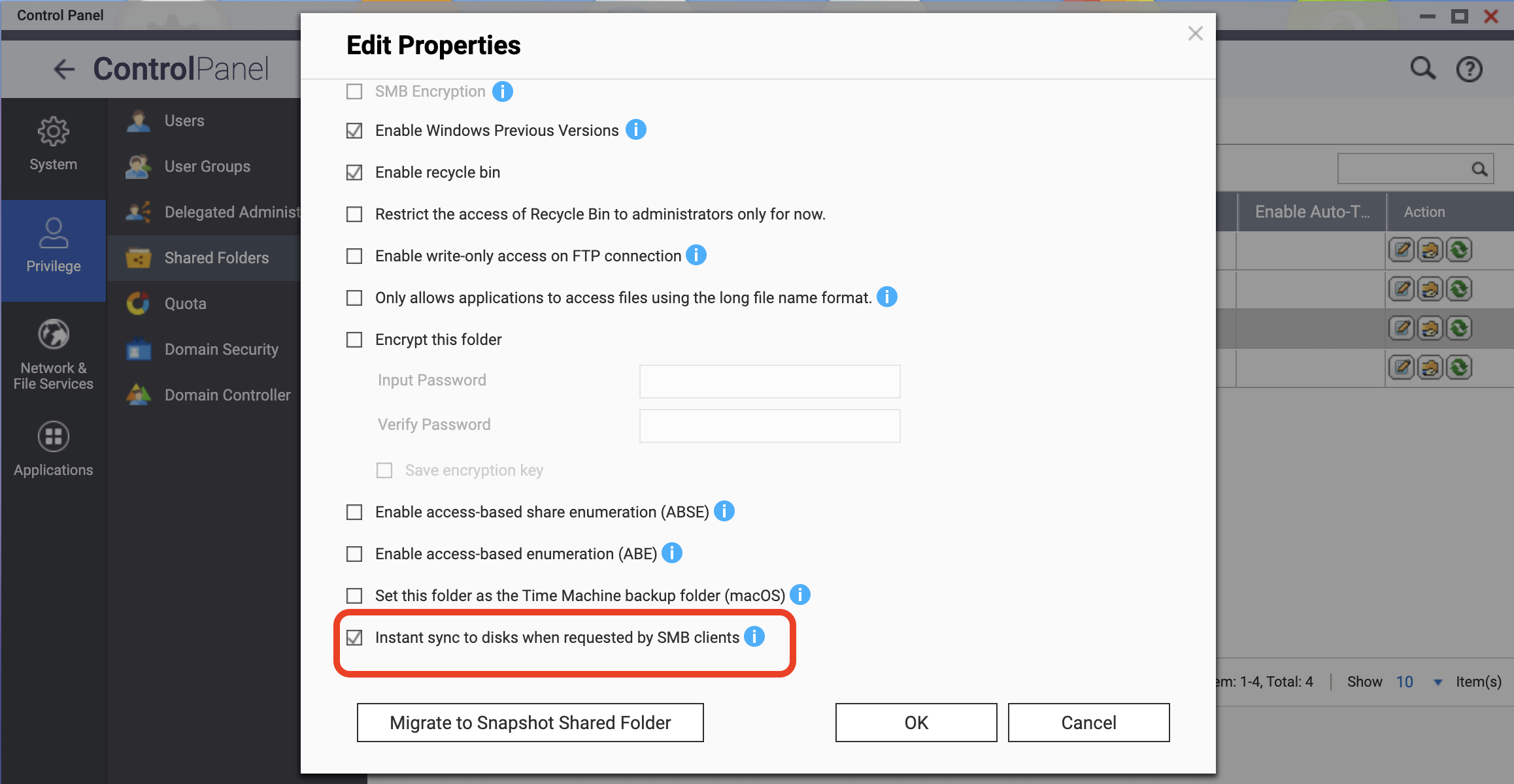
- Go to Control Panel > Privilege > Shared Folders.
- Select the target shared folder.
- Under Action, select Edit Properties.
- Select Instant sync to disks when requested by SMB clients.
- Click OK.
This setting enables SMB write-through for the selected shared folder. To disable SMB write-through, simply deselect this setting.
For further assistance, ask other users and QNAP experts in the community. Go to QNAP Community


