Applicable Products
NAS (QTS / QuTS hero)
Scenario
Some QNAP NAS models support both QTS (a modern app-based NAS OS with ext4 file system) and QuTS hero (an advanced, ZFS-based NAS OS). If you want to change your NAS operating system, this article explains how to safely switch from one to the other and highlights key benefits and considerations for each.
Solution
Switching from QTS to QuTS hero
Benefits of QuTS hero (ZFS)
- Data integrity and self-healing: ZFS provides end-to-end checksums that detect and correct data corruption, and supports copy-on-write snapshots.
- Efficient storage: Inline data deduplication and compression saves space.
Note: At least 32 GB RAM is recommended for optimal performance of these features. - Advanced protection and disaster recovery: SnapSync enables near-real-time, snapshot-based backup and disaster recovery across QuTS hero NAS devices.
- Large shared folder support: Single ZFS shared folders can be up to 5 petabytes (PB).
- WORM (Write Once, Read Many): Data can be locked against modification, supporting compliance needs.
Procedure
Important
Switching to QuTS hero will erase all data on your NAS. Make sure to back up your data before starting.
- Power off your NAS and remove all storage devices, including M.2 SSDs.
- Ensure your NAS is connected to the internet, then power it on.
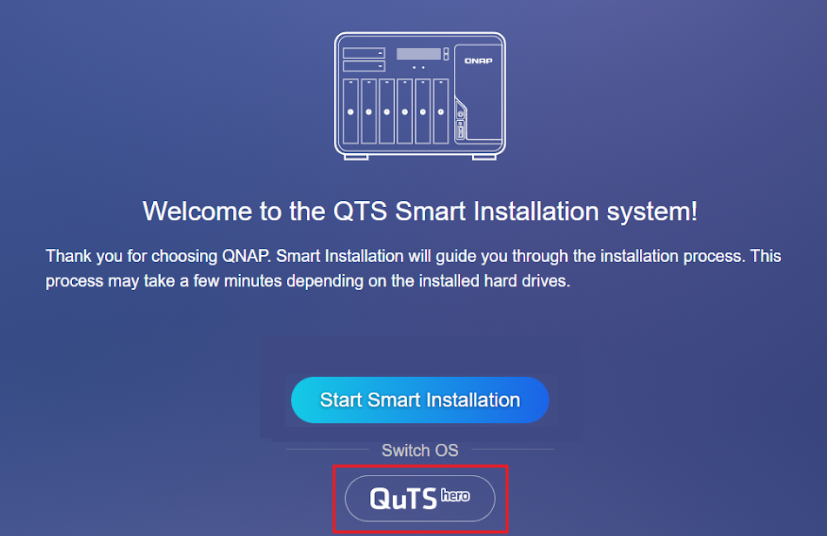
- Sign in to the NAS. The QuTS hero Smart Installation screen will appear.
- Select QuTS hero under the Switch OS heading and follow the on-screen instructions to complete the installation.
- After installation, power off the NAS, reinstall your storage devices, and restart the NAS.
Switching from QuTS hero to QTS
Benefits of QTS (ext4/LVM)
- Qtier auto-tiering (QTS only): Automatically moves frequently accessed ("hot") data to SSDs and less-used ("cold") data to HDDs within the same storage pool.
- Lower system overhead: QTS runs efficiently even on NAS models with less than 8 GB of RAM, making it a good choice for entry-level hardware.
- Wide app compatibility: QTS supports a large selection of QNAP and third-party applications.
- LVM (Logical Volume Manager): Enables flexible volume and storage management.
Procedure
Important
Switching to QTS will erase all data on your NAS. Make sure to back up your data before starting.
- Power off your NAS and remove all storage devices, including M.2 SSDs.
- Ensure your NAS is connected to the internet, then power it on.
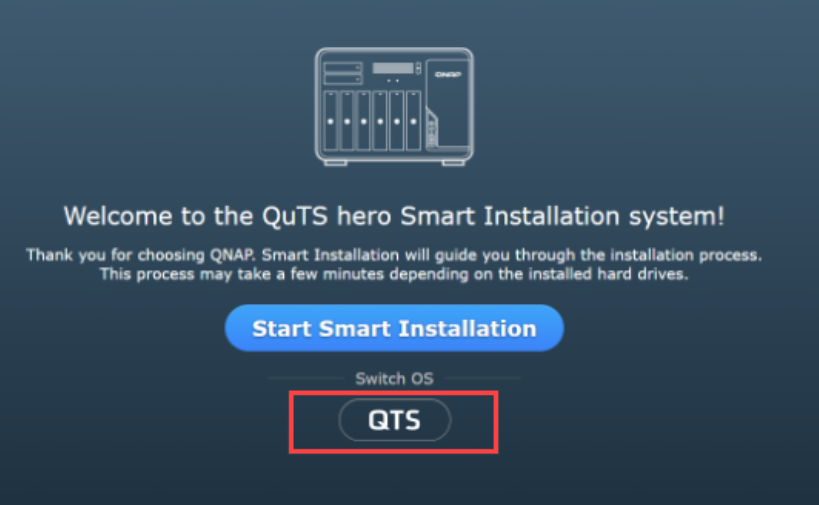
- Sign in to the NAS. The QTS Smart Installation screen will appear.
- Select QTS under the Switch OS heading and follow the on-screen instructions to complete the installation.
- After installation, power off the NAS, reinstall your storage devices, and restart the NAS.
Which operating system should I choose?
| Choose QuTS hero (ZFS) if you want... | Choose QTS (ext4/LVM) if you want... |
|---|
- ZFS self-healing, integrity and robust snapshots
- Data deduplication and compression
- Large single shared folders (up to 5 PB)
- SnapSync for disaster recovery
- WORM compliance features
| - Auto-tiering (Qtier for SSD/HDD in a single pool)
- Lower resource overhead on entry-level hardware
- Extensive QNAP app ecosystem
- Simpler, traditional NAS experience
- Recommended for systems with less than 8 GB RAM
|
Note:
TS-264/TS-464/TS-664 uses the QTS operating system by default. You will be able to switch to using the QuTS hero operating system.
(Switching to QuTS hero is supported starting from QTS 5.2.1.)
Further Reading
Toepasselijke Producten
NAS (QTS / QuTS hero)
Scenario
Sommige QNAP NAS-modellen ondersteunen zowel QTS (een modern app-gebaseerd NAS-besturingssysteem met ext4-bestandssysteem) als QuTS hero (een geavanceerd, ZFS-gebaseerd NAS-besturingssysteem). Als u uw NAS-besturingssysteem wilt wijzigen, legt dit artikel uit hoe u veilig kunt overschakelen van het ene naar het andere en belicht het de belangrijkste voordelen en overwegingen voor elk.
Oplossing
Overschakelen van QTS naar QuTS hero
Voordelen van QuTS hero (ZFS)
- Gegevensintegriteit en zelfherstel: ZFS biedt end-to-end checksums die gegevensbeschadiging detecteren en corrigeren, en ondersteunt copy-on-write Snapshot.
- Efficiënte Opslag: Inline data Ontdubbeling en compressie bespaart ruimte.
Opmerking: Minimaal 32 GB RAM wordt aanbevolen voor optimale prestaties van deze functies. - Geavanceerde bescherming en herstel bij rampen: SnapSync maakt bijna real-time, snapshot-gebaseerde back-up en herstel bij rampen mogelijk op QuTS hero NAS-apparaten.
- Ondersteuning voor grote gedeelde mappen: Enkele ZFS gedeelde mappen kunnen tot 5 petabytes (PB) groot zijn.
- WORM (Write Once, Read Many): Gegevens kunnen worden vergrendeld tegen wijziging, ter ondersteuning van compliance-behoeften.
Procedure
Belangrijk
Overschakelen naar QuTS hero zal alle gegevens op uw NAS wissen. Zorg ervoor dat u een back-up van uw gegevens maakt voordat u begint.
- Zet uw NAS uit en verwijder alle Opslag-apparaten, inclusief M.2 SSD's.
- Zorg ervoor dat uw NAS is verbonden met het internet en zet hem dan aan.
- Meld u aan bij de NAS. Het QuTS hero Smart Installation-scherm verschijnt.
- Selecteer QuTS hero onder de Switch OS-kop en volg de instructies op het scherm om de installatie te voltooien.
- Na de installatie, zet de NAS uit, installeer uw Opslag-apparaten opnieuw en start de NAS opnieuw op.
Overschakelen van QuTS hero naar QTS
Voordelen van QTS (ext4/LVM)
- Qtier auto-tiering (alleen QTS): Verplaatst automatisch vaak geraadpleegde ("hot") gegevens naar SSD's en minder gebruikte ("cold") gegevens naar HDD's binnen dezelfde Opslag-pool.
- Lagere systeemoverhead: QTS draait efficiënt, zelfs op NAS-modellen met minder dan 8 GB RAM, waardoor het een goede keuze is voor instapniveau hardware.
- Brede app-compatibiliteit: QTS ondersteunt een grote selectie van QNAP- en applicaties van derden.
- LVM (Logical Volume Manager): Maakt flexibel volume- en Opslag-beheer mogelijk.
Procedure
Belangrijk
Overschakelen naar QTS wist alle gegevens op uw NAS. Zorg ervoor dat u een back-up van uw gegevens maakt voordat u begint.
- Zet uw NAS uit en verwijder alle Opslag-apparaten, inclusief M.2 SSD's.
- Zorg ervoor dat uw NAS met het internet is verbonden en zet hem dan aan.
- Meld u aan bij de NAS. Het QTS Smart Installation-scherm verschijnt.
- Selecteer QTS onder de kop 'Switch OS' en volg de instructies op het scherm om de installatie te voltooien.
- Na de installatie, zet de NAS uit, installeer uw Opslag-apparaten opnieuw en start de NAS opnieuw op.
Welk besturingssysteem moet ik kiezen?
| Kies QuTS hero (ZFS) als u wilt... | Kies QTS (ext4/LVM) als u wilt... |
|---|
- ZFS self-healing, integriteit en robuuste Snapshot
- Data Ontdubbeling en compressie
- Grote enkele gedeelde mappen (tot 5 PB)
- SnapSync voor disaster recovery
- WORM-compliance functies
| - Auto-tiering (Qtier voor SSD/HDD in een enkele pool)
- Lagere resourcebelasting op instapniveau hardware
- Uitgebreid QNAP app-ecosysteem
- Eenvoudigere, traditionele NAS-ervaring
- Aanbevolen voor systemen met minder dan 8 GB RAM
|
Opmerking:
TS-264/TS-464/TS-664 gebruikt standaard het QTS-besturingssysteem. U kunt overschakelen naar het QuTS hero-besturingssysteem.
(Overschakelen naar QuTS hero wordt ondersteund vanaf QTS 5.2.1.)
Verdere Lezing


