Applicable Products
NAS (QTS / QuTS hero)
Scenario
Some QNAP NAS models support both QTS (a modern app-based NAS OS with ext4 file system) and QuTS hero (an advanced, ZFS-based NAS OS). If you want to change your NAS operating system, this article explains how to safely switch from one to the other and highlights key benefits and considerations for each.
Solution
Switching from QTS to QuTS hero
Benefits of QuTS hero (ZFS)
- Data integrity and self-healing: ZFS provides end-to-end checksums that detect and correct data corruption, and supports copy-on-write snapshots.
- Efficient storage: Inline data deduplication and compression saves space.
Note: At least 32 GB RAM is recommended for optimal performance of these features. - Advanced protection and disaster recovery: SnapSync enables near-real-time, snapshot-based backup and disaster recovery across QuTS hero NAS devices.
- Large shared folder support: Single ZFS shared folders can be up to 5 petabytes (PB).
- WORM (Write Once, Read Many): Data can be locked against modification, supporting compliance needs.
Procedure
Important
Switching to QuTS hero will erase all data on your NAS. Make sure to back up your data before starting.
- Power off your NAS and remove all storage devices, including M.2 SSDs.
- Ensure your NAS is connected to the internet, then power it on.
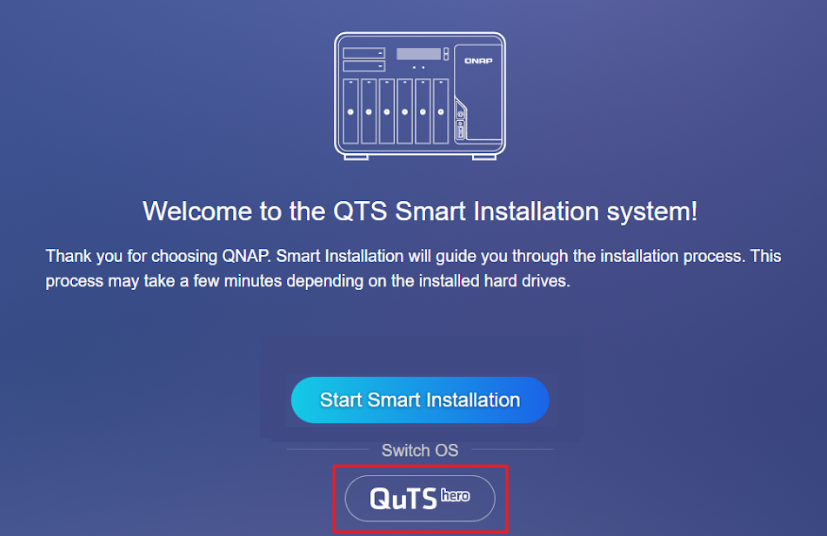
- Sign in to the NAS. The QuTS hero Smart Installation screen will appear.
- Select QuTS hero under the Switch OS heading and follow the on-screen instructions to complete the installation.
- After installation, power off the NAS, reinstall your storage devices, and restart the NAS.

Switching from QuTS hero to QTS
Benefits of QTS (ext4/LVM)
- Qtier auto-tiering (QTS only): Automatically moves frequently accessed ("hot") data to SSDs and less-used ("cold") data to HDDs within the same storage pool.
- Lower system overhead: QTS runs efficiently even on NAS models with less than 8 GB of RAM, making it a good choice for entry-level hardware.
- Wide app compatibility: QTS supports a large selection of QNAP and third-party applications.
- LVM (Logical Volume Manager): Enables flexible volume and storage management.
Procedure
Important
Switching to QTS will erase all data on your NAS. Make sure to back up your data before starting.
- Power off your NAS and remove all storage devices, including M.2 SSDs.
- Ensure your NAS is connected to the internet, then power it on.
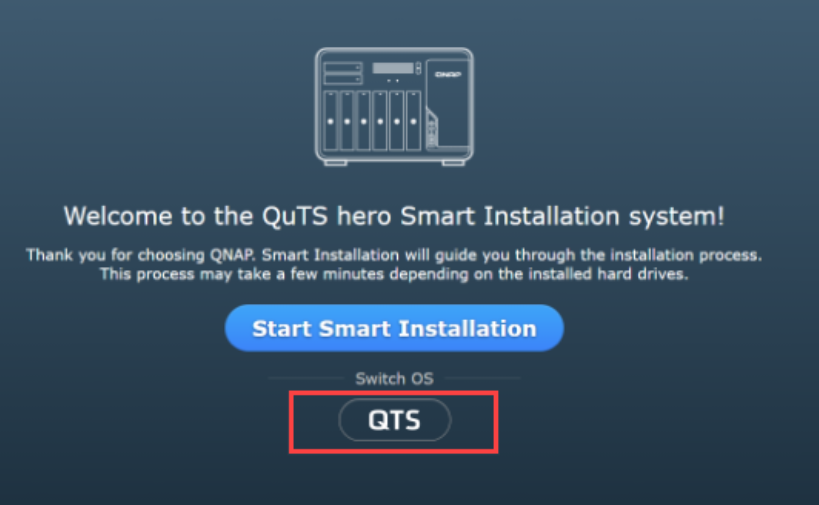
- Sign in to the NAS. The QTS Smart Installation screen will appear.
- Select QTS under the Switch OS heading and follow the on-screen instructions to complete the installation.
- After installation, power off the NAS, reinstall your storage devices, and restart the NAS.

Which operating system should I choose?
| Choose QuTS hero (ZFS) if you want... | Choose QTS (ext4/LVM) if you want... |
|---|
- ZFS self-healing, integrity and robust snapshots
- Data deduplication and compression
- Large single shared folders (up to 5 PB)
- SnapSync for disaster recovery
- WORM compliance features
| - Auto-tiering (Qtier for SSD/HDD in a single pool)
- Lower resource overhead on entry-level hardware
- Extensive QNAP app ecosystem
- Simpler, traditional NAS experience
- Recommended for systems with less than 8 GB RAM
|
Further Reading
Geçerli Ürünler
NAS (QTS / QuTS hero)
Senaryo
Bazı QNAP NAS modelleri hem QTS (ext4 dosya sistemine sahip modern, uygulama tabanlı bir NAS işletim sistemi) hem de QuTS hero (gelişmiş, ZFS tabanlı bir NAS işletim sistemi) destekler. NAS işletim sisteminizi değiştirmek istiyorsanız, bu makale birinden diğerine güvenli bir şekilde nasıl geçiş yapacağınızı açıklar ve her biri için önemli avantajları ve dikkate alınması gerekenleri vurgular.
Çözüm
QTS'den QuTS hero'a Geçiş
QuTS hero (ZFS) Avantajları
- Veri bütünlüğü ve kendi kendine iyileştirme: ZFS, veri bozulmalarını tespit eden ve düzelten uçtan uca sağlama toplamları sağlar ve yazma sırasında kopyalama Anlık Görüntü destekler.
- Verimli Depolama: Satır içi veri Yinelenenleri kaldırma ve sıkıştırma alan tasarrufu sağlar.
Not: Bu özelliklerin optimal performansı için en az 32 GB RAM önerilir. - Gelişmiş koruma ve felaket kurtarma: SnapSync, QuTS hero NAS cihazları arasında neredeyse gerçek zamanlı, anlık görüntü tabanlı yedekleme ve felaket kurtarma sağlar.
- Büyük paylaşılan klasör desteği: Tek ZFS paylaşılan klasörleri 5 petabayta (PB) kadar olabilir.
- WORM (Bir Defa Yaz, Çok Defa Oku): Veriler değişikliğe karşı kilitlenebilir, uyumluluk ihtiyaçlarını destekler.
Prosedür
Önemli
QuTS hero'a geçiş NAS'ınızdaki tüm verileri silecektir. Başlamadan önce verilerinizi yedeklediğinizden emin olun.
- NAS'ınızı kapatın ve M.2 SSD'ler dahil tüm Depolama cihazlarını çıkarın.
- NAS'ınızın internete bağlı olduğundan emin olun, ardından açın.
- NAS'a giriş yapın. QuTS hero Akıllı Kurulum ekranı görünecektir.
- Seç QuTS hero İşletim Sistemi Değiştir başlığı altında ve kurulumu tamamlamak için ekrandaki talimatları izleyin.
- Kurulumdan sonra, NAS'ı kapatın, Depolama cihazlarınızı yeniden takın ve NAS'ı yeniden başlatın.
QuTS hero'dan QTS'ye Geçiş
QTS (ext4/LVM) Avantajları
- Qtier otomatik katmanlama (sadece QTS): Sık erişilen ("sıcak") verileri otomatik olarak SSD'lere ve daha az kullanılan ("soğuk") verileri aynı Depolama havuzundaki HDD'lere taşır.
- Daha düşük sistem yükü: QTS, 8 GB'den az RAM'e sahip NAS modellerinde bile verimli çalışır, bu da onu giriş seviyesi donanım için iyi bir seçim yapar.
- Geniş uygulama uyumluluğu: QTS, geniş bir QNAP ve üçüncü taraf uygulama seçeneğini destekler.
- LVM (Mantıksal Birim Yöneticisi): Esnek birim ve Depolama yönetimini etkinleştirir.
Prosedür
Önemli
QTS'ye geçmek NAS'ınızdaki tüm verileri silecektir. Başlamadan önce verilerinizi yedeklediğinizden emin olun.
- NAS'ınızı kapatın ve M.2 SSD'ler dahil tüm Depolama cihazlarını çıkarın.
- NAS'ınızın internete bağlı olduğundan emin olun, ardından açın.
- NAS'a giriş yapın. QTS Akıllı Kurulum ekranı görünecektir.
- Seç QTS Switch OS başlığı altında ve kurulumu tamamlamak için ekrandaki talimatları izleyin.
- Kurulumdan sonra, NAS'ı kapatın, Depolama cihazlarınızı yeniden takın ve NAS'ı yeniden başlatın.
Hangi işletim sistemini seçmeliyim?
| Eğer istiyorsanız QuTS hero (ZFS) seçin... | Eğer istiyorsanız QTS (ext4/LVM) seçin... |
|---|
- ZFS kendi kendini iyileştirme, bütünlük ve sağlam Anlık Görüntü
- Veri Yinelenenleri kaldırma ve sıkıştırma
- Büyük tek paylaşılan klasörler (en fazla 5 PB)
- Felaket kurtarma için SnapSync
- WORM uyumluluk özellikleri
| - Otomatik katmanlama (Tek bir havuzda SSD/HDD için Qtier)
- Giriş seviyesi donanımda daha düşük kaynak yükü
- Kapsamlı QNAP uygulama ekosistemi
- Daha basit, geleneksel NAS deneyimi
- 8 GB'den az RAM'e sahip sistemler için önerilir
|
Daha Fazla Okuma