


Why did my Snapshot Replica job fail with an “out of space” error?
Last modified date:
2025-08-11
Applicable Products
- QuTS hero
- Storage & Snapshots
Symptom
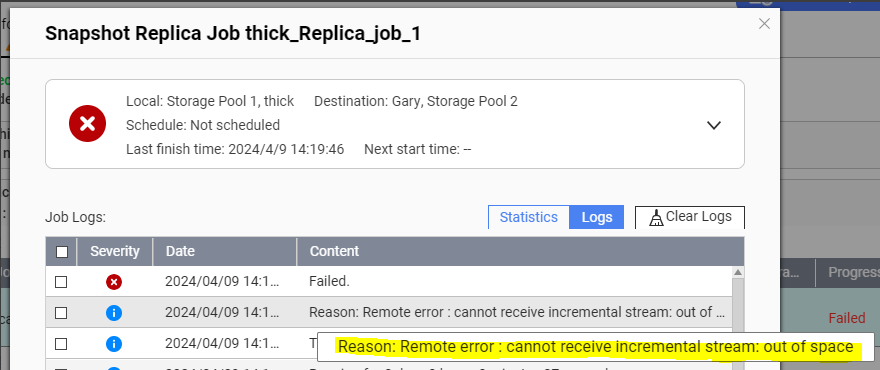
Your Snapshot Replica job failed with the following messages in QuLog Center and the Snapshot Replica job logs:
- QuLog Center event log: "[Storage & Snapshots] Snapshot Replica: Failed to finish job 'job_name'."
- Snapshot Replica job log: "Reason: Remote error: cannot receive incremental stream: out of space"
Tip
- To view event logs in your system, go to QuLog Center > Local Device > Event Log.
- To view the Snapshot Replica job logs, go to Storage & Snapshots > Data Protection > Snapshot Replica, identify the job, click the Job Details icon under Action, and then click Logs.
Root Cause
When a Snapshot Replica job transfers snapshot data to the destination storage pool, the data is temporarily stored in the pool's free space before it is moved to the snapshot vault.
If the amount of data to transfer is greater than the amount of free space in the destination pool, then the Snapshot Replica job will fail, and the log messages mentioned above will appear.
Note
If the source of the Snapshot Replica job is a thick shared folder, the free space at the destination storage pool must be around 2 times or more than the used capacity of the source shared folder.
Solution
Ensure free space in the destination storage pool is greater than or equal to the size of the source data.
You can access the destination storage pool's Increase Pool Free Space wizard to find out what actions you can take to increase free space in the pool:
- Open Storage & Snapshots on the destination NAS.
- Go to Storage > Storage/Snapshots.
- Click the storage pool.
- Click Manage.
The pool management window opens. - Click Action > Free some space.
The Increase Pool Free Space wizard opens.
- Perform one or more available actions in the wizard.NoteThe available actions may differ from the above screenshot depending on the storage pool's circumstances.


