


How do I disable audio recording for a camera in Surveillance applications?
Last modified date:
2025-11-30
Applicable Products
- Surveillance Station
- QVR Pro
- QVR Surveillance
Overview
Disabling audio recording for a camera can help address privacy concerns or comply with local regulations. Both Surveillance Station and QVR Pro/QVR Surveillance provide options to disable audio recording for individual cameras.
Procedure
- In Surveillance Station:
- Open Surveillance Station and go to Camera Settings.
- Select the camera you want to configure.
- Go to Camera Configuration → Video Settings.
- Uncheck the option Enable audio recording on the camera.
- Click Apply to save the changes.

- In QVR Pro or QVR Surveillance:
- Open QVR Pro or QVR Surveillance and go to Camera Settings.
- Select the camera and click Edit.
- Go to Camera Stream.
- Uncheck the option Enable audio recording.
- Click Apply to save the changes.
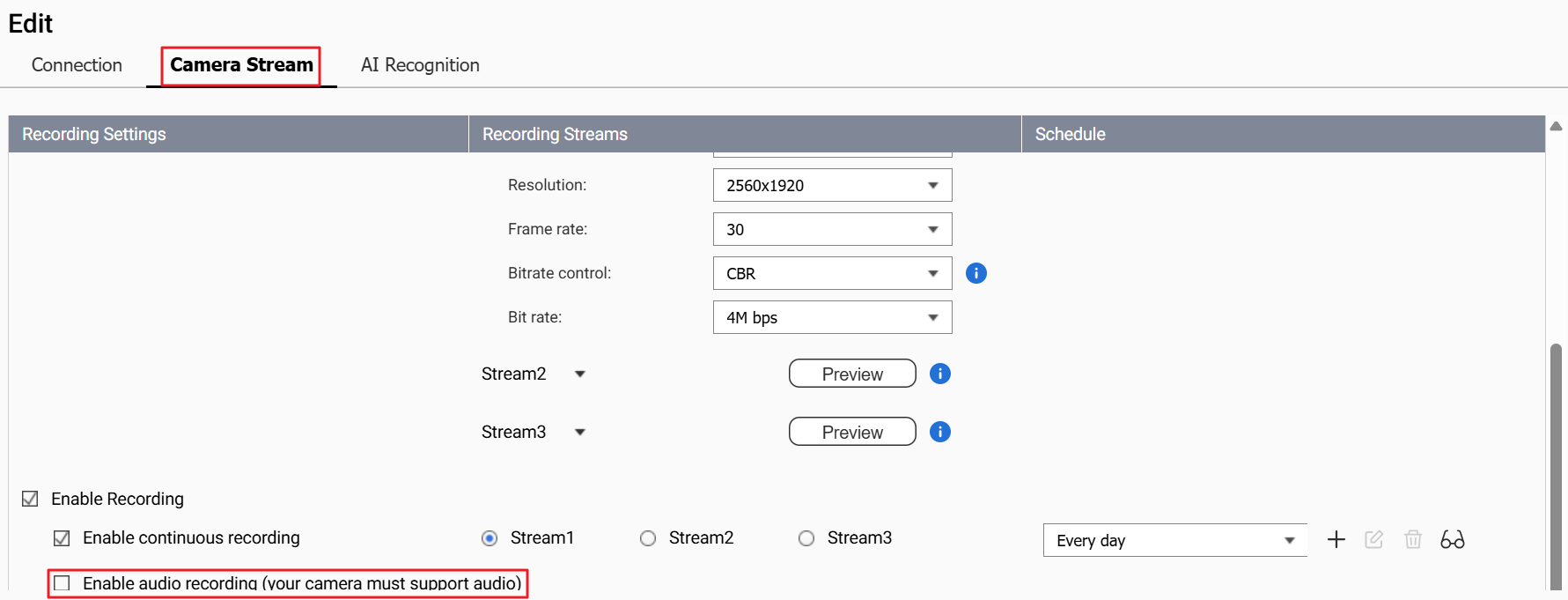
Note: Disabling audio recording does not affect video recording. If you want to disable video recording, you must adjust the recording schedule or remove the camera from the application.


