QNAP QTS's SSD cache feature is a core tool for accelerating the random-access performance of enterprise virtual machines (VMs), databases, and VDI. When a read-only cache SSD goes offline unexpectedly due to hardware aging or poor contact, QTS activates a proactive protection mechanism to safeguard your data and ensure data consistency.
Benefits of QTS SSD Caching
When VMs are slow to start, database query latency rises, or VDI desktops begin to lag, many people instinctively look to the CPU or network for the cause. The real bottleneck, however, is often the traditional hard disk drive (HDD): when handling large volumes of small, random read/write requests, the seek latency of mechanical drive heads quickly accumulates and becomes the performance ceiling for the entire system.
With QTS SSD caching, you can automatically keep frequently accessed hot data on SSDs without migrating existing data or rebuilding your storage pool. The HDD storage pool handles capacity while the SSDs focus on reducing latency, perfectly balancing enterprise-grade performance with large-capacity needs. For VMs, VDI, databases, iSCSI LUNs, and frequently read/written shared folders, a properly configured SSD cache often improves the perceived experience more directly than simply adding more hard drives.
The Three Modes of QTS SSD Caching and Their Differing Risks
QTS SSD caching offers three modes: read-only, read-write, and write-only.
-
Read-only cache: Accelerates reads only; the cache holds a copy of the hot data. Even if the cache device fails, the original data remains fully intact on the HDD—only performance is affected.
-
Read-write and write-only cache: Newly written data is first held on the cache device, then gradually written back to the HDD by a background write-back mechanism. Until write-back completes, this not-yet-written-back data exists only on the cache device, so the reliability of the cache device directly affects data safety.
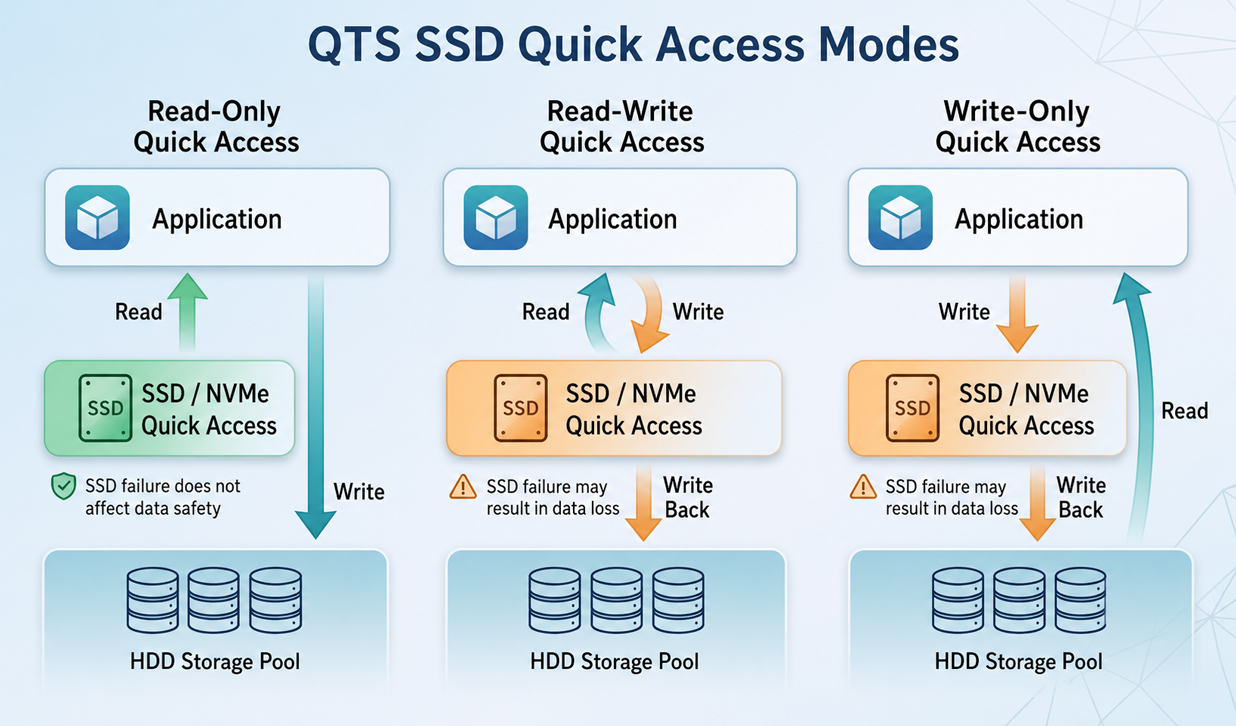
▲ Data flow and failure-risk differences across the three QTS SSD cache modes
Because the risk levels differ, a read-only cache and a read-write/write-only cache are handled very differently when the cache device fails. A read-write or write-only cache failure is close to a data emergency and must be handled carefully to avoid losing not-yet-written-back data; a read-only cache failure does not involve data loss, but QTS still includes a proactive protection mechanism to ensure data consistency.
When a read-only cache SSD goes offline unexpectedly, QTS does more than disable the cache—it proactively suspends access to the volume and waits for user intervention. Next, let's take a closer look at the design thinking behind this protection mechanism.
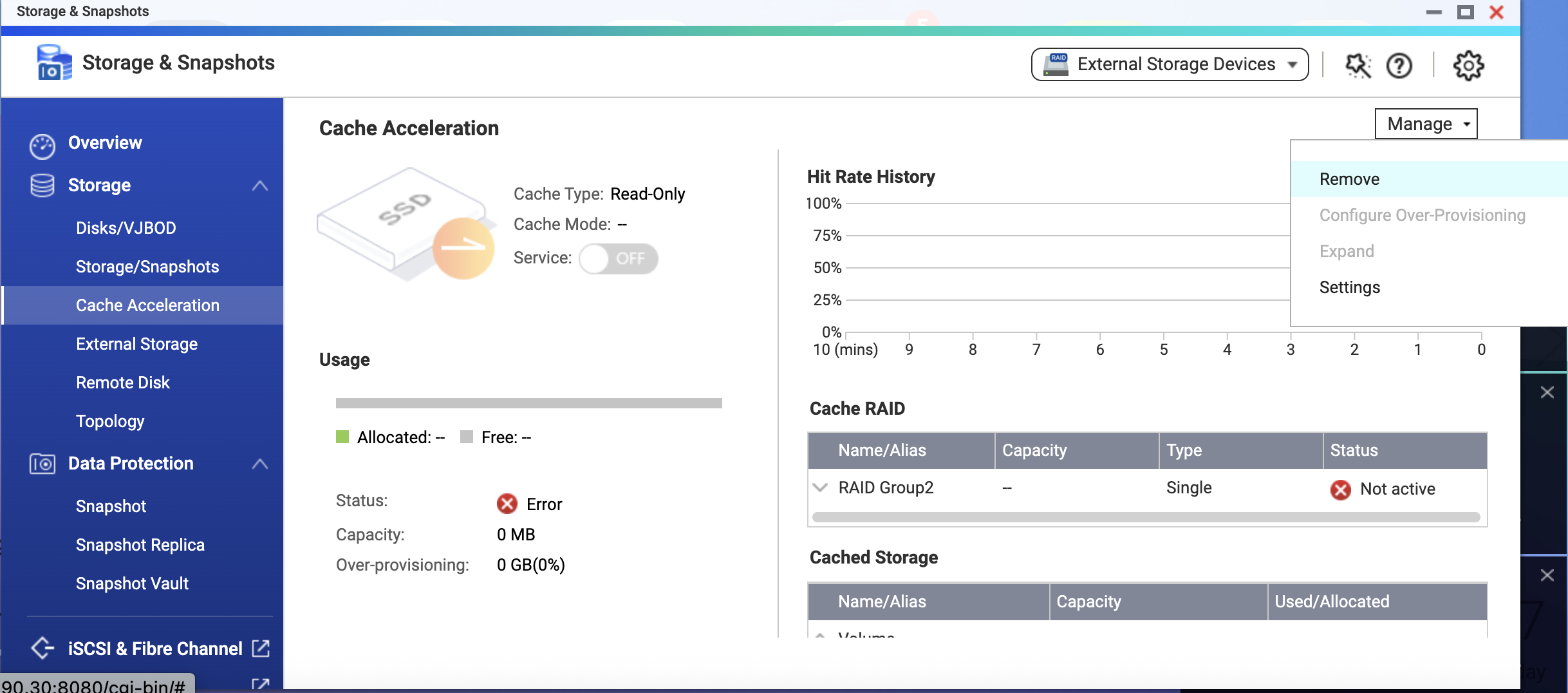
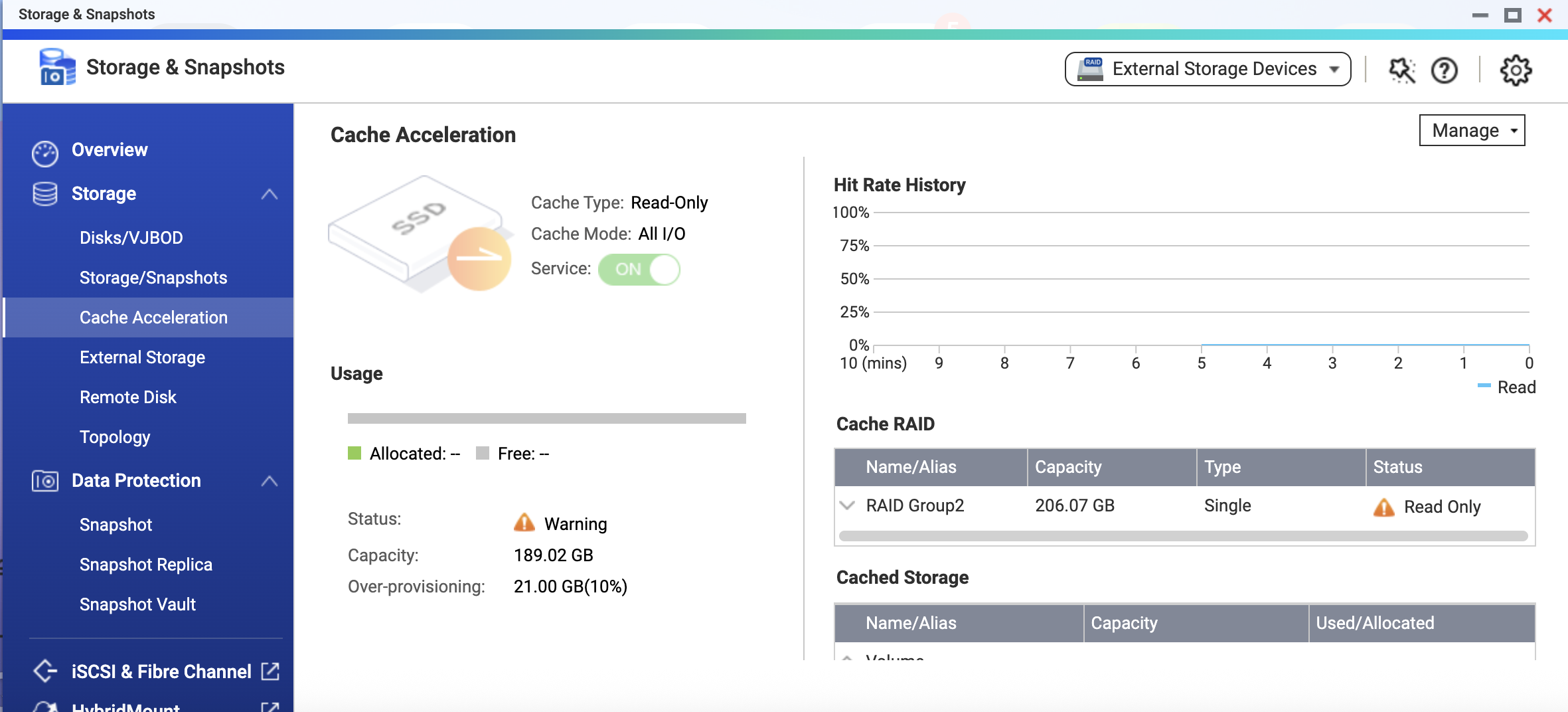
▲ QTS "Cache Acceleration" page: the read-only cache is running, with a warning shown in its status
Why Does an Offline Read-Only Cache SSD Cause the Volume to Stop Serving Access?
A read-only cache does not participate in writes, so no data is lost when the SSD fails. At first glance, simply letting the service fall back to HDD speed and keep running seems like the simplest approach—but QTS's design is more thorough.
A caching system must continuously track which data has been cached and whether the cached content is still valid; this information is recorded in the cache's metadata. When the SSD suddenly goes offline, QTS cannot verify the integrity of that cache metadata. More importantly, if the system allowed direct access to the underlying storage while the cache was offline, the data in the cache could become inconsistent with the actual state of the underlying storage once the cache device reconnects.
QTS chooses to suspend access at this moment precisely to safeguard you proactively—ensuring that whether you go on to restore or remove the cache, the data you read always matches the underlying storage.
Therefore, when QTS detects a problem with a cache SSD, it proactively halts access to the volume. This not only ensures data consistency but also gives you a chance to step in and resolve the issue—for example, by reseating a temporarily loose SSD—so you don't abandon the hot data already accumulated on a large cache just because of a brief offline event. Every time access is restored, your data is trustworthy, and the benefit of the cache is preserved as much as possible.
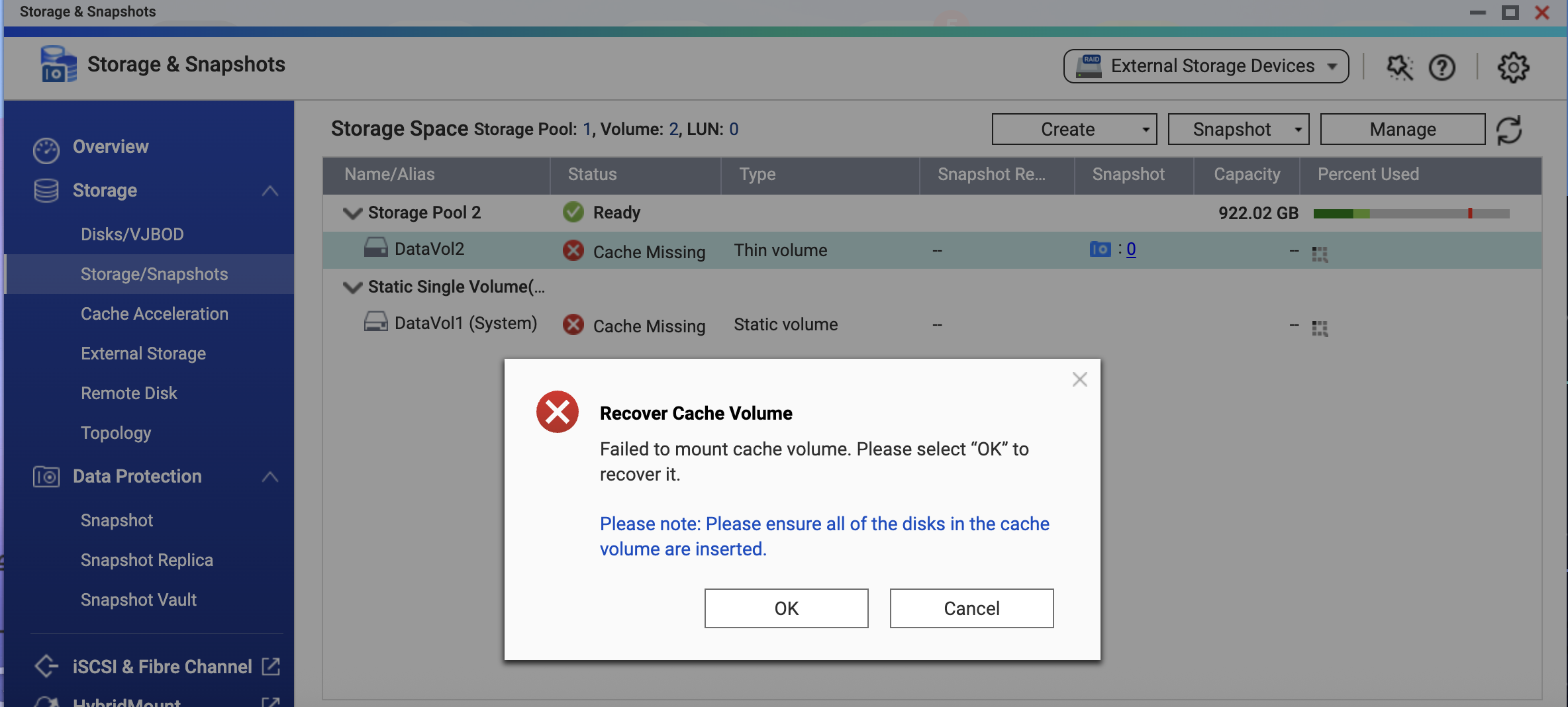
▲ The volume shows a "Cache Missing" status; QTS indicates the cache volume needs to be recovered
Two Ways to Restore Volume Access
QTS will not decide for you how to handle the cache. Based on your current situation, you need to choose one of the following methods:
Method 1: Reinsert the SSD (temporary hardware disconnection)
If the SSD went offline only due to poor contact or a temporary issue, reinsert it and follow these steps:
- Go to Storage & Snapshots > Cache Acceleration in QTS.
- The system will prompt you to "Recover Cache Volume"; click "OK" and the system will begin the recovery process.
- After recovery, the system automatically runs a file system check. Once data consistency is confirmed, the volume returns to normal access.
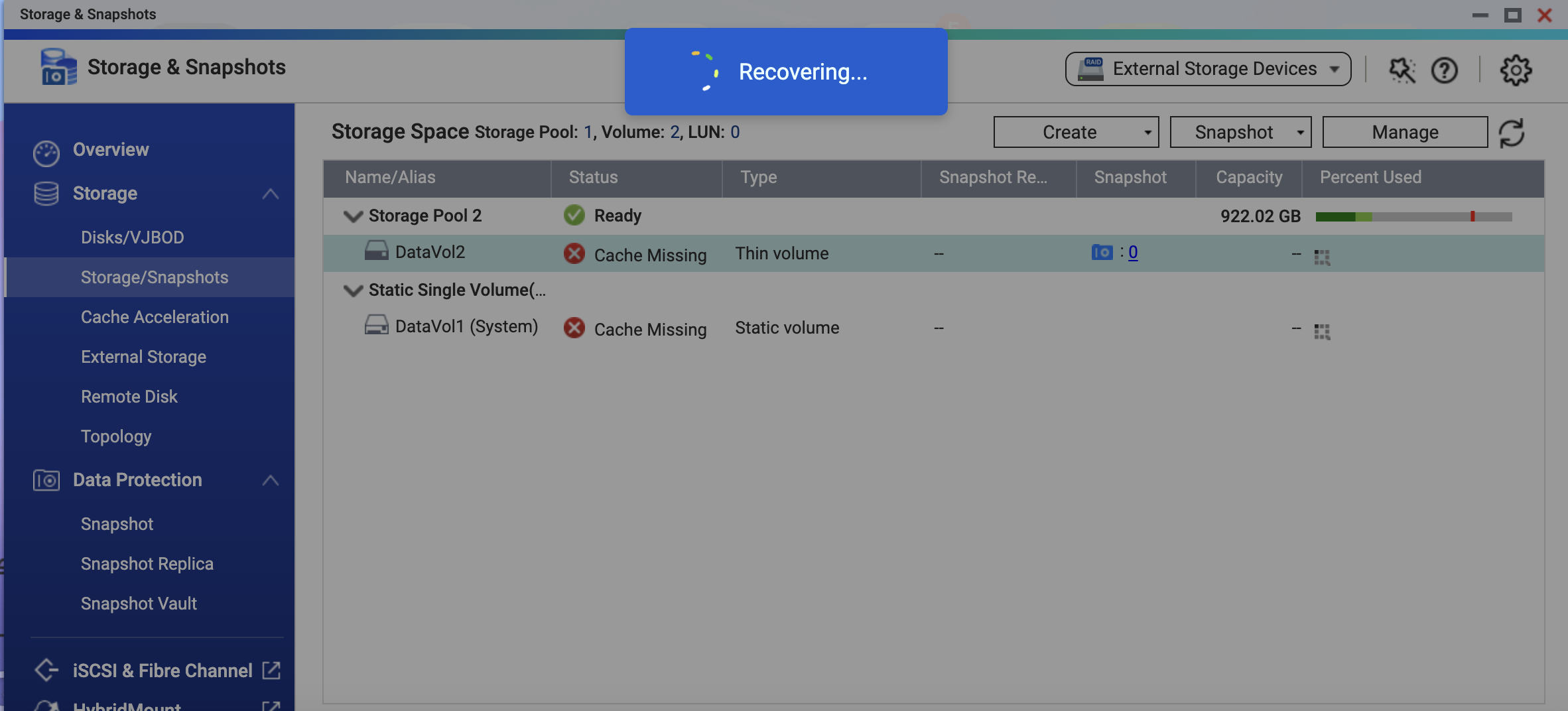
▲ The system is performing the cache volume recovery operation
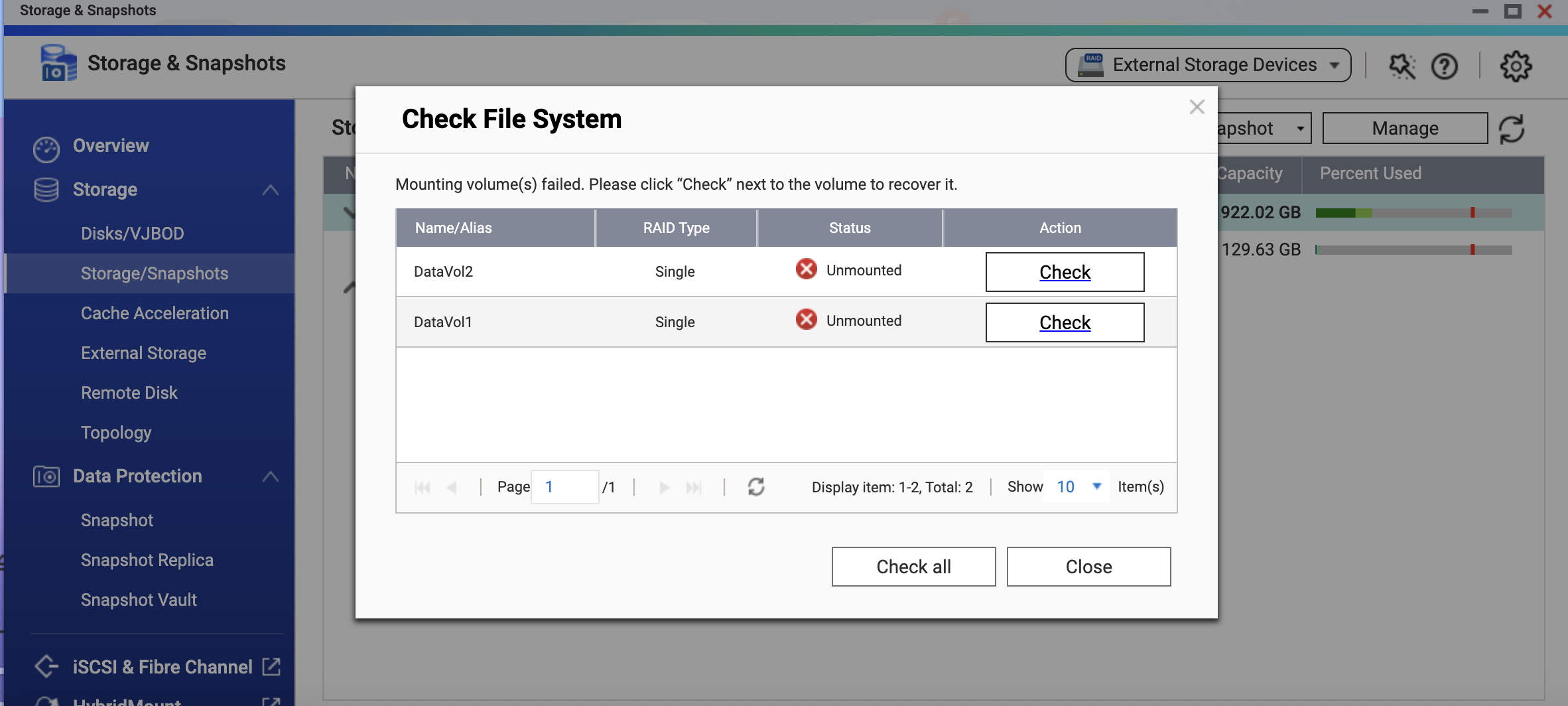
▲ After recovery, a file system check is required to confirm data consistency
Method 2: Remove the SSD Cache via QTS (permanent hardware failure)
If the SSD is confirmed to be damaged, or you want to bring the service back before replacing the cache later:
- Open the Storage & Snapshots interface in QTS and locate the SSD cache.
- Go to the "Manage" menu and click "Remove" to clear the cache configuration.
- After removal, the system automatically flushes the data and runs a file system check to confirm data consistency.
- Once the check completes, the volume returns to normal access. Your original data is fully intact, and you can later install a new SSD to rebuild the cache.
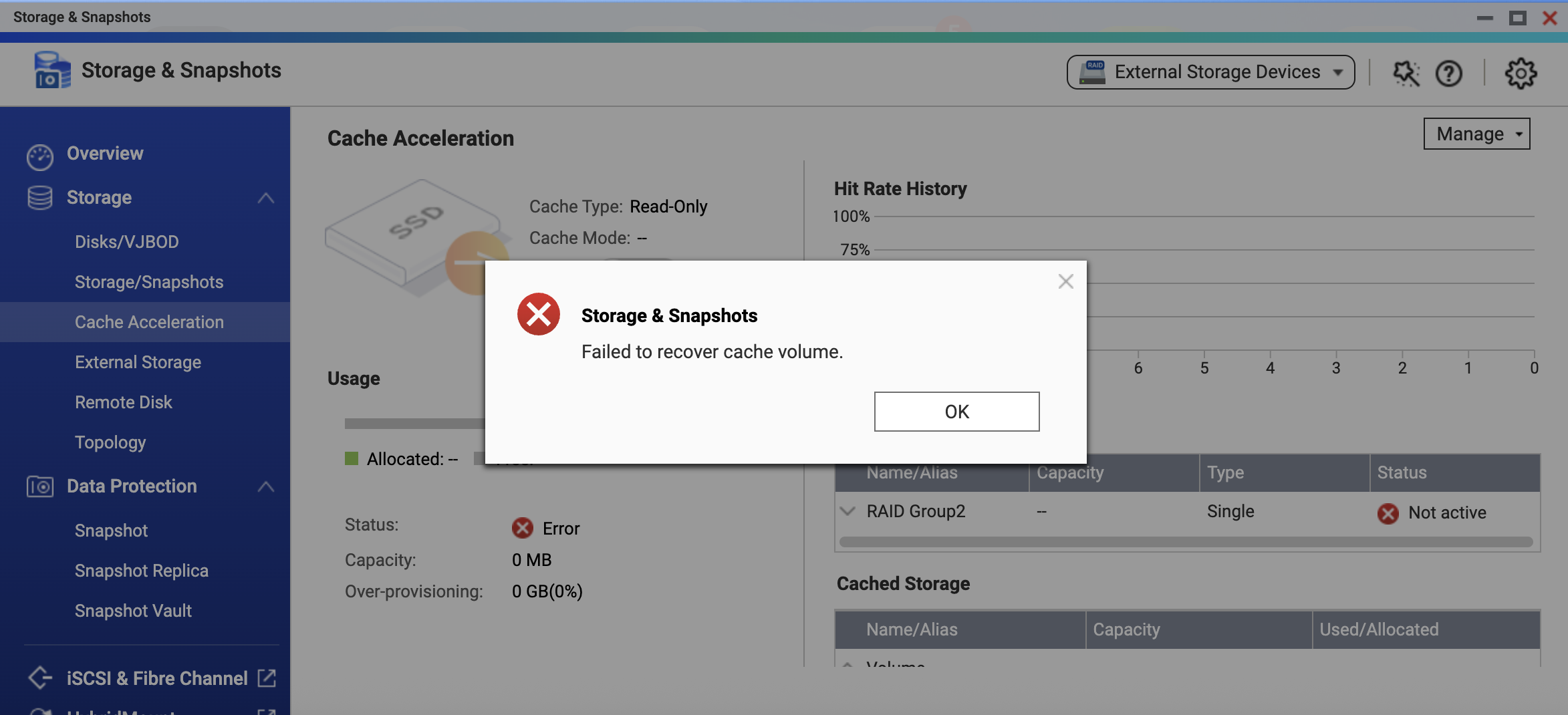
▲ If the SSD cannot be recovered, QTS displays "Unable to recover cache volume"
▲ Go to the "Manage" menu and select "Remove" to clear the cache configuration
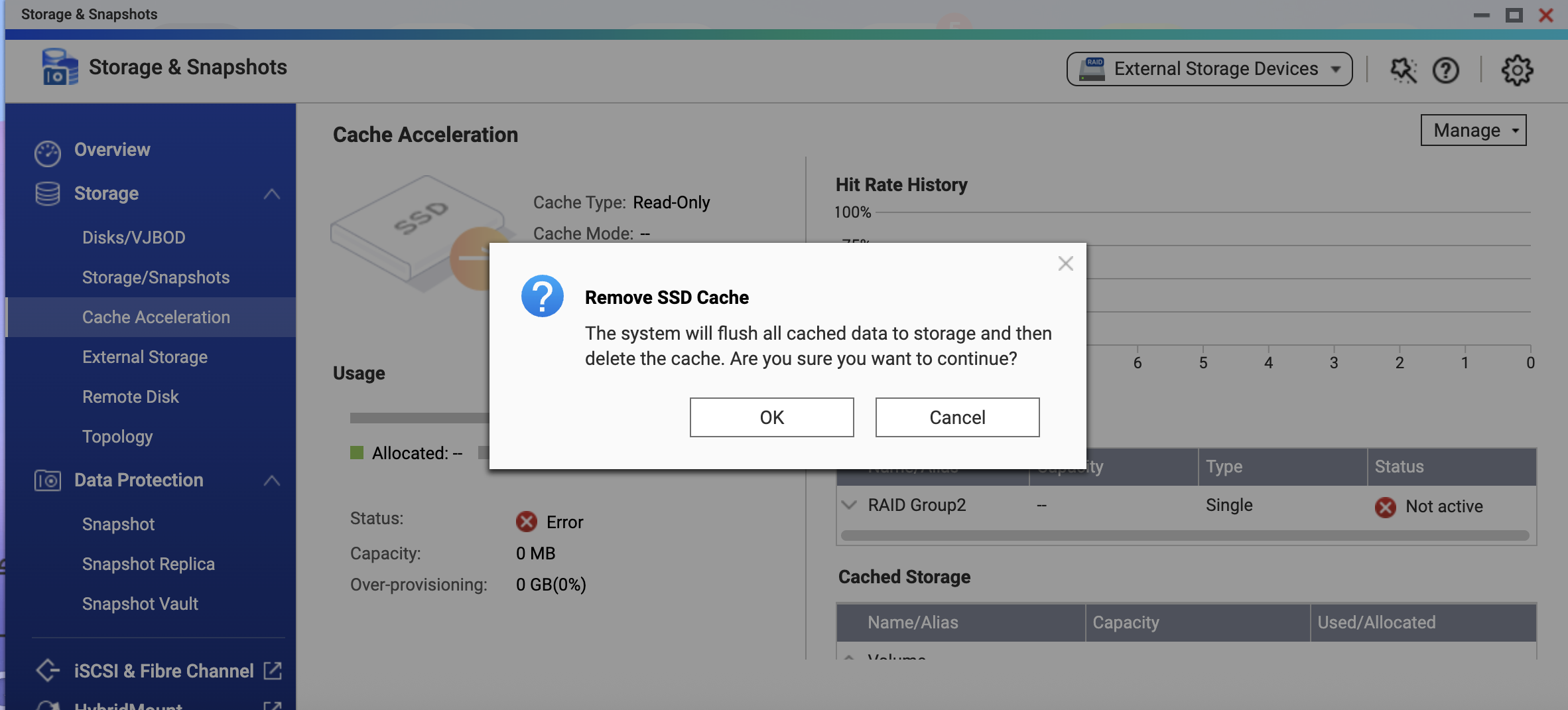
▲ Confirm removal of the SSD cache; the system flushes the data and deletes the cache configuration
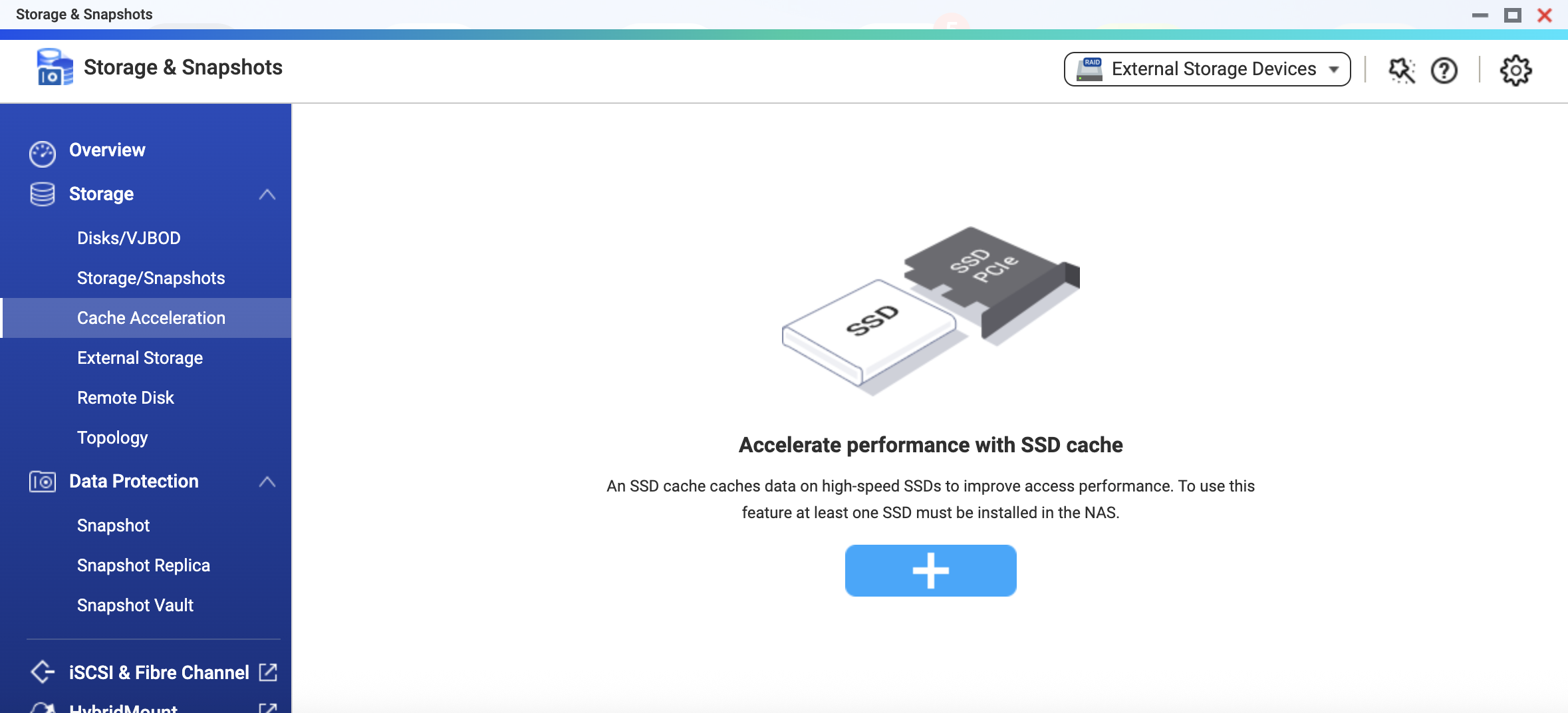
▲ After the cache is removed, the page returns to its initial state, ready for you to create a new SSD cache
Note: Regardless of which method you choose, your data on the HDD is unaffected once the process completes.
How Can You Further Improve Cache Service Availability?
Read-only cache data is always stored in the HDD storage pool, and the SSD is used only to accelerate reads. From a data-integrity standpoint, it is therefore technically viable to build the cache with a single SSD or RAID 0.
However, as described above, once a read-only cache SSD fails, access to the volume is suspended and manual intervention is needed to restore it. If your service has availability requirements and you want the cache to keep running without interrupting access when a single SSD fails, we recommend building the read-only cache on a RAID level with redundancy (such as RAID 1 or RAID 5).
With a redundant RAID configuration, the cache can keep operating through its remaining members when a single SSD fails—until you replace the failed SSD and the rebuild completes—preventing the volume from going offline due to a cache problem.
Summary
QTS proactively suspends volume access when a read-only cache goes offline in order to ensure that the data you read is always fully consistent with the underlying storage. This reflects QNAP's design principle for data protection: it is better to pause the service than to let an uncertain state undermine the trustworthiness of your data. By following the recovery steps and the RAID redundancy recommendation in this article, you can enjoy the performance gains of SSD caching while maintaining high service availability.
If you need further assistance during the process, feel free to contact the QNAP technical support team at any time.
De SSD-cachefunctie van QNAP QTS is een essentieel hulpmiddel voor het versnellen van de random-access prestaties van zakelijke virtuele machines (VM's), databases en VDI. Wanneer een alleen-lezen cache-SSD onverwacht offline gaat door hardwareveroudering of slechte aansluiting, activeert QTS een proactief beschermingsmechanisme om uw gegevens te beschermen en dataconsistentie te waarborgen.
Voordelen van QTS SSD-caching
Wanneer VM's traag opstarten, de databasevertraging toeneemt of VDI-desktops beginnen te haperen, zoeken veel mensen instinctief naar de oorzaak bij de CPU of het netwerk. De echte bottleneck is echter vaak de traditionele harde schijf (HDD): bij het verwerken van grote hoeveelheden kleine, willekeurige lees-/schrijfverzoeken stapelt de zoekvertraging van mechanische schijfkoppen zich snel op en vormt het de prestatiegrens van het hele systeem.
Met QTS SSD-caching kunt u automatisch vaak gebruikte hot data op SSD's bewaren zonder bestaande data te migreren of uw opslagpool opnieuw op te bouwen. De HDD-opslagpool zorgt voor capaciteit, terwijl de SSD's zich richten op het verminderen van vertraging, waardoor enterprise-prestaties perfect worden gecombineerd met grote capaciteitsbehoeften. Voor VM's, VDI, databases, iSCSI LUN's en veelgelezen/-geschreven gedeelde mappen verbetert een goed geconfigureerde SSD-cache vaak de gebruikerservaring directer dan simpelweg meer harde schijven toevoegen.
De drie modi van QTS SSD-caching en hun verschillende risico's
QTS SSD-caching biedt drie modi: alleen-lezen, lezen-schrijven en alleen-schrijven.
-
Alleen-lezen cache: Versnelt alleen het lezen; de cache bevat een kopie van de hot data. Zelfs als het cache-apparaat uitvalt, blijft de originele data volledig intact op de HDD—alleen de prestaties worden beïnvloed.
-
Lezen-schrijven en alleen-schrijven cache: Nieuw geschreven data wordt eerst op het cache-apparaat opgeslagen en vervolgens geleidelijk teruggeschreven naar de HDD door een achtergrondmechanisme. Totdat het terugschrijven is voltooid, bestaat deze nog-niet-teruggeschreven data alleen op het cache-apparaat, dus de betrouwbaarheid van het cache-apparaat beïnvloedt direct de dataveiligheid.
▲ Datastroom en risico's bij uitval van de drie QTS SSD-cachemodi
Omdat de risiconiveaus verschillen, worden een alleen-lezen cache en een lezen-schrijven/alleen-schrijven cache heel anders behandeld wanneer het cache-apparaat uitvalt. Een lezen-schrijven of alleen-schrijven cache-uitval is bijna een data-noodsituatie en moet zorgvuldig worden afgehandeld om verlies van nog-niet-teruggeschreven data te voorkomen; een alleen-lezen cache-uitval leidt niet tot dataverlies, maar QTS bevat toch een proactief beschermingsmechanisme om dataconsistentie te waarborgen.
Wanneer een alleen-lezen cache-SSD onverwacht offline gaat, doet QTS meer dan alleen de cache uitschakelen—het schort proactief de toegang tot het volume op en wacht op gebruikersinterventie. Laten we nu dieper ingaan op de ontwerpgedachte achter dit beschermingsmechanisme.
▲ QTS "Cache Acceleration"-pagina: de alleen-lezen cache draait, met een waarschuwing in de status
Waarom stopt een offline alleen-lezen cache-SSD de toegang tot het volume?
Een alleen-lezen cache neemt niet deel aan schrijven, dus er gaat geen data verloren wanneer de SSD uitvalt. Op het eerste gezicht lijkt het simpelste om de service terug te laten vallen op HDD-snelheid en door te laten gaan—maar het ontwerp van QTS is grondiger.
Een cachesysteem moet continu bijhouden welke data is gecached en of de gecachte inhoud nog geldig is; deze informatie wordt opgeslagen in de metadata van de cache. Wanneer de SSD plotseling offline gaat, kan QTS de integriteit van die cachemetadata niet verifiëren. Belangrijker nog: als het systeem directe toegang tot de onderliggende opslag toestaat terwijl de cache offline is, kan de data in de cache inconsistent worden met de werkelijke staat van de onderliggende opslag zodra het cache-apparaat weer wordt aangesloten.
QTS kiest ervoor om de toegang op dit moment te onderbreken, juist om u proactief te beschermen—zodat, of u nu de cache herstelt of verwijdert, de data die u leest altijd overeenkomt met de onderliggende opslag.
Daarom stopt QTS de toegang tot het volume zodra er een probleem met een cache-SSD wordt gedetecteerd. Dit zorgt niet alleen voor dataconsistentie, maar geeft u ook de kans om het probleem op te lossen—bijvoorbeeld door een tijdelijk losse SSD opnieuw te plaatsen—zodat u niet de hot data op een grote cache hoeft op te geven vanwege een kort offline moment. Elke keer dat de toegang wordt hersteld, is uw data betrouwbaar en blijft het cachevoordeel zoveel mogelijk behouden.
▲ Het volume toont de status "Cache Missing"; QTS geeft aan dat het cachevolume moet worden hersteld
Twee manieren om de toegang tot het volume te herstellen
QTS bepaalt niet voor u hoe u met de cache omgaat. Afhankelijk van uw situatie kiest u een van de volgende methoden:
Methode 1: SSD opnieuw plaatsen (tijdelijke hardware-onderbreking)
Als de SSD alleen offline ging door slechte aansluiting of een tijdelijk probleem, plaats deze opnieuw en volg deze stappen:
- Ga naar Opslag & Snapshots > Cache Acceleration in QTS.
- Het systeem vraagt u om "Cachevolume herstellen"; klik op "OK" en het systeem start het herstelproces.
- Na herstel voert het systeem automatisch een bestandssysteemcontrole uit. Zodra dataconsistentie is bevestigd, keert het volume terug naar normale toegang.
▲ Het systeem voert de hersteloperatie van het cachevolume uit
▲ Na herstel is een bestandssysteemcontrole vereist om dataconsistentie te bevestigen
Methode 2: SSD-cache verwijderen via QTS (permanente hardware-uitval)
Als de SSD beschadigd is, of u wilt de service herstellen voordat u later de cache vervangt:
- Open de Opslag & Snapshots-interface in QTS en zoek de SSD-cache.
- Ga naar het menu "Beheren" en klik op "Verwijderen" om de cacheconfiguratie te wissen.
- Na verwijdering spoelt het systeem automatisch de data en voert een bestandssysteemcontrole uit om dataconsistentie te bevestigen.
- Zodra de controle is voltooid, keert het volume terug naar normale toegang. Uw originele data blijft volledig intact en u kunt later een nieuwe SSD installeren om de cache opnieuw op te bouwen.
▲ Als de SSD niet kan worden hersteld, toont QTS "Kan cachevolume niet herstellen"
▲ Ga naar het menu "Beheren" en selecteer "Verwijderen" om de cacheconfiguratie te wissen
▲ Bevestig het verwijderen van de SSD-cache; het systeem spoelt de data en verwijdert de cacheconfiguratie
▲ Na het verwijderen van de cache keert de pagina terug naar de beginstatus, klaar om een nieuwe SSD-cache aan te maken
Opmerking: ongeacht welke methode u kiest, uw data op de HDD blijft onaangetast zodra het proces is voltooid.
Hoe kunt u de beschikbaarheid van de cache verder verbeteren?
Alleen-lezen cachedata wordt altijd opgeslagen in de HDD-opslagpool, en de SSD wordt alleen gebruikt om het lezen te versnellen. Vanuit het oogpunt van dataintegriteit is het dus technisch mogelijk om de cache te bouwen met één SSD of RAID 0.
Zoals hierboven beschreven, wordt de toegang tot het volume opgeschort en is handmatige interventie nodig zodra een alleen-lezen cache-SSD uitvalt. Als uw service beschikbaarheidseisen heeft en u wilt dat de cache blijft werken zonder onderbreking van de toegang wanneer een enkele SSD uitvalt, raden we aan de alleen-lezen cache op een RAID-niveau met redundantie te bouwen (zoals RAID 1 of RAID 5).
Met een redundante RAID-configuratie kan de cache blijven werken via de resterende leden wanneer een enkele SSD uitvalt—totdat u de defecte SSD vervangt en de rebuild is voltooid—waardoor wordt voorkomen dat het volume offline gaat door een cacheprobleem.
Samenvatting
QTS schort proactief de toegang tot het volume op wanneer een alleen-lezen cache offline gaat, om ervoor te zorgen dat de data die u leest altijd volledig overeenkomt met de onderliggende opslag. Dit weerspiegelt het ontwerpprincipe van QNAP voor dataprotectie: liever de service pauzeren dan een onzekere staat de betrouwbaarheid van uw data laten ondermijnen. Door de herstelstappen en de RAID-redundantie-aanbeveling in dit artikel te volgen, kunt u genieten van de prestatievoordelen van SSD-caching met behoud van hoge beschikbaarheid.
Heeft u tijdens het proces verdere hulp nodig, neem dan gerust contact op met het QNAP technische ondersteuningsteam.


 7 min lezen