


How do I find the serial number of the QSW-M7308R
Last modified date:
2026-01-26
Applicable Products
- QSW-M7308R
Scenario
The QSW-M7308R web management interface does not display the serial number in the System Information page. However, you may need the serial number for support or registration purposes.
Workaround
- Open your Chrome browser and navigate to the QSW-M7308R login page.
- Before logging in, press F12 (or go to the top-right menu → More Tools → Developer Tools) to open Developer Tools.
- Log in to the web interface as usual.
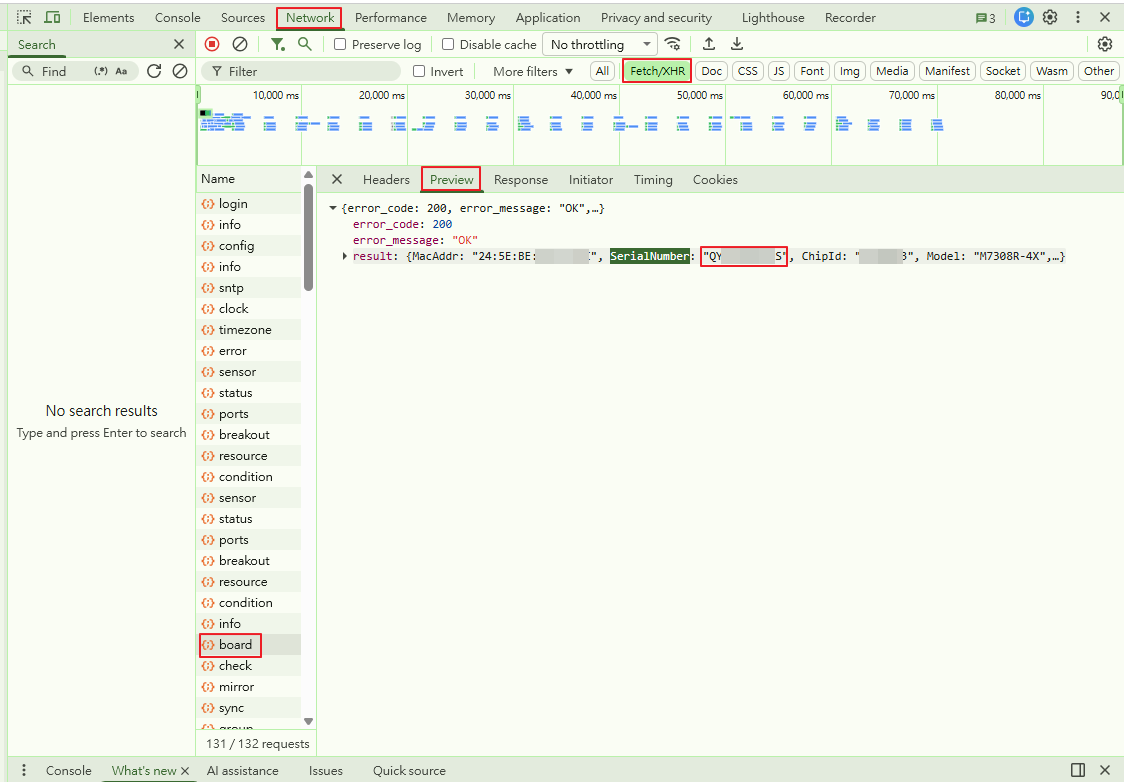
- In Developer Tools, click the Network tab at the top.
- In the filter bar below the Network tab, select Fetch/XHR to filter the requests.
- In the “Name” list on the left, find and click the item named board.
- On the right, click the Preview tab.
- Look for the SerialNumber key and its value. This is your device’s serial number.
If you cannot access the web interface, the serial number is also printed on a label on the device chassis.


