


How to Configure QuWAN on QHora-301W
QuWAN and QuWAN Orchestrator
QuWAN is a QNAP cloud-based SD-WAN networking solution that provides a centralized control platform to manage network functions of devices within its private network topology. QuWAN can intelligently and securely direct traffic across the WAN network.
The QuWAN virtual router (vRouter) application can be installed as a virtual machine on networking devices and can be controlled by the QNAP cloud service, QuWAN Orchestrator.
Applicable Products
| Product | Model | Software |
|---|---|---|
| QNAP |
| QuRouter |
| QuWAN Agent | |
| QuCPE: QNE | Install QuWAN vRouter using the Service Composer application. Note: For details, see the Service Composer section of the QNE User Guide. | |
| Third-party hypervisor | VMware | QuWAN vRouter Edition |
QuWAN Device Management Hierarchy
Within an organization, QuWAN devices are categorized into three hierarchical levels:
| Hierarchy Level | Description |
|---|---|
| Organization | Before deploying QuWAN devices, users must create organizations in QNAP Account. You can add multiple administrators and users to the organization based on your SD-WAN needs. |
| Domain | QuWAN uses geographical network domains to distribute traffic across multiple zones. QNAP categorizes domains into:
|
| Region | Within an organization, a region is a geographical or administrative management zone. Large organizations can deploy multi-region architecture to support distributed networks. During setup, QuWAN creates two regions:
Note: Devices added to a region must comply with the data protection regulations that apply to that region. |
| Site | Site are remote small-scale branch offices, or stand-alone divisions in a region which can house QuWAN-enabled QNAP devices. During setup, QuWAN adds your device to a default site named My Site. Tip: To add or edit the organization and site details, go to https://account.qnap.com. |
| Device role |
|
QuWAN Deployment Topologies
The QuWAN SD-WAN service can be deployed within a region, between two or more regions, or between two different domains.
Intraregional Deployment
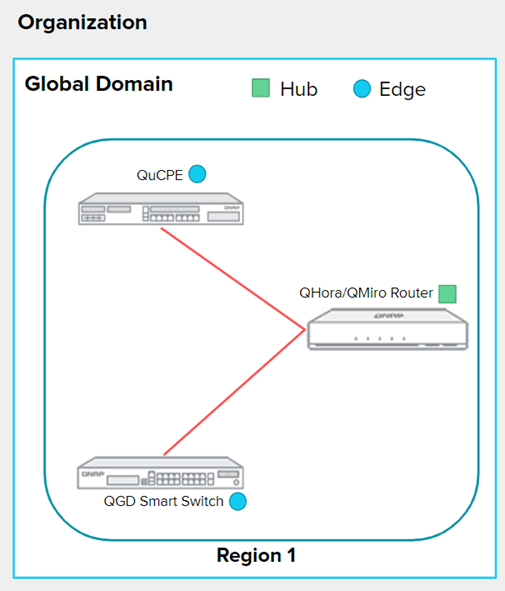
The intraregional topology represents a small deployment zone where on-premises hub or edge devices within a region can form a hub-spoke network.
The following figure displays an overview of an intraregional deployment topology within an organization.
Interregional Deployment
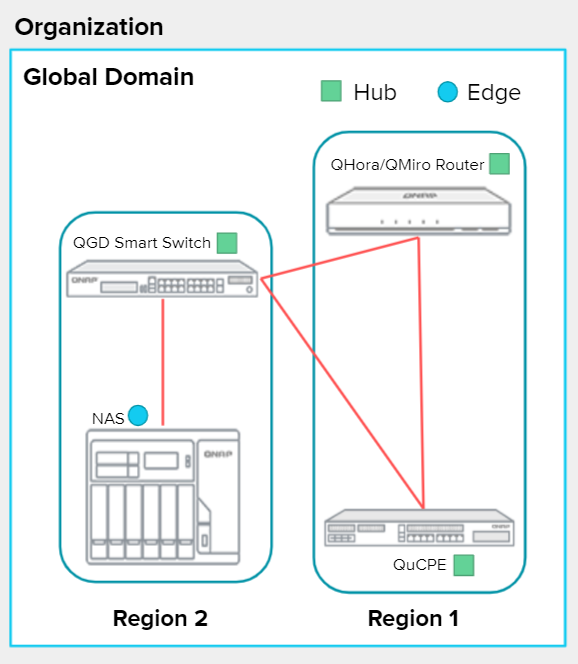
The interregional topology represents a deployment where two or more regions can form an SD-WAN link with an organization. A typical interregional deployment model contains two or more user-defined regions accommodating several hubs and edges. Hub-to-hub deployments in a domain forms a mesh network.
The following figure displays an overview of an interregional deployment topology within an organization.
Interdomain Link Deployment
Interdomain links use Multiprotocol Label Switching (MPLS) technology to forward packets between different domains in an organization. This works by building tunnels across routed IP networks. QuWAN Orchestrator can further secure the tunnel by encrypting IP packets that use MPLS labels.
The following figure displays an overview of an interdomain link deployment topology within an organization.

Understanding the WAN IP Attributes
QuWAN Orchestrator provides a checking feature to inspect whether the QuWAN device is hub configurable using a public IP address or behind the NAT configuration. The system identifies the following four WAN IP attributes and allows you to assign the role of hub or edge to the device based on the detected attribute.
-
Public IP address: All the WAN-enabled ports on the device are assigned a public IP address. QuWAN devices with a public IP address can be assigned the role of a hub or an edge.
-
Behind NAT: One of the WAN-enabled ports on the device is assigned a private IP address. You can assign only the role of an edge to QuWAN devices configured behind network address translation (NAT).
-
Behind NAT (Device role - Hub or edge): All the IPSec NAT-T and ISAKMP/IKE service ports on the WAN-enabled ports are accessible even if the IP address is not public.
Tip:To configure the device behind NAT (Device role - Hub or edge), enable port forwarding on the IKE and IPSec service ports on the router or firewall in front of the QuWAN device.
-
Public IP (IPSec/IKE passthrough failure): IPSec NAT-T and ISAKMP/IKE service ports are not accessible on the WAN-enabled ports. You can assign only the role of an edge to QuWAN devices detected with the public IP (IPSec/IKE passthrough failure) attribute.
Tip:IPSec/IKE passthrough failure could occur if the IKE and IPSec service ports are blocked on the router or firewall in front of the QuWAN device. To access the IKE and IPSec services, enable the service ports on router or firewall.
About the QHora-301W
The QHora-301W is QNAP's first 802.11ax-enabled router that comes with dual 10 GbE ports. The router features built-in SD-WAN technology to support VPN deployment. The QHora-301W features eight internal 5dBi antennas, four 1 GbE ports, and supports wireless transfer speeds up to 3600 Mbps. You can deploy the router as a hub or edge using QuWAN, QNAP's software defined-WAN (SD-WAN) technology.
Creating a QNAP ID
- Click Sign up.
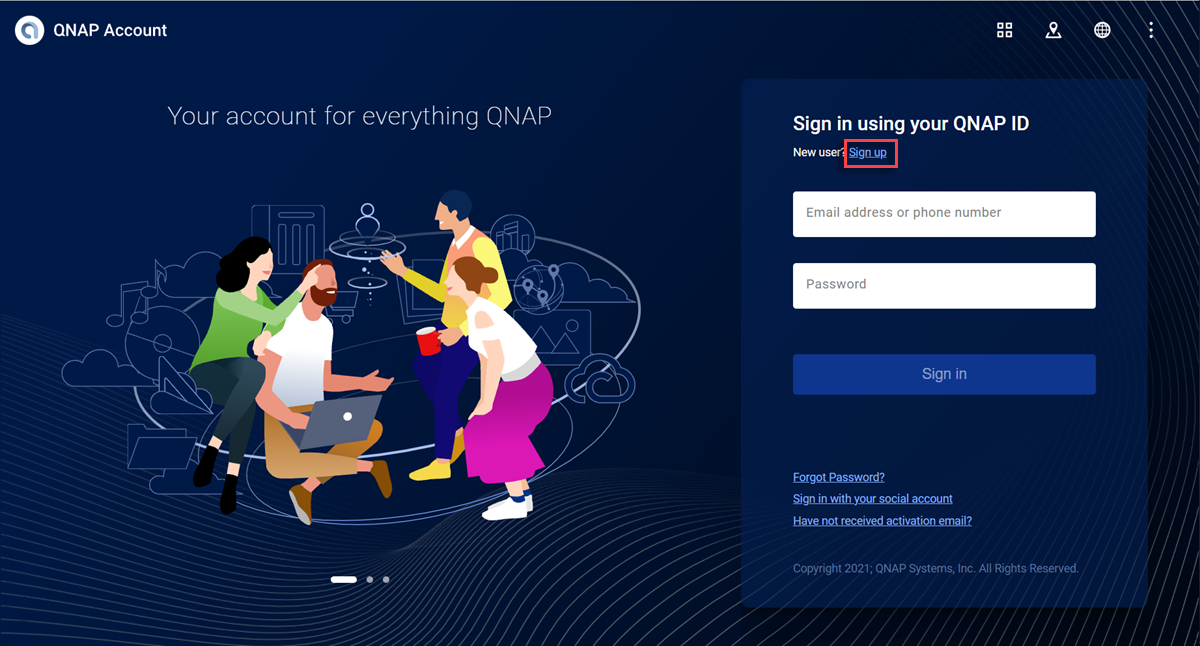
The Create Account screen appears.
- Click Sign Up.

The Data Privacy Notice box appears.
Configuring QuWAN Settings
- Configure the QuWAN settings.
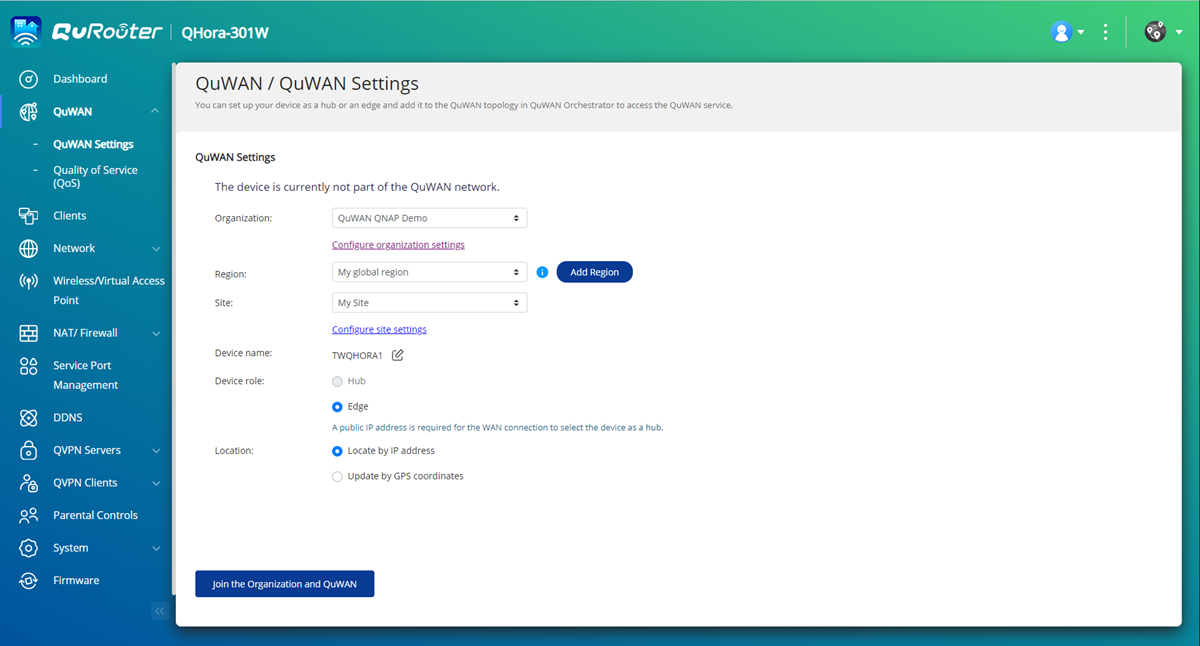
Setting
User Action
Organization
Select an organization associated with your QNAP ID.
Note:If there are no organizations associated with your QNAP ID, click Create or edit organization. QuRouter redirects you to QNAP Account website where you can create a new organization or edit an existing one.
Region
Select a region linked with the selected organization.
Click Add Region to create a new region.
Site
Select a site from the drop-down menu.
Note:Click Create or edit site to create a new site associated with the selected organization or edit an existing site.
Device Role
Select one of the following:-
Hub: Configure the device as an SD-WAN hub. A public IP address is required for the WAN connection to select the device as a hub.
-
Edge: Configure the device as an SD-WAN edge.
Important:-
You can only assign the device role of edge to devices behind NAT in an organization.
-
QuWAN Orchestrator automatically assigns the role of a hub to the first device added to the organization only if it is assigned a public IP address.
-
If the QuWAN device is using a private IP address, you can only assign the device role of edge using QuRouter. If you have enabled port forwarding on the router in front of the QuWAN device, you can change the device role from edge to hub in QuWAN Orchestrator.
Location
Select one of the following:-
Locate by IP address
-
Update by GPS coordinates
-
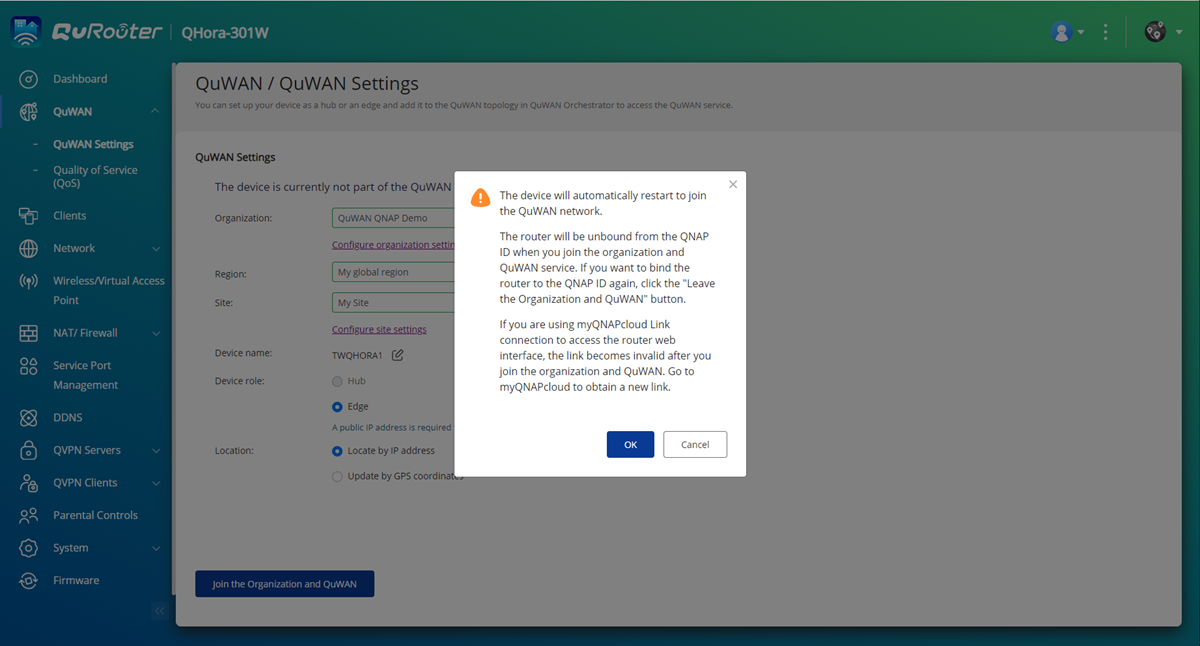
- Click Join the Organization and QuWAN. Important:
-
The router is unbound from the QNAP ID once it is part of the QuWAN topology.
-
The router can support a maximum of 30 VPN tunnels.
A confirmation message appears.
-
QuRouter adds the router to the QuWAN topology.
Accessing QuWAN Orchestrator
- Click
 located on the taskbar.
Pro další pomoc se zeptejte ostatních uživatelů a odborníků QNAP v komunitě. Přejít do komunity QNAP


