


How do I extract .qdff files using the QuDedup Extract Tool?
Applicable Products
QuDedup Extract Tool
Background
QuDedup is a QNAP deduplication technology in Hybrid Backup Sync (HBS) that reduces backup sizes for improved transfer speeds and storage efficiency. When you run a backup job with QuDedup enabled, the data is deduplicated and stored as a .qdff folder in the destination.
On a QNAP NAS, you can extract and restore the deduplicated data from a .qdff folder simply by creating a restore job in HBS.
To extract the deduplicated data on a computer, you can use QuDedup Extract Tool. QuDedup Extract Tool is available for Windows, macOS, and Ubuntu.
Extracting .qdff Files on a Computer
- Download and install QuDedup Extract Tool on your computer.
You can download QuDedup Extract Tool at https://www.qnap.com/en/utilities/enterprise#utliity_18. - Open QuDedup Extract Tool.

- Click Browse file.
The file browser opens. - Locate and select a .qdff folder to extract.
- Click Select Folder.
QuDedup Extract Tool opens the folder and displays its contents.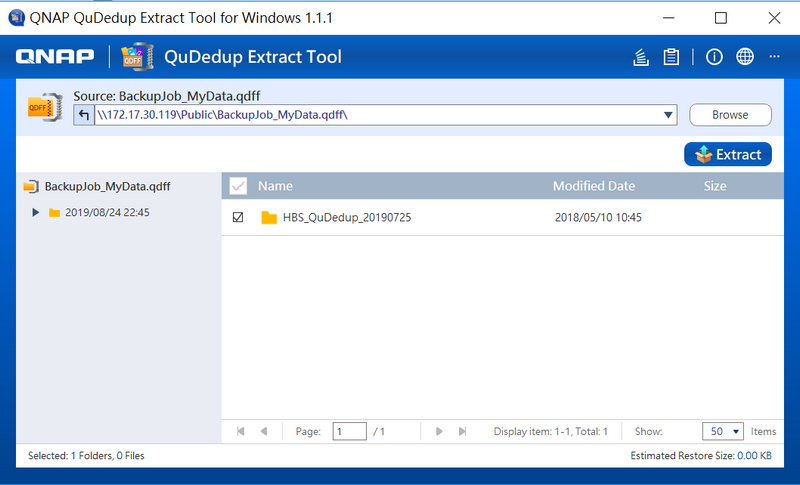
- Select the version and the files and folders to extract.
- Click Extract.
A confirmation window opens. - Click OK.
The file browser opens. - Select a destination folder on your computer.
- Click Select Folder.
A dialog box appears.
- Select a conflict policy.
QuDedup Extract Tool extracts all files and folders to the destination folder according to the selected conflict policy.Conflict Policy Description Replace All Replace existing destination files with the source files if they have the same names. Skip All Do not replace existing destination files with the source files if they have the same names. TipIf the Background Tasks window does not automatically open, you can click the icon in the upper-right corner to view the extraction status.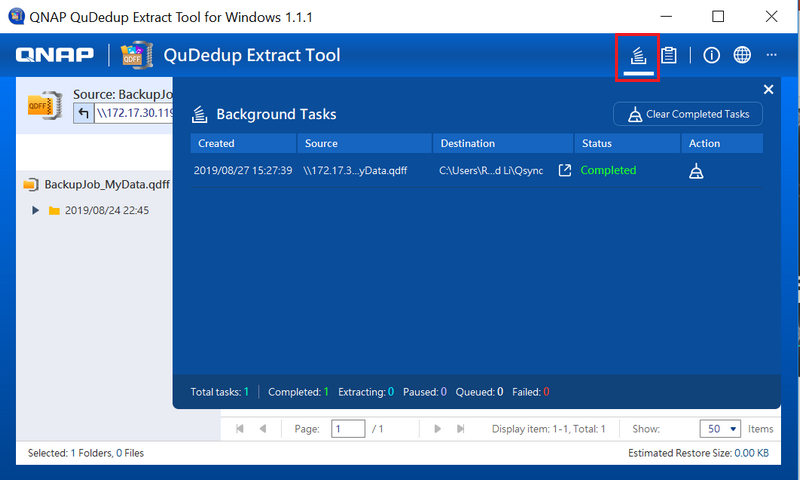
Pro další pomoc se zeptejte ostatních uživatelů a odborníků QNAP v komunitě. Přejít do komunity QNAP


