The 'time machine' of ransomware: Snapshot technology principles, attack and defense, and key concepts of protection
In the battlefield of enterprise cybersecurity defense, ransomware (Ransomware) has undoubtedly become the most troublesome adversary in recent years. When hackers encrypt your critical data and demand a huge ransom, traditional "backup restore" often results in excessive downtime (high RTO), causing severe business interruption and losses.
At this time, a storage-level technology called "Snapshot" has become the last line of defense against ransomware for many businesses and individual users, and is even referred to as the "time machine" for data recovery.
So what exactly is a snapshot? How can it instantly "restore" encrypted files? Besides passive restore, what proactive detection capabilities does modern snapshot technology offer? This article will delve into the underlying principles and key management aspects of snapshots.
What is a snapshot?
Simply put, a snapshot is a record of the state of a file system or storageunit at a “specific point in time.” It is important to clarify that a snapshot does not “make another copy” of the data, but rather records the version state of every file, directory, and block mapping relationship (Metadata, Block map) in the file system at that moment.
Many people mistakenly think that a snapshot is a “backup,” but in fact, the two are fundamentally different in terms of technical principles:
-
Backup: creates a complete copy of the data to another physical Storage Space (a full copy).
-
Snapshot: is more like taking a “photo” of the current data structure. It usually only records the pointers or metadata of the data, rather than duplicating the data itself.
Simply put, when we back up 100 gigabyte photos in hard disk drives, making 10 backups will consume 1TB of space. But when we use snapshot technology, under “normal usage scenarios,” keeping 10 snapshots usually only takes up an extra 1%–20% of space (about 1–20 GB), which is a huge efficiency difference.
Comparison table of space and time costs between snapshots and traditional backups
| Comparison Items |
Initial data Amount (Day 0) |
Day 1 (Change 10GB) |
Day 2 (Change 10GB) |
Total Space Used (Approximate) |
Establishment/restore Speed |
| Traditional Full Backup (Full Backup) |
100 gigabyte |
+100 gigabyte (Second Full Backup) |
+100 gigabyte (Third Full Backup) |
300 gigabyte |
Slow (requires moving a large amount of data) |
| Snapshot |
100 gigabyte (original data) |
+10 gigabyte (only records changed blocks) |
+10 gigabyte (only records changed blocks) |
120 gigabyte |
Ultra-fast (only marks pointers) |
Chart Help: This table simulates an environment where an initial 100GB data changes by 10GB each day over two days. You can see that traditional backups duplicate the entire data each time, resulting in linear and multiplied space consumption. In contrast, snapshots only record the changed blocks, so space growth is extremely slow. This explains why businesses can easily retain hundreds of snapshot time points.
Technical Principle: Operation and Trade-offs of COW and ROW
Currently, the mainstream snapshot technologies are mainly divided into two types, each with its own advantages in terms of efficiency and space utilization:
1. Copy-On-Write (COW)
When the original data needs to be modified, the system will first pause the write operation, copy the “old data block” to the snapshot reserved area, and then allow the new data to be written in the original location.
Advantage: Reading the original data is very fast because the data location has not changed.
Disadvantage: Write performance is relatively poor (because each write operation requires "read old data -> copy -> write new data"), which is known as the "write penalty (Write Penalty)".
2. Redirect-On-Write (ROW) during writing
This is a common approach used in modern high-efficiency storage (such as the ZFS file system and mid-to-high-end NAS). When new data is written, the system does not move the old blocks, but instead writes the new data directly to a “new location” on the hard disk drives, and updates the pointer to the new location, while the snapshot continues to retain the pointer to the old blocks.
Advantage: Creating snapshots and writing data has almost no impact on performance, and the speed is extremely fast.
Cost: Fragmentation. This is a physical limitation that ROW technology must face. Due to the data blocks of files being scattered across different physical locations in hard disk drives after multiple modifications, over time this may lead to decreased read performance of traditional hard disk drives (HDD). Therefore, for storage systems using ROW technology, it is generally recommended to pair with an all-flash architecture (All-Flash) or a robust background auto-reorganization mechanism to mitigate this impact.
How do snapshots defend against ransomware? From passive restore to proactive detection
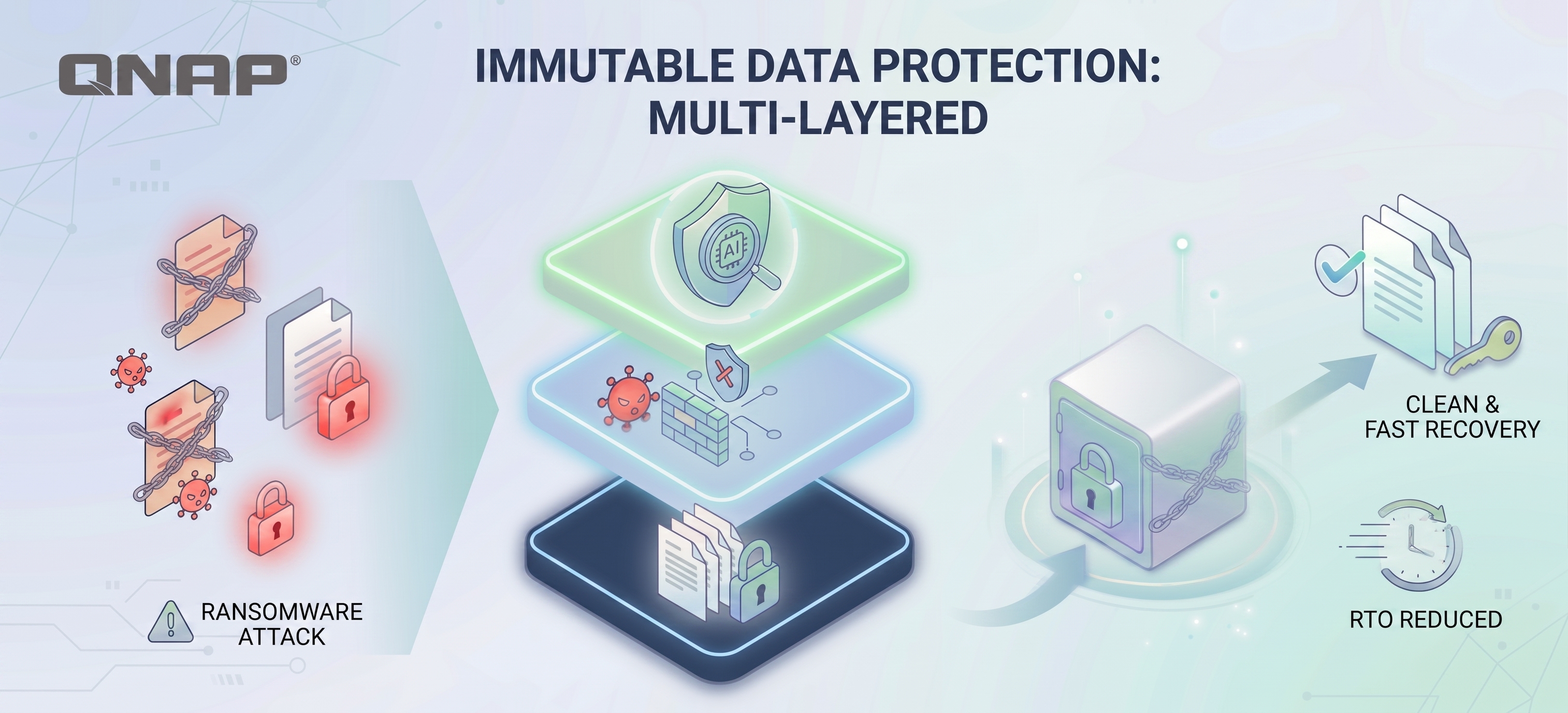
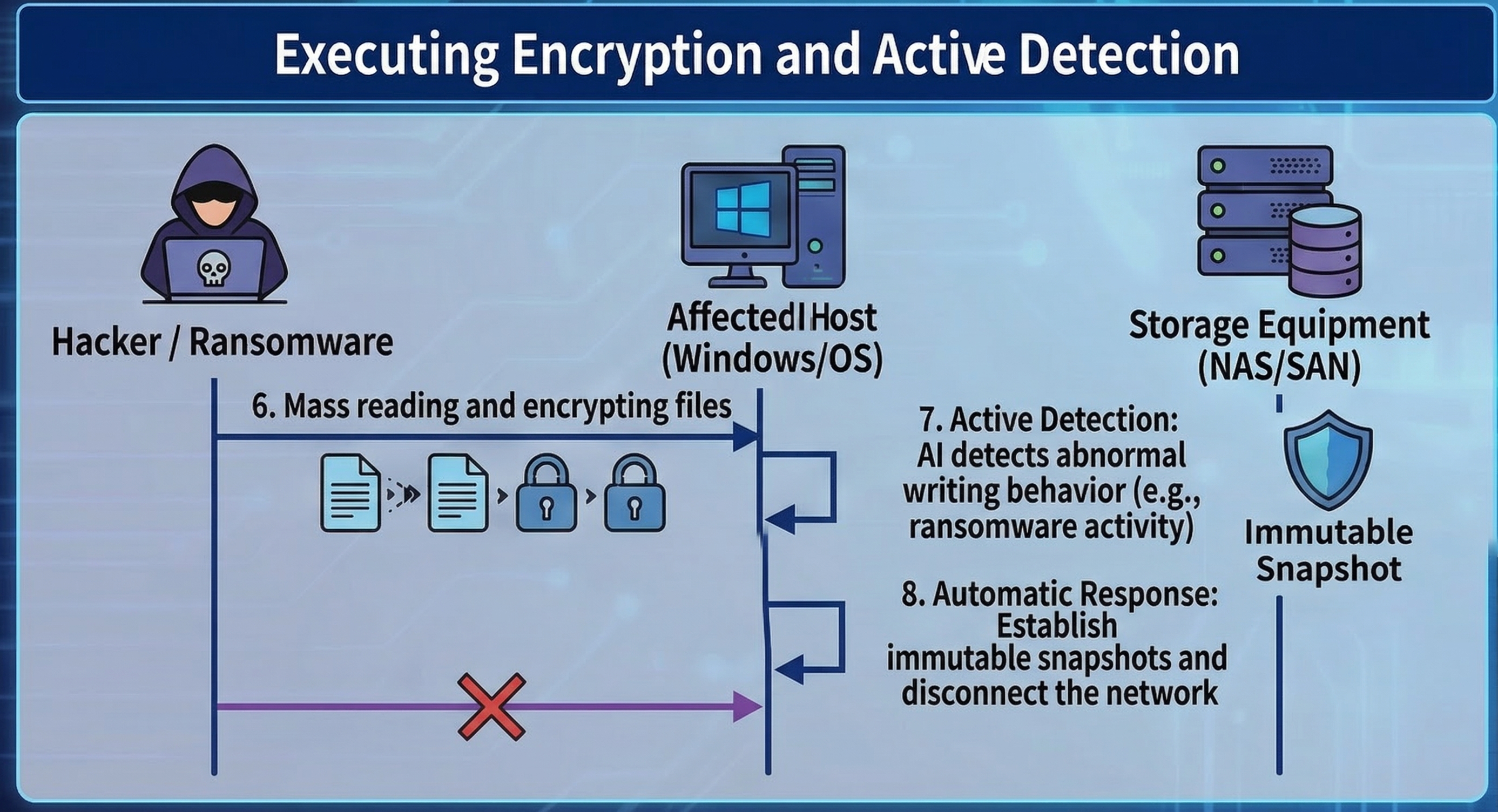
The standard operating procedure for ransomware software is: read file → encrypt → delete original file → leave behind the encrypted, scrambled file. In response to this process, QuicKProtect provides multiple layers of defense mechanisms.
Key 1: Bypassing OS-level attacks (VSS vs. Storage Snapshot)
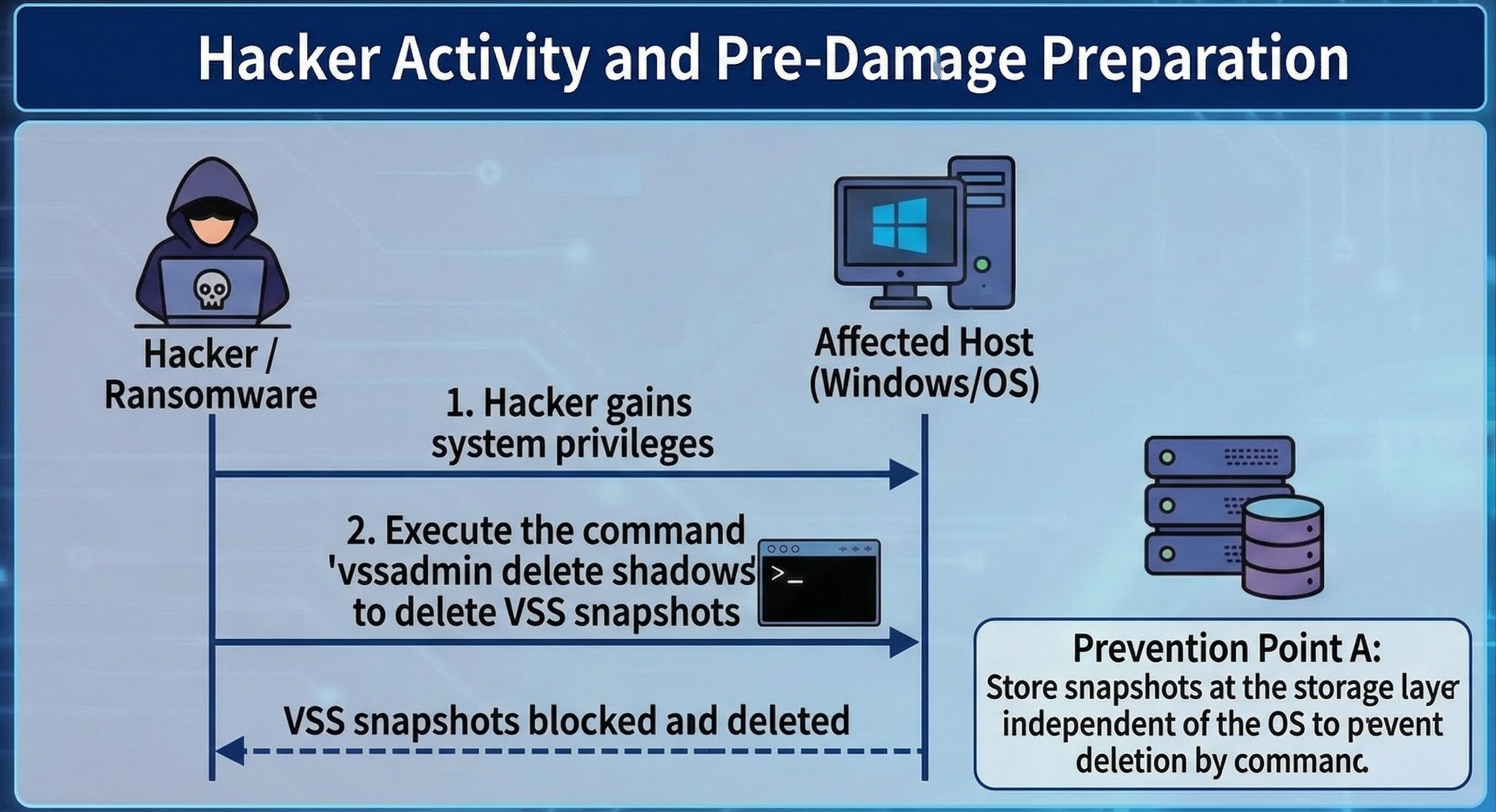
Speaking of snapshots, we must also distinguish between "operating system-level" and "storageunit level." The first action of modern ransomware (such as LockBit, BlackCat) after infiltrating Windows is often to execute commands to delete VSS (Volume Shadow Copy), preventing users from utilizing the built-in restore feature of Windows. At this point, snapshots at the storageunit level play the most critical role.
Because NAS or SAN snapshot management is independent of the operating system (Out-of-Band), even if a hacker obtains Administrator Permission of Windows and wipes out local snapshots, they still cannot delete the underlying snapshots on storageunit through commands.
Key Two: Instant restore (Instant Recovery)
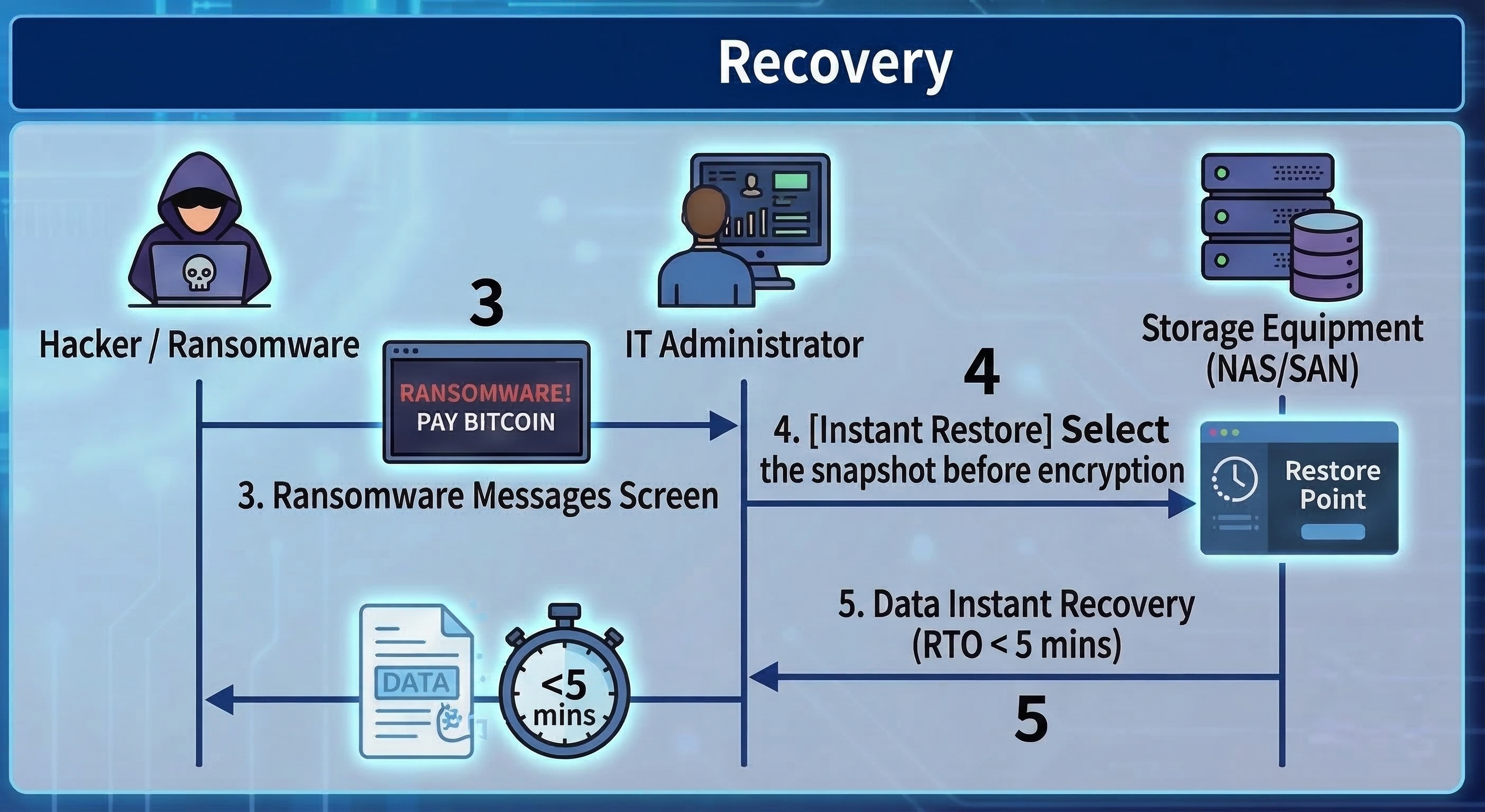
Because snapshots preserve the 'point-in-time state' of files before they are encrypted, when ransomware is detected, administrators only need to select a time point before the infection (for example, if the infection occurred at 10:00, select the 09:55 snapshot) in the management interface of storageunit.
At this point, whether the data size is 1TB or 100TB, using snapshot restore usually only takes a few seconds to a few minutes. The system just needs to point the index back to the old blocks, which greatly reduces the Recovery Time Objective (RTO).
Key Three: AI Entropy Detection, transforming from a time-of-flight camera to a detector
Traditional snapshots are passive, but the latest storage technology is using snapshots for “proactive defense.” When ransomware encrypts files, it causes the “entropy” (randomness) of data blocks to spike dramatically (after encryption, data appears as random data).
Modern storageunit will monitor the entropy changes of write blocks in real time. If a large number of blocks show abnormal spikes in entropy along with high-frequency writes, the system will determine that an attack is occurring and will automatically trigger immutable snapshots, or even proactively cut off write Permission to the connection (SMB/NFS).
In addition, if the system itself provides appropriate mechanisms, you can also monitor suspicious file operations through Security Center (file activity monitoring). Once an anomaly is detected, protection measures can be triggered, such as setting the volume to read-only, automatically creating snapshots, or temporarily suspending the snapshot schedule, to prevent data encryption or data loss.
Advanced Protection: Immutable Snapshots and Management Principles
As cybersecurity attacks evolve, hackers not only encrypt data, but also attempt to compromise storageunit administrators Permission to quickly destroy snapshots. To counter this kind of 'cut-off' attack, it is necessary to implement the following stricter locking mechanisms.
Immutable Snapshots / WORM
This is a “Write Once, Read Many” technology. Once an immutable snapshot is set (for example, locked for 7 days), during this period, no one (including Administrators or Root accounts with the highest Permission) can delete or modify these snapshots. It’s like locking the film in a time-locked safe.
The last line of defense at the management layer: MFA and the four-eyes principle
No matter how strong the technology, human nature is often the weak point. What if a hacker obtains the highest Permission password through social engineering? The new generation of information security compliance requirements (such as the revised ISO 27001) recommend implementing the following measures:
Multi-factor Authentication (MFA): When logging into the storage management interface or performing deletion operations, mobile OTP two-step verification is mandatory. Using Google Authenticator or Microsoft Authenticator has become standard practice. Similar confirmations are also required for critical actions in systems and services such as ZOHO and Cloudflare DNS. Administrators should be accustomed to and routinely deploy these measures in daily system operations.
Four-Eyes Principle (Four-Eyes Principle): For destructive commands such as "Delete Snapshot" or "Format", the system should be configured to require simultaneous License execution by "two" different admin accounts. This can effectively prevent a single account from being compromised or maliciously abused by insiders.
Snapshots are not the same as backups and cannot solve the issue of “double ransomware”.
Although Quick Photo is extremely powerful on ransomware prevention software, and it is also very useful when colleagues in the office call the administrator or IT staff to rescue them from accidental deletion or system damagedata, we still need to clarify the actual perceptions in the market:
The first point is that snapshots cannot completely replace backups, as snapshots still rely on the original storageunit. If the entire NAS hardware fails or hard disk drives is damaged, the snapshots will also be lost. When implementing storage environments for enterprises or home use, we should always follow the 3-2-1 backup principle (3 copies of data, 2 different media, 1 offsite), and preferably prepare an extra NAS to back up your NAS or storageunit. In addition, you can purchase tape drives, external hard disk drives, and other devices for backup, as well as cloud and offsite backups, etc. Through Hybrid Backup Sync 3, you can achieve multi-layered backups, including air-gapped backups. In today's world where threats are increasing, the 3-2-1 backup principle remains a golden rule.
The second point is that snapshots can save data, but they cannot save confidential information. Although snapshots solve the issue of "data availability (Availability)" and allow you to recover your files, the current trend of "Double Extortion" means that hackers will first steal your sensitive data and then encrypt it. Even if you use snapshots to quickly restore restore and data, hackers can still threaten to expose your customer data. Therefore, snapshots must be paired with DLP (Data Loss Prevention for data leakage protection) and Networking encrypted transmission to form a complete data security strategy.
Snapshot Protection Capability Grading Checklist
| Protection function |
Basic Snapshot |
Advanced Snapshot |
Enterprise Management |
| Instant restore (Instant Recovery) |
✅ |
✅ |
✅ |
| Defense against VSS deletion attacks (independent at the base layer) |
✅ |
✅ |
✅ |
| Defense against highest-level Permission administrator deletion (WORM/immutable) |
❌
(Admin can delete) |
✅
(No one can delete within the set period) |
✅ |
| Active detection of ransomware encryption behavior (AI entropy analysis) |
❌ |
✅
(Detected and automatically quick snapshot/disconnect) |
✅ |
| Defense against internal malicious destruction/password compromise (MFA/four-eyes principle) |
❌ |
❌ |
✅
(Requires dual review for deletion) |
De 'tijdmachine' van ransomware: Principes van snapshot-technologie, aanval en verdediging, en kernconcepten van bescherming
Op het slagveld van cyberbeveiliging binnen bedrijven is ransomware (Ransomware) zonder twijfel de meest lastige tegenstander van de afgelopen jaren geworden. Wanneer hackers je cruciale data versleutelen en een enorme losgeld eisen, leidt traditioneel "backup herstel" vaak tot buitensporige downtime (hoge RTO), wat ernstige bedrijfsstilstand en verliezen veroorzaakt.
Op dat moment is een opslagtechnologie genaamd "Snapshot" voor veel bedrijven en individuele gebruikers de laatste verdedigingslinie tegen ransomware geworden, en wordt zelfs aangeduid als de "tijdmachine" voor dataherstel.
Wat is een snapshot nu precies? Hoe kan het direct versleutelde bestanden "herstellen"? Naast passief herstel, welke proactieve detectiemogelijkheden biedt moderne snapshot-technologie? Dit artikel gaat dieper in op de onderliggende principes en belangrijke beheeraspecten van snapshots.
Wat is een snapshot?
Kort gezegd is een snapshot een vastlegging van de staat van een bestandssysteem of opslagunit op een "specifiek moment in de tijd." Het is belangrijk om te verduidelijken dat een snapshot niet "een extra kopie" van de data maakt, maar de versie-status van elk bestand, elke map en de blok-mappingrelatie (Metadata, Block map) in het bestandssysteem op dat moment vastlegt.
Veel mensen denken ten onrechte dat een snapshot een "backup" is, maar in feite zijn de twee fundamenteel verschillend qua technische principes:
-
Backup: maakt een volledige kopie van de data naar een andere fysieke opslagruimte (een volledige kopie).
-
Snapshot: lijkt meer op het maken van een "foto" van de huidige datastructuur. Het legt meestal alleen de pointers of metadata van de data vast, in plaats van de data zelf te dupliceren.
Kort gezegd: als we 100 gigabyte foto's op harde schijven back-uppen en 10 backups maken, verbruikt dat 1TB aan ruimte. Maar met snapshot-technologie neemt het bewaren van 10 snapshots onder "normale gebruiksscenario's" meestal slechts 1% tot 20% extra ruimte in beslag (ongeveer 1-20 GB), wat een enorm efficiëntieverschil is.
Vergelijkingstabel van ruimte- en tijdskosten tussen snapshots en traditionele backups
| Vergelijkingsitems |
Initiële datahoeveelheid (Dag 0) |
Dag 1 (Wijziging 10GB) |
Dag 2 (Wijziging 10GB) |
Totale gebruikte ruimte (bij benadering) |
Snelheid van aanmaken/herstellen |
| Traditionele volledige backup (Full Backup) |
100 gigabyte |
+100 gigabyte (Tweede volledige backup) |
+100 gigabyte (Derde volledige backup) |
300 gigabyte |
Traag (vereist verplaatsen van grote hoeveelheden data) |
| Snapshot |
100 gigabyte (originele data) |
+10 gigabyte (legt alleen gewijzigde blokken vast) |
+10 gigabyte (legt alleen gewijzigde blokken vast) |
120 gigabyte |
Supersnel (merkt alleen pointers aan) |
Uitleg bij de tabel: Deze tabel simuleert een omgeving waarin een initiële 100GB data elke dag met 10GB verandert over twee dagen. Je ziet dat traditionele backups elke keer de volledige data dupliceren, wat leidt tot lineaire en vermenigvuldigde ruimteconsumptie. Snapshots leggen daarentegen alleen de gewijzigde blokken vast, waardoor de ruimtegroei extreem traag is. Dit verklaart waarom bedrijven eenvoudig honderden snapshot-tijdpunten kunnen bewaren.
Technisch principe: Werking en afwegingen van COW en ROW
Momenteel zijn de gangbare snapshot-technologieën vooral onderverdeeld in twee typen, elk met eigen voordelen qua efficiëntie en ruimtegebruik:
1. Copy-On-Write (COW)
Wanneer de originele data moet worden gewijzigd, pauzeert het systeem eerst de schrijfoperatie, kopieert het "oude datablock" naar het snapshot-reservegebied, en laat daarna de nieuwe data op de originele locatie schrijven.
Voordeel: Het lezen van de originele data is zeer snel omdat de locatie van de data niet is veranderd.
Nadeel: De schrijfprestaties zijn relatief slecht (omdat elke schrijfoperatie vereist "oude data lezen -> kopiëren -> nieuwe data schrijven"), dit staat bekend als de "write penalty (Write Penalty)".
2. Redirect-On-Write (ROW) tijdens schrijven
Dit is een veelgebruikte aanpak in moderne, efficiënte opslag (zoals het ZFS-bestandssysteem en midden- tot high-end NAS). Wanneer nieuwe data wordt geschreven, verplaatst het systeem de oude blokken niet, maar schrijft het de nieuwe data direct naar een "nieuwe locatie" op de harde schijf, en werkt de pointer naar de nieuwe locatie bij, terwijl de snapshot de pointer naar de oude blokken behoudt.
Voordeel: Het aanmaken van snapshots en het schrijven van data heeft vrijwel geen invloed op de prestaties, en de snelheid is extreem hoog.
Nadeel: Fragmentatie. Dit is een fysieke beperking waar ROW-technologie mee te maken heeft. Door de datablocks van bestanden na meerdere wijzigingen verspreid te liggen over verschillende fysieke locaties op harde schijven, kan dit na verloop van tijd leiden tot verminderde leesprestaties van traditionele harde schijven (HDD). Daarom wordt voor opslag met ROW-technologie meestal aanbevolen om een all-flash-architectuur (All-Flash) of een robuust automatisch reorganisatiemechanisme te gebruiken om deze impact te beperken.
Hoe verdedigen snapshots tegen ransomware? Van passief herstel naar proactieve detectie
De standaardprocedure van ransomware is: bestand lezen → versleutelen → origineel bestand verwijderen → versleuteld, verhaspeld bestand achterlaten. Hierop biedt QuicKProtect meerdere lagen van verdedigingsmechanismen.
Sleutel 1: OS-niveau aanvallen omzeilen (VSS vs. Storage Snapshot)
Bij snapshots moeten we ook onderscheid maken tussen "besturingssysteem-niveau" en "opslagunit-niveau." De eerste actie van moderne ransomware (zoals LockBit, BlackCat) na infiltratie van Windows is vaak het uitvoeren van commando's om VSS (Volume Shadow Copy) te verwijderen, zodat gebruikers de ingebouwde hersteloptie van Windows niet kunnen gebruiken. Op dat moment spelen snapshots op opslagunit-niveau de belangrijkste rol.
Omdat NAS- of SAN-snapshotbeheer onafhankelijk is van het besturingssysteem (Out-of-Band), kunnen hackers zelfs met Administrator Permission van Windows en het wissen van lokale snapshots, de onderliggende snapshots op opslagunit niet via commando's verwijderen.
Sleutel 2: Direct herstel (Instant Recovery)
Omdat snapshots de 'staat op een bepaald moment' van bestanden bewaren vóór versleuteling, hoeven beheerders bij detectie van ransomware alleen een tijdstip vóór de infectie te selecteren (bijvoorbeeld als de infectie om 10:00 plaatsvond, kies de snapshot van 09:55) in de beheerinterface van de opslagunit.
Op dat moment, of de data nu 1TB of 100TB is, duurt het herstellen via snapshots meestal slechts enkele seconden tot enkele minuten. Het systeem hoeft alleen de index terug te wijzen naar de oude blokken, wat de Recovery Time Objective (RTO) sterk verkort.
Sleutel 3: AI-entropiedetectie, van tijds-of-flight camera naar detector
Traditionele snapshots zijn passief, maar de nieuwste opslagtechnologie gebruikt snapshots voor "proactieve verdediging." Wanneer ransomware bestanden versleutelt, stijgt de "entropie" (willekeur) van datablocks enorm (na versleuteling lijkt data op willekeurige data).
Moderne opslagunits monitoren de entropieveranderingen van schrijfblokken realtime. Als veel blokken abnormale entropiepieken vertonen samen met veelvuldige schrijfacties, bepaalt het systeem dat er een aanval plaatsvindt en worden automatisch onveranderbare snapshots geactiveerd, of zelfs proactief schrijf Permission naar de verbinding (SMB/NFS) afgesloten.
Daarnaast, als het systeem zelf passende mechanismen biedt, kun je ook verdachte bestandsacties monitoren via Security Center (monitoring van bestandsactiviteit). Zodra een afwijking wordt gedetecteerd, kunnen beschermingsmaatregelen worden geactiveerd, zoals het volume op alleen-lezen zetten, automatisch snapshots aanmaken, of het snapshotschema tijdelijk pauzeren, om dataversleuteling of dataverlies te voorkomen.
Geavanceerde bescherming: Onveranderbare snapshots en beheersprincipes
Naarmate cyberaanvallen zich ontwikkelen, proberen hackers niet alleen data te versleutelen, maar ook de Permission van opslagunit-beheerders te compromitteren om snel snapshots te vernietigen. Om dit soort 'cut-off'-aanvallen tegen te gaan, moeten de volgende strengere vergrendelingsmechanismen worden toegepast.
Onveranderbare snapshots / WORM
Dit is een "Write Once, Read Many"-technologie. Zodra een onveranderbare snapshot is ingesteld (bijvoorbeeld vergrendeld voor 7 dagen), kan gedurende deze periode niemand (inclusief beheerders of root-accounts met de hoogste Permission) deze snapshots verwijderen of wijzigen. Het is alsof je de film in een tijdslotkluis opsluit.
De laatste verdedigingslinie op beheerniveau: MFA en het vierogenprincipe
Hoe sterk de technologie ook is, de menselijke factor blijft vaak het zwakke punt. Wat als een hacker via social engineering het wachtwoord met de hoogste Permission bemachtigt? De nieuwe generatie informatiebeveiligingsnormen (zoals de herziene ISO 27001) adviseert de volgende maatregelen:
Multi-factor Authenticatie (MFA): Bij het inloggen op de beheerinterface van opslag of het uitvoeren van verwijderacties is mobiele OTP-twee-staps-verificatie verplicht. Google Authenticator of Microsoft Authenticator zijn standaard geworden. Vergelijkbare bevestigingen zijn ook vereist voor kritieke acties in systemen en diensten zoals ZOHO en Cloudflare DNS. Beheerders moeten gewend raken aan en routinematig deze maatregelen toepassen in dagelijkse systeemoperaties.
Vierogenprincipe (Four-Eyes Principle): Voor destructieve commando's zoals "Delete Snapshot" of "Format" moet het systeem zo worden ingesteld dat gelijktijdige License-uitvoering door "twee" verschillende admin-accounts vereist is. Dit voorkomt effectief dat één account wordt gecompromitteerd of kwaadwillig misbruikt door insiders.
Snapshots zijn niet hetzelfde als backups en lossen het probleem van "dubbele ransomware" niet op.
Hoewel Quick Photo extreem krachtig is tegen ransomware en ook zeer nuttig wanneer collega's op kantoor de beheerder of IT-medewerker bellen om hen te redden van per ongeluk verwijderde of beschadigde systemen, moeten we de werkelijke percepties op de markt verduidelijken:
Ten eerste kunnen snapshots backups niet volledig vervangen, omdat snapshots nog steeds afhankelijk zijn van de originele opslagunit. Als de hele NAS-hardware uitvalt of de harde schijf beschadigd raakt, gaan de snapshots ook verloren. Bij het implementeren van opslagomgevingen voor bedrijven of thuisgebruik moeten we altijd het 3-2-1 backupprincipe volgen (3 kopieën van data, 2 verschillende media, 1 offsite), en bij voorkeur een extra NAS voorbereiden om je NAS of opslagunit te back-uppen. Daarnaast kun je tape drives, externe harde schijven en andere apparaten aanschaffen voor backup, evenals cloud- en offsite-backups, enzovoort. Met Hybrid Backup Sync 3 kun je gelaagde backups realiseren, inclusief air-gapped backups. In de huidige wereld van toenemende dreigingen blijft het 3-2-1 backupprincipe een gouden regel.
Ten tweede kunnen snapshots data redden, maar geen vertrouwelijke informatie. Hoewel snapshots het probleem van "data beschikbaarheid (Availability)" oplossen en je bestanden laten herstellen, betekent de huidige trend van "Double Extortion" dat hackers eerst je gevoelige data stelen en daarna versleutelen. Zelfs als je snapshots gebruikt om snel te herstellen, kunnen hackers nog steeds dreigen je klantgegevens openbaar te maken. Snapshots moeten daarom worden gecombineerd met DLP (Data Loss Prevention voor bescherming tegen datalekken) en versleutelde netwerktransmissie om een complete datastrategie te vormen.
Checklist voor grading van snapshot-beschermingsmogelijkheden
| Beschermingsfunctie |
Basis Snapshot |
Geavanceerde Snapshot |
Enterprise Management |
| Direct herstel (Instant Recovery) |
✅ |
✅ |
✅ |
| Verdediging tegen VSS-verwijderingsaanvallen (onafhankelijk op basislaag) |
✅ |
✅ |
✅ |
| Verdediging tegen verwijdering door beheerder met hoogste Permission (WORM/onveranderbaar) |
❌
(Admin kan verwijderen) |
✅
(Niemand kan verwijderen binnen de ingestelde periode) |
✅ |
| Actieve detectie van ransomware-encryptiegedrag (AI-entropieanalyse) |
❌ |
✅
(Gedetecteerd en automatisch snelle snapshot/verbinding verbreken) |
✅ |
| Verdediging tegen interne kwaadwillige vernietiging/wachtwoordcompromittering (MFA/vierogenprincipe) |
❌ |
❌ |
✅
(Vereist dubbele controle voor verwijdering) |


 9 min lezen