The 'time machine' of ransomware: Snapshot technology principles, attack and defense, and key concepts of protection
In the battlefield of enterprise cybersecurity defense, ransomware (Ransomware) has undoubtedly become the most troublesome adversary in recent years. When hackers encrypt your critical data and demand a huge ransom, traditional "backup restore" often results in excessive downtime (high RTO), causing severe business interruption and losses.
At this time, a storage-level technology called "Snapshot" has become the last line of defense against ransomware for many businesses and individual users, and is even referred to as the "time machine" for data recovery.
So what exactly is a snapshot? How can it instantly "restore" encrypted files? Besides passive restore, what proactive detection capabilities does modern snapshot technology offer? This article will delve into the underlying principles and key management aspects of snapshots.
What is a snapshot?
Simply put, a snapshot is a record of the state of a file system or storageunit at a “specific point in time.” It is important to clarify that a snapshot does not “make another copy” of the data, but rather records the version state of every file, directory, and block mapping relationship (Metadata, Block map) in the file system at that moment.
Many people mistakenly think that a snapshot is a “backup,” but in fact, the two are fundamentally different in terms of technical principles:
-
Backup: creates a complete copy of the data to another physical Storage Space (a full copy).
-
Snapshot: is more like taking a “photo” of the current data structure. It usually only records the pointers or metadata of the data, rather than duplicating the data itself.
Simply put, when we back up 100 gigabyte photos in hard disk drives, making 10 backups will consume 1TB of space. But when we use snapshot technology, under “normal usage scenarios,” keeping 10 snapshots usually only takes up an extra 1%–20% of space (about 1–20 GB), which is a huge efficiency difference.
Comparison table of space and time costs between snapshots and traditional backups
| Comparison Items |
Initial data Amount (Day 0) |
Day 1 (Change 10GB) |
Day 2 (Change 10GB) |
Total Space Used (Approximate) |
Establishment/restore Speed |
| Traditional Full Backup (Full Backup) |
100 gigabyte |
+100 gigabyte (Second Full Backup) |
+100 gigabyte (Third Full Backup) |
300 gigabyte |
Slow (requires moving a large amount of data) |
| Snapshot |
100 gigabyte (original data) |
+10 gigabyte (only records changed blocks) |
+10 gigabyte (only records changed blocks) |
120 gigabyte |
Ultra-fast (only marks pointers) |
Chart Help: This table simulates an environment where an initial 100GB data changes by 10GB each day over two days. You can see that traditional backups duplicate the entire data each time, resulting in linear and multiplied space consumption. In contrast, snapshots only record the changed blocks, so space growth is extremely slow. This explains why businesses can easily retain hundreds of snapshot time points.
Technical Principle: Operation and Trade-offs of COW and ROW
Currently, the mainstream snapshot technologies are mainly divided into two types, each with its own advantages in terms of efficiency and space utilization:
1. Copy-On-Write (COW)
When the original data needs to be modified, the system will first pause the write operation, copy the “old data block” to the snapshot reserved area, and then allow the new data to be written in the original location.
Advantage: Reading the original data is very fast because the data location has not changed.
Disadvantage: Write performance is relatively poor (because each write operation requires "read old data -> copy -> write new data"), which is known as the "write penalty (Write Penalty)".
2. Redirect-On-Write (ROW) during writing
This is a common approach used in modern high-efficiency storage (such as the ZFS file system and mid-to-high-end NAS). When new data is written, the system does not move the old blocks, but instead writes the new data directly to a “new location” on the hard disk drives, and updates the pointer to the new location, while the snapshot continues to retain the pointer to the old blocks.
Advantage: Creating snapshots and writing data has almost no impact on performance, and the speed is extremely fast.
Cost: Fragmentation. This is a physical limitation that ROW technology must face. Due to the data blocks of files being scattered across different physical locations in hard disk drives after multiple modifications, over time this may lead to decreased read performance of traditional hard disk drives (HDD). Therefore, for storage systems using ROW technology, it is generally recommended to pair with an all-flash architecture (All-Flash) or a robust background auto-reorganization mechanism to mitigate this impact.
How do snapshots defend against ransomware? From passive restore to proactive detection
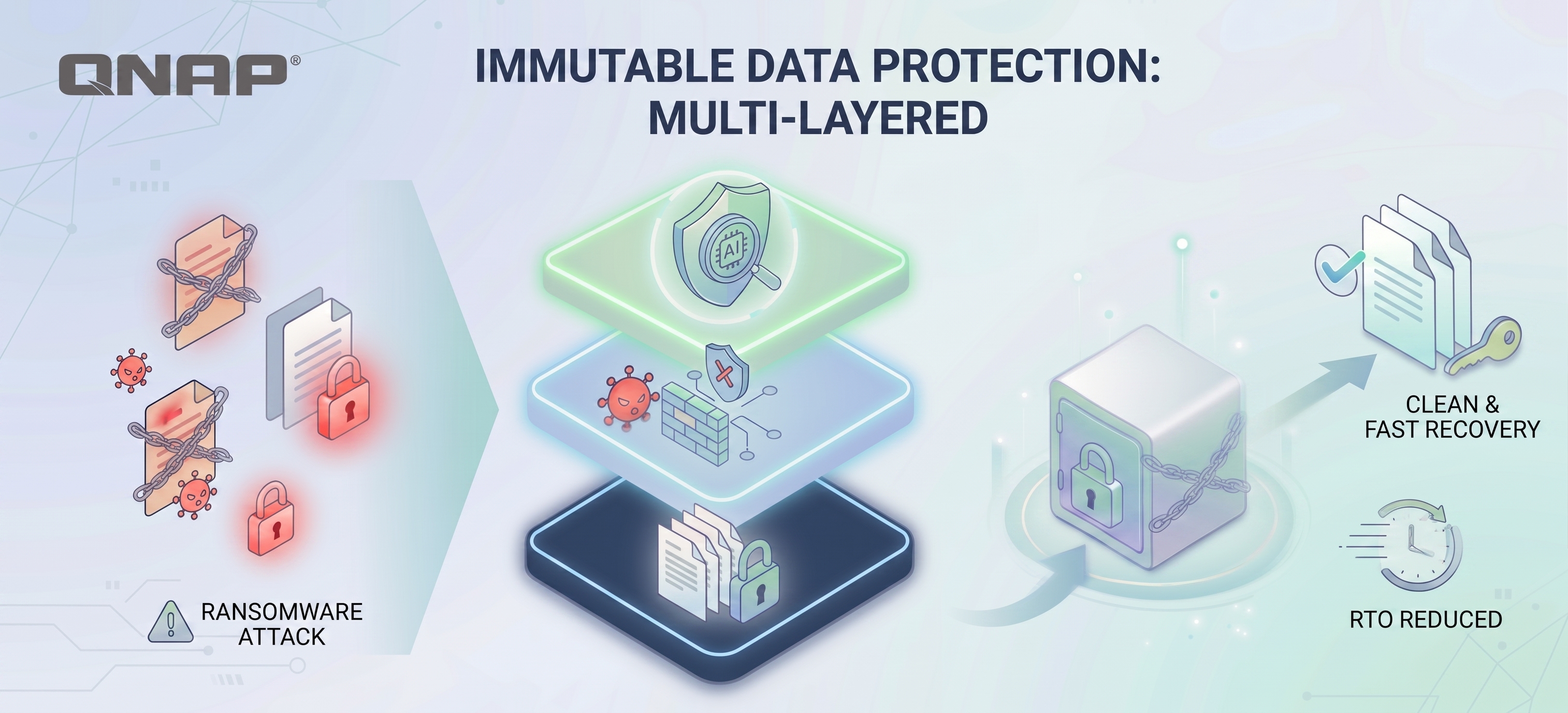
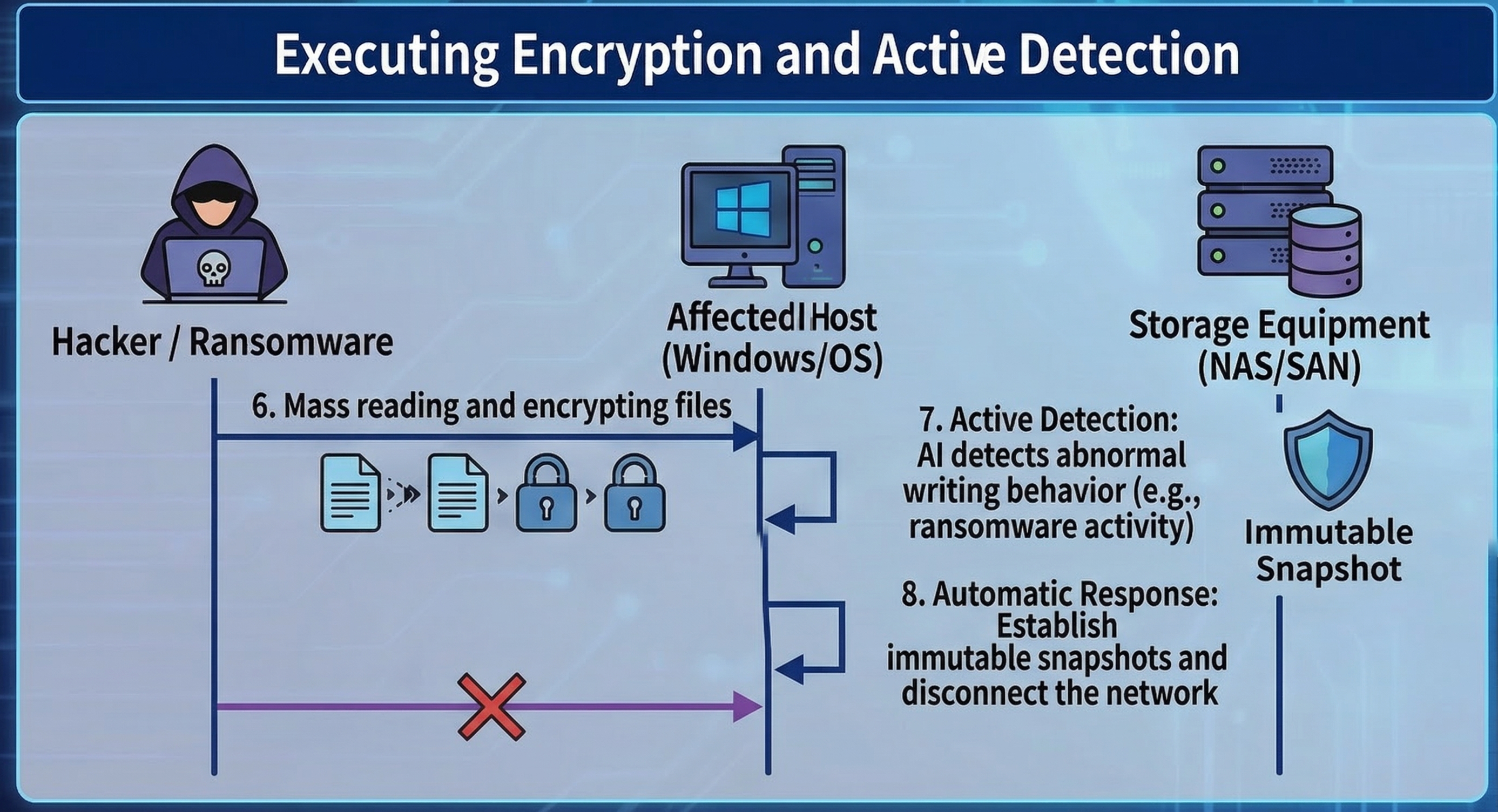
The standard operating procedure for ransomware software is: read file → encrypt → delete original file → leave behind the encrypted, scrambled file. In response to this process, QuicKProtect provides multiple layers of defense mechanisms.
Key 1: Bypassing OS-level attacks (VSS vs. Storage Snapshot)
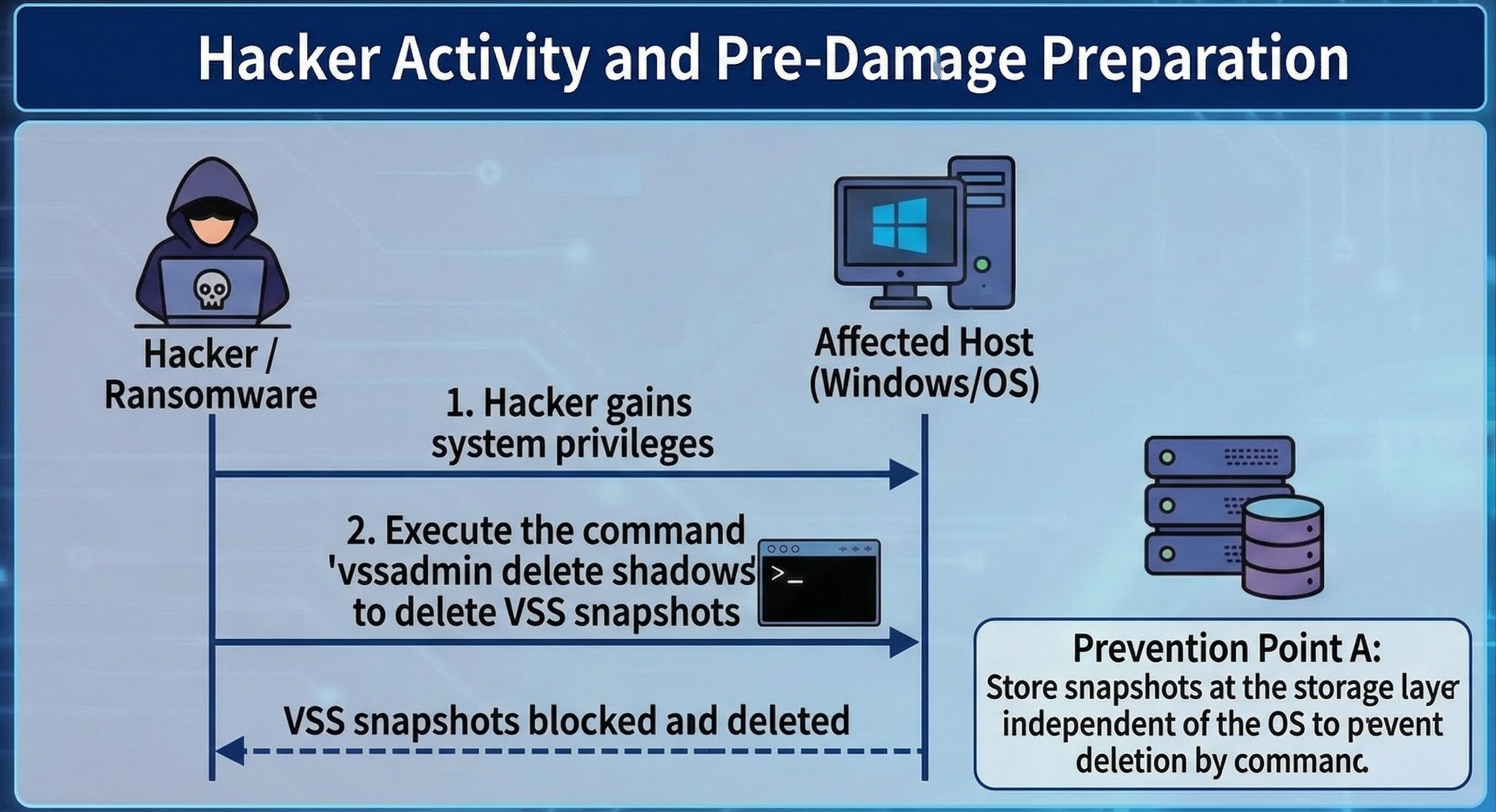
Speaking of snapshots, we must also distinguish between "operating system-level" and "storageunit level." The first action of modern ransomware (such as LockBit, BlackCat) after infiltrating Windows is often to execute commands to delete VSS (Volume Shadow Copy), preventing users from utilizing the built-in restore feature of Windows. At this point, snapshots at the storageunit level play the most critical role.
Because NAS or SAN snapshot management is independent of the operating system (Out-of-Band), even if a hacker obtains Administrator Permission of Windows and wipes out local snapshots, they still cannot delete the underlying snapshots on storageunit through commands.
Key Two: Instant restore (Instant Recovery)
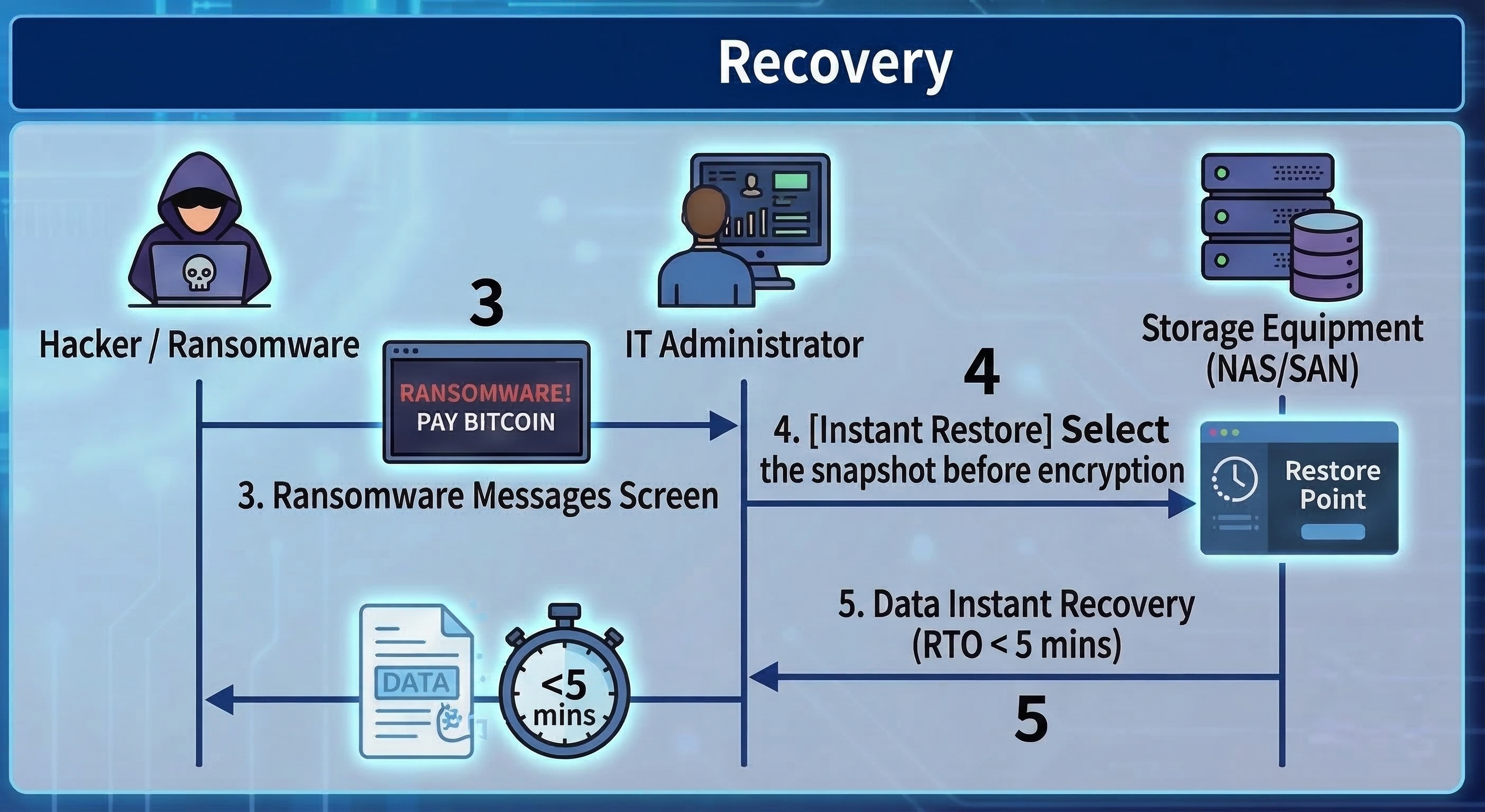
Because snapshots preserve the 'point-in-time state' of files before they are encrypted, when ransomware is detected, administrators only need to select a time point before the infection (for example, if the infection occurred at 10:00, select the 09:55 snapshot) in the management interface of storageunit.
At this point, whether the data size is 1TB or 100TB, using snapshot restore usually only takes a few seconds to a few minutes. The system just needs to point the index back to the old blocks, which greatly reduces the Recovery Time Objective (RTO).
Key Three: AI Entropy Detection, transforming from a time-of-flight camera to a detector
Traditional snapshots are passive, but the latest storage technology is using snapshots for “proactive defense.” When ransomware encrypts files, it causes the “entropy” (randomness) of data blocks to spike dramatically (after encryption, data appears as random data).
Modern storageunit will monitor the entropy changes of write blocks in real time. If a large number of blocks show abnormal spikes in entropy along with high-frequency writes, the system will determine that an attack is occurring and will automatically trigger immutable snapshots, or even proactively cut off write Permission to the connection (SMB/NFS).
In addition, if the system itself provides appropriate mechanisms, you can also monitor suspicious file operations through Security Center (file activity monitoring). Once an anomaly is detected, protection measures can be triggered, such as setting the volume to read-only, automatically creating snapshots, or temporarily suspending the snapshot schedule, to prevent data encryption or data loss.
Advanced Protection: Immutable Snapshots and Management Principles
As cybersecurity attacks evolve, hackers not only encrypt data, but also attempt to compromise storageunit administrators Permission to quickly destroy snapshots. To counter this kind of 'cut-off' attack, it is necessary to implement the following stricter locking mechanisms.
Immutable Snapshots / WORM
This is a “Write Once, Read Many” technology. Once an immutable snapshot is set (for example, locked for 7 days), during this period, no one (including Administrators or Root accounts with the highest Permission) can delete or modify these snapshots. It’s like locking the film in a time-locked safe.
The last line of defense at the management layer: MFA and the four-eyes principle
No matter how strong the technology, human nature is often the weak point. What if a hacker obtains the highest Permission password through social engineering? The new generation of information security compliance requirements (such as the revised ISO 27001) recommend implementing the following measures:
Multi-factor Authentication (MFA): When logging into the storage management interface or performing deletion operations, mobile OTP two-step verification is mandatory. Using Google Authenticator or Microsoft Authenticator has become standard practice. Similar confirmations are also required for critical actions in systems and services such as ZOHO and Cloudflare DNS. Administrators should be accustomed to and routinely deploy these measures in daily system operations.
Four-Eyes Principle (Four-Eyes Principle): For destructive commands such as "Delete Snapshot" or "Format", the system should be configured to require simultaneous License execution by "two" different admin accounts. This can effectively prevent a single account from being compromised or maliciously abused by insiders.
Snapshots are not the same as backups and cannot solve the issue of “double ransomware”.
Although Quick Photo is extremely powerful on ransomware prevention software, and it is also very useful when colleagues in the office call the administrator or IT staff to rescue them from accidental deletion or system damagedata, we still need to clarify the actual perceptions in the market:
The first point is that snapshots cannot completely replace backups, as snapshots still rely on the original storageunit. If the entire NAS hardware fails or hard disk drives is damaged, the snapshots will also be lost. When implementing storage environments for enterprises or home use, we should always follow the 3-2-1 backup principle (3 copies of data, 2 different media, 1 offsite), and preferably prepare an extra NAS to back up your NAS or storageunit. In addition, you can purchase tape drives, external hard disk drives, and other devices for backup, as well as cloud and offsite backups, etc. Through Hybrid Backup Sync 3, you can achieve multi-layered backups, including air-gapped backups. In today's world where threats are increasing, the 3-2-1 backup principle remains a golden rule.
The second point is that snapshots can save data, but they cannot save confidential information. Although snapshots solve the issue of "data availability (Availability)" and allow you to recover your files, the current trend of "Double Extortion" means that hackers will first steal your sensitive data and then encrypt it. Even if you use snapshots to quickly restore restore and data, hackers can still threaten to expose your customer data. Therefore, snapshots must be paired with DLP (Data Loss Prevention for data leakage protection) and Networking encrypted transmission to form a complete data security strategy.
Snapshot Protection Capability Grading Checklist
| Protection function |
Basic Snapshot |
Advanced Snapshot |
Enterprise Management |
| Instant restore (Instant Recovery) |
✅ |
✅ |
✅ |
| Defense against VSS deletion attacks (independent at the base layer) |
✅ |
✅ |
✅ |
| Defense against highest-level Permission administrator deletion (WORM/immutable) |
❌
(Admin can delete) |
✅
(No one can delete within the set period) |
✅ |
| Active detection of ransomware encryption behavior (AI entropy analysis) |
❌ |
✅
(Detected and automatically quick snapshot/disconnect) |
✅ |
| Defense against internal malicious destruction/password compromise (MFA/four-eyes principle) |
❌ |
❌ |
✅
(Requires dual review for deletion) |
Fidye yazılımının 'zaman makinesi': Anlık görüntü teknolojisinin prensipleri, saldırı ve savunma, ve koruma için temel kavramlar
Kurumsal siber güvenlik savunmasının savaş alanında, fidye yazılımı (Ransomware) son yıllarda tartışmasız en sorunlu rakip haline gelmiştir. Hackerlar kritik verilerinizi şifreleyip büyük bir fidye talep ettiğinde, geleneksel "yedekleme geri yükleme" genellikle aşırı kesinti süresine (yüksek RTO) yol açar ve ciddi iş kesintileri ile kayıplara neden olur.
Bu noktada, "Anlık Görüntü" adı verilen depolama seviyesinde bir teknoloji, birçok işletme ve bireysel kullanıcı için fidye yazılımına karşı son savunma hattı haline gelmiş ve hatta veri kurtarma için "zaman makinesi" olarak adlandırılmıştır.
Peki anlık görüntü tam olarak nedir? Şifrelenmiş dosyaları nasıl anında "geri yükleyebilir"? Pasif geri yüklemenin yanı sıra, modern anlık görüntü teknolojisi hangi proaktif tespit yeteneklerini sunar? Bu makale, anlık görüntülerin temel prensipleri ve yönetimindeki önemli noktaları inceleyecek.
Anlık görüntü nedir?
Basitçe söylemek gerekirse, anlık görüntü, bir dosya sistemi veya depolama biriminin "belirli bir zamandaki" durumunun kaydıdır. Anlık görüntünün verilerin "başka bir kopyasını oluşturmadığını", bunun yerine o anda dosya sistemindeki her dosya, dizin ve blok eşleme ilişkisini (Metadata, Block map) kaydettiğini netleştirmek önemlidir.
Birçok kişi anlık görüntüyü bir "yedekleme" olarak düşünür, ancak teknik prensipler açısından ikisi temelde farklıdır:
-
Yedekleme: Verilerin tam bir kopyasını başka bir fiziksel Depolama Alanına oluşturur (tam kopya).
-
Anlık Görüntü: Mevcut veri yapısının bir "fotoğrafını çekmek" gibidir. Genellikle verinin kendisini çoğaltmak yerine yalnızca veri işaretçilerini veya metadata'yı kaydeder.
Basitçe söylemek gerekirse, sabit disklerde 100 GB fotoğrafı yedeklediğimizde, 10 yedekleme yapmak 1TB alan tüketir. Ancak anlık görüntü teknolojisi kullandığımızda, "normal kullanım senaryolarında" 10 anlık görüntü tutmak genellikle yalnızca ekstra %1-%20 alan (yaklaşık 1-20 GB) gerektirir, bu da büyük bir verimlilik farkıdır.
Anlık görüntü ile geleneksel yedekleme arasındaki alan ve zaman maliyeti karşılaştırma tablosu
| Karşılaştırma Kalemleri |
Başlangıç Veri Miktarı (Gün 0) |
Gün 1 (10GB Değişim) |
Gün 2 (10GB Değişim) |
Toplam Kullanılan Alan (Yaklaşık) |
Kurulum/geri yükleme Hızı |
| Geleneksel Tam Yedekleme (Full Backup) |
100 GB |
+100 GB (İkinci Tam Yedekleme) |
+100 GB (Üçüncü Tam Yedekleme) |
300 GB |
Yavaş (büyük miktarda veri taşımak gerekir) |
| Anlık Görüntü |
100 GB (orijinal veri) |
+10 GB (yalnızca değişen bloklar kaydedilir) |
+10 GB (yalnızca değişen bloklar kaydedilir) |
120 GB |
Ultra hızlı (sadece işaretçiler kaydedilir) |
Tablo Yardımı: Bu tablo, başlangıçta 100GB verinin iki gün boyunca her gün 10GB değiştiği bir ortamı simüle eder. Geleneksel yedeklemelerin her seferinde tüm veriyi çoğalttığını ve doğrusal olarak artan alan tüketimine yol açtığını görebilirsiniz. Buna karşılık, anlık görüntüler yalnızca değişen blokları kaydeder, bu nedenle alan artışı son derece yavaştır. Bu, işletmelerin yüzlerce anlık görüntü zaman noktasını kolayca tutabilmesini açıklar.
Teknik Prensip: COW ve ROW'un çalışma şekli ve dengeleri
Mevcut ana akım anlık görüntü teknolojileri, verimlilik ve alan kullanımı açısından kendi avantajlarına sahip iki ana türe ayrılır:
1. Copy-On-Write (COW)
Orijinal veri değiştirileceğinde, sistem önce yazma işlemini durdurur, "eski veri bloğunu" anlık görüntü için ayrılan alana kopyalar ve ardından yeni verinin orijinal konuma yazılmasına izin verir.
Avantajı: Orijinal veriyi okumak çok hızlıdır çünkü veri konumu değişmemiştir.
Dezavantajı: Yazma performansı nispeten düşüktür (çünkü her yazma işlemi "eski veriyi oku -> kopyala -> yeni veriyi yaz" gerektirir), bu da "yazma cezası (Write Penalty)" olarak bilinir.
2. Redirect-On-Write (ROW) yazma sırasında
Bu, modern yüksek verimli depolamada (örneğin ZFS dosya sistemi ve orta-üst seviye NAS) yaygın bir yaklaşımdır. Yeni veri yazıldığında, sistem eski blokları taşımaz, bunun yerine yeni veriyi doğrudan sabit disklerde "yeni bir konuma" yazar ve işaretçiyi yeni konuma günceller, anlık görüntü ise eski bloklara işaretçiyi tutmaya devam eder.
Avantajı: Anlık görüntü oluşturmak ve veri yazmak performansı neredeyse hiç etkilemez ve hız son derece yüksektir.
Maliyet: Parçalanma. Bu, ROW teknolojisinin karşılaşmak zorunda olduğu fiziksel bir sınırlamadır. Dosyaların veri blokları, sabit disklerde birden fazla değişiklikten sonra farklı fiziksel konumlara dağılır ve zamanla geleneksel sabit disklerin (HDD) okuma performansında azalmaya yol açabilir. Bu nedenle, ROW teknolojisi kullanan depolama sistemlerinde genellikle tümü-flash mimarisi (All-Flash) veya güçlü bir arka plan otomatik yeniden düzenleme mekanizması ile birlikte kullanılması önerilir.
Anlık görüntüler fidye yazılımına karşı nasıl savunma sağlar? Pasif geri yüklemeden proaktif tespitlere
Fidye yazılımı yazılımının standart çalışma prosedürü şudur: dosyayı oku → şifrele → orijinal dosyayı sil → şifrelenmiş, karışık dosyayı bırak. Bu sürece yanıt olarak QuicKProtect birden fazla katmanlı savunma mekanizması sunar.
Anahtar 1: İşletim sistemi seviyesindeki saldırıları atlatmak (VSS vs. Depolama Anlık Görüntüsü)
Anlık görüntülerden bahsederken, "işletim sistemi seviyesi" ile "depolama birimi seviyesi" arasındaki farkı da ayırt etmeliyiz. Modern fidye yazılımının (örneğin LockBit, BlackCat) Windows'a sızdıktan sonraki ilk eylemi genellikle VSS'yi (Volume Shadow Copy) silmek için komutlar çalıştırmaktır, böylece kullanıcıların Windows'un yerleşik geri yükleme özelliğini kullanmasını engeller. Bu noktada, depolama birimi seviyesindeki anlık görüntüler en kritik rolü oynar.
Çünkü NAS veya SAN anlık görüntü yönetimi işletim sisteminden bağımsızdır (Out-of-Band), bir hacker Windows'un Yönetici Yetkisini ele geçirip yerel anlık görüntüleri silse bile, depolama birimindeki temel anlık görüntüleri komutlarla silemez.
Anahtar İki: Anında geri yükleme (Instant Recovery)
Anlık görüntüler dosyaların şifrelenmeden önceki 'zaman noktasındaki durumunu' koruduğu için, fidye yazılımı tespit edildiğinde, yöneticiler yalnızca enfeksiyondan önceki bir zaman noktasını (örneğin enfeksiyon 10:00'da olduysa, 09:55 anlık görüntüsünü) depolama birimi yönetim arayüzünde seçmelidir.
Bu noktada, veri boyutu ister 1TB ister 100TB olsun, anlık görüntü ile geri yükleme genellikle sadece birkaç saniye veya birkaç dakika sürer. Sistem sadece indeksi eski bloklara geri yönlendirmek zorundadır, bu da Kurtarma Süresi Hedefini (RTO) büyük ölçüde azaltır.
Anahtar Üç: AI Entropi Tespiti, zaman-of-flight kameradan dedektöre dönüşüm
Geleneksel anlık görüntüler pasiftir, ancak en yeni depolama teknolojisi anlık görüntüleri "proaktif savunma" için kullanıyor. Fidye yazılımı dosyaları şifrelediğinde, veri bloklarının "entropisi" (rastgeleliği) dramatik şekilde artar (şifrelemeden sonra veri rastgele veri gibi görünür).
Modern depolama birimi, yazma bloklarının entropi değişimlerini gerçek zamanlı izler. Çok sayıda blokta entropi anormal şekilde artarsa ve yüksek frekanslı yazmalarla birlikte görülürse, sistem bir saldırı olduğunu belirler ve otomatik olarak değiştirilemez anlık görüntüleri tetikler, hatta bağlantıya (SMB/NFS) yazma Yetkisini proaktif olarak keser.
Ek olarak, sistem uygun mekanizmalar sağlıyorsa, Güvenlik Merkezi (dosya etkinliği izleme) ile şüpheli dosya işlemlerini de izleyebilirsiniz. Bir anormallik tespit edildiğinde, koruma önlemleri tetiklenebilir; örneğin hacmi salt okunur yapmak, otomatik anlık görüntü oluşturmak veya anlık görüntü zamanlamasını geçici olarak durdurmak gibi, veri şifreleme veya veri kaybını önlemek için.
Gelişmiş Koruma: Değiştirilemez Anlık Görüntüler ve Yönetim Prensipleri
Siber güvenlik saldırıları geliştikçe, hackerlar sadece verileri şifrelemekle kalmaz, aynı zamanda depolama birimi yönetici Yetkisini ele geçirip anlık görüntüleri hızla yok etmeye çalışır. Bu tür 'kesme' saldırılarına karşı koymak için aşağıdaki daha sıkı kilitleme mekanizmalarını uygulamak gerekir.
Değiştirilemez Anlık Görüntüler / WORM
Bu bir "Bir Kez Yaz, Çok Kez Oku" teknolojisidir. Değiştirilemez bir anlık görüntü ayarlandığında (örneğin 7 gün kilitli), bu süre boyunca hiç kimse (Yöneticiler veya en yüksek Yetkiye sahip Root hesapları dahil) bu anlık görüntüleri silemez veya değiştiremez. Bu, filmi zaman kilitli bir kasada kilitlemek gibidir.
Yönetim katmanında son savunma hattı: MFA ve dört göz prensibi
Teknoloji ne kadar güçlü olursa olsun, insan faktörü genellikle zayıf noktadır. Bir hacker sosyal mühendislik ile en yüksek Yetki şifresini ele geçirirse ne olur? Yeni nesil bilgi güvenliği uyumluluk gereksinimleri (örneğin güncellenmiş ISO 27001) aşağıdaki önlemlerin uygulanmasını önerir:
Çok faktörlü Kimlik Doğrulama (MFA): Depolama yönetim arayüzüne giriş yaparken veya silme işlemleri gerçekleştirirken, mobil OTP iki adımlı doğrulama zorunludur. Google Authenticator veya Microsoft Authenticator kullanmak standart uygulama haline gelmiştir. ZOHO ve Cloudflare DNS gibi sistem ve hizmetlerde kritik işlemler için benzer onaylar da gereklidir. Yöneticiler bu önlemleri günlük sistem operasyonlarında alışkanlık haline getirmeli ve rutin olarak uygulamalıdır.
Dört Göz Prensibi (Four-Eyes Principle): "Anlık Görüntü Sil" veya "Format" gibi yıkıcı komutlar için sistem, "iki" farklı yönetici hesabı tarafından eşzamanlı Yetki yürütülmesini gerektirecek şekilde yapılandırılmalıdır. Bu, tek bir hesabın ele geçirilmesini veya içeriden kötüye kullanılmasını etkin şekilde önler.
Anlık görüntüler yedekleme ile aynı değildir ve "çift fidye yazılımı" sorununu çözemez.
Quick Photo fidye yazılımı önleme yazılımında son derece güçlü olmasına rağmen, ofisteki meslektaşlar yanlışlıkla silme veya sistem veri hasarı durumunda yöneticiden veya IT personelinden yardım istediğinde de çok faydalı olsa da, piyasadaki gerçek algıları netleştirmemiz gerekir:
Birinci nokta, anlık görüntülerin yedeklemeyi tamamen değiştiremeyeceğidir, çünkü anlık görüntüler hala orijinal depolama birimine bağlıdır. Tüm NAS donanımı arızalanır veya sabit diskler zarar görürse, anlık görüntüler de kaybolur. Kurumsal veya ev kullanımı için depolama ortamı oluştururken her zaman 3-2-1 yedekleme prensibini (3 veri kopyası, 2 farklı ortam, 1 dış mekan) izlemeli ve tercihen NAS veya depolama biriminizi yedeklemek için ekstra bir NAS hazırlamalısınız. Ayrıca, yedekleme için teyp sürücüleri, harici sabit diskler ve diğer cihazlar satın alabilir, bulut ve dış mekan yedeklemeleri gibi seçenekleri değerlendirebilirsiniz. Hybrid Backup Sync 3 ile çok katmanlı yedeklemeler, hava boşluklu yedeklemeler dahil, gerçekleştirilebilir. Tehditlerin arttığı günümüzde, 3-2-1 yedekleme prensibi altın kural olmaya devam ediyor.
İkinci nokta, anlık görüntüler veriyi kurtarabilir, ancak gizli bilgileri kurtaramaz. Anlık görüntüler "veri kullanılabilirliği (Availability)" sorununu çözüp dosyalarınızı geri yüklemenizi sağlasa da, "Çift Şantaj" trendi nedeniyle hackerlar önce hassas verilerinizi çalıyor, ardından şifreliyor. Anlık görüntülerle hızlıca geri yükleme ve veri kurtarma yapsanız bile, hackerlar müşteri verilerinizi ifşa etmekle tehdit edebilir. Bu nedenle, anlık görüntüler DLP (Veri Sızıntısı Önleme) ve Ağ şifreli iletim ile birlikte kullanılmalı ve eksiksiz bir veri güvenliği stratejisi oluşturulmalıdır.
Anlık Görüntü Koruma Yeteneği Derecelendirme Kontrol Listesi
| Koruma fonksiyonu |
Temel Anlık Görüntü |
Gelişmiş Anlık Görüntü |
Kurumsal Yönetim |
| Anında geri yükleme (Instant Recovery) |
✅ |
✅ |
✅ |
| VSS silme saldırılarına karşı savunma (taban katmanda bağımsız) |
✅ |
✅ |
✅ |
| En yüksek Yetki yönetici silme saldırısına karşı savunma (WORM/değiştirilemez) |
❌
(Yönetici silebilir) |
✅
(Belirlenen süre içinde kimse silemez) |
✅ |
| Fidye yazılımı şifreleme davranışının aktif tespiti (AI entropi analizi) |
❌ |
✅
(Tespit edildi ve otomatik hızlı anlık görüntü/bağlantı kesildi) |
✅ |
| İçeriden kötü niyetli yok etme/şifre ele geçirme saldırısına karşı savunma (MFA/dört göz prensibi) |
❌ |
❌ |
✅
(Silme için çift inceleme gerektirir) |


 9 dk okuma