The 'time machine' of ransomware: Snapshot technology principles, attack and defense, and key concepts of protection
In the battlefield of enterprise cybersecurity defense, ransomware (Ransomware) has undoubtedly become the most troublesome adversary in recent years. When hackers encrypt your critical data and demand a huge ransom, traditional "backup restore" often results in excessive downtime (high RTO), causing severe business interruption and losses.
At this time, a storage-level technology called "Snapshot" has become the last line of defense against ransomware for many businesses and individual users, and is even referred to as the "time machine" for data recovery.
So what exactly is a snapshot? How can it instantly "restore" encrypted files? Besides passive restore, what proactive detection capabilities does modern snapshot technology offer? This article will delve into the underlying principles and key management aspects of snapshots.
What is a snapshot?
Simply put, a snapshot is a record of the state of a file system or storageunit at a “specific point in time.” It is important to clarify that a snapshot does not “make another copy” of the data, but rather records the version state of every file, directory, and block mapping relationship (Metadata, Block map) in the file system at that moment.
Many people mistakenly think that a snapshot is a “backup,” but in fact, the two are fundamentally different in terms of technical principles:
-
Backup: creates a complete copy of the data to another physical Storage Space (a full copy).
-
Snapshot: is more like taking a “photo” of the current data structure. It usually only records the pointers or metadata of the data, rather than duplicating the data itself.
Simply put, when we back up 100 gigabyte photos in hard disk drives, making 10 backups will consume 1TB of space. But when we use snapshot technology, under “normal usage scenarios,” keeping 10 snapshots usually only takes up an extra 1%–20% of space (about 1–20 GB), which is a huge efficiency difference.
Comparison table of space and time costs between snapshots and traditional backups
| Comparison Items |
Initial data Amount (Day 0) |
Day 1 (Change 10GB) |
Day 2 (Change 10GB) |
Total Space Used (Approximate) |
Establishment/restore Speed |
| Traditional Full Backup (Full Backup) |
100 gigabyte |
+100 gigabyte (Second Full Backup) |
+100 gigabyte (Third Full Backup) |
300 gigabyte |
Slow (requires moving a large amount of data) |
| Snapshot |
100 gigabyte (original data) |
+10 gigabyte (only records changed blocks) |
+10 gigabyte (only records changed blocks) |
120 gigabyte |
Ultra-fast (only marks pointers) |
Chart Help: This table simulates an environment where an initial 100GB data changes by 10GB each day over two days. You can see that traditional backups duplicate the entire data each time, resulting in linear and multiplied space consumption. In contrast, snapshots only record the changed blocks, so space growth is extremely slow. This explains why businesses can easily retain hundreds of snapshot time points.
Technical Principle: Operation and Trade-offs of COW and ROW
Currently, the mainstream snapshot technologies are mainly divided into two types, each with its own advantages in terms of efficiency and space utilization:
1. Copy-On-Write (COW)
When the original data needs to be modified, the system will first pause the write operation, copy the “old data block” to the snapshot reserved area, and then allow the new data to be written in the original location.
Advantage: Reading the original data is very fast because the data location has not changed.
Disadvantage: Write performance is relatively poor (because each write operation requires "read old data -> copy -> write new data"), which is known as the "write penalty (Write Penalty)".
2. Redirect-On-Write (ROW) during writing
This is a common approach used in modern high-efficiency storage (such as the ZFS file system and mid-to-high-end NAS). When new data is written, the system does not move the old blocks, but instead writes the new data directly to a “new location” on the hard disk drives, and updates the pointer to the new location, while the snapshot continues to retain the pointer to the old blocks.
Advantage: Creating snapshots and writing data has almost no impact on performance, and the speed is extremely fast.
Cost: Fragmentation. This is a physical limitation that ROW technology must face. Due to the data blocks of files being scattered across different physical locations in hard disk drives after multiple modifications, over time this may lead to decreased read performance of traditional hard disk drives (HDD). Therefore, for storage systems using ROW technology, it is generally recommended to pair with an all-flash architecture (All-Flash) or a robust background auto-reorganization mechanism to mitigate this impact.
How do snapshots defend against ransomware? From passive restore to proactive detection
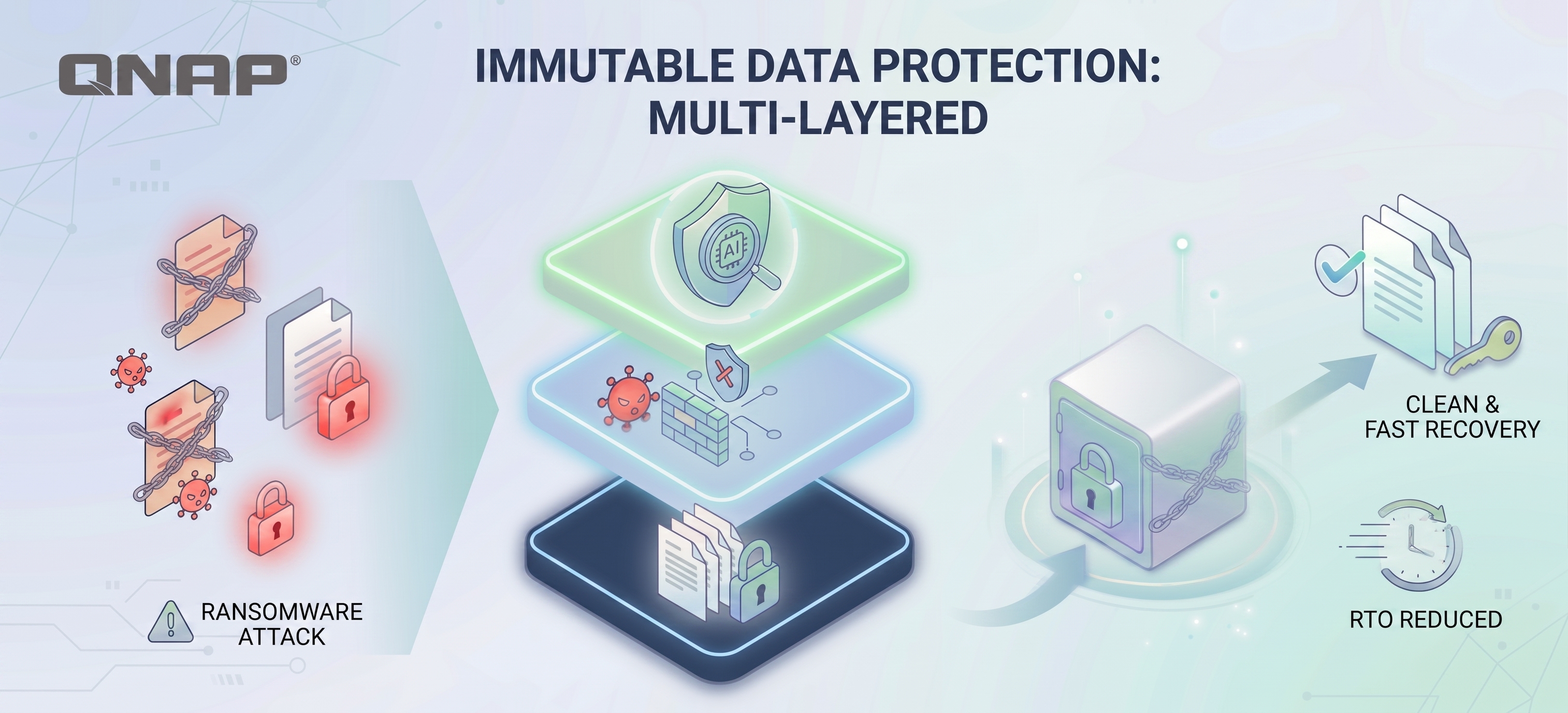
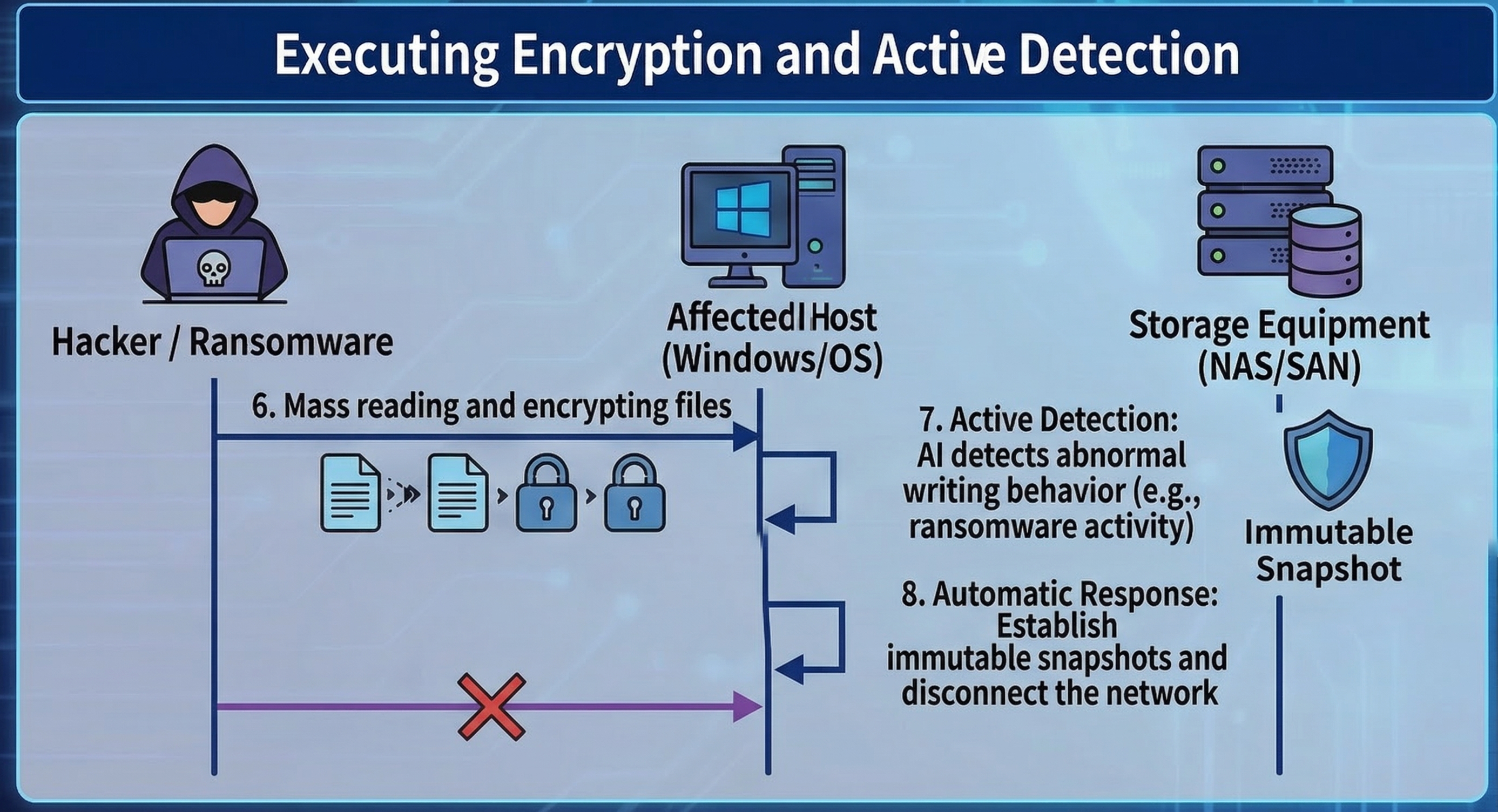
The standard operating procedure for ransomware software is: read file → encrypt → delete original file → leave behind the encrypted, scrambled file. In response to this process, QuicKProtect provides multiple layers of defense mechanisms.
Key 1: Bypassing OS-level attacks (VSS vs. Storage Snapshot)
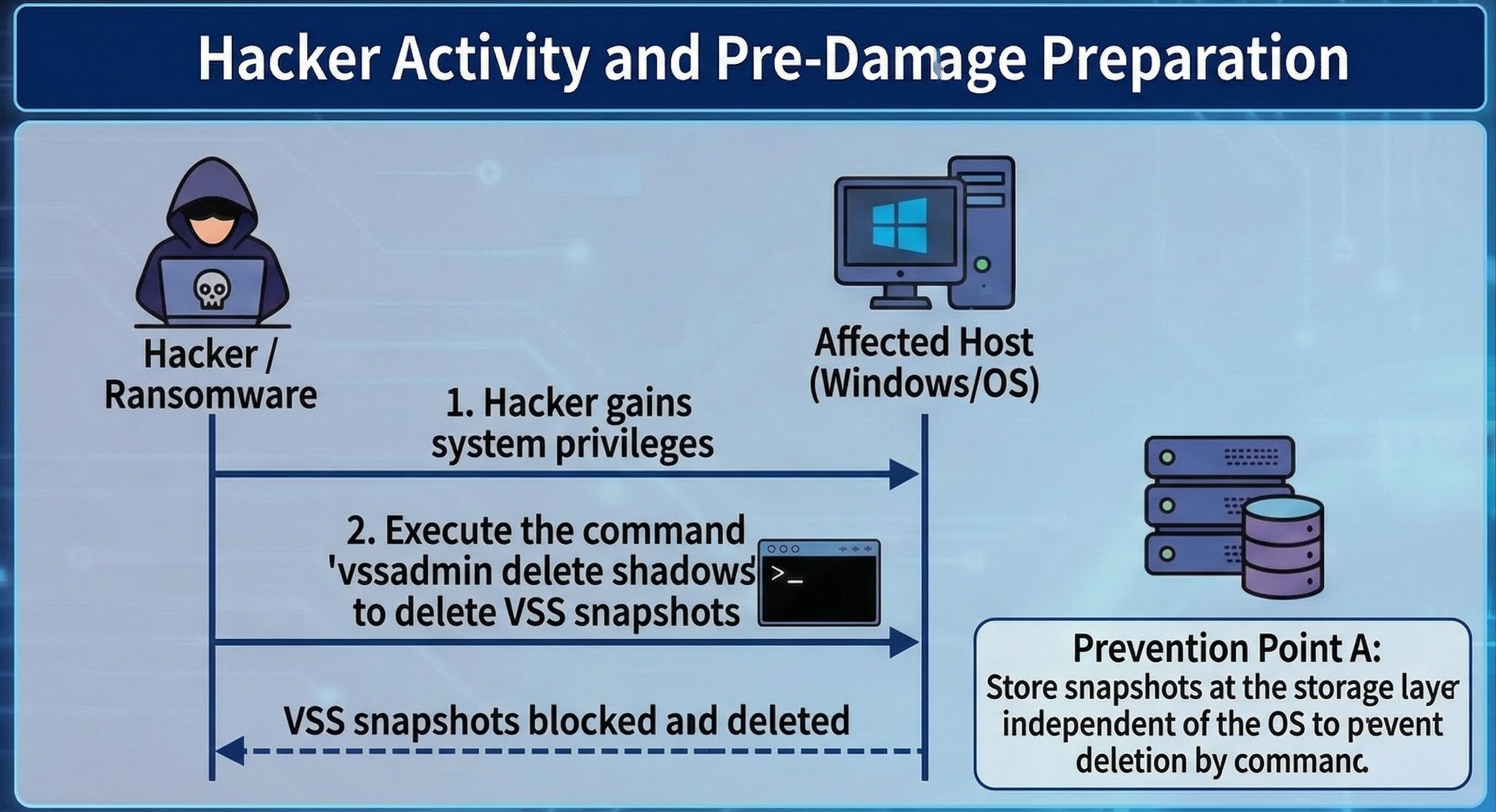
Speaking of snapshots, we must also distinguish between "operating system-level" and "storageunit level." The first action of modern ransomware (such as LockBit, BlackCat) after infiltrating Windows is often to execute commands to delete VSS (Volume Shadow Copy), preventing users from utilizing the built-in restore feature of Windows. At this point, snapshots at the storageunit level play the most critical role.
Because NAS or SAN snapshot management is independent of the operating system (Out-of-Band), even if a hacker obtains Administrator Permission of Windows and wipes out local snapshots, they still cannot delete the underlying snapshots on storageunit through commands.
Key Two: Instant restore (Instant Recovery)
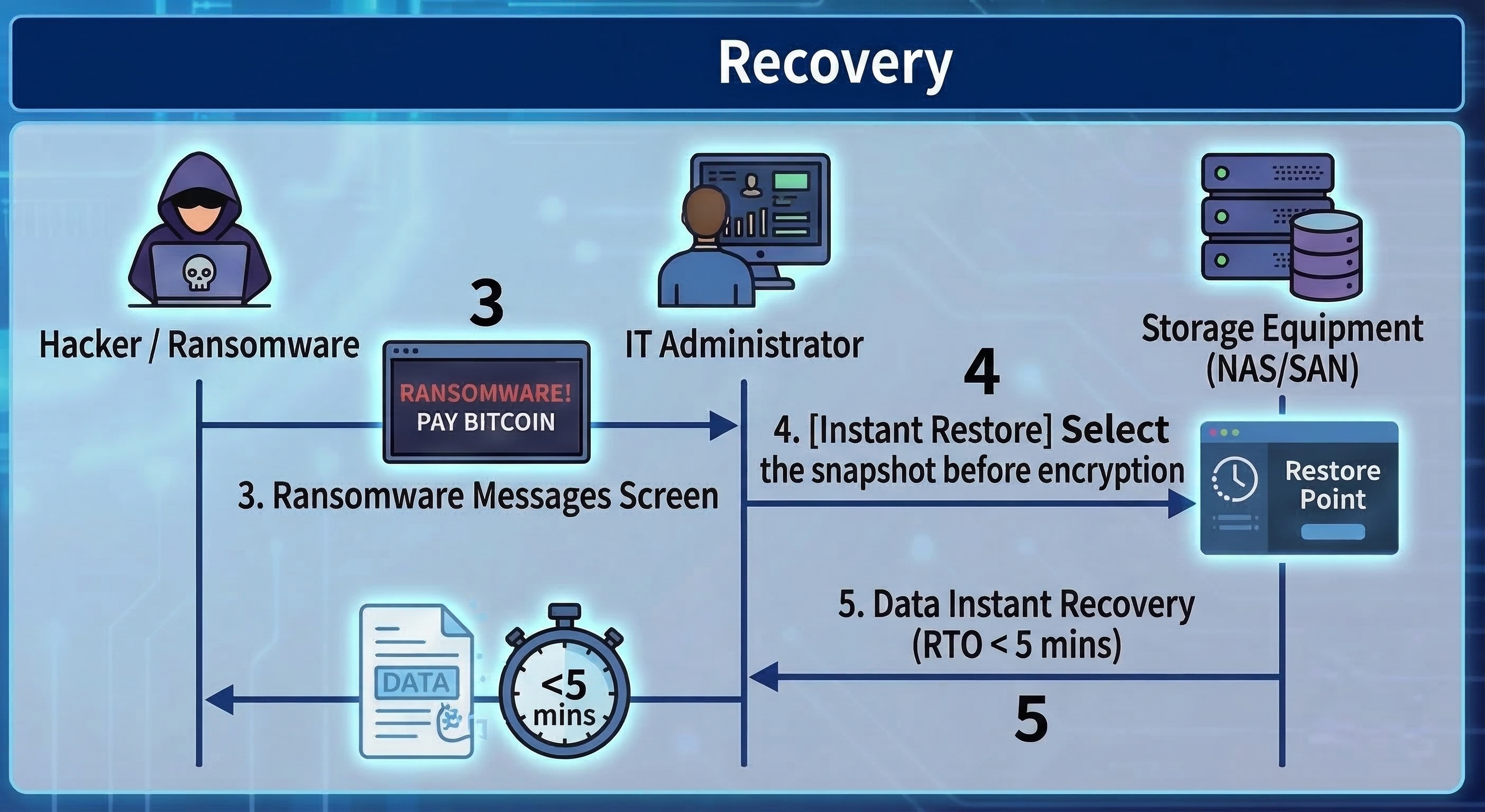
Because snapshots preserve the 'point-in-time state' of files before they are encrypted, when ransomware is detected, administrators only need to select a time point before the infection (for example, if the infection occurred at 10:00, select the 09:55 snapshot) in the management interface of storageunit.
At this point, whether the data size is 1TB or 100TB, using snapshot restore usually only takes a few seconds to a few minutes. The system just needs to point the index back to the old blocks, which greatly reduces the Recovery Time Objective (RTO).
Key Three: AI Entropy Detection, transforming from a time-of-flight camera to a detector
Traditional snapshots are passive, but the latest storage technology is using snapshots for “proactive defense.” When ransomware encrypts files, it causes the “entropy” (randomness) of data blocks to spike dramatically (after encryption, data appears as random data).
Modern storageunit will monitor the entropy changes of write blocks in real time. If a large number of blocks show abnormal spikes in entropy along with high-frequency writes, the system will determine that an attack is occurring and will automatically trigger immutable snapshots, or even proactively cut off write Permission to the connection (SMB/NFS).
In addition, if the system itself provides appropriate mechanisms, you can also monitor suspicious file operations through Security Center (file activity monitoring). Once an anomaly is detected, protection measures can be triggered, such as setting the volume to read-only, automatically creating snapshots, or temporarily suspending the snapshot schedule, to prevent data encryption or data loss.
Advanced Protection: Immutable Snapshots and Management Principles
As cybersecurity attacks evolve, hackers not only encrypt data, but also attempt to compromise storageunit administrators Permission to quickly destroy snapshots. To counter this kind of 'cut-off' attack, it is necessary to implement the following stricter locking mechanisms.
Immutable Snapshots / WORM
This is a “Write Once, Read Many” technology. Once an immutable snapshot is set (for example, locked for 7 days), during this period, no one (including Administrators or Root accounts with the highest Permission) can delete or modify these snapshots. It’s like locking the film in a time-locked safe.
The last line of defense at the management layer: MFA and the four-eyes principle
No matter how strong the technology, human nature is often the weak point. What if a hacker obtains the highest Permission password through social engineering? The new generation of information security compliance requirements (such as the revised ISO 27001) recommend implementing the following measures:
Multi-factor Authentication (MFA): When logging into the storage management interface or performing deletion operations, mobile OTP two-step verification is mandatory. Using Google Authenticator or Microsoft Authenticator has become standard practice. Similar confirmations are also required for critical actions in systems and services such as ZOHO and Cloudflare DNS. Administrators should be accustomed to and routinely deploy these measures in daily system operations.
Four-Eyes Principle (Four-Eyes Principle): For destructive commands such as "Delete Snapshot" or "Format", the system should be configured to require simultaneous License execution by "two" different admin accounts. This can effectively prevent a single account from being compromised or maliciously abused by insiders.
Snapshots are not the same as backups and cannot solve the issue of “double ransomware”.
Although Quick Photo is extremely powerful on ransomware prevention software, and it is also very useful when colleagues in the office call the administrator or IT staff to rescue them from accidental deletion or system damagedata, we still need to clarify the actual perceptions in the market:
The first point is that snapshots cannot completely replace backups, as snapshots still rely on the original storageunit. If the entire NAS hardware fails or hard disk drives is damaged, the snapshots will also be lost. When implementing storage environments for enterprises or home use, we should always follow the 3-2-1 backup principle (3 copies of data, 2 different media, 1 offsite), and preferably prepare an extra NAS to back up your NAS or storageunit. In addition, you can purchase tape drives, external hard disk drives, and other devices for backup, as well as cloud and offsite backups, etc. Through Hybrid Backup Sync 3, you can achieve multi-layered backups, including air-gapped backups. In today's world where threats are increasing, the 3-2-1 backup principle remains a golden rule.
The second point is that snapshots can save data, but they cannot save confidential information. Although snapshots solve the issue of "data availability (Availability)" and allow you to recover your files, the current trend of "Double Extortion" means that hackers will first steal your sensitive data and then encrypt it. Even if you use snapshots to quickly restore restore and data, hackers can still threaten to expose your customer data. Therefore, snapshots must be paired with DLP (Data Loss Prevention for data leakage protection) and Networking encrypted transmission to form a complete data security strategy.
Snapshot Protection Capability Grading Checklist
| Protection function |
Basic Snapshot |
Advanced Snapshot |
Enterprise Management |
| Instant restore (Instant Recovery) |
✅ |
✅ |
✅ |
| Defense against VSS deletion attacks (independent at the base layer) |
✅ |
✅ |
✅ |
| Defense against highest-level Permission administrator deletion (WORM/immutable) |
❌
(Admin can delete) |
✅
(No one can delete within the set period) |
✅ |
| Active detection of ransomware encryption behavior (AI entropy analysis) |
❌ |
✅
(Detected and automatically quick snapshot/disconnect) |
✅ |
| Defense against internal malicious destruction/password compromise (MFA/four-eyes principle) |
❌ |
❌ |
✅
(Requires dual review for deletion) |
Die „Zeitmaschine“ der Ransomware: Prinzipien der Snapshot-Technologie, Angriff und Verteidigung sowie zentrale Schutzkonzepte
Im Kampf um die Cybersicherheit von Unternehmen ist Ransomware in den letzten Jahren zweifellos zum lästigsten Gegner geworden. Wenn Hacker Ihre wichtigen Daten verschlüsseln und ein hohes Lösegeld fordern, führt die herkömmliche „Backup-Wiederherstellung“ oft zu langen Ausfallzeiten (hohes RTO), was zu erheblichen Geschäftsunterbrechungen und Verlusten führt.
In diesem Moment wird eine Speichertechnologie namens „Snapshot“ für viele Unternehmen und Einzelanwender zur letzten Verteidigungslinie gegen Ransomware und wird sogar als „Zeitmaschine“ für die Datenwiederherstellung bezeichnet.
Was genau ist also ein Snapshot? Wie kann er verschlüsselte Dateien sofort „wiederherstellen“? Welche proaktiven Erkennungsfunktionen bietet moderne Snapshot-Technologie neben der passiven Wiederherstellung? Dieser Artikel beleuchtet die zugrunde liegenden Prinzipien und die wichtigsten Verwaltungsaspekte von Snapshots.
Was ist ein Snapshot?
Einfach ausgedrückt ist ein Snapshot eine Aufzeichnung des Zustands eines Dateisystems oder Speichermediums zu einem „bestimmten Zeitpunkt“. Wichtig ist, dass ein Snapshot keine „weitere Kopie“ der Daten erstellt, sondern den Versionszustand jeder Datei, jedes Verzeichnisses und die Blockzuordnung (Metadaten, Block-Map) im Dateisystem zu diesem Zeitpunkt festhält.
Viele Menschen glauben fälschlicherweise, dass ein Snapshot ein „Backup“ ist, aber tatsächlich unterscheiden sich beide grundlegend in ihren technischen Prinzipien:
-
Backup: Erstellt eine vollständige Kopie der Daten auf einen anderen physischen Speicherplatz (eine vollständige Kopie).
-
Snapshot: Ist eher wie ein „Foto“ der aktuellen Datenstruktur. Es werden in der Regel nur die Zeiger oder Metadaten der Daten gespeichert, nicht die Daten selbst dupliziert.
Vereinfacht gesagt: Wenn wir 100 GB Fotos auf Festplatten sichern und 10 Backups machen, werden 1 TB Speicherplatz verbraucht. Mit Snapshot-Technologie benötigt das Vorhalten von 10 Snapshots unter „normalen Nutzungsszenarien“ meist nur 1–20 % zusätzlichen Speicherplatz (etwa 1–20 GB) – ein enormer Effizienzunterschied.
Vergleichstabelle: Speicher- und Zeitaufwand von Snapshots und herkömmlichen Backups
| Vergleich |
Anfangsdatenmenge (Tag 0) |
Tag 1 (10GB Änderung) |
Tag 2 (10GB Änderung) |
Gesamter Speicherbedarf (ca.) |
Erstellungs-/Wiederherstellungsgeschwindigkeit |
| Traditionelles Voll-Backup |
100 GB |
+100 GB (zweites Voll-Backup) |
+100 GB (drittes Voll-Backup) |
300 GB |
Langsam (große Datenmengen müssen bewegt werden) |
| Snapshot |
100 GB (Originaldaten) |
+10 GB (nur geänderte Blöcke werden gespeichert) |
+10 GB (nur geänderte Blöcke werden gespeichert) |
120 GB |
Sehr schnell (nur Zeiger werden gesetzt) |
Tabellenhilfe: Diese Tabelle simuliert eine Umgebung, in der sich 100 GB Anfangsdaten an zwei Tagen jeweils um 10 GB ändern. Sie sehen, dass herkömmliche Backups jedes Mal die gesamten Daten duplizieren, was zu linear und multipliziert wachsendem Speicherverbrauch führt. Snapshots hingegen speichern nur die geänderten Blöcke, sodass das Speicherwachstum extrem langsam ist. Deshalb können Unternehmen problemlos Hunderte von Snapshot-Zeitpunkten aufbewahren.
Technisches Prinzip: Funktionsweise und Abwägungen von COW und ROW
Aktuell werden die gängigen Snapshot-Technologien hauptsächlich in zwei Typen unterteilt, die jeweils eigene Vorteile hinsichtlich Effizienz und Speicherplatznutzung bieten:
1. Copy-On-Write (COW)
Wenn Originaldaten geändert werden sollen, pausiert das System zunächst den Schreibvorgang, kopiert den „alten Datenblock“ in den für Snapshots reservierten Bereich und erlaubt dann das Schreiben der neuen Daten am ursprünglichen Ort.
Vorteil: Das Lesen der Originaldaten ist sehr schnell, da sich der Speicherort nicht geändert hat.
Nachteil: Die Schreibperformance ist relativ schlecht (da jeder Schreibvorgang „alte Daten lesen -> kopieren -> neue Daten schreiben“ erfordert), was als „Write Penalty“ bezeichnet wird.
2. Redirect-On-Write (ROW) beim Schreiben
Dies ist ein gängiges Verfahren in moderner Hochleistungs-Speicherung (wie dem ZFS-Dateisystem und Mittel- bis High-End-NAS). Beim Schreiben neuer Daten werden die alten Blöcke nicht verschoben, sondern die neuen Daten direkt an einen „neuen Ort“ auf der Festplatte geschrieben und der Zeiger auf die neue Position aktualisiert, während der Snapshot weiterhin auf die alten Blöcke verweist.
Vorteil: Das Erstellen von Snapshots und das Schreiben von Daten haben nahezu keinen Einfluss auf die Performance, die Geschwindigkeit ist extrem hoch.
Nachteil: Fragmentierung. Dies ist eine physikalische Einschränkung, der sich ROW-Technologie stellen muss. Da die Datenblöcke von Dateien nach mehreren Änderungen über verschiedene physische Orte auf Festplatten verteilt werden, kann dies im Laufe der Zeit zu einer verringerten Leseleistung klassischer Festplatten (HDD) führen. Daher wird für Speichersysteme mit ROW-Technologie in der Regel eine All-Flash-Architektur oder ein leistungsfähiger Hintergrund-Auto-Reorganisationsmechanismus empfohlen, um diesen Effekt abzumildern.
Wie verteidigen Snapshots gegen Ransomware? Von passiver Wiederherstellung zu proaktiver Erkennung
Das Standardvorgehen von Ransomware ist: Datei lesen → verschlüsseln → Originaldatei löschen → verschlüsselte, unlesbare Datei hinterlassen. Als Antwort darauf bietet QuicKProtect mehrere Verteidigungsebenen.
Schlüssel 1: Umgehung von Angriffen auf Betriebssystemebene (VSS vs. Storage-Snapshot)
Bei Snapshots muss zwischen „Betriebssystemebene“ und „Speicherebene“ unterschieden werden. Die erste Aktion moderner Ransomware (wie LockBit, BlackCat) nach dem Eindringen in Windows ist oft das Ausführen von Befehlen zum Löschen von VSS (Volume Shadow Copy), um die Nutzung der integrierten Windows-Wiederherstellung zu verhindern. Hier spielen Snapshots auf Speicherebene die entscheidende Rolle.
Da die Verwaltung von NAS- oder SAN-Snapshots unabhängig vom Betriebssystem erfolgt (Out-of-Band), kann ein Hacker selbst mit Administratorrechten unter Windows und gelöschten lokalen Snapshots die darunterliegenden Snapshots auf dem Speicher nicht per Befehl löschen.
Schlüssel 2: Sofortige Wiederherstellung (Instant Recovery)
Da Snapshots den „Zeitpunkt-Zustand“ der Dateien vor der Verschlüsselung bewahren, müssen Administratoren bei Erkennung von Ransomware im Verwaltungsinterface des Speichers nur einen Zeitpunkt vor der Infektion auswählen (z. B. bei Infektion um 10:00 Uhr den Snapshot von 09:55).
Unabhängig davon, ob es sich um 1 TB oder 100 TB Daten handelt, dauert die Wiederherstellung per Snapshot meist nur wenige Sekunden bis Minuten. Das System muss lediglich den Index auf die alten Blöcke zurücksetzen, was das Recovery Time Objective (RTO) erheblich reduziert.
Schlüssel 3: KI-Entropie-Erkennung – vom Zeitraffer zur Detektion
Traditionelle Snapshots sind passiv, aber die neueste Speichertechnologie nutzt Snapshots zur „proaktiven Verteidigung“. Wenn Ransomware Dateien verschlüsselt, steigt die „Entropie“ (Zufälligkeit) der Datenblöcke sprunghaft an (nach der Verschlüsselung erscheinen die Daten als Zufallsdaten).
Moderne Speicher überwachen die Entropieänderungen der Schreibblöcke in Echtzeit. Wenn viele Blöcke gleichzeitig ungewöhnlich hohe Entropie und Schreibfrequenz aufweisen, erkennt das System einen Angriff und löst automatisch unveränderliche Snapshots aus oder trennt sogar proaktiv die Schreibberechtigung zur Verbindung (SMB/NFS).
Zusätzlich kann – sofern das System entsprechende Mechanismen bietet – über das Security Center (Dateiaktivitätsüberwachung) verdächtige Dateioperationen überwacht werden. Bei Anomalien können Schutzmaßnahmen ausgelöst werden, z. B. das Volume auf „read-only“ setzen, Snapshots automatisch erstellen oder den Snapshot-Zeitplan vorübergehend aussetzen, um Datenverschlüsselung oder -verlust zu verhindern.
Erweiterter Schutz: Unveränderliche Snapshots und Management-Prinzipien
Mit der Weiterentwicklung von Cyberangriffen versuchen Hacker nicht nur, Daten zu verschlüsseln, sondern auch, die Administratorrechte des Speichers zu kompromittieren, um Snapshots schnell zu zerstören. Um solchen „Cut-Off“-Angriffen entgegenzuwirken, sind folgende strengere Sperrmechanismen erforderlich.
Unveränderliche Snapshots / WORM
Dies ist eine „Write Once, Read Many“-Technologie. Ist ein unveränderlicher Snapshot gesetzt (z. B. für 7 Tage gesperrt), kann in diesem Zeitraum niemand (auch nicht Administratoren oder Root-Accounts mit höchsten Rechten) diese Snapshots löschen oder verändern. Es ist, als würde man den Film in einen zeitschlossgesicherten Tresor legen.
Die letzte Verteidigungslinie auf Managementebene: MFA und Vier-Augen-Prinzip
So stark die Technik auch ist, der Mensch bleibt oft das schwächste Glied. Was, wenn ein Hacker das höchste Berechtigungs-Passwort durch Social Engineering erlangt? Neue Compliance-Anforderungen (wie die überarbeitete ISO 27001) empfehlen folgende Maßnahmen:
Multi-Faktor-Authentifizierung (MFA): Beim Login ins Storage-Management oder bei Löschvorgängen ist eine mobile OTP-Zwei-Faktor-Authentifizierung Pflicht. Google Authenticator oder Microsoft Authenticator sind Standard. Ähnliche Bestätigungen sind auch für kritische Aktionen in Systemen und Diensten wie ZOHO und Cloudflare DNS erforderlich. Administratoren sollten sich an diese Maßnahmen gewöhnen und sie im täglichen Betrieb routinemäßig einsetzen.
Vier-Augen-Prinzip: Für destruktive Befehle wie „Snapshot löschen“ oder „Formatieren“ sollte das System so konfiguriert sein, dass die gleichzeitige Freigabe durch „zwei“ verschiedene Admin-Konten erforderlich ist. So kann verhindert werden, dass ein einzelnes Konto kompromittiert oder von Insidern missbraucht wird.
Snapshots sind keine Backups und lösen das Problem der „doppelten Ransomware“ nicht.
Obwohl Quick Photo bei der Abwehr von Ransomware extrem leistungsfähig ist und auch hilfreich, wenn Kollegen im Büro Administratoren oder IT-Mitarbeiter um Hilfe bei versehentlichem Löschen oder Systemschäden bitten, muss man die tatsächlichen Gegebenheiten am Markt klarstellen:
Erstens können Snapshots Backups nicht vollständig ersetzen, da sie weiterhin auf dem ursprünglichen Speicher basieren. Fällt die gesamte NAS-Hardware aus oder wird die Festplatte beschädigt, gehen auch die Snapshots verloren. Bei der Implementierung von Speicherumgebungen für Unternehmen oder zu Hause sollte immer das 3-2-1-Backup-Prinzip beachtet werden (3 Kopien der Daten, 2 verschiedene Medien, 1 externes Backup) und idealerweise ein zusätzliches NAS für das Backup des NAS oder Speichers bereitstehen. Zusätzlich können Bandlaufwerke, externe Festplatten und andere Geräte für Backups sowie Cloud- und Offsite-Backups genutzt werden. Mit Hybrid Backup Sync 3 sind mehrstufige Backups, einschließlich Air-Gap-Backups, möglich. In einer Welt mit zunehmenden Bedrohungen bleibt das 3-2-1-Backup-Prinzip eine goldene Regel.
Zweitens können Snapshots zwar Daten retten, aber keine vertraulichen Informationen schützen. Snapshots lösen das Problem der „Datenverfügbarkeit (Availability)“ und ermöglichen die Wiederherstellung von Dateien, aber beim aktuellen Trend der „Double Extortion“ stehlen Hacker zuerst sensible Daten und verschlüsseln sie dann. Selbst wenn Sie mit Snapshots schnell wiederherstellen, können Hacker weiterhin drohen, Ihre Kundendaten zu veröffentlichen. Daher müssen Snapshots mit DLP (Data Loss Prevention zum Schutz vor Datenlecks) und verschlüsselter Netzwerkübertragung kombiniert werden, um eine vollständige Datensicherheitsstrategie zu bilden.
Checkliste zur Einstufung der Snapshot-Schutzfunktionen
| Schutzfunktion |
Basis-Snapshot |
Erweiterter Snapshot |
Enterprise Management |
| Sofortige Wiederherstellung (Instant Recovery) |
✅ |
✅ |
✅ |
| Schutz vor VSS-Löschangriffen (unabhängig auf Basisebene) |
✅ |
✅ |
✅ |
| Schutz vor Löschung durch Administrator mit höchsten Rechten (WORM/unveränderlich) |
❌
(Admin kann löschen) |
✅
(Niemand kann im festgelegten Zeitraum löschen) |
✅ |
| Aktive Erkennung von Ransomware-Verschlüsselungsverhalten (KI-Entropieanalyse) |
❌ |
✅
(Erkannt und automatisch Schnell-Snapshot/Trennung) |
✅ |
| Schutz vor interner böswilliger Zerstörung/Passwortkompromittierung (MFA/Vier-Augen-Prinzip) |
❌ |
❌ |
✅
(Doppelte Freigabe für Löschung erforderlich) |


 9 Min. Lesezeit