Applicable Products
Software
- QuWAN Orchestrator 2.9 and later versions
- QVPN Service 3.3 and later
- QNAP NAS running QTS with HBS 3 Hybrid Backup Sync installed
Overview
With QuWAN Express Supernode, two QNAP NAS devices on different networks can communicate over a secure virtual network. This guide shows you how to create a remote backup job in HBS 3 using the QuWAN virtual IP assigned to the destination NAS.
Prerequisites
Before creating a backup job, both NAS devices must first join QuWAN Express Supernode. The IP addresses used in HBS 3 are the virtual IPs assigned by QuWAN after joining — not the physical LAN IPs.
You can refer to the article "How to connect a NAS to QuWAN Orchestrator using QuWAN Express and the Super Node Service?" to learn how to join your NAS to QuWAN Express.
Procedure
Step 1:Open HBS 3 and Start a New Backup Job
- HBS 3 Hybrid Backup Sync
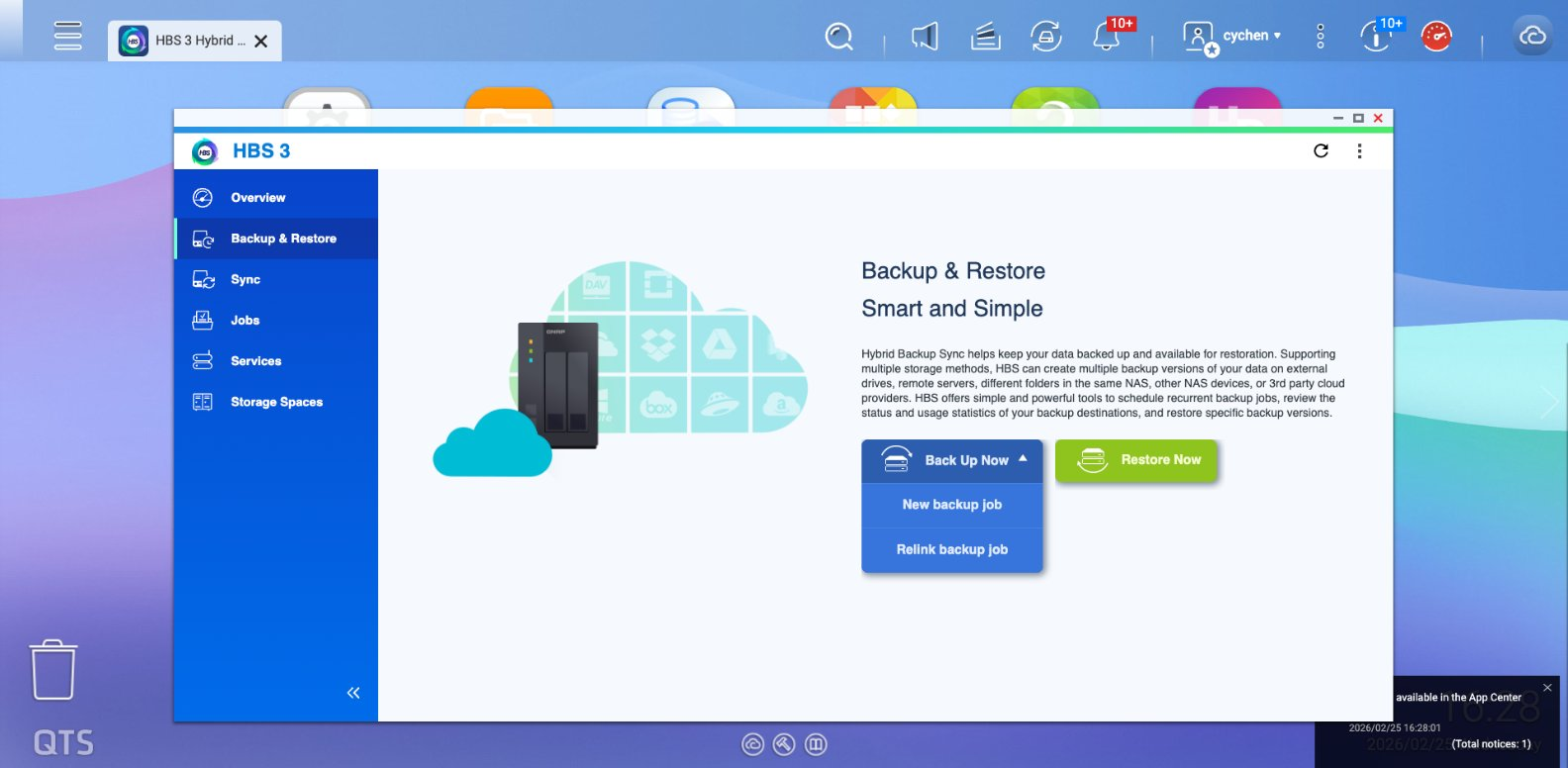
- Go to Backup & Restore, click Back Up Now, then select New backup job from the dropdown.
- Select the Source Folder

Step 2: Select Remote NAS and Add an Account
- On the destination screen, select Remote NAS.
- Click + Add new account.
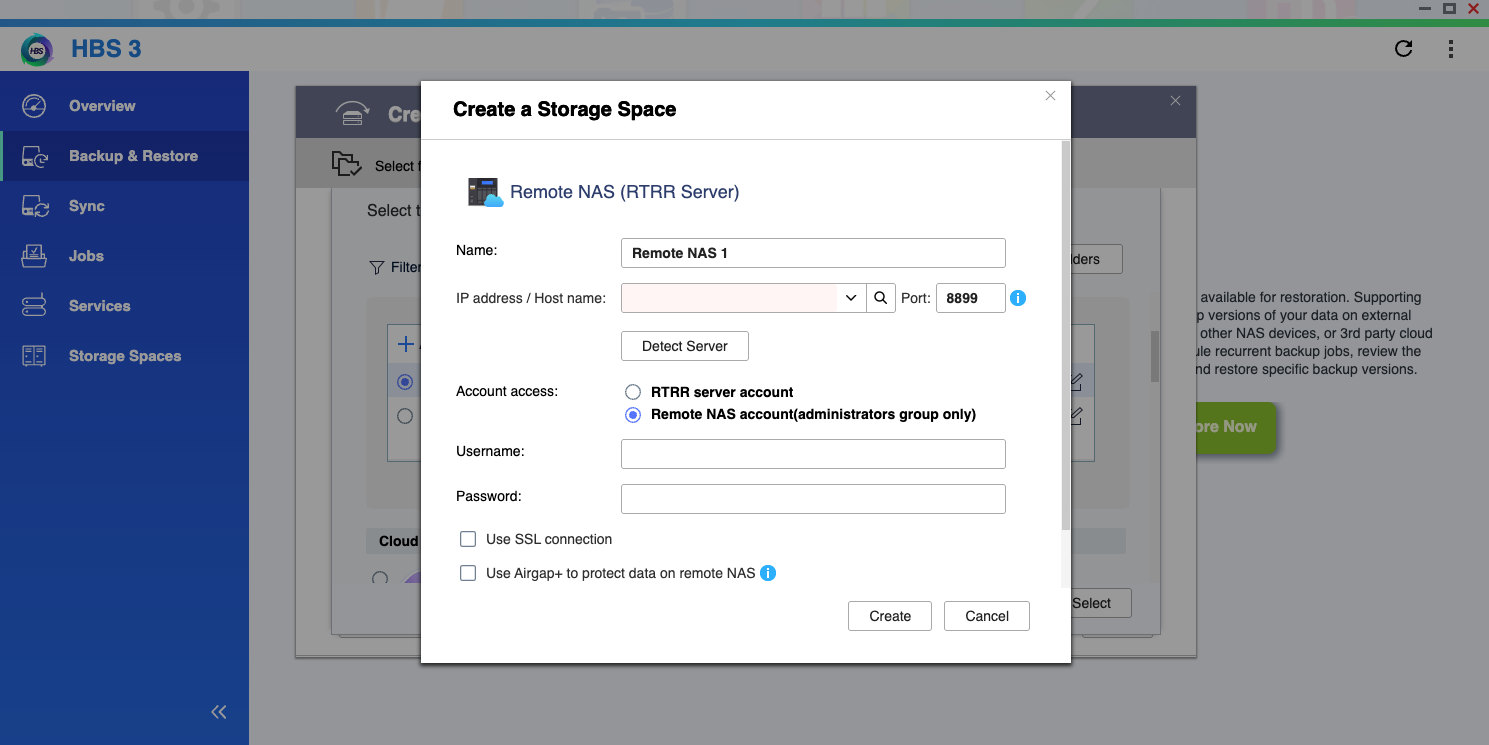
- In the Create a Storage Space dialog:
- IP address / Host name field: enter the virtual IP of the destination NAS you get from QuWAN Express, then click Detect Server to check if it is connected.
- Account access: choose Remote NAS account, and enter the destination NAS user name and password.
- Click Create.

Step3: Task Configuration
Follow the process to complete the task:
- Select the destination folder.
- Set the schedule according to your preference.
- Select your transmission rules.
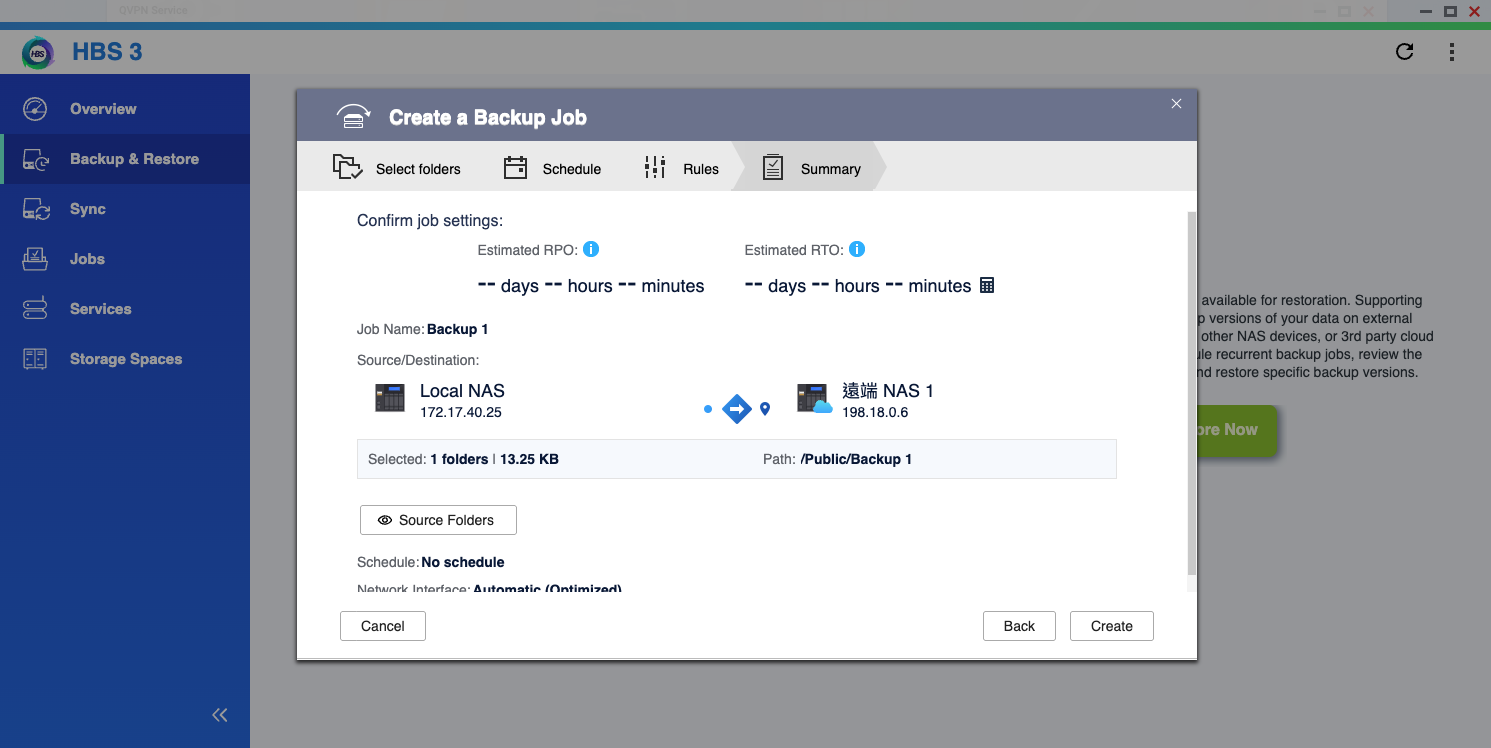
- Check the summary to ensure all settings are correct.
- Click Create.
- Complete your transmission settings; you can now see the page transferring data.

적용되는 제품
소프트웨어
- QuWAN Orchestrator 2.9 및 이후 버전
- QVPN Service 3.3 및 이후
- HBS 3 Hybrid Backup Sync가 설치된 QTS를 실행하는 QNAP NAS
개요
QuWAN Express Supernode를 사용하면 서로 다른 네트워크에 있는 두 QNAP NAS 장치가 안전한 가상 네트워크를 통해 통신할 수 있습니다. 이 가이드는 HBS 3에서 대상 NAS에 할당된 QuWAN 가상 IP를 사용하여 원격 백업 작업을 생성하는 방법을 보여줍니다.
필수 조건
백업 작업을 생성하기 전에 두 NAS 장치는 먼저 QuWAN Express Supernode에 가입해야 합니다. HBS 3에서 사용되는 IP 주소는 가입 후 QuWAN에 의해 할당된 가상 IP이며, 물리적 LAN IP가 아닙니다.
"QuWAN Express 및 슈퍼 노드 서비스를 사용하여 NAS를 QuWAN Orchestrator에 연결하는 방법은?" 문서를 참조하여 NAS를 QuWAN Express에 가입하는 방법을 알아볼 수 있습니다.
절차
1단계: HBS 3을 열고 새 백업 작업 시작
- HBS 3 Hybrid Backup Sync
- 백업 및 복원으로 이동하여지금 백업을 클릭한 다음 드롭다운에서 새 백업 작업을 선택합니다.
- 소스 폴더 선택
2단계: 원격 NAS 선택 및 계정 추가
- 대상 화면에서원격 NAS를 선택합니다.
- + 새 계정 추가를 클릭합니다.
- 스토리지공간 생성 대화 상자에서:
- IP 주소 / 호스트 이름 필드: QuWAN Express에서 얻은 대상 NAS의 가상 IP를 입력하고, 그런 다음서버 감지를 클릭하여 연결되었는지 확인합니다.
- 계정 액세스: 원격 NAS계정을 선택하고, 대상 NAS 사용자 이름과 비밀번호를 입력합니다.
- 클릭 생성.
3단계: 작업 구성
프로세스를 따라 작업을 완료합니다:
- 선택 대상 폴더.
- 설정 일정 선호에 따라.
- 전송 규칙 선택.
- 확인 요약 모든 설정이 올바른지 확인합니다.
- 클릭 생성.
- 전송 설정을 완료하면 데이터를 전송하는 페이지를 볼 수 있습니다.