


How can I specify time schedule to turn ON the LED light on QNAP NAS?
Ultima data di modifica
2022-06-24
Applicable Products:
- Hardware
By default, the LED light is always at 100% when the function "Turn on LED light" in System > Hardware > General is activated, if you want them to turn off during a specific time slot of the day, you may set the LED lightness at its minimum (slide the ball bar at the left corner), then enable the function "Apply this setting during a specific time", so you can determine at what time you do not want the LED light to be turned on, please, see an example on the picture below. 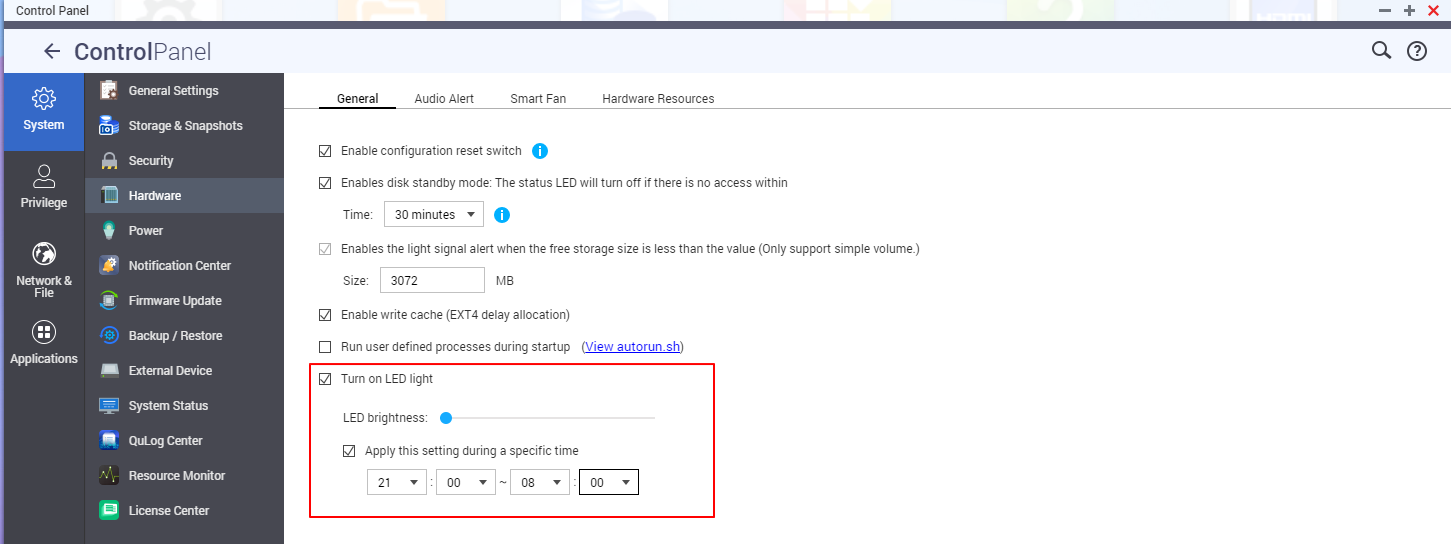
Per ulteriore assistenza, chiedi ad altri utenti e agli esperti QNAP nella community. Vai alla community QNAP


