


Dieser Inhalt ist maschinell übersetzt. Bitte beachten Sie den Haftungsausschluss für maschinelle Übersetzung.
Umschalten auf Englisch
Kann ich das Betriebssystem meines NAS wechseln? Ein praktischer Leitfaden zwischen QTS und QuTS hero
Zuletzt geändertes Datum
2025-09-17
Anwendbare Produkte
NAS (QTS / QuTS hero)
Szenario
Einige QNAP NAS-Modelle unterstützen sowohl QTS (ein modernes, app-basiertes NAS-Betriebssystem mit ext4-Dateisystem) als auch QuTS hero (ein fortschrittliches, ZFS-basiertes NAS-Betriebssystem). Wenn Sie Ihr NAS-Betriebssystem ändern möchten, erklärt dieser Artikel, wie Sie sicher von einem zum anderen wechseln können und hebt die wichtigsten Vorteile und Überlegungen für jedes hervor.
Lösung
Wechsel von QTS zu QuTS hero
Vorteile von QuTS hero (ZFS)
- Datenintegrität und Selbstheilung: ZFS bietet End-to-End-Prüfsummen, die Datenkorruption erkennen und korrigieren, und unterstützt Copy-on-Write Snapshot.
- Effiziente Speicher: Inline-Datendeduplizierung und Kompression sparen Platz.
Hinweis: Mindestens 32 GB RAM werden für die optimale Leistung dieser Funktionen empfohlen. - Erweiterter Schutz und Disaster Recovery: SnapSync ermöglicht nahezu Echtzeit-, snapshot-basierte Sicherung und Disaster Recovery über QuTS hero NAS-Geräte.
- Unterstützung großer freigegebener Ordner: Einzelne ZFS-Freigabeordner können bis zu 5 Petabyte (PB) groß sein.
- WORM (Write Once, Read Many): Daten können gegen Änderungen gesperrt werden, um Compliance-Anforderungen zu unterstützen.
Verfahren
Wichtig
Der Wechsel zu QuTS hero wird alle Daten auf Ihrem NAS löschen. Stellen Sie sicher, dass Sie Ihre Daten vor Beginn sichern.
- Schalten Sie Ihr NAS aus und entfernen Sie alle Speicher Geräte, einschließlich M.2 SSDs.
- Stellen Sie sicher, dass Ihr NAS mit dem Internet verbunden ist, und schalten Sie es dann ein.
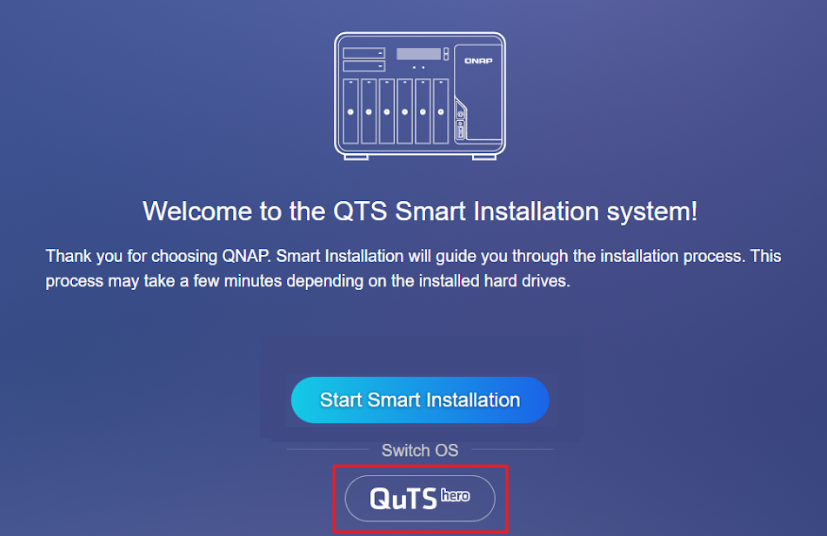
- Melden Sie sich beim NAS an. Der QuTS hero Smart Installation Bildschirm wird angezeigt.
- Auswählen QuTS hero unter der Überschrift Betriebssystem wechseln und folgen Sie den Anweisungen auf dem Bildschirm, um die Installation abzuschließen.
- Nach der Installation schalten Sie das NAS aus, installieren Sie Ihre Speicher Geräte erneut und starten Sie das NAS neu.
Wechsel von QuTS hero zu QTS
Vorteile von QTS (ext4/LVM)
- Qtier Auto-Tiering (nur QTS): Verschiebt automatisch häufig abgerufene („heiße“) Daten auf SSDs und weniger genutzte („kalte“) Daten auf HDDs innerhalb desselben Speicher Pools.
- Niedriger System-Overhead: QTS läuft effizient, selbst auf NAS-Modellen mit weniger als 8 GB RAM, was es zu einer guten Wahl für Einstiegs-Hardware macht.
- Breite App-Kompatibilität: QTS unterstützt eine große Auswahl an QNAP- und Drittanbieteranwendungen.
- LVM (Logical Volume Manager): Ermöglicht flexible Volume- und Speicher-Verwaltung.
Verfahren
Wichtig
Der Wechsel zu QTS löscht alle Daten auf Ihrem NAS. Stellen Sie sicher, dass Sie Ihre Daten vor Beginn sichern.
- Schalten Sie Ihr NAS aus und entfernen Sie alle Speicher-Geräte, einschließlich M.2 SSDs.
- Stellen Sie sicher, dass Ihr NAS mit dem Internet verbunden ist, und schalten Sie es dann ein.
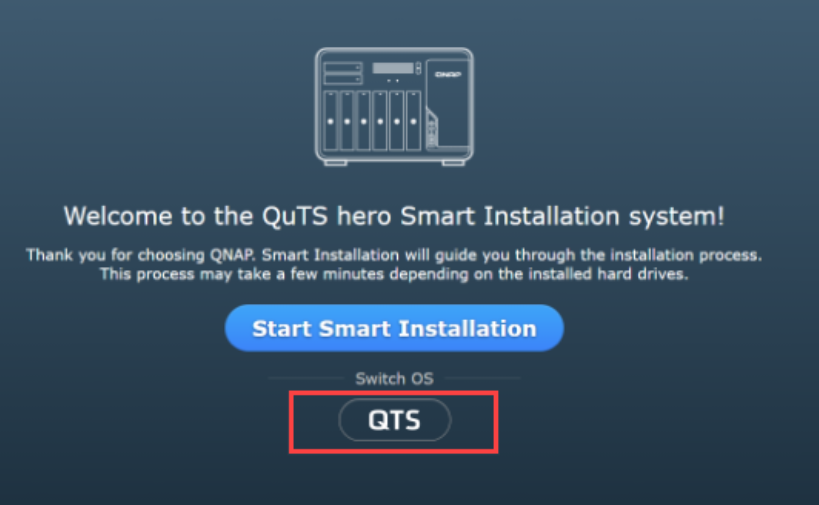
- Melden Sie sich beim NAS an. Der QTS Smart Installation Bildschirm wird angezeigt.
- Auswählen QTS unter der Überschrift Betriebssystem wechseln und folgen Sie den Anweisungen auf dem Bildschirm, um die Installation abzuschließen.
- Nach der Installation schalten Sie das NAS aus, installieren Sie Ihre Speicher-Geräte erneut und starten Sie das NAS neu.
Welches Betriebssystem soll ich wählen?
| Wählen Sie QuTS hero (ZFS), wenn Sie... | Wählen Sie QTS (ext4/LVM), wenn Sie... |
|---|---|
|
|


